Day-to-day operation of Data Hopper EDW loads: environments, Docker runners, batch orchestration, and partial model updates.
How you got the models and the resource definition group is design-time — see Architecture — build vs run and Getting started — building an EDW. This page is the operate lane.
For multi-team programs (who owns core vs subject models, catalog contracts, git vs runtime, analyst discovery), see Organizing large Data Vault programs.
Docker runners
From the repository root:
# PostgreSQL on port 54320
./scripts/run-postgres.sh up

# Optional local Marquez (OpenLineage API :5001, UI :3001)
./scripts/run-marquez.sh up

# Run a workflow in a Hop container
./scripts/run-hop.sh retail-example workflows/run-retail-initial.hwf
./scripts/run-hop.sh integration-tests tests/run-tests.hwf
After Marquez is up, export model-derived lineage with retail-example/workflows/send-lineage-to-marquez.hwf and open a Hop Lineage View (.hlv). Optional smoke: ./scripts/smoke-lineage-view.sh (not part of mvn test or the multi-database suite). ${MARQUEZ_API} is the export POST URL; ${MARQUEZ_BASE_URL} is the Marquez host root used by the lineage backend.
See scripts/README.md and integration-tests/PROJECT.md for multi-database CI runs.
Batch orchestration pattern
Typical production workflow chain:
-
Harvest source metadata — discover live source schemas, persist drift history (OPS); does not load the EDW (see Metadata harvesting)
-
Validate resource definitions — schema gate / policy on contracts (optional axes: live, version, target DDL)
-
Measure / evaluate source quality — content rules (optional)
-
Update resource definition group (or dedicated DV / BV / DM update actions) — load the warehouse
-
Optional Measure target quality with alert-only disposition
Configure on each action:
-
Pipeline run configuration (connection, logging, variables)
-
Parallel pipeline copies — throughput vs resource use
-
DDL options — execute on database, export to file, or fail if DDL needed (CI gate)
-
Optional catalog publish after DV/BV updates
Retail example: retail-example/workflows/run-retail-initial.hwf and run-retail-update.hwf.
Partial loads (record source groups)
Tag DV_SOURCE definitions with a group (for example hourly, daily). On Data Vault Update, set Record source group to load only matching sources. Empty group means all sources participate.
Metrics and regression
The integration-tests project collects Data Vault / Business Vault update metrics JSON and runs golden-dataset unit tests. Use it as a reference for CI gates (model check abort, fail-if-DDL-needed).
Workflow load overview
Preferred: use the Update resource definition group workflow action. It loads every DV/BV/DM model listed on a resource definition group (order: all DV, then BV, then DM; list order within each layer), and can manage vault update metrics internally (assigns DV_WORKFLOW_EXECUTION_ID at start and publishes a load overview at the end). No separate Begin/End actions or hand-wired per-model hops are required. While it runs, the canvas badge and View load metrics dialog show which model/table is current, stalls, and this-run plus OPS history (see Performance tuning).
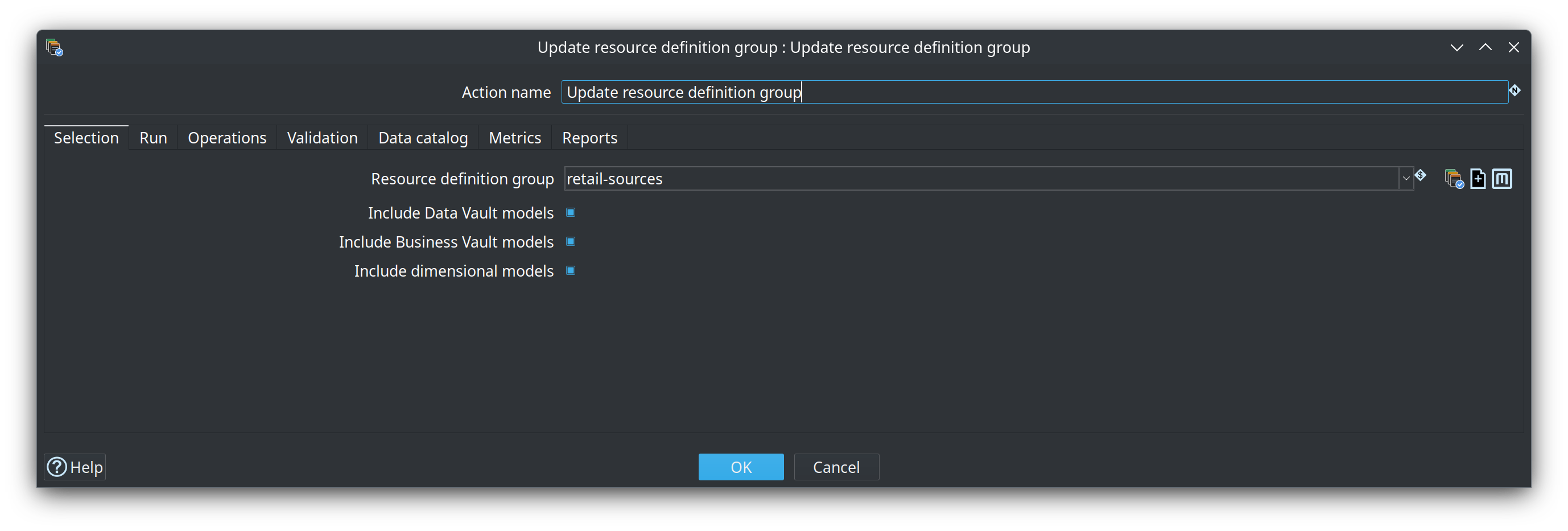
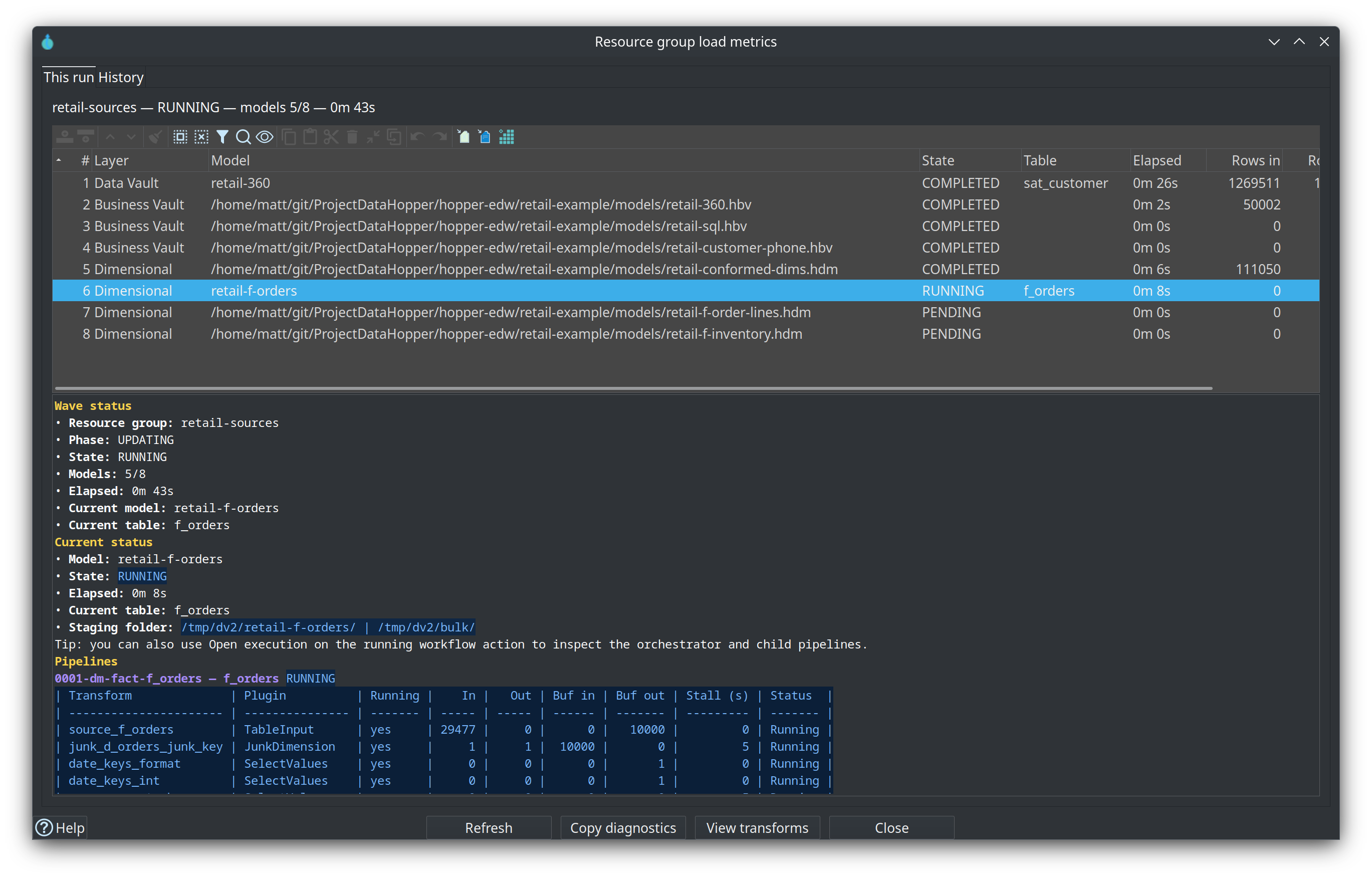
Full option reference: Update resource definition group action.
Retail example (run-retail-update.hwf / run-retail-update-models.hwf):
Harvest source metadata (optional Phase 1 wiring)
  → Schema gate (Validate resource definitions)
  → Measure / Evaluate source quality
  → Update resource definition group (retail-sources)
  → Record the load in retail_load_log
Metadata harvest details: Metadata harvesting.
Advanced: you can still bracket custom multi-action graphs with:
-
Begin Vault Update — assigns
DV_WORKFLOW_EXECUTION_ID(andDV_WORKFLOW_EXECUTION_STARTED_AT) before model updates run. -
Per-model Data Vault / Business Vault / Dimensional Update actions (or a nested workflow).
-
End Vault Update — correlates all
load_runrows with that execution id, publishesworkflow_load_overview/workflow_load_overview_modelto the OPS database, and optionally writes Markdown/HTML reports.
Schema gate details and HTML report samples: Resource definition validation.
Configure the group action (or End Vault Update) with the same execution metrics profile as the model updates (retail-execution-metrics). Retail report files default to ${PROJECT_HOME}/work/reports.
Catalog record definitions for ops tables are published under the FILE catalog storage root (retail: work/edw-catalog/hop/<project>/operations/) — for example workflow_load_overview, workflow_load_overview_model.
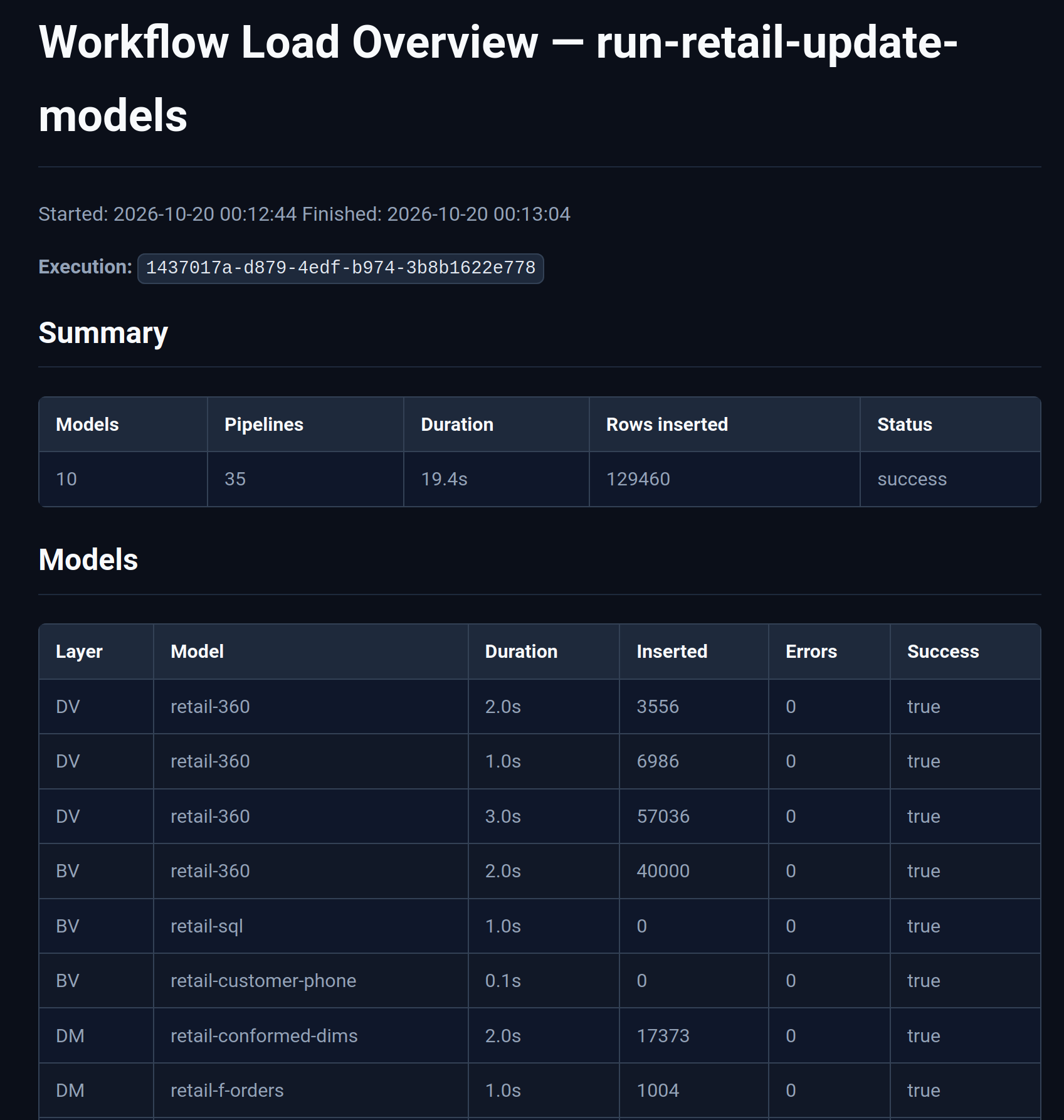
The HTML report summarizes the wave (model count, pipeline count, total duration, rows inserted) and lists each DV/BV/DM model with per-model duration and row counts:
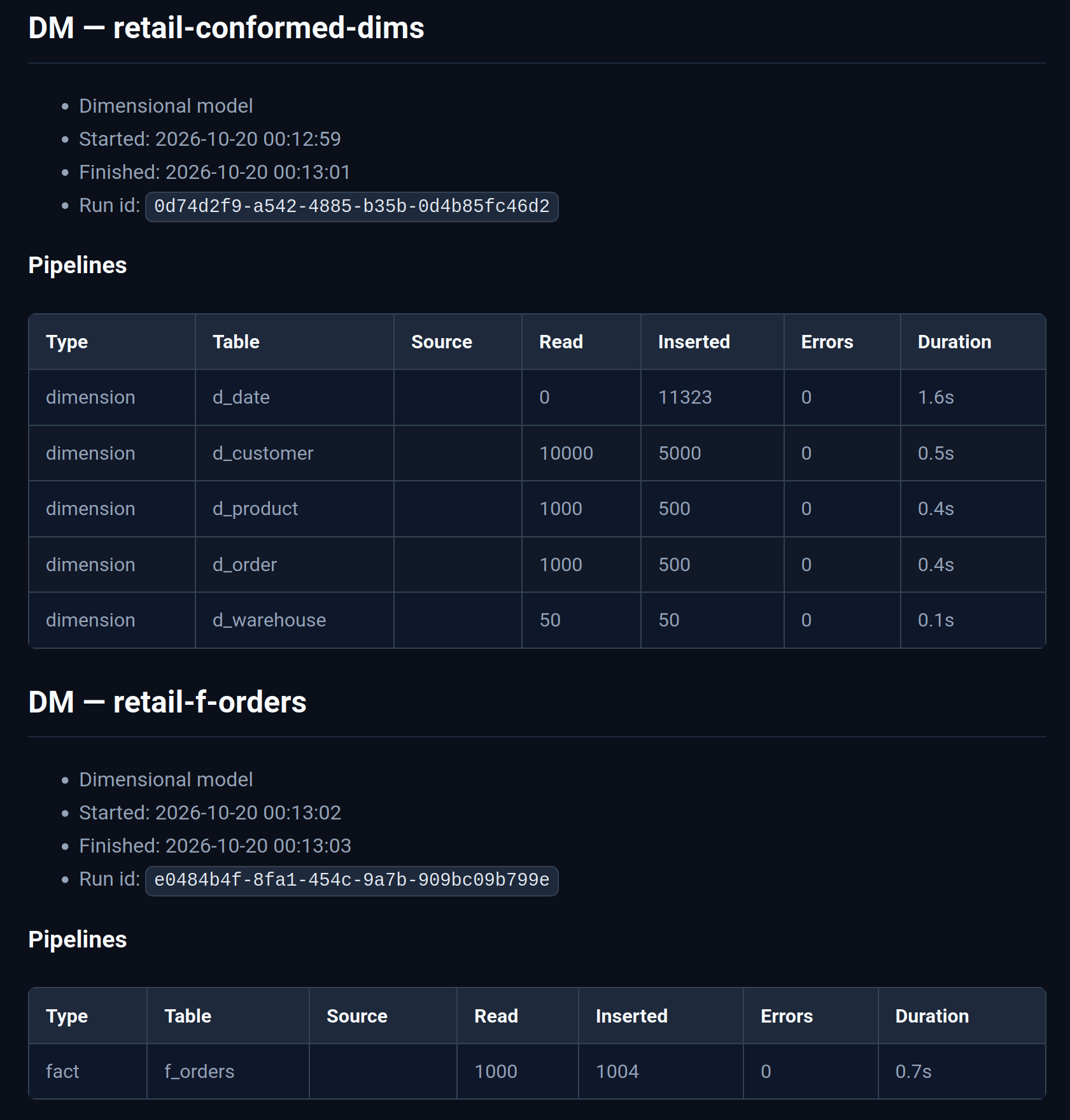
Drill into a model to see pipeline-level read, insert, error, and duration metrics:
Load duration overview on model graphs
When an execution metrics profile is configured and prior runs are stored in the OPS database, DV/BV/DM model canvases can show a Load durations pane alongside the graph. On the desktop each model table gets a horizontal bar per recent run (Airflow-style), with hover tooltips for run time and status. On Hop Web the same pane is a table (one row per table, one column per run). Toggle the pane from the modeler toolbar; use View data to open catalog-backed load metrics.
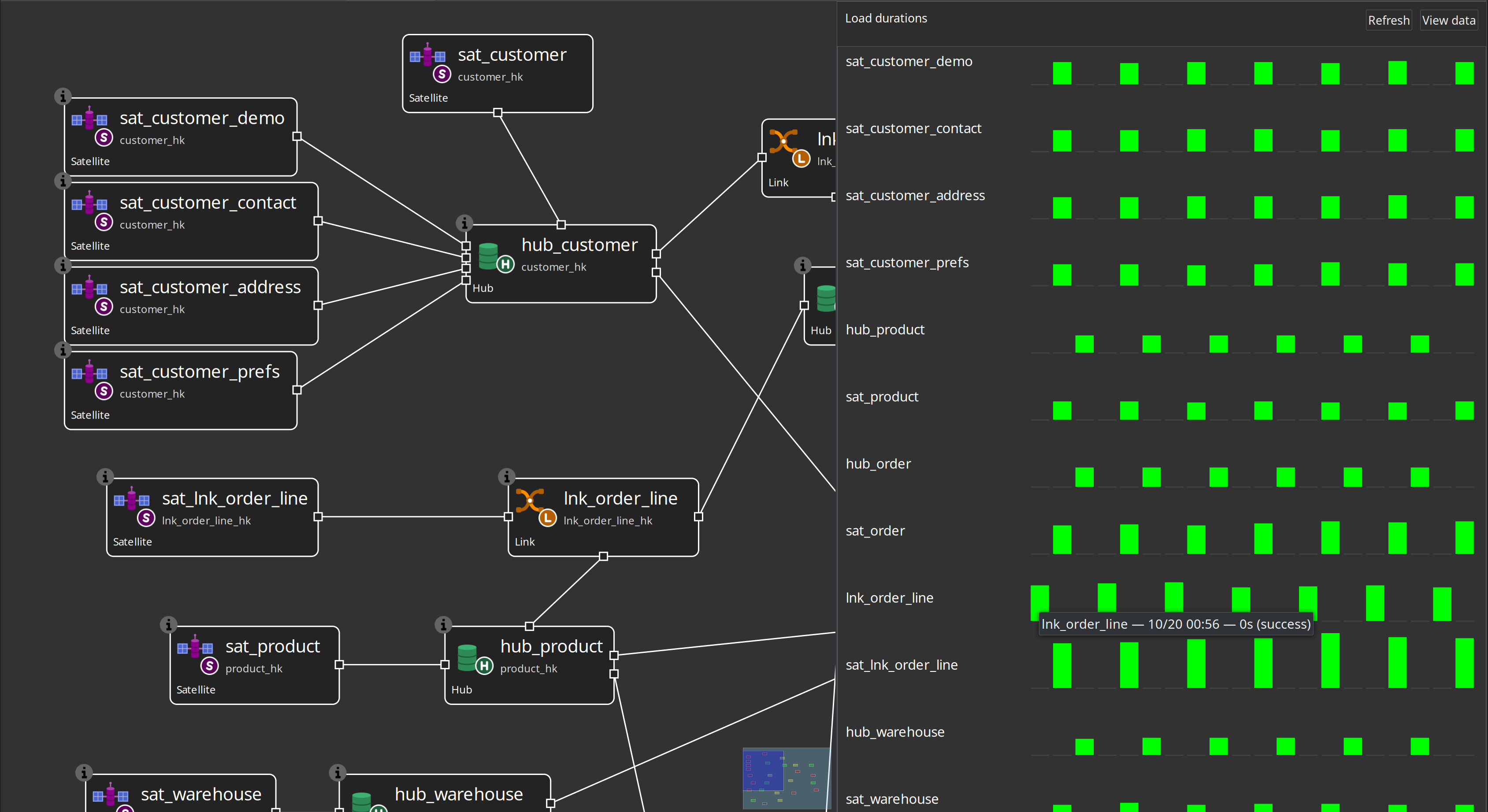
See load-run metrics plan for the metadata contract and catalog schema.
Load-run metrics tables (OPS)
Tables such as load_run and load_pipeline_metric live on the OPS connection (retail schema dv_ops), not in the Vault EDW.
A data engineer who needs the DDL should open metadata Execution metrics profile, set the target database and operations schema, and click Generate SQL. That opens Hop’s SQL editor with dialect-specific CREATE statements (Postgres / MySQL / SQL Server / Snowflake). Review, copy for a DBA, or execute. Auto-create on first publish is optional; Generate SQL is the supported way to know which SQL to run. Retail’s sql/create-load-metrics-tables.sql is only a Postgres bootstrap for the sample.
Help: Execution metrics profile.
Performance
Sort memory, parallel pipeline/table copies, and large-model notes: performance-tuning.md.
Finding objects while operating
Day-to-day operators and modelers can use Hop Search Everywhere to jump to hubs, satellites, source queries, resource definition groups, or metrics profiles by name without walking the project tree. See Project and metadata search.
The EDW Journey perspective lists the same group’s sources, controls, models, operate workflows, and reports in load order — see EDW Journey.