Description
This is the normal load action once you have a resource definition group — including a group that lists only one .hdv. Build order: Getting started — first load. Per-model Data Vault / Business Vault / Dimensional Update actions remain available; Begin/End Vault Update is the advanced way to bracket a custom multi-action graph.
The Update resource definition group workflow action loads every Data Vault (.hdv), Business Vault (.hbv), and dimensional (.hdm) model listed on a Resource definition group, in a fixed layer order:
-
All Data Vault models (list order on the group)
-
All Business Vault models
-
All dimensional models
Each model runs through the same update path as the dedicated Data Vault Update / Business Vault Update / Dimensional Update actions (model check options, DDL policy, parallel pipeline copies, optional catalog publish).
If a listed .hdv uses a read-only existing vault configuration, that Data Vault job is skipped (logged) so Business Vault and dimensional updates still run. A standalone Data Vault Update action pointed at the same file still errors.
Optionally the action manages vault update metrics for the whole wave: it assigns DV_WORKFLOW_EXECUTION_ID at the start (Begin-style) and publishes a workflow load overview at the end (End-style). You do not need separate Begin/End Vault Update actions or hand-wired per-model hops for a standard multi-layer load.
Retail example workflows run-retail-update.hwf and run-retail-update-models.hwf use this action with group retail-sources.
Dialog
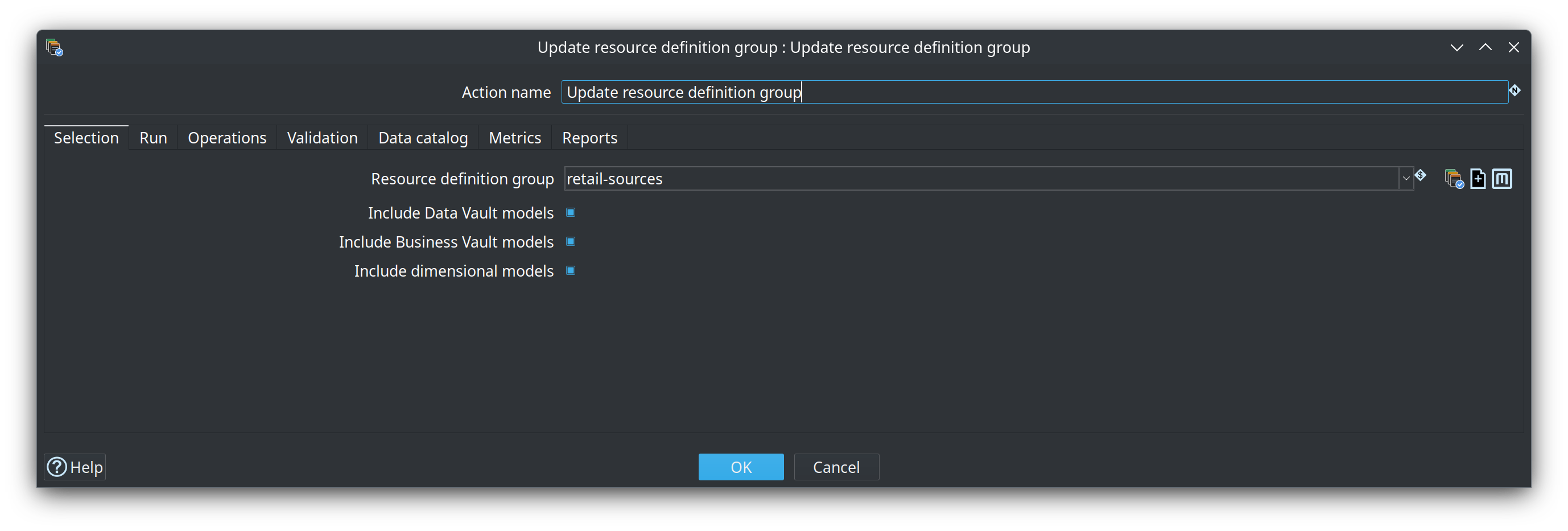
The dialog is organized into tabs.
Selection
| Option | Description |
|---|---|
Resource definition group |
Metadata name of the group that lists |
Include Data Vault models |
Run Data Vault Update for each |
Include Business Vault models |
Run Business Vault Update for each |
Include dimensional models |
Run Dimensional Update for each |
Run
Load date, pipeline / workflow run configurations, parallel pipeline copies, and optional Record source group filter for Data Vault models (same semantics as Data Vault Update).
Operations
Update target database structure, Fail if DDL is needed, Do not update target database (dry run), and DV Ensure special records.
| Option | Description |
|---|---|
Update target database structure / Fail if DDL is needed |
Same DDL policy as the dedicated update actions, applied per model. |
Target type mapping |
Optional Target type mapping applied before Hop dialect types. Copied to each child DV / BV / DM update. Empty uses unique auto-match on the model target connection. |
Do not update target database |
Dry run. Runs the parallel model checks (and optional DDL when structure update or fail-if-DDL is on) but skips data load pipelines on every child DV/BV/DM update — same semantics as Data Vault Update. With structure update and fail-if-DDL both off, only validation runs and reports (no per-model update step). |
Validation
Model checks for every selected DV/BV/DM model run before the update wave. Repeated environment findings (for example target database encoding / Unicode capability on a shared connection) are collapsed once in the log and report, with a model count, instead of one identical line per model.
| Option | Description |
|---|---|
Log model check failures / Abort on model check failures |
Log aggregated findings; abort stops the action when errors exist (warnings never abort by themselves). |
Detailed data type checking |
Live source schema checks for Data Vault models (higher latency over VPN). |
Prefer last harvest for type checks |
When detailed checking is on, reuse DISCOVERED layouts from Harvest source metadata ( |
Harvest run id / history database |
Optional overrides for harvest reuse (defaults: |
Model check parallelism |
Max concurrent model validations (default |
Ignore warnings |
Omit warnings from the workflow log (including shared encoding warnings). Errors still abort when abort-on-check is on. Warnings remain in the validation report file when written. |
Write validation report |
Write Markdown and/or HTML under the validation report folder (default |
Data catalog
Publish target tables to catalog after each model update, with optional catalog connection override (empty = use the group’s default catalog connection).
Metrics
When Manage vault update metrics (Begin/End) is enabled:
-
Assigns
DV_WORKFLOW_EXECUTION_ID(and related variables) before models run — prefer Use workflow log channel id as execution id -
Propagates those variables onto this action and each programmatic child DV/BV/DM update so
load_run.workflow_execution_idis correlated (required for overview reports) -
Uses the shared Execution metrics profile (retail:
retail-execution-metrics) -
Can publish overview rows to the OPS database, ensure catalog definitions for overview tables, and log a summary to the workflow
Reports
Optional Markdown / HTML workflow load overview under a report folder (retail default: ${PROJECT_HOME}/work/reports). Same report style as End Vault Update.
| Option | Description |
|---|---|
Write Markdown / Write HTML |
Emit load-overview reports after the wave (and on failure when metrics are available). |
Report output folder |
Directory for report files (variables allowed). Default |
Report file base name |
Optional base name without extension (variables allowed). Retail passes |
Include pipeline detail / insights |
Same detail levels as End Vault Update. |
If reports are missing after a successful load, check the workflow log for no metrics found for the execution id: child updates must inherit DV_WORKFLOW_EXECUTION_ID (handled by this action when metrics management is on).
Live badge and load metrics
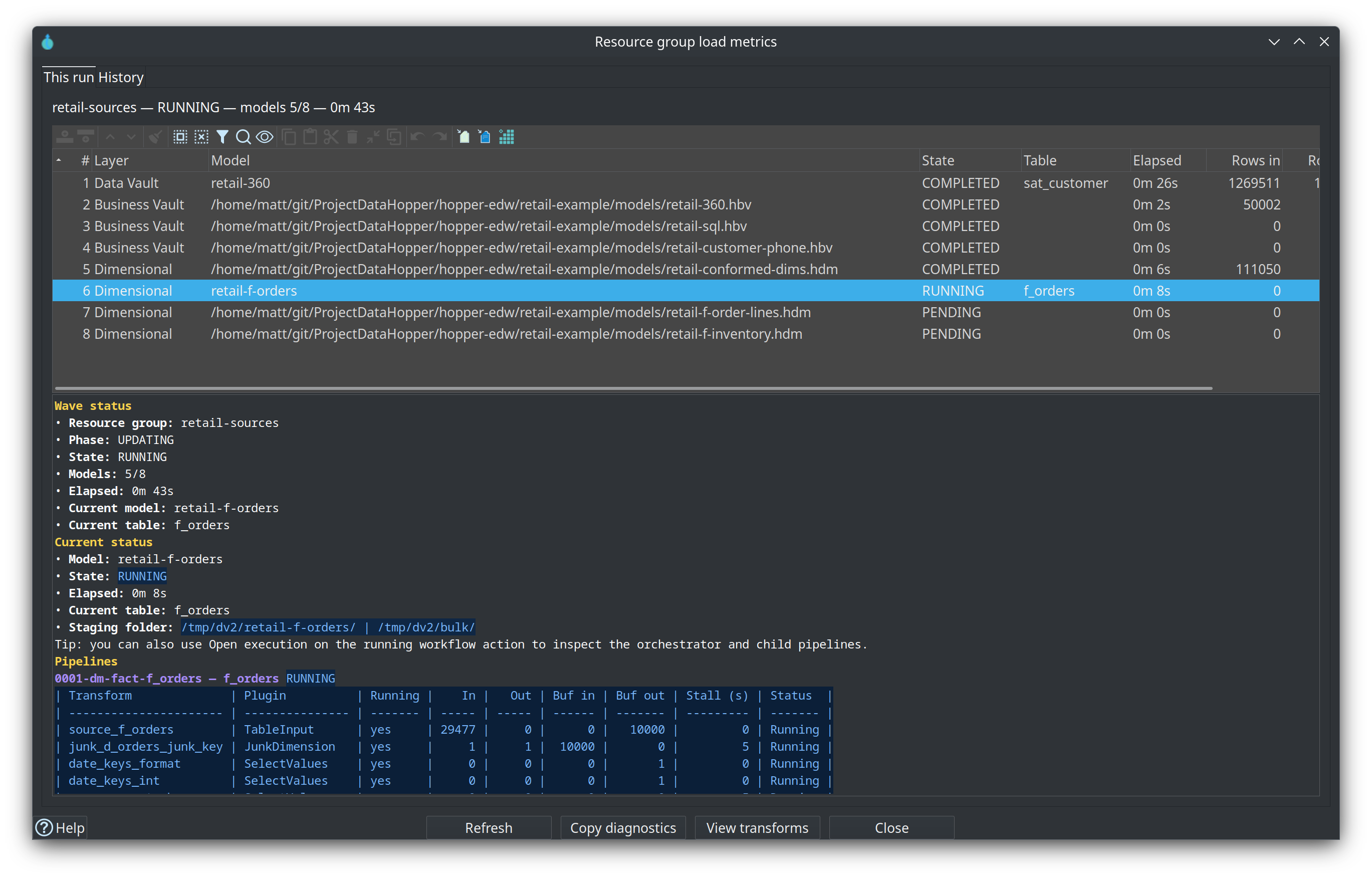
On the workflow canvas the action shows a bottom-right badge while it runs (clock / stall warning / failure) and a metrics glyph when idle. Click the badge or use View load metrics on the action context menu to open Resource group load metrics:
-
This run — every model in the wave, current table, elapsed time, and live transform metrics (rows, buffers, stall seconds)
-
History — recent OPS
workflow_load_overviewrows (double-click for per-model / per-pipeline detail)
Open referenced models
From the workflow canvas context menu, Open referenced object lists every non-empty model path on the configured group (DV, then BV, then DM). Labels show a project-relative path for readability (for example Data Vault: models/retail-360.hdv) without a ${PROJECT_HOME}/ prefix. Opening still uses the stored path so Hop can resolve project variables.
Typical chain
Harvest source metadata
  → Schema gate (Validate resource definitions)
  → Measure / Evaluate source quality
  → Update resource definition group (retail-sources)
  → Record the load in retail_load_log
See Metadata harvesting for the observation step, Operations for Docker runners and load overview screenshots, and Resource definition validation for the schema gate.
Related documentation
-
Execution maps — crawler expands group models into the
.hemgraph