This page is the Data Hopper EDW architecture picture: what the Data Catalog is for, how the model files relate, and which workflow actions sit on that spine.
It is not a Draw.io export of one project. For those derived diagrams see Architecture export.
-
Build an EDW from scratch: Getting started — building an EDW
-
Tour a finished sample: Getting started — retail example
-
Resource definition group (the spine): Resource definition group
Overview
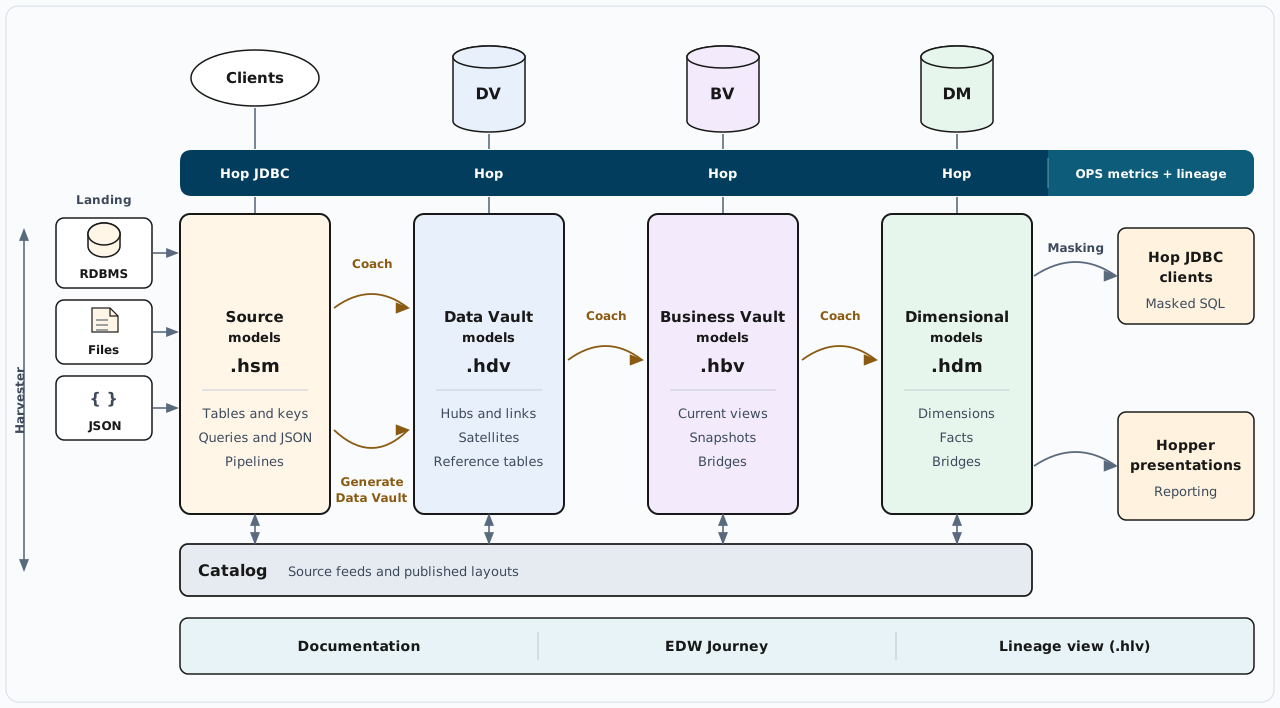
Landing databases, files, and JSON feed the source model. Clients query that model through Hop JDBC. Hop loads each later layer into its database and records OPS metrics and lineage. The coach is the guide from one model file to the next, and Generate Data Vault builds the raw vault from the source model. The Masking arrow is Hop JDBC clients reading the dimensional model with masked columns. Hopper presentations report from that same model. The catalog under the models is the shared contract. Documentation, the EDW Journey, and the lineage view (.hlv) read that stack.
The sections below take one slice of this picture. To build a warehouse in this order, start at Getting started — building an EDW.
Picture: edw-overview.svg.
Why the catalog sits in the middle
Hubs, links, satellites, Business Vault tables, and dimensional tables bind to catalog names, not raw connection strings. The catalog is the shared vocabulary:
-
In: source contracts (
DV_SOURCEfeeds) published from a source model or imported in the Data Catalog perspective. -
Out: published DV / BV / DM table layouts, lineage siblings, the model registry, and operations stubs — written when an update action publishes after a load.
Harvest observes live schemas and does not rewrite working-tree contracts. Apply-harvest, catalog Refresh from source, and schema-gate remediation are separate, deliberate writes.
D1 — Logical layers
Landing systems stay outside the plugin. You model them, publish contracts, then generate and load each warehouse layer.

PlantUML source: d1-logical-layers.puml.
| Layer | File | Role |
|---|---|---|
Source system |
|
Tables, PK/FK, queries, JSON extractions, pipeline contracts. Publish feeds; optionally Generate Data Vault… |
Source contracts |
Data Catalog |
|
Raw Data Vault |
|
Hubs, links, satellites, reference tables. Insert-only loads. |
Business Vault |
|
SCD2, PIT, bridges, SQL business tables on top of raw vault history. |
Dimensional |
|
Kimball dims, facts, bridges. Often reads BV and/or raw vault. |
Semantic layer |
|
Consumption model over the warehouse: entities, attributes, measures, relationships, format masks, named selections. Bound to a |
Execution / lineage views |
|
Optional ops graphs and Hop Lineage Views — not required to build the warehouse. |
Typical databases in a Hop project:
-
Source (retail:
CRM) — landing tables the.hsmand catalog sources point at. -
Vault — raw DV, BV, and dimensional tables (one or more Hop connections).
-
OPS — optional harvest history, quality history, and load-run metrics.
D2 — Catalog as the contract bus
One FILE catalog, two directions.
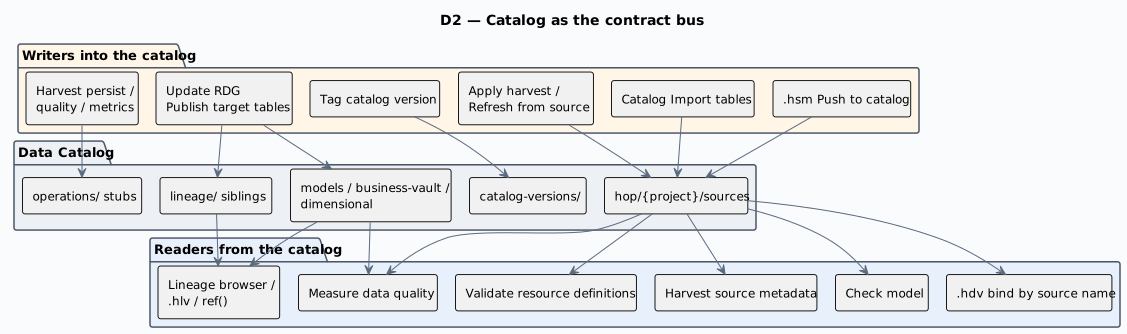
PlantUML source: d2-catalog-bus.puml.
Rules that surprise first-time users:
-
Harvest never rewrites contracts. It writes OPS history (
schema_harvest_*) and can later apply FKs or field layouts if you choose Apply harvest to catalog…. -
Length remediation expands models and target DDL from the catalog length. It does not change the catalog. If the live source is the new truth, update the catalog yourself, then re-validate.
-
Version tags freeze source contracts used by the group’s models — not the
.hdv/.hbv/.hdmfiles (those live in git) and not published target layouts.
Namespaces after a published load (retail example under work/edw-catalog/):
| Namespace | Contents |
|---|---|
|
Source feeds (input contracts) |
|
Published DV table layouts |
|
Published BV targets |
|
Published dimensional tables |
|
Derived lineage siblings (not an edit surface) |
|
Load metrics, harvest, quality ops stubs |
|
Immutable source-contract snapshots |
Details: Data Catalog, Data Vault sources, Source-to-target lineage.
D3 — Resource definition group as the spine
A resource definition group is not a pile of catalog records. It is the project’s list of warehouse models plus the default catalog connection. Almost every cross-model action takes a group:

PlantUML source: d3-rdg-spine.puml.
Create the group as soon as the first .hdv exists. Add .hbv and .hdm paths to the same group later. Split into multiple groups only when teams need separate load waves — see Organizing large Data Vault programs.
Full field and button-bar reference: Resource definition group.
D4 — Build-time vs run-time
Design changes the models and contracts. Operate loads the warehouse. Do not mix the two in your head.
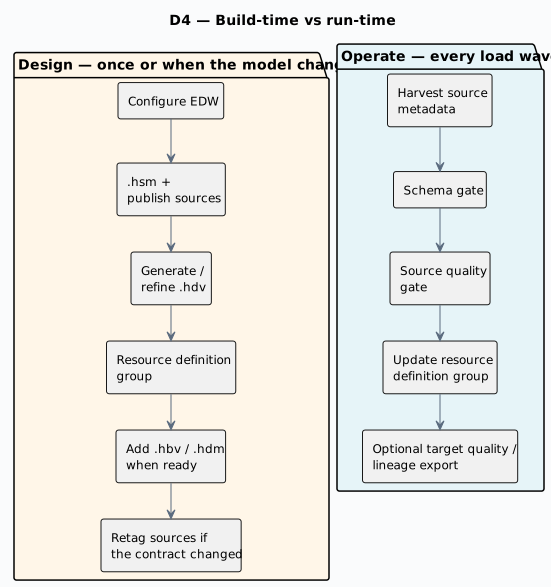
PlantUML source: d4-build-vs-run.puml.
Greenfield first load can skip harvest, the schema gate, and quality: one Update resource definition group with Update target database structure and Publish target tables to catalog is enough to create tables and write layouts back. Add the full operate chain as soon as that first load works.
D5 — Four controls, four jobs
These are not one slider.
| Control | Question it answers | Fails the load? |
|---|---|---|
Check model (toolbar / update action) |
Is this |
Optional abort on errors |
Harvest source metadata |
What do live sources look like now? |
No (default). Observation only. |
Validate resource definitions (schema gate) |
May we load given the catalog contract, a version tag, a harvest run, and/or target DDL? |
Yes, by policy ( |
Measure data quality + Evaluate quality gate |
Are the rows acceptable (nulls, domains, counts, …)? |
Pre-load: yes by policy. Post-load: usually |
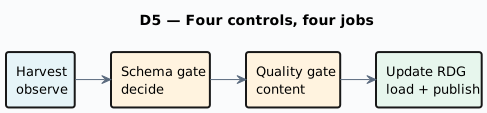
PlantUML source: d5-four-controls.puml.
D6 — After the first raw-vault load
Grow one resource definition group. Do not create a second group for BV or DM unless you have a multi-team split.

PlantUML source: d6-grow-the-warehouse.puml.
Then day-2: harvest history and apply FKs, catalog version tags + CI gate, quality bindings on published targets, execution maps, Hop Lineage View / Marquez. That is operations and discovery, not a new modeling layer.
Walkthrough: Getting started — after the first load.
D7 — EDW Journey perspective
The Hop GUI map of D1 + D3 + D5 is the EDW Journey perspective: a tree of one resource definition group in operate order (sources → controls → DV → BV → DM → orchestration → outputs). Selecting a node opens the existing catalog, modeler, metadata, workflow, or report — it does not replace those editors.
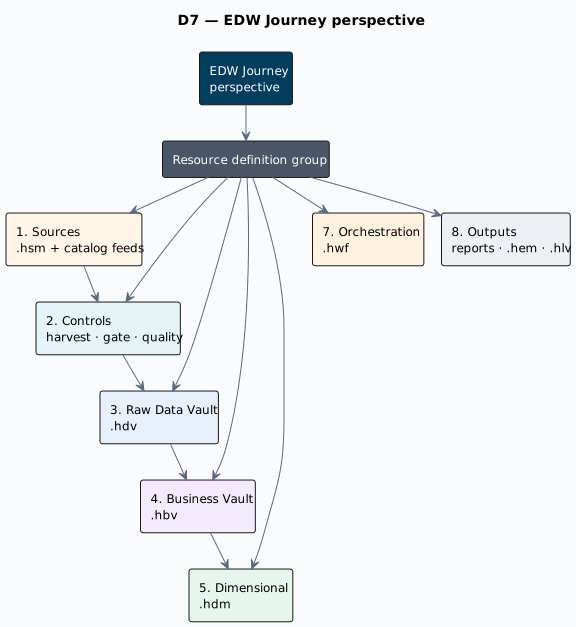
PlantUML source: d7-edw-journey.puml.
User guide: EDW Journey perspective.