- When validation runs
- Resource definition group (design time)
- Workflow action (CI/CD schema gate)
- Validation results dialog (GUI)
- Issue detail and remediation
- Retail example: address_line1 length expand
- HTML / Markdown gate reports
- Practical design-time workflow
- Schema impact simulation (programmatic)
- DTAP promotion recipe
- Related documents
Beyond Check model on .hdv / .hbv / .hdm files, the plugin validates Data Catalog record definitions — especially DV_SOURCE feeds — and surfaces issues in the Hop GUI with optional remediation, acknowledgements, downstream impact, and catalog version baselines for CI/CD.
When validation runs
-
Explicit Validate sources on a Resource definition group metadata editor (design time)
-
Workflow action Validate resource definitions (schema gate) before DV/BV/DM loads (CI/CD)
-
Pipelines that depend on catalog layout (indirectly, via model checks and source resolution)
Model validation and catalog validation are complementary: a passing model check still requires accurate source definitions in the catalog.
Resource definition group (design time)
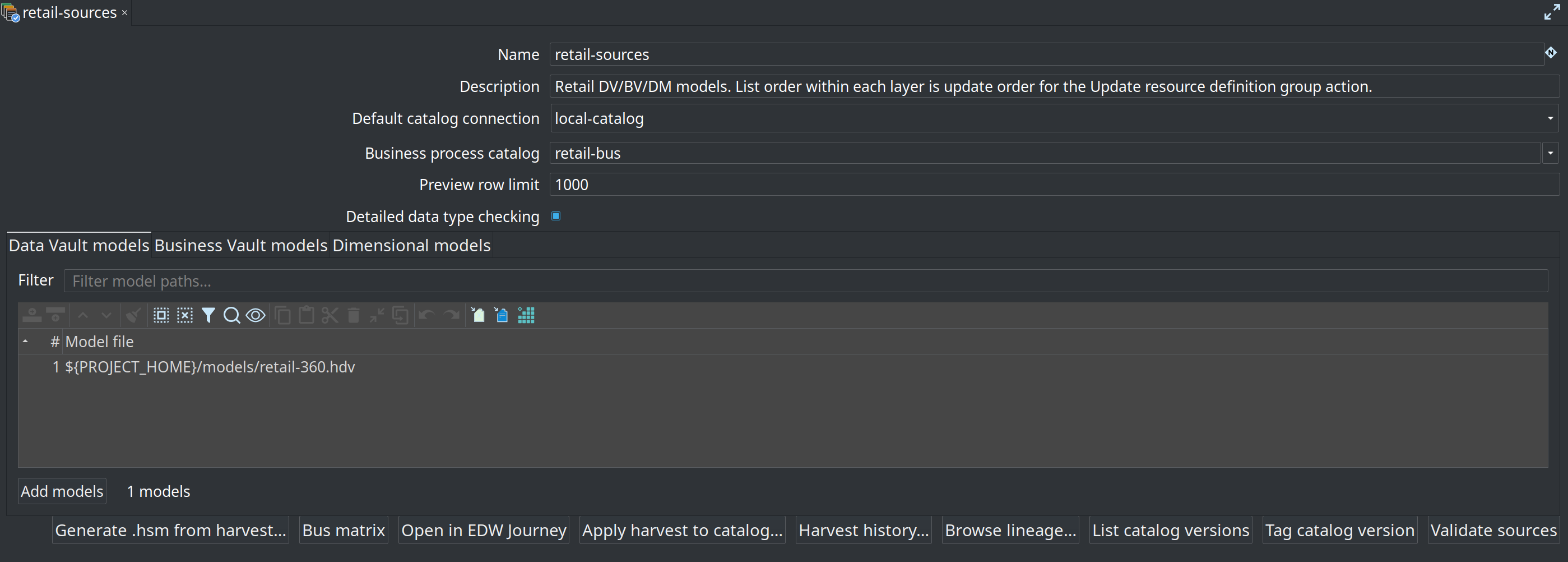
Open metadata type Resource definition group. A group scopes which DV / BV / DM model files participate in validation and catalog-version tagging. Set Default catalog connection to your FILE catalog (retail: local-catalog → work/edw-catalog).
Bottom of the editor:
-
List catalog versions — review tags already stored under the catalog’s
catalog-versions/folder -
Tag catalog version — freeze current source contracts for a semantic tag (for example
v1.0.0) -
Validate sources — open the validation options dialog (baseline + check axes), then run comparison and open the results dialog
-
Browse lineage… — reverse source-to-target lineage browser (see Source-to-target lineage)
Catalog version storage and scope are described in Data Catalog — Catalog versions. Versions can also be browsed read-only under Versions in the Data Catalog perspective.
Design-time validation options
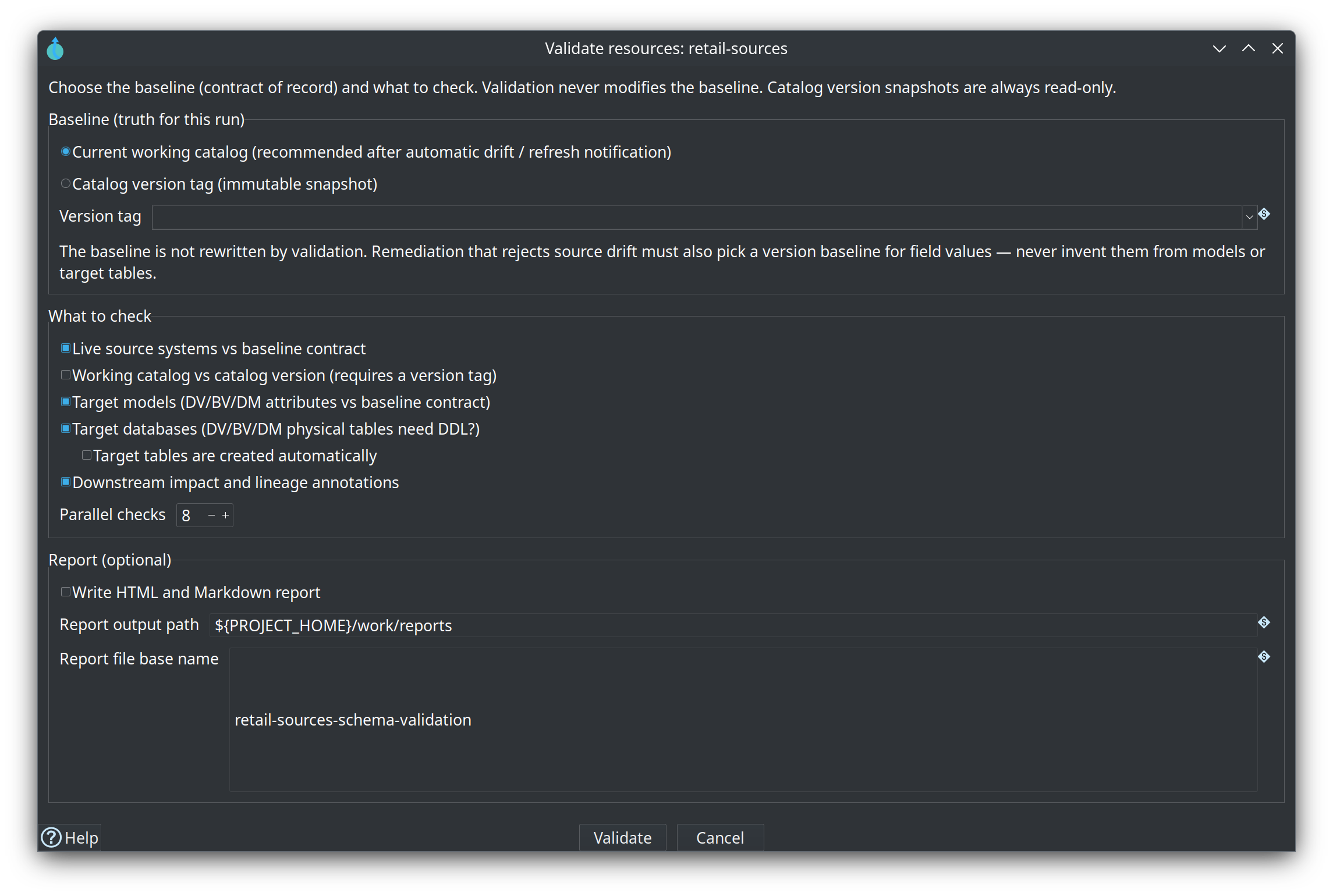
Validate sources does not run immediately. An options dialog asks what is being compared:
-
Baseline (truth for this run) — current working catalog (typical after automatic drift notification) or a catalog version tag (immutable snapshot)
-
What to check — live source systems, working catalog vs version, target models (DV/BV/DM), target databases (DDL needed?), downstream impact/lineage
-
Parallel checks — max concurrent live-source discoveries and target-table DDL checks (default 8, range 1–64). Raise this when validating hundreds of database sources over a high-latency link (VPN); set 1 for serial debugging.
-
Optional report — write HTML/Markdown under a Hop VFS path (same formatter as the CI gate)
Validation is always read-only. Catalog version snapshots are never modified by validation. The results banner restates the chosen baseline and axes.
Workflow action (CI/CD schema gate)
Add Validate resource definitions to a workflow (category General) and place it before Data Vault / Business Vault / Dimensional update actions.
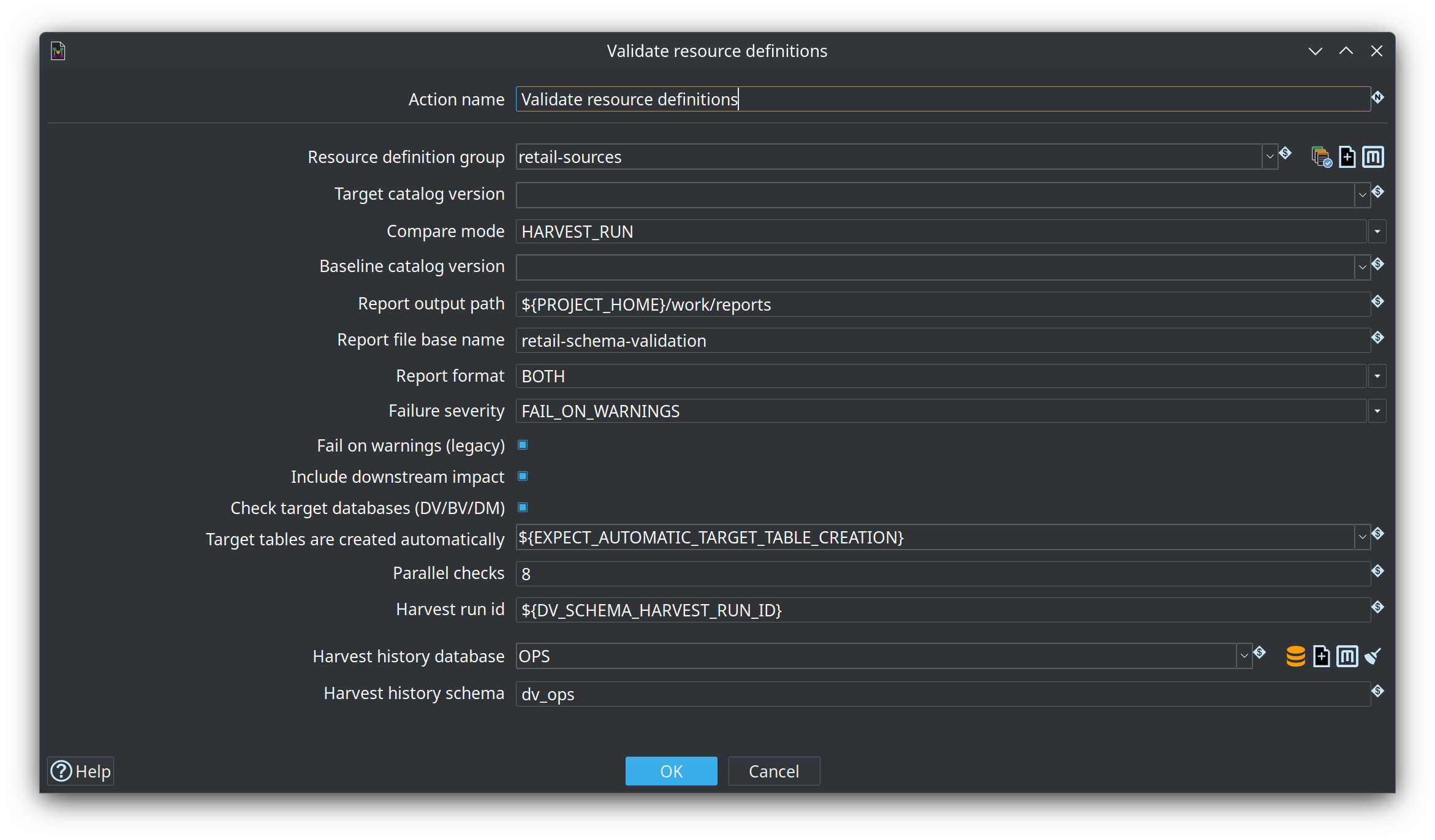
| Parameter | Purpose | |
|---|---|---|
Resource definition group |
Required validation scope (for example |
|
Target catalog version |
Tag such as |
|
Compare mode |
|
|
Baseline catalog version |
WORKING_VS_VERSION / VERSION_VS_VERSION: expected/reference tag. LIVE_SOURCE: used as expected when Target is empty. ComboVar list is filled from tags in the group’s FILE catalog. |
|
Harvest run id |
HARVEST_RUN: run id (default |
|
Harvest history database / schema |
HARVEST_RUN: OPS connection holding |
|
Report output path |
Folder/path for Markdown and/or HTML (Hop VFS), for example |
|
Report file base name |
Optional base name without extension (defaults to a group/timestamp name) |
|
Report format |
|
|
Failure severity |
|
|
Fail on warnings (legacy) |
Older workflows only; prefer Failure severity |
|
Include downstream impact |
Annotate issues with Source→DV→BV→DM blast radius |
|
Check target databases |
Compare model tables to the physical target database (CREATE/ALTER DDL needed) |
|
Target tables are created automatically |
When target DB checks are on: missing tables (CREATE that vault update will apply) are not reported — they are expected. Layout drift on existing tables stays a warning. |
|
Parallel checks |
Max concurrent live-source / target-DB checks (default |
Initial load and automatic table creation
On a first vault load, target tables often do not exist yet. Enable Target tables are created automatically on the workflow action (Y/N or a Hop variable such as ${EXPECT_AUTOMATIC_TARGET_TABLE_CREATION}) and the same option in the GUI Validate sources dialog so pending CREATE findings are omitted from reports and the results dialog (not listed as INFO noise). The gate can keep fail-on-warnings without treating expected first-load CREATE as a defect. ALTER / layout drift on tables that already exist is still reported.
On incremental update runs, leave the option off (N) so missing or altered target tables fail the gate — the warehouse should already exist and drift is real. The retail sample sets EXPECT_AUTOMATIC_TARGET_TABLE_CREATION=Y from run-retail-initial and N from run-retail-update into shared run-retail-update-models.hwf.
Compare modes
| Mode | Expected (baseline) | Actual | Typical use | |
|---|---|---|---|---|
|
Working tree, or Target/Baseline tag |
Live physical source discovery |
Daily CI against CRM/source DB |
|
|
Baseline (or Target if Baseline empty) tag |
Working-tree catalog |
Detect catalog field length/type edits without a live DB |
|
|
Baseline tag |
Target tag |
Offline PR review between two frozen contracts |
|
|
Contract already compared during harvest |
Persisted harvest snapshot (OPS) |
After Harvest source metadata — no second live discovery; see Metadata harvesting |
Version fields support Hop variables (for example ${PROMOTED_TAG}). Tag lists refresh when the resource definition group changes.
Validation results dialog (GUI)
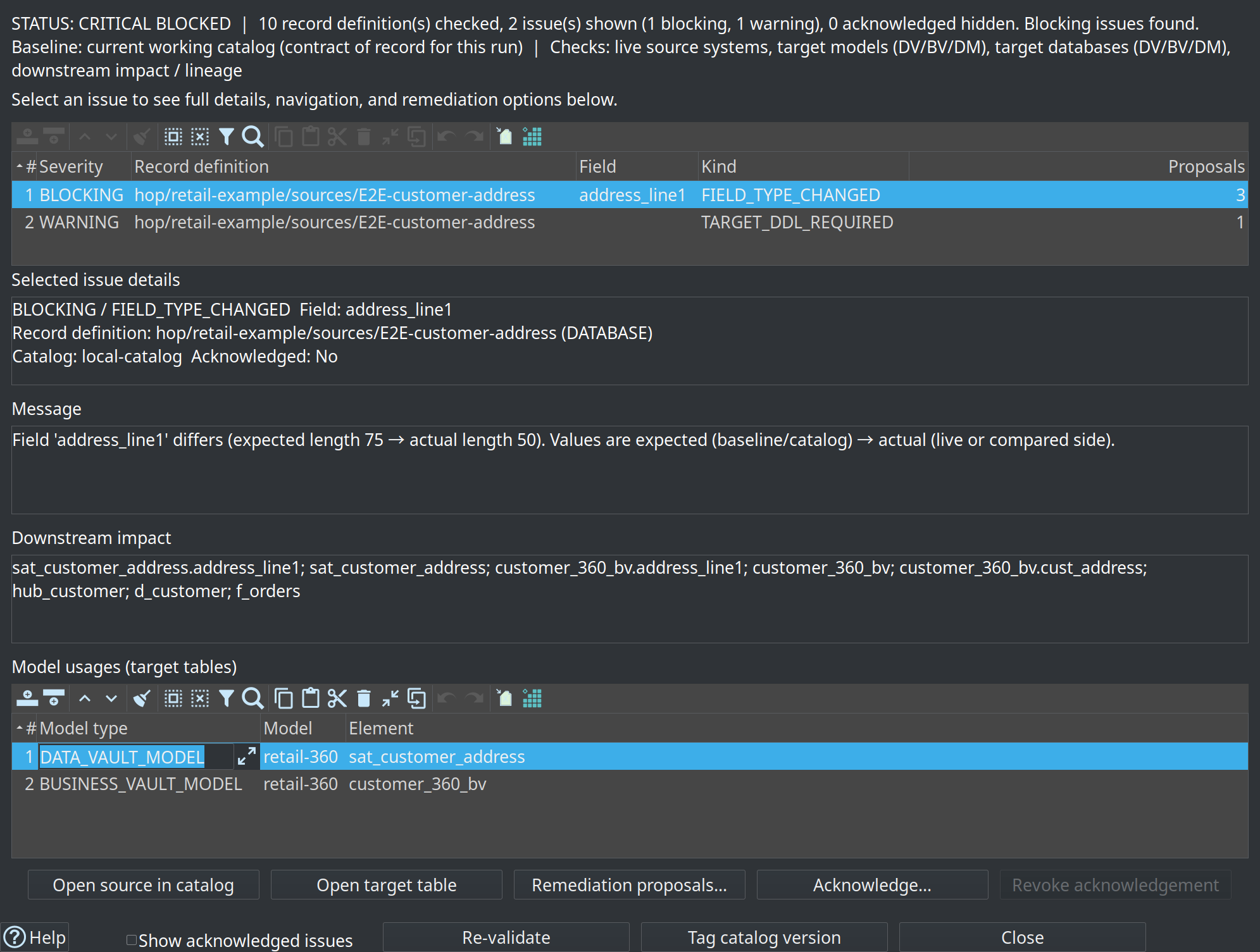
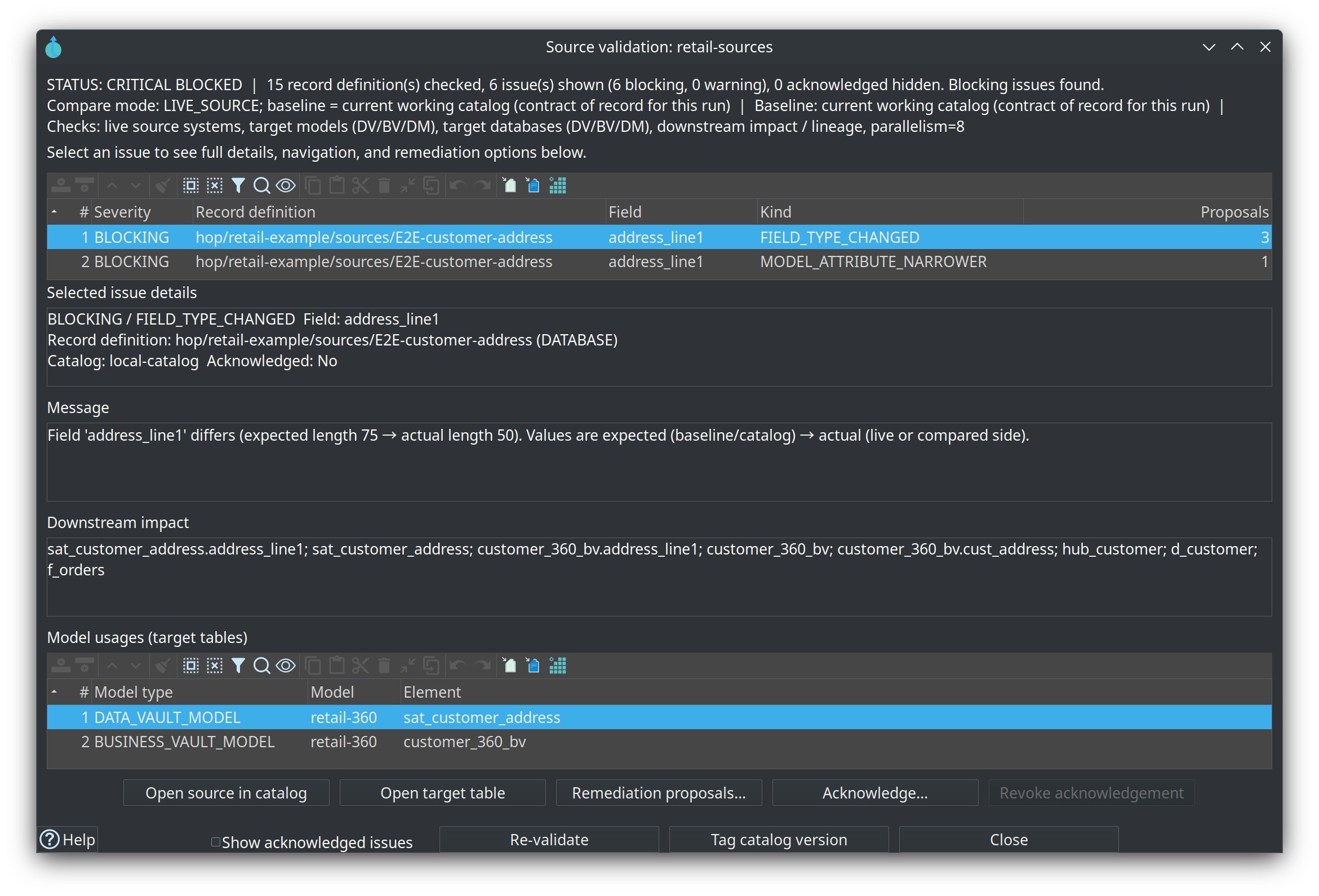
After Validate sources, the Source validation dialog uses a master-detail layout with a status banner (PASS / WARNINGS / CRITICAL BLOCKED) and the baseline/axes context from the options dialog:
-
Top — issue summaries (compact rows): Severity, Record definition, Field, Kind (for example
FIELD_TYPE_CHANGED), Proposals count -
BLOCKING rows are highlighted in red; WARNING rows in amber
-
Bottom — selected issue details: full message, downstream impact, and model usages
-
Select a summary row to load details (no need to hunt for double-click)
Detail actions for the selected issue:
-
Open source in catalog — jump to the source record definition in the Data Catalog perspective
-
Open target table — open the selected model usage (hub, satellite, BV, or DM table)
-
Remediation proposals… — open the proposals dialog (also available via double-click)
-
Acknowledge… / Revoke acknowledgement — accept or clear a warning with a comment
-
Footer: show acknowledged issues, re-validate (re-opens options), tag catalog version
Issue detail and remediation
Full issue text and blast radius stay in the details pane of the results dialog. Use Remediation proposals… for fixes.
How to read a finding (axis first)
Each issue message is structured so you can see what was checked before the severity label:
-
Axis — which check produced the finding (live sources, working catalog vs baseline version, target database layout, …)
-
Compared — expected vs actual sides for that axis
-
Found — factual result (for example “source missing from baseline v1.0.0”, or “2 DDL statements required”)
-
Why it matters — what to do next for this axis
The status banner also restates compare mode and baseline (current working catalog or a version tag such as v1.0.0). Selecting “current catalog” as baseline does not use a version tag; warnings can still appear from other axes (live discovery, target DB, models).
| Kind | Typical meaning | |
|---|---|---|
|
Source is used by models and in the working catalog, but not in the frozen baseline version |
|
|
Models reference a source that is not in the working catalog yet (publish/generate first) |
|
|
Live discovery failed or the source is not refreshable (connection, path, COMPOSITE model) |
|
|
EDW/target table lags the model (often normal before the first vault update creates tables). Not a source-catalog field mismatch |
|
|
Field contract or model attribute length/type drift |
A satellite attribute with no length is compared using the effective length from the source-model card that published the feed. Pipeline, JSON, masking, and query cards apply their data type mapping profiles and field overrides first. A pipeline String with no length that premodel-defaults maps to 2000 matches a working-catalog length of 2000 and is not blocking. An explicit shorter length on the attribute is still blocking.
Catalog is never rewritten by length remediation
The working catalog field length is the contract used to expand models and target DDL. Remediation does not change the catalog. If the live source should define a new length, update the catalog yourself in the Data Catalog, then re-validate.
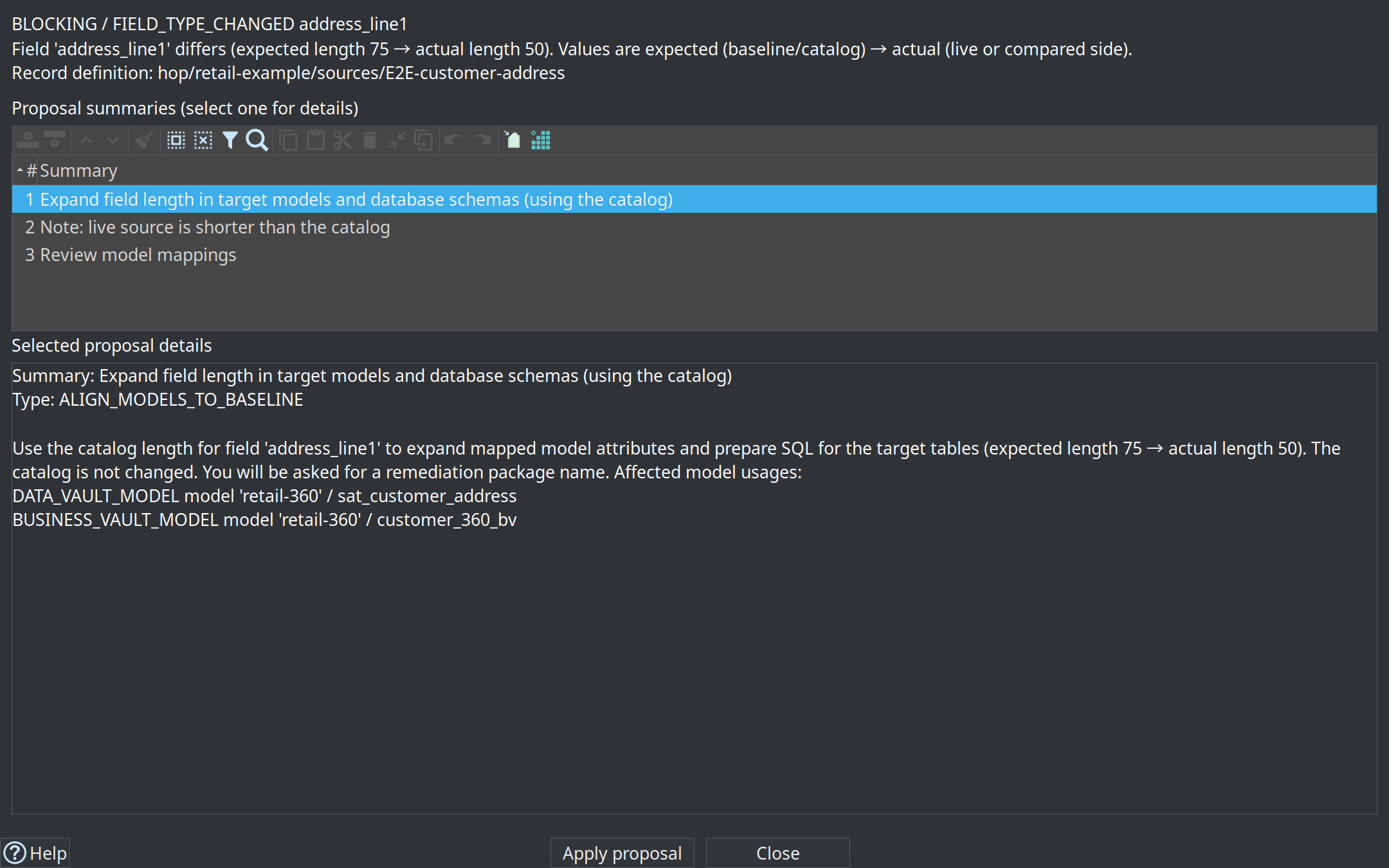
Primary proposal for length drift:
Expand field length in target models and database schemas (using the catalog)
-
Catalog is not changed
-
DV satellite attributes in git-versioned models are expanded to the catalog field length
-
Downstream BV SCD2 columns linked by explicit field mappings (e.g.
address_line1→cust_addressoncustomer_360_bv) are included for target DDL -
Downstream DM columns sourced via SQL that reads a BV table (e.g.
JOIN customer_360_bv sc+ attributecust_addressond_customer) are included when field names match (SQL table-ref + BV-mediated lineage, confidenceDERIVED_VIA_BV) -
You name the remediation package folder
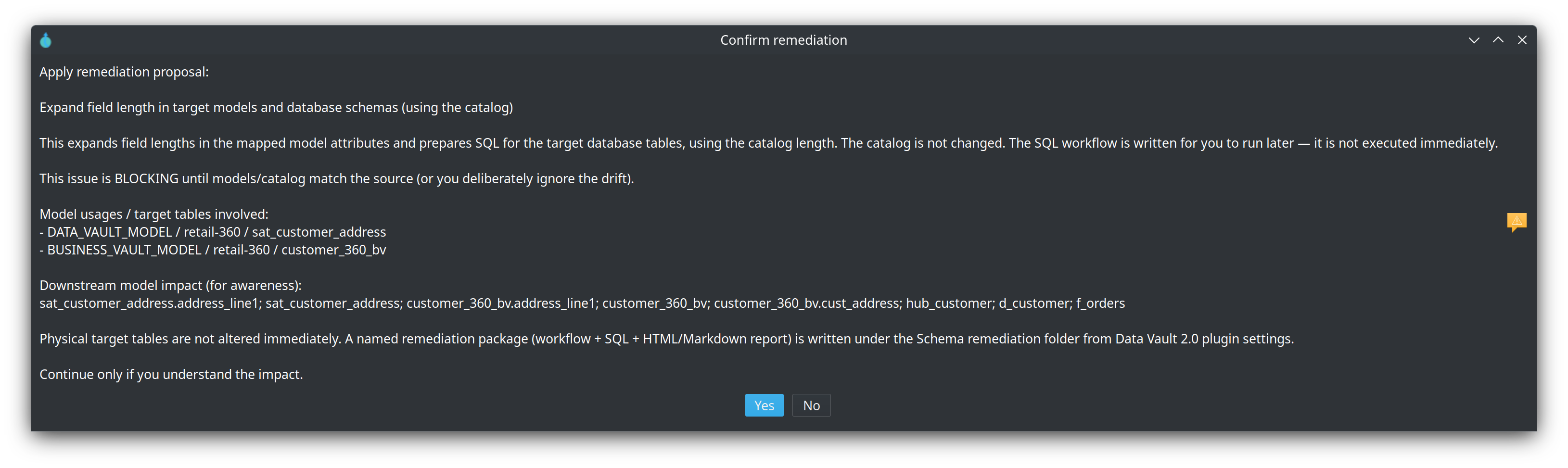
Schema remediation package
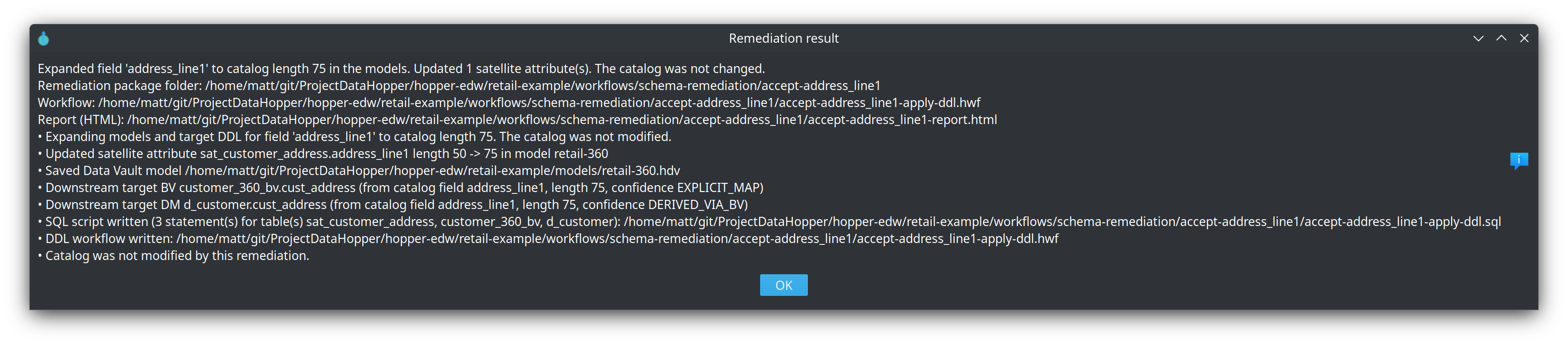
Under the Schema remediation folder (Hopper EDW plugin settings; default ${PROJECT_HOME}/workflows/schema-remediation/<name>/) the plugin writes:
-
a reviewable SQL script (always when DDL is needed), with sections per affected table
-
a Hop workflow with one SQL action per target table (run later per DTAP environment — not executed immediately)
-
HTML and Markdown reports of the catalog length used, each downstream target + lineage confidence, and that the catalog was not modified

Other issue kinds (field added/removed, primary key change) may still offer Refresh catalog contract from source — that path does update the catalog. It is separate from length expand.
Acknowledgements persist with the catalog record so teams can document conscious exceptions (for example known schema drift in a non-production feed).
Retail example: address_line1 length expand
In the retail project, widening catalog field address_line1 to 75 and applying expand produces a package under:
retail-example/workflows/schema-remediation/accept-address_line1/
| File | Role | |
|---|---|---|
|
What changed, downstream targets, confidence |
|
|
Reviewable multi-table DDL (one section per table) |
|
|
Hop workflow: one SQL action per table → Success |
Example Markdown report (checked-in sample; paths project-relative under the retail project):
# Schema remediation: expand models and schemas from catalog length

- **Remediation name:** accept-address_line1
- **Workflow:** `workflows/schema-remediation/accept-address_line1/accept-address_line1-apply-ddl.hwf`
- **SQL script:** `workflows/schema-remediation/accept-address_line1/accept-address_line1-apply-ddl.sql`

## What changed

- Expanding models and target DDL for field 'address_line1' to catalog length 75. The catalog was not modified.
- Downstream target BV customer_360_bv.cust_address (from catalog field address_line1, length 75, confidence EXPLICIT_MAP)
- Downstream target DM d_customer.cust_address (from catalog field address_line1, length 75, confidence DERIVED_VIA_BV)
- SQL script written (3 statement(s) for table(s) sat_customer_address, customer_360_bv, d_customer): ...
- DDL workflow written: ...
- Catalog was not modified by this remediation.
The companion SQL widens three physical tables on connection Vault — DV satellite, BV SCD2, and DM dimension — using dialect-specific length-change steps (PostgreSQL example uses a temporary column rename):
-- Connection: Vault  Table: sat_customer_address
ALTER TABLE sat_customer_address ADD COLUMN address_line1_KTL VARCHAR(75);
UPDATE sat_customer_address SET address_line1_KTL=address_line1;
ALTER TABLE sat_customer_address DROP COLUMN address_line1;
ALTER TABLE sat_customer_address RENAME address_line1_KTL TO address_line1;

-- Connection: Vault  Table: customer_360_bv
ALTER TABLE customer_360_bv ADD COLUMN cust_address_KTL VARCHAR(75);
...

-- Connection: Vault  Table: d_customer
ALTER TABLE d_customer ADD COLUMN cust_address_KTL VARCHAR(75);
...
Review the workflow/SQL on each DTAP environment before loads that need the wider columns. The workflow is not run automatically when you accept the proposal.
HTML / Markdown gate reports
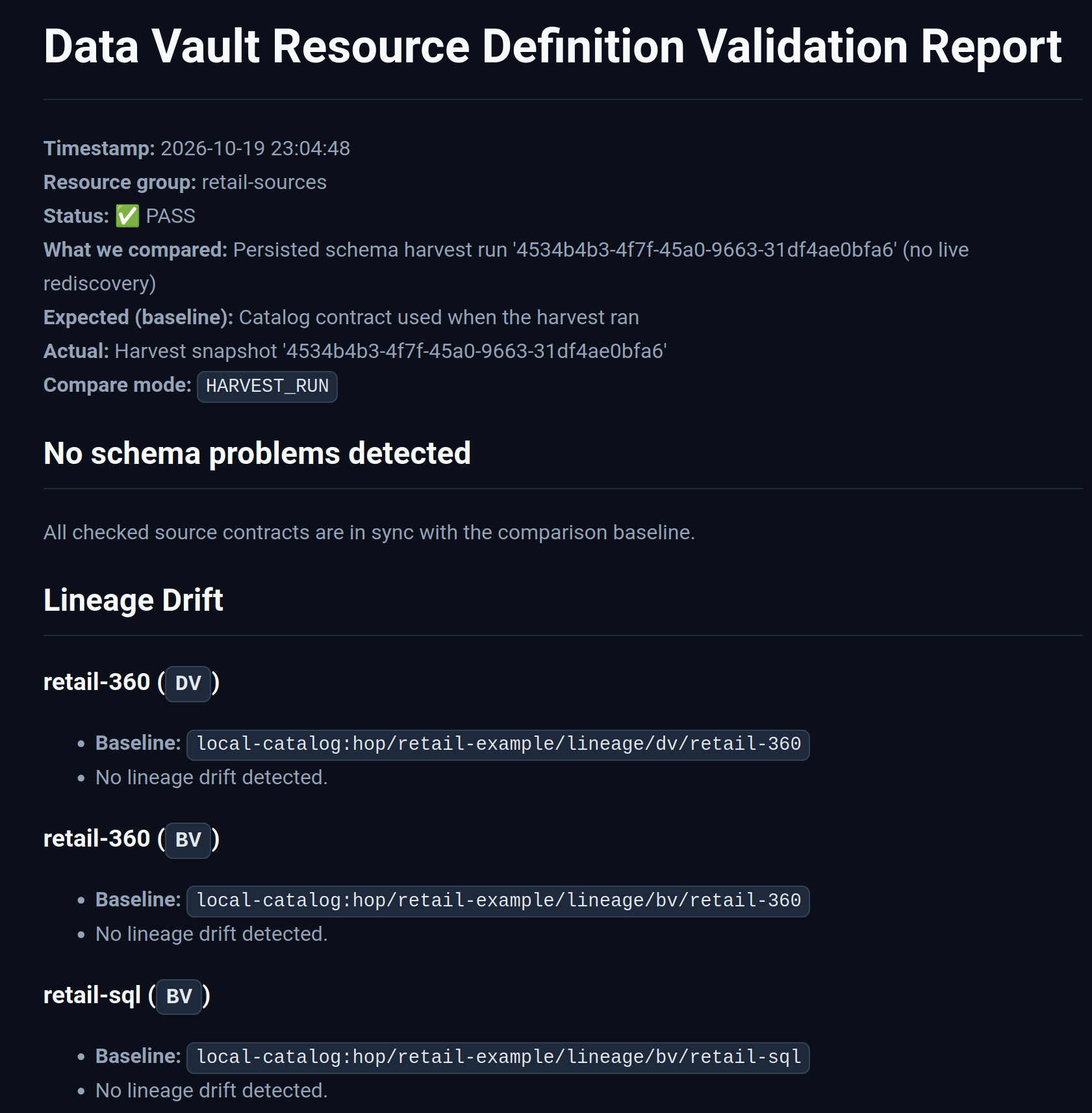
When the workflow action has a Report output path, it writes scannable artifacts via Hop VFS (local, S3, Azure, and similar). The HTML report title is Data Vault Resource Definition Validation Report and includes resource group, baseline, compare mode, status, issue table, downstream impact summary, and required action.
Pass (no schema drift vs the comparison baseline):
Critical blocked (length/type drift with blast radius):
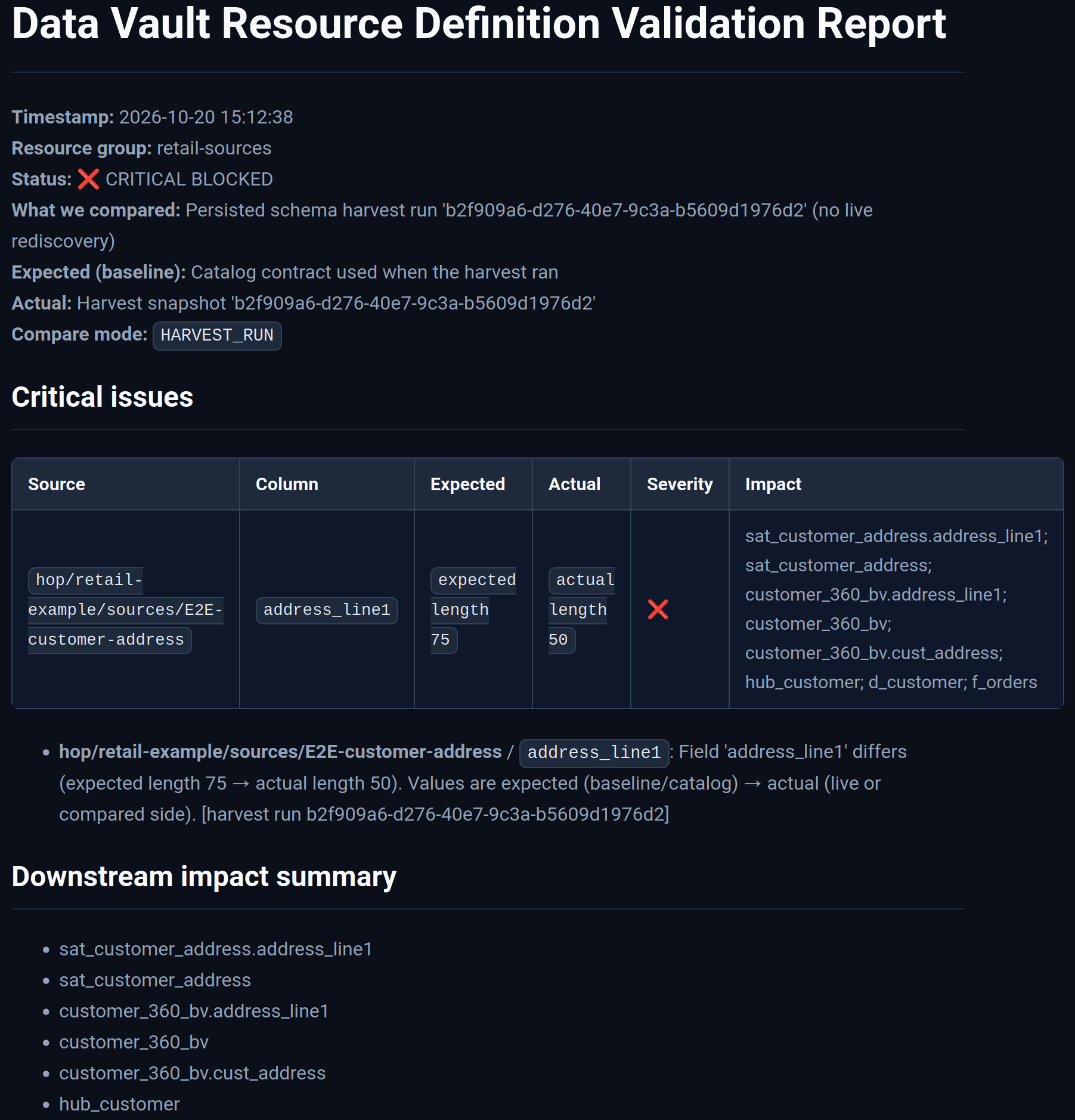
Markdown siblings are intended for CI log scrapers and PR comments. Retail writes files such as work/reports/retail-schema-validation.md and .html.
Practical design-time workflow
-
Edit or import sources in the Data Catalog (or refresh contracts from the live system).
-
Open the Resource definition group → Validate sources → choose baseline and axes.
-
Fix errors; apply expand-from-catalog proposals where models/schemas lag the catalog.
-
Acknowledge warnings that are accepted risk, with a short reason.
-
Tag catalog version when the contract is ready for DTAP promotion.
-
Run Check model on the
.hdvfile — detailed type checking uses live database schemas when enabled.
Schema impact simulation (programmatic)
SchemaImpactSimulationService orchestrates catalog schema comparison and optional downstream impact enrichment for CI/CD and design-time dry-runs (same modes as the workflow action). Optional axes include target models and target database DDL readiness.
Results include a ValidationReport, optional ImpactGraph blast-radius labels on issues, and overall status (PASS / WARNING / CRITICAL_BLOCKED).
SchemaValidationReportFormatter emits log text, Markdown (CI artifact layout), and HTML. SchemaValidationReportFileWriter writes those artifacts via Hop VFS.
DTAP promotion recipe
Use catalog versions and the schema gate to keep Development, Test, Acceptance, and Production aligned without “deploy and pray.”
-
DEV — approve schema change
-
Import or refresh source definitions in the Data Catalog (set the catalog field length when the contract changes).
-
Run Validate sources on the resource definition group; review downstream impact.
-
Apply remediations (expand models and database schemas from the catalog) or acknowledge accepted warnings.
-
Review generated files under
workflows/schema-remediation/and commit them with the model change when appropriate. -
Run the generated DDL workflow against the DEV target database (or include it in the environment promotion package).
-
Tag catalog version (for example
v2.4.0or2026-Q3-Release) after the contract is agreed.
-
-
Git promote
-
Commit model files (
.hdv/.hbv/.hdm), schema-remediation workflow/SQL artifacts, and any seeded version fixtures. Prefer a gitignored runtime catalog (work/edw-catalog/) for working-tree and snapshot files generated on each machine. -
Promote the same tag through DTAP branches or release artifacts; run the DDL workflow on each environment before loads that need the wider columns.
-
-
TEST / ACC / PROD — gate before load
-
In the daily update workflow, place Validate resource definitions before Data Vault / Business Vault / Dimensional update actions.
-
Configure for example:
Resource definition group: ${RESOURCE_GROUP} Target catalog version: ${PROMOTED_TAG} # empty = working tree only Compare mode: LIVE_SOURCE Report output path: ${PROJECT_HOME}/work/reports Report format: BOTH Failure severity: FAIL_ON_BLOCKING # or FAIL_ON_WARNINGS Include downstream impact: Y -
On failure, open the Markdown/HTML report under
work/reports/(or your CI artifact path) and fix DDL / mappings before re-running loads.
-
-
Offline design review (optional)
-
WORKING_VS_VERSION— compare a tagged baseline to the current working-tree catalog without touching live sources. -
VERSION_VS_VERSION— compare two tags when reviewing a PR that only changes frozen contracts.
-
Retail example
The retail project workflow retail-example/workflows/run-retail-update-models.hwf runs Validate resource definitions on group retail-sources with:
-
Compare mode:
WORKING_VS_VERSION— picks up catalog field edits (length/type) against a frozen tag -
Baseline catalog version:
v1.0.0(seeded fromfixtures/schema-gate-baseline/intowork/edw-catalog/catalog-versions/byworkflows/bootstrap-retail-work.hwfwhen that folder is missing) -
Report output path:
${PROJECT_HOME}/work/reports -
Report base name:
retail-schema-validation -
Format: Markdown and HTML
-
Failure severity: fail on warnings (strict sample)
-
Downstream impact enabled
To detect a length change from the tagged baseline, edit the working-tree source JSON (or catalog UI) and re-run the workflow. LIVE_SOURCE compares to the physical CRM table and will not see catalog-only metadata edits.
Design-time expand of address_line1 to 75 is illustrated under retail-example/workflows/schema-remediation/accept-address_line1/. See also Getting started with the retail example.
Limitations
-
Catalog version snapshots freeze source record definitions, not model files (models stay in Git).
-
Free-form DM SQL field lineage is best-effort: BV-mediated name matching and
table/alias.*resolution; complex SQL may remain table-level only in impact. -
Length remediation never rewrites the catalog; refresh-from-source remains a separate proposal for add/remove/PK issues.
-
The validation action does not auto-apply DDL; pair with update-action
failIfDdlNeededfor target-DB readiness. -
Content quality (nulls, ranges, allowed values) uses the separate Measure / Evaluate quality gate stack — see Data quality.