Description
The Data Vault Update workflow action is the main way to load a complete Data Vault model in Apache Hop. You point it at a saved Data Vault Model (.hdv file), choose a pipeline run configuration, and the action takes care of the rest.
If the model’s Data Vault configuration has Read-only existing vault enabled, the action fails immediately after loading the model. Hop will not generate DDL, insert sentinels, or run load pipelines. Document the .hdv for Business Vault and dimensional layers instead; use Update resource definition group to skip that Data Vault job and continue BV/DM.
At runtime the action:
-
Loads the model from the
.hdvfile. -
Optionally validates the model before any work is done.
-
Optionally ensures unknown and invalid sentinel rows exist in hubs and links (per the model configuration).
-
When any table uses orphan policy
QUARANTINE, creates the shared quarantine table if it is missing. -
Optionally generates DDL (CREATE/ALTER statements) for the model’s target database. DDL handling is independent of the data load: you can execute it on the database, write it to a SQL file, require that no DDL is needed, or combine these options.
-
Generates update pipelines for every hub, link, and satellite in the model (unless you choose to skip the data load or filter by record source group).
-
For multi-source hubs and links, also generates a serial multi-source workflow that runs each source pipeline one after another so keys written by an earlier source are visible to the next (required when primary keys are enabled).
-
Stages free pipelines (satellites, single-source tables) to a folder and runs them through a parallel orchestrator (configurable copy count). Multi-source units run as workflows first, then free pipelines.
-
Link CDC always sorts the source stream in Hop on the link hash key (hash is computed in the pipeline). For the target stream the plugin automatically chooses either SQL
ORDER BYwith a hop-compatible binary/Ccollation (when the target engine is known and the order is certain to match Hop SortRows) or a Hop Sort Rows transform. Linguistic database collations (PostgreSQL locale/ICU, SQL Server CI, MySQL*_ci, and others) can disagree with Java on STRING (decimal-dash) hash keys — for example0-100-…vs0-10-…— which breaks MergeRows and can re-insert existing keys under a primary key. This is not PostgreSQL-only; unknown engines fall back to Sort Rows. There is no user option for this: correctness is automatic. -
Uses a single load date for the entire batch, so every row written during one run of the action receives the same
LOAD_DATEvalue. -
Aggregates row counts and errors from all generated pipelines into the workflow action result.
The action uses the same pipeline generation logic as the Debug button in the visual Data Vault model editor. What you inspect in the GUI is what runs in the workflow, with the addition of batch load date, optional model checks, sentinel row handling, and flexible DDL options.
Dialog tabs
The action dialog is organized into three tabs.
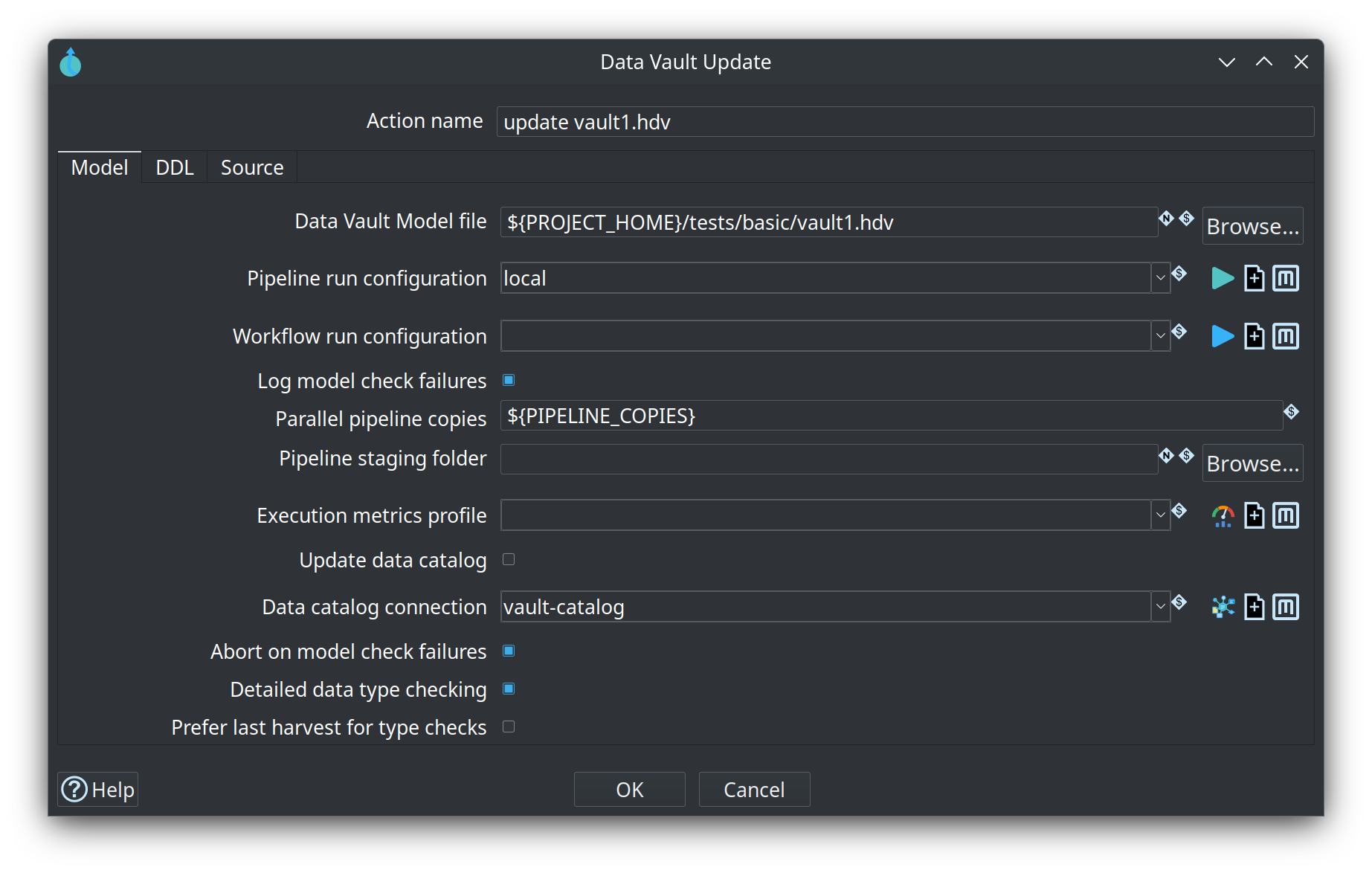
Model tab
| Option | Description |
|---|---|
Action name |
The name of the action as it appears in the workflow. Standard Hop setting; does not affect loading. |
Data Vault Model file |
Path to the |
Pipeline run configuration |
Pipeline Run Configuration used to execute every generated update pipeline. Required whenever data load pipelines run. Use the icons next to the field to create or manage run configurations. |
Log model check failures |
When enabled (default: on), runs |
Abort on model check failures |
When enabled (default: on), stops immediately if any check returns an error. Warnings alone do not abort. |
Detailed data type checking |
When enabled (default: on), model check validates source-to-target field type compatibility using the live source schema for database sources. Disable to validate using stored source field metadata only (faster, no database round-trip). |
Prefer last harvest for type checks |
When detailed checking is on (default: on), reuse DISCOVERED layouts from a schema harvest ( |
Harvest run id / history database |
Optional harvest location for type-check reuse. |
Parallel pipeline copies |
Number of Pipeline Executor copies used to run staged update pipelines in parallel (round-robin distribution). Default is |
Pipeline staging folder |
Folder where generated update pipelines are written before execution. When empty, defaults to |
DDL tab
| Option | Description |
|---|---|
Update target database structure |
When enabled (default: on), generates CREATE/ALTER DDL for every table and executes it on the model’s target database before running data load pipelines. Disable when you manage schemas externally. |
Target type mapping |
Optional Target type mapping applied before Hop dialect types. Empty uses unique auto-match on the model target connection. |
DDL SQL filename |
Optional path where generated DDL is written when schema changes are needed. Variables supported. The file begins with a |
Fail if DDL is needed |
Fails immediately if any DDL would be required, before execution or file export. Useful in production or CI/CD to ensure schemas are already current. |
Source tab
| Option | Description |
|---|---|
Record source group |
Optional filter. When set, only record sources whose Group field in Data Vault Source metadata matches this value are processed. Leave empty to update all sources. Supports variables (for example |
Ensure unknown and invalid records |
When enabled (default: on), checks each hub and link for missing unknown and invalid sentinel rows (per the model configuration) and inserts them before running load pipelines. |
Do not update target database |
When enabled, skips running data load pipelines. DDL generation, file export, and execution (when configured) still run. Use for schema-only maintenance in the same workflow step. |
Typical option combinations
-
Full load (default) – All Model and DDL defaults on, Source tab options off. Validates the model (with detailed type checking), applies DDL if needed, ensures sentinel rows, stages and runs all pipelines.
-
Fast model check – Disable Detailed data type checking when you only want structural validation and stored-metadata type checks (for example in CI without database connectivity).
-
Parallel load – Set Parallel pipeline copies to
2or higher on large models to run staged table pipelines concurrently. -
Schema export only – Enable DDL SQL filename, disable Update target database structure, enable Do not update target database. Writes DDL to a file without loading data.
-
Partial load by feed group – Set Record source group to match the
Groupon selected Data Vault Sources (for example onlynightlyfeeds). -
Production guard – Enable Fail if DDL is needed so the action fails if the target schema is not already aligned with the model. When any DDL is generated, the action logs a source-to-target lineage explanation (which mappings force the structural change). See Source-to-target lineage.
DDL and target database
Each model references a single target database in its embedded configuration. DDL generation collects one statement per table, executes against that connection, and (when a filename is set) writes a single file with one target-database header. This matches the one-vault-database-per-model design used throughout the plugin.