Why
Data type mappings control how source metadata arrives as Hop types (String, Integer, Timestamp, length, precision). They do not control the native SQL type Hop emits for CREATE/ALTER.
Hop dialect defaults are reasonable (Postgres VARCHAR(n), TIMESTAMP, SMALLINT for short integers) but estates often want project policy: CHAR(1) flags, NVARCHAR({length}), timestamp(6) with time zone.
A Target type mapping is a reusable metadata element with ordered rules. Matching rules run before Hop getFieldDefinition. Unmatched columns keep today’s database-specific types.
On Snowflake, the plugin then rewrites Hop’s dialect defaults that are wrong for Data Vault: TYPE_BINARY → BINARY(n) instead of VARIANT, timestamps → TIMESTAMP_NTZ, dates → DATE. A target type mapping still wins when a rule matches.
Issue #127.
Concepts
| Concept | Role |
|---|---|
Target type mapping (metadata) |
Named project profile: optional target database plus ordered rules. |
Match |
Hop type, inclusive min/max length and precision, length absent, optional field-name pattern. |
Target SQL type |
Native type template. Hop variables ( |
First match wins |
Put |
Auto-match |
When no mapping is selected and exactly one saved mapping names the actual target connection, that mapping is used. |
This is not a Data type mapping. Data type mappings improve source → Hop. Target type mappings improve Hop → DDL.
Project metadata editor
In Hop Metadata perspective, under EDW, create a Target type mapping (key target-type-mapping).
-
Name / Description
-
Target database — Hop connection this profile is intended for (auto-match + preview)
-
Rules — ordered match → SQL type grid
-
Preview — sample Hop type / length / precision / field name → resolved SQL (or dialect default)
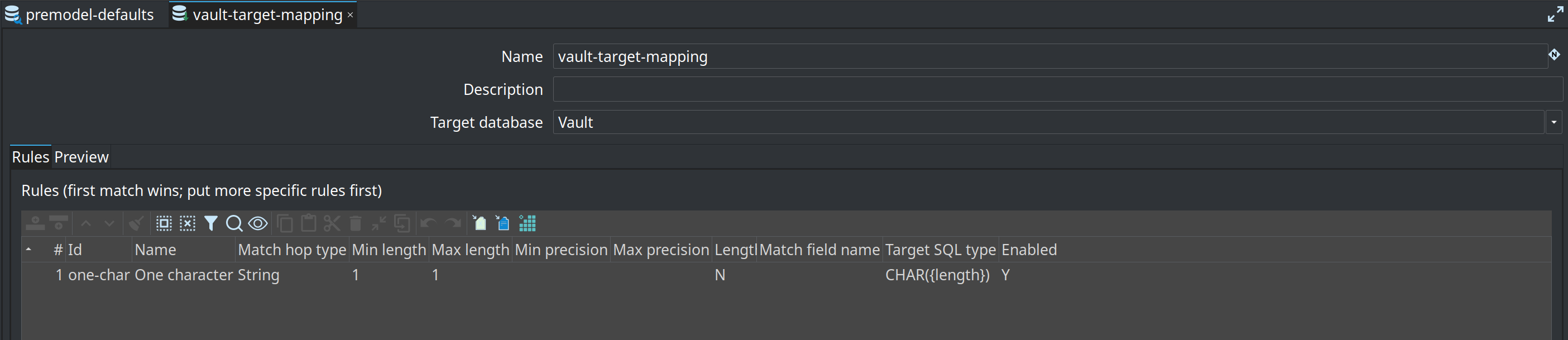
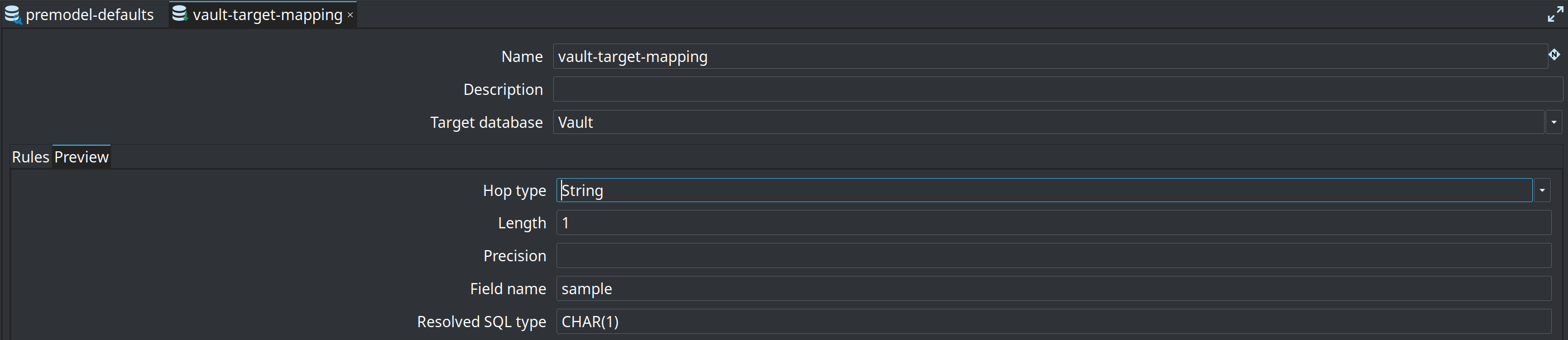
Retail ships vault-target-mapping (retail-example/metadata/target-type-mapping/, target database Vault):
-
String, min-length=1, max-length=1 →
CHAR({length})
run-retail-update-models.hwf selects that mapping on Update resource definition group. Other useful rules (not in the sample):
-
String, max-length=2000 →
NVARCHAR({length})(orVARCHAR({length})on Postgres) -
Integer, max-length=2 →
BYTE -
Integer, max-length=3 →
SMALLINT -
Timestamp →
timestamp(6) with time zone
Where you select it
| Surface | Behaviour |
|---|---|
Record Definition DDL |
Optional Target type mapping on the Target tab. Empty → auto-match on the resolved target connection. |
Update resource definition group |
Operations tab. The name is copied to each child DV / BV / DM update. |
Data Vault / Business Vault / Dimensional Update |
DDL tab. Same optional override. |
Modeler SQL, schema gate, remediation |
No extra field. Unique auto-match on the model target connection, or the |
An explicit name that does not exist fails DDL (no silent fallback). Two mappings for the same target database skip auto-match; select one explicitly.
A mapping on the integration-test Vault connection changes generated DDL; do not add one there unless you update the relevant goldens. The retail sample mapping only remaps one-character Strings to CHAR({length}).
Placeholders and variables
-
IVariablesresolves the template ('${VARCHAR_TYPE}'). -
'{length}'and'{precision}'(case-insensitive) are replaced from the Hop field.
If the template still contains '{length}' and the field has no length, the rule does not match.
SQL Server UTF-8
Vault/EDW SQL Server DDL still expands unmatched ANSI VARCHAR/CHAR (length ×3 + UTF-8 COLLATE). A column that matched a rule is emitted verbatim (NVARCHAR({length}) is not expanded).
Recommended workflow
-
Create one Target type mapping per warehouse dialect / connection.
-
Set Target database to the vault connection so modeler SQL and Update agree without selecting the mapping on every action.
-
List specific rules first.
-
Optionally select the mapping on Update resource definition group or Record Definition DDL when several mappings exist.