Why
Source systems rarely hand you EDW-grade types. Kafka, JSON, XML, CDC, and many files produce String / Integer / Number without lengths (or weak temporal typing). Downstream DDL then collapses to TEXT / LONGTEXT / CLOB, and load pipelines need ad-hoc Select Values transforms.
Data type mappings make pre-modeling explicit:
-
Project-level reusable policies (metadata)
-
Per-source profile attach + field overrides on the source model (
.hsm) -
Catalog stores the effective layout (types, lengths, conversion masks, renames)
-
DV/BV/DM load pipelines inject Select Values so runtime matches the contract
Fields remain “what the physical source produces.” Mappings remain “what the warehouse expects.”
See also: design plan, issue #113.
For Hop type → native SQL type on CREATE/ALTER, use Target type mappings (issue #127). Do not put dialect tokens such as CHAR(1) or timestamptz in a Data type mapping.
Concepts
| Concept | Role |
|---|---|
Data type mapping (metadata) |
Named project profile with ordered rules (match + target type/length/conversion) and optional scope (source kinds, DB/path patterns). |
Match criteria |
Hop type, native/SQL type pattern, field name pattern, length absent / below / above. |
Target |
Hop type, length, precision, rename, conversion mask, decimal/grouping symbols, locale, time zone, lenient flags. |
HSM binding |
Each source table / query / JSON / pipeline card can attach one or more profiles (order matters) and field-level overrides. |
Effective layout |
Physical fields ⊕ profiles ⊕ overrides. Catalog publish and vault modelers use this only. |
Model default profiles |
On Edit model, set comma-separated default profile names applied to newly imported tables and new cards. |
Project metadata editor
In Hop Metadata perspective, under EDW, create a Data type mapping (key data-type-mapping).
The editor has Name / Description, then two tabs:
-
Scope — multi-select source kinds (
DATABASE,CSV, …) and optional connection / schema / path / namespace patterns (TextVar). -
Rules — ordered match → target grid (first match wins within the profile).
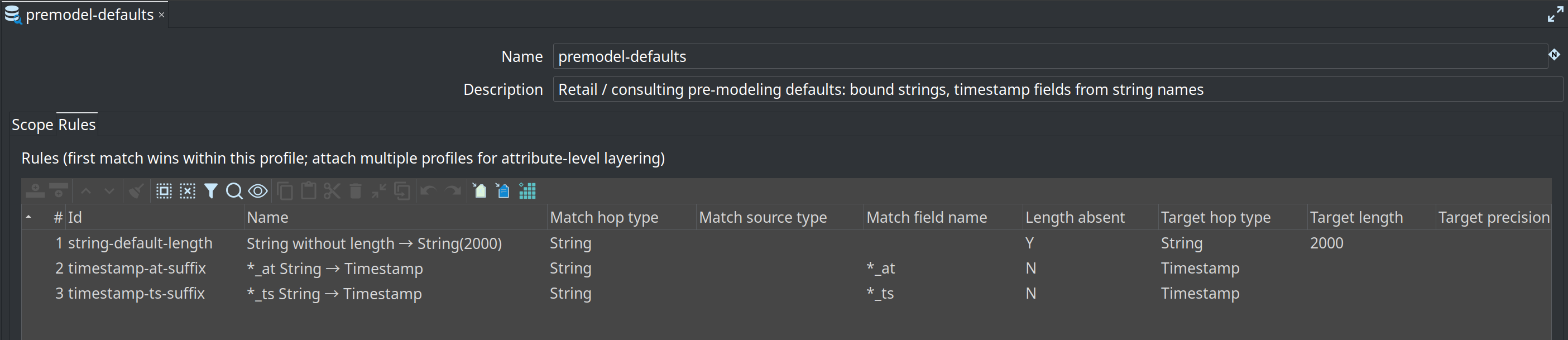
Example premodel-defaults (also shipped under retail-example/metadata/data-type-mapping/):
-
String + length absent → String length 2000
-
Field name
*_at/*_ts+ String → Timestamp + maskyyyy-MM-dd HH:mm:ss
Rules without match criteria are rejected at validation. String → Date/Timestamp without a conversion mask is an error.
Use the Help button in the editor for the full column reference (scope patterns, masks, safety tips).
Source model dialogs
Every source card dialog has a Data type mapping tab:
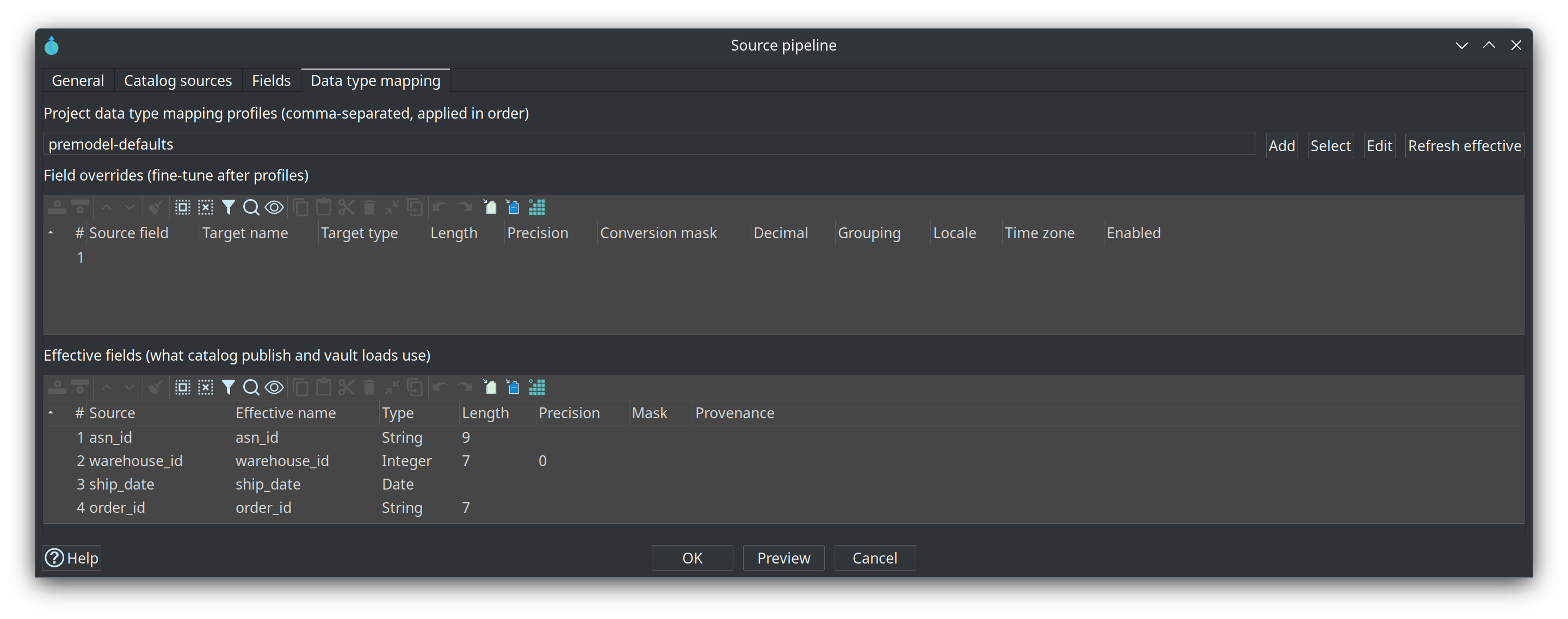
-
Profiles — comma-separated project mapping names (applied in order), with Add / Select / Edit buttons:
-
Add — create a new Data type mapping profile and attach it.
-
Select — multi-select existing project profiles (pre-selects currently attached names).
-
Edit — edit the single attached profile, pick among attached profiles, or open the project picker when none are attached.
-
-
Field overrides — fine-tune rename, type, length, mask, symbols, locale, time zone.
-
Effective fields — read-only preview (Refresh effective).
-
Validate — includes mapping safety checks (missing profiles, dangerous conversions, rename collisions).
Applies to:
-
Source table
-
Source query
-
Source JSON
-
Source pipeline
Edit model defaults
Edit model and the Source model configuration metadata editor share Default data type mappings: a comma-separated list of profile names. Select and Edit sit to the right of the field.
-
Select chooses one or more existing profiles. The field is replaced with that selection, in the order you pick them.
-
Edit opens the profile named in the field. Several names ask which one to edit. An empty field creates a profile and adds its name.
Used when:
-
Importing schema tables
-
Adding a new table / query / JSON / pipeline card that has no profiles yet
Catalog publish
Publish (table / query / JSON / pipeline) writes the effective field list to the data catalog DV_SOURCE:
-
Effective field name (after rename)
-
Hop type, length, precision
-
inputOptions.conversion(mask, locale, symbols, …) -
sourceStreamNamewhen a rename maps a different physical/stream name
Modelers that “get attributes from source” therefore see pre-modeled types (e.g. VARCHAR-friendly length 2000 instead of unbounded text).
Harvest, catalog refresh, and Validate resource definitions rediscover PIPELINE, JSON, and COMPOSITE feeds through the same projection path as publish, including attached mapping profiles.
Validate sources uses that same effective length when a satellite attribute has no length of its own. A pipeline String with no length that premodel-defaults maps to 2000 is not reported as narrower than a catalog length of 2000. An explicit shorter attribute length is still blocking.
The catalog is a second model. Editing lengths or mappings on the .hsm card does not change vault loads or the schema gate until you publish. Source-model Check model / dialog Validate report a stale catalog feed; harvest findings for those source kinds say to republish rather than to widen hub/link keys to the last published length.
Load pipelines
After the source read transform (database, file, JSON, composite, pipeline inject, …), generated DV loads call apply catalog data type mappings:
-
Select Values transform name:
apply data type mappings -
Applies length, conversion mask, and rename when present on catalog fields that are on the incoming stream
-
Hub and link loads typically
SELECTonly relationship keys and alias the source indicator (record_source AS x_record_source). Satellite attributes on the same catalog feed (stock_qty,order_status,quantity, …) and sourceload_dateare not mapped. The source-indicator mapping is applied to the vault alias. If the generated stream layout cannot be determined, mappings are skipped rather than applied to the full catalog.
No .hsm is required at generate/runtime once the catalog has been published.
Validation summary
| Severity | Example |
|---|---|
ERROR |
String → Date/Timestamp without conversion mask; override references unknown field; duplicate target names; missing attached profile name |
WARNING |
String → Number without mask; length narrowing; PK type change; Boolean-ish conversions; temporal without locale/time zone |
OK |
Physical fields unchanged and no mapping configured (legacy behaviour) |
Recommended workflow (large estates)
-
Define org standards once as Data type mapping metadata (global + domain-specific profiles).
-
Set Default data type mappings on each
.hsmmodel. -
Import schema / add sources → profiles attach automatically.
-
Fine-tune outliers on the Data type mapping tab.
-
Validate and Publish to catalog.
-
Build / refresh DV/BV/DM models from catalog; generate loads.