Data Hopper EDW stores record definitions in the Hop Data Catalog. Modelers work in the Data Catalog perspective; generated pipelines and transforms resolve definitions by namespace and name.
The catalog is a contract bus (picture: Architecture — D2):
-
In: source feeds (
DV_SOURCE/COMPOSITE/JSON/PIPELINE) published from a source model or imported in this perspective. -
Out: published DV / BV / DM table layouts, lineage siblings, and operations stubs — written when Update resource definition group (or a per-model Update) has catalog publish enabled.
Harvest does not rewrite working-tree contracts. Apply-harvest and Refresh from source are explicit. Build order: Getting started — building an EDW. The list of models that publish and validate together is a resource definition group.
Local file catalog
Sample projects use a file-based catalog configured in metadata/data-catalog/local-catalog.json:
{
  "name": "local-catalog",
  "enabled": true,
  "catalog": {
    "FILE": {
      "pluginId": "FILE",
      "storageDirectory": "${PROJECT_HOME}/work/edw-catalog"
    }
  }
}
Definitions are JSON files under the FILE catalog storage directory (retail example: work/edw-catalog/, gitignored). The path after the storage root must match the record’s namespace field. Other projects may still use a tracked folder such as catalog-data/ — the path is only a metadata property.
Namespaces
The plugin derives the default sources namespace from the open Hop project:
-
Pattern:
hop/{project-folder-name}/sources -
Examples:
-
retail-example/→hop/retail-example/sources -
integration-tests/→hop/integration-tests/sources
-
Additional namespaces appear when models publish catalog entries, for example:
-
hop/{project}/models/{model-name}/— DV table definitions -
hop/{project}/business-vault/{model-name}/— BV target tables -
hop/{project}/dimensional/{model-name}/— dimensional table definitions -
hop/{project}/lineage/{dv|bv|dm}/{model-name}/— source-to-target lineage sibling records (derived; not an edit surface)
Catalog lineage namespaces, the Lineage tab, explainable DDL, the drift gate, and the reverse browser are documented in Source-to-target lineage.
The catalog key is namespace/name (for example hop/retail-example/sources/E2E-customer-hub).
Folder layout example (retail-example)
work/edw-catalog/              # gitignored runtime FILE catalog
└── hop/
    └── retail-example/
        ├── sources/           # DV_SOURCE feeds (copied from fixtures/catalog-sources)
        ├── models/retail-360/ # Published DV table layouts
        ├── business-vault/    # Published BV tables
        ├── dimensional/       # Published dimensional tables
        └── operations/        # Ops / quality table stubs (published at runtime)
Working in Hop GUI
-
Open the Hop project (so
${PROJECT_HOME}resolves). -
Open the Data Catalog perspective.
-
Browse the tree by namespace.
-
Double-click a record to open its editor.
-
Press F5 or use refresh if files changed on disk.
If a record appears in the tree but fails to open, the namespace in the JSON file likely does not match its directory path. Fix the namespace and refresh.
Record definition types
| Type | Role | |
|---|---|---|
|
Data Vault source feed — see Data Vault Source |
|
Other catalog types |
Published model targets, conformed dimensions, pipeline inputs |
Field layout
Catalog documents store column layout in structured field lists — never as a top-level Hop rowMetaXml blob.
| Type | Authoritative layout | |
|---|---|---|
|
|
|
Vault / BV / DM targets, ops tables |
|
physicalTable / physicalFile / physicalIcebergTable are location refs for sources; only target/ops records put columns on physicalTable.fields.
In-memory Hop IRowMeta is derived from the structured list for pipeline APIs and is not persisted. Legacy files that still contain rowMetaXml are migrated into the structured list on load and rewritten without the blob.
Hub Import keys, satellite Load from source, catalog DDL, and the catalog field grid all resolve layout through DvSourceFieldSupport.sourceFieldsFromDefinition.
See also Catalog record definition schema notes.
Validation
Use Validate on catalog record groups to run feed-level schema checks. Issues can include remediation proposals and acknowledgements — see Resource definition validation.
For content rules (not empty, allowed values, ranges, nulls), bind quality rules on the record definition and use the Measure data quality / Evaluate quality gate workflow actions — see Data quality.
Model-level Check model validates .hdv / .hbv / .hdm structure separately; these layers complement each other.
Catalog versions
File-based catalogs can freeze source record definitions under a semantic tag (for example v2.4.0 or 2026-Q3-Release). Tags are a design-time baseline for schema comparison and CI gates; they are independent of DTAP database state.
Storage layout
Versions live under the catalog storage directory in a non-hidden folder named catalog-versions (not .catalog-versions):
{storageDirectory}/                 # e.g. work/edw-catalog/
├── hop/.../sources/*.json          # working tree (editable)
└── catalog-versions/
    ├── versions.json               # tag → snapshot index
    └── snapshots/<snapshot-id>/
        ├── manifest.json
        └── records/hop/.../*.json  # immutable copies
The working-tree catalog list API ignores catalog-versions/ so snapshots never appear as live records. The Data Catalog perspective shows live records under Working catalog (N) and snapshots under Catalog sources versions. Get Record Definition Names reads only the working catalog. Retail stores the live catalog under gitignored work/edw-catalog/; a seed for demo tag v1.0.0 lives in fixtures/schema-gate-baseline/ and is copied by workflows/bootstrap-retail-work.hwf when catalog-versions/versions.json is not already there.
Tagging from Hop GUI
A catalog sources version freezes the source contracts used by a resource definition group’s models, not every file in the catalog.
From a Resource definition group
-
Open metadata type Resource definition group.
-
Select the group that references your DV/BV/DM models (for example
retail-sources). -
Set the Default catalog connection (FILE catalog, for example
local-catalog). -
Use Tag catalog version to snapshot all source definitions currently referenced by the group’s models.
-
Use List catalog versions to review existing tags, timestamps, and record counts.
-
Use Validate sources for an interactive schema check: a design-time options dialog asks for the baseline (working catalog or version tag) and which axes to check (live sources, version drift, target models, target databases). Length remediation expands models and DV/BV/DM DDL from the catalog without rewriting catalog records.
-
Use Harvest history… to browse persisted schema harvest runs and drift for sources used by the group.
-
Use Apply harvest to catalog… / Generate .hsm from harvest… to promote harvest FK (and optional field) inventory into catalog contracts or a source model (see Metadata harvesting).
From the Data Catalog perspective
-
Select any element under a FILE catalog connection (for example
local-catalog). -
Click the toolbar Tag version action (enabled only when a catalog is selected).
-
Choose the resource definition group that defines source scope, then enter the tag and optional description.
-
Expand Catalog sources versions under that connection to browse tags and open frozen record definitions read-only (snapshots are never edited from the UI).
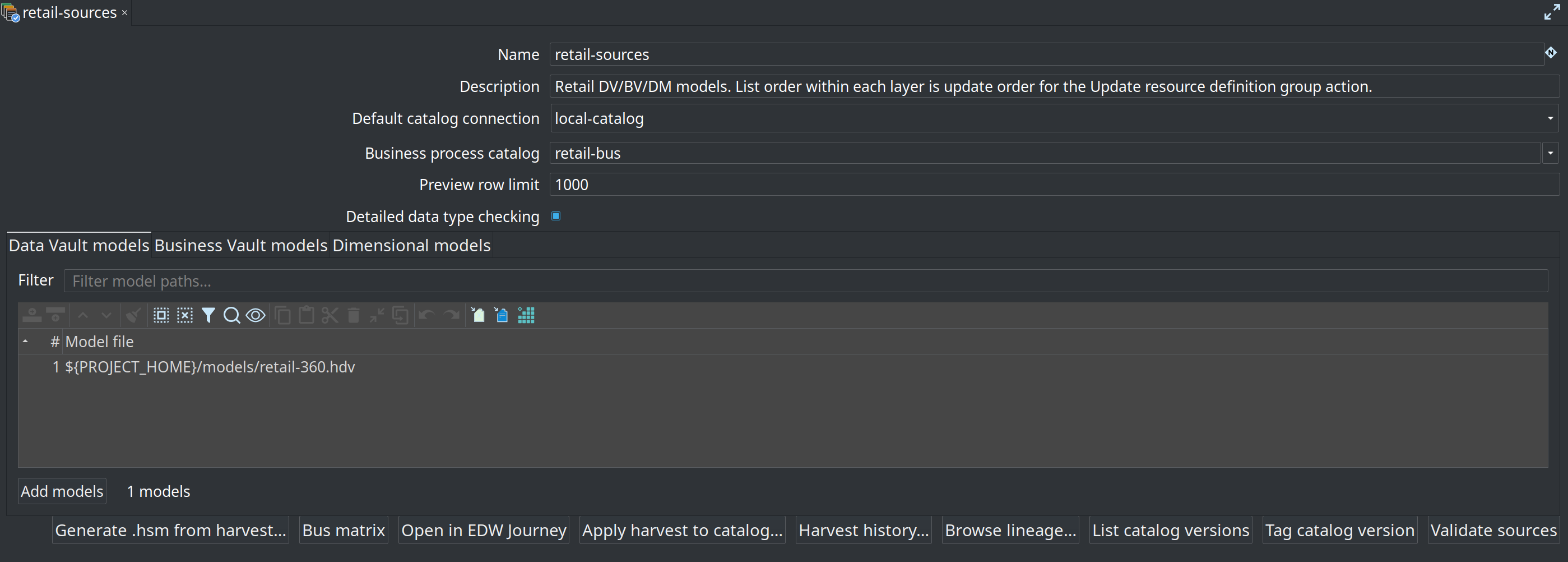
Duplicate tags are rejected. Snapshot contents are immutable: editing working-tree JSON after tagging does not change the frozen version.
Scope (MVP)
-
Snapshots cover source record definitions discovered from the resource definition group (hubs, satellites, links, BV SCD2 feeds, and DM
RECORD_DEFINITIONsources). -
Model files (
.hdv/.hbv/.hdm) remain versioned in Git; they are not copied into the snapshot. -
Only the FILE catalog implementation is supported.
Use tagged versions as the expected contract for the Validate resource definitions workflow action (compare tagged catalog vs live source or vs working tree, with optional Markdown/HTML reports and downstream impact). Full UI, compare modes, and DTAP recipe: Resource definition validation.
Related documents
-
Record Definition Input transform (reads data rows)