A resource definition group is the project’s list of warehouse models plus the default Data Catalog connection. It is the spine for harvest, the schema gate, catalog version tags, lineage browse, architecture / OpenLineage export, and the preferred load action Update resource definition group.
It is not a folder of catalog record definitions. Source feeds live in the catalog; the group points at the .hdv / .hbv / .hdm files that use those feeds.
Architecture picture: Architecture — D3. Build order: Getting started — building an EDW.
When to create one
As soon as the first Data Vault model (.hdv) exists and checks clean. Business Vault and dimensional paths can stay empty.
Add .hbv and .hdm files to the same group when you author them. Create a second group only when teams need separate load waves — see Organizing large Data Vault programs.
Retail sample: metadata retail-sources (retail-example/metadata/resource-definition-group/retail-sources.json).
Create and edit (Hop GUI)
-
Open the Hop project so
${PROJECT_HOME}resolves. -
Metadata perspective → EDW → Resource definition group → New.
-
Set Name (for example
sales-edw) and Default catalog connection (Configure EDW typically createdlocal-catalog). -
On the Data Vault models tab, Add models and select the
.hdvfile(s). Prefer${PROJECT_HOME}/models/….hdv. -
Leave Business Vault models and Dimensional models empty until those files exist.
-
Save.
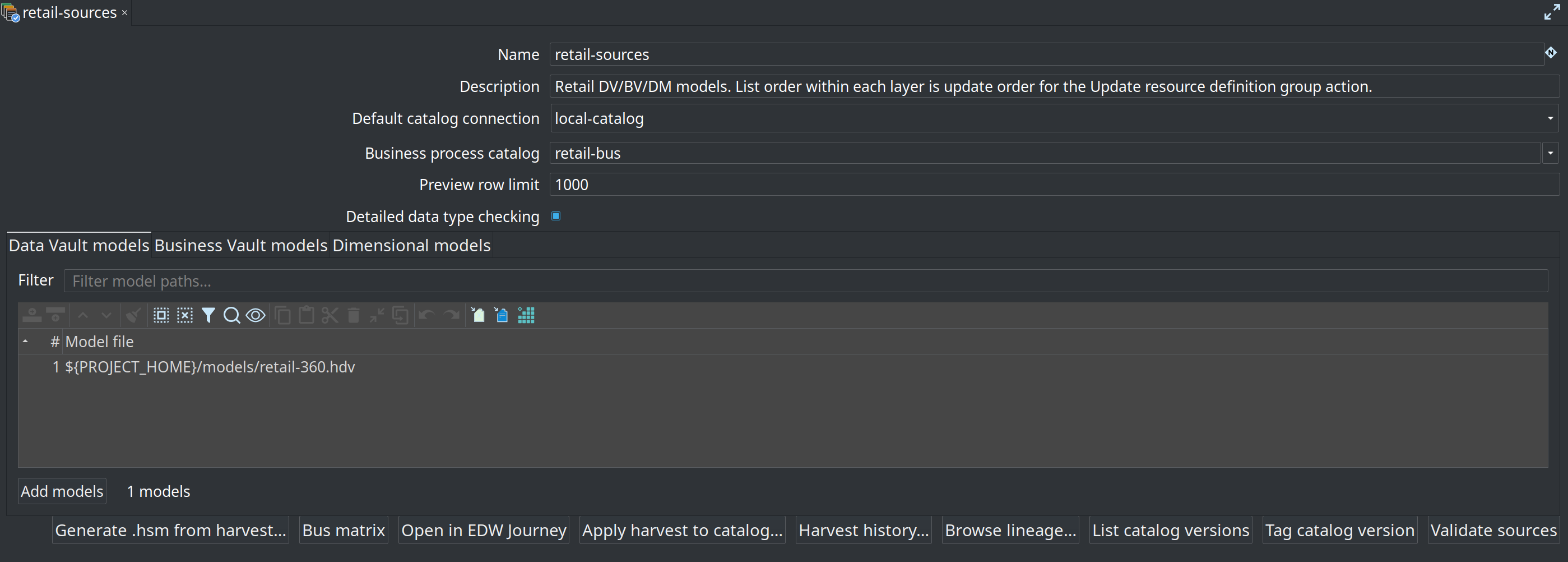
Fields
| Field | Purpose |
|---|---|
Name |
Metadata name used by workflow actions (for example |
Description |
Optional. |
Default catalog connection |
FILE catalog used when harvest, validate, tag, and Update RDG do not override it. Individual models may still name a catalog. |
Business process catalog |
Optional bus matrix taxonomy. Empty unions every Business process catalog in the project. |
Preview row limit |
Rows attempted for file-source readability checks during validation. |
Detailed data type checking |
When on, validation / model checks can compare live source metadata to stored catalog contracts (higher latency). |
Data Vault models tab |
|
Business Vault models tab |
|
Dimensional models tab |
|
Layer order for Update resource definition group is always all DV, then all BV, then all DM. You cannot interleave layers by shuffling the three lists.
Use Add models to pick project files. Filter the path list when the project has many models.
Bottom button bar
| Button | What it does |
|---|---|
Open in EDW Journey |
Switch to the EDW Journey perspective for this group (sources through outputs). |
Bus matrix |
Open the Kimball bus matrix for the group’s dimensional models. |
Generate .hsm from harvest… |
Day-2: build or merge a source model from the latest harvest FK inventory. Not a greenfield first step. |
Apply harvest to catalog… |
Day-2: copy discovered FKs (and optionally field layouts) into working-tree |
Harvest history… |
Browse OPS |
Browse lineage… |
Reverse source-to-target lineage across models in the group. |
List catalog versions |
Review tags already stored under the catalog |
Tag catalog version |
Freeze source contracts currently referenced by the group’s models (for example |
Validate sources |
Design-time schema check: options dialog (baseline + axes), then results and optional remediation. |
What the group scopes
| Surface | How it uses the group |
|---|---|
Harvest source metadata action |
Harvests every catalog source referenced by the listed models. |
Validate resource definitions action / Validate sources |
Schema gate scope (live, version, harvest run, target DDL, impact). |
Update resource definition group action |
Loads every listed model (layer includes on the action can skip BV or DM). |
Tag / List catalog version |
Source-contract snapshot for feeds used by the listed models. |
Browse lineage… |
Reverse browser across the group’s models. |
Export architecture / Export data lineage |
Model file list for Draw.io and OpenLineage when the group is selected. |
Execution-map crawl |
Expands group models into the |
The group does not list catalog JSON paths. Putting hop/{project}/sources/*.json in a model tab is an anti-pattern.
Catalog publish on update
When Update resource definition group (or a per-model Update) has Publish target tables to catalog enabled, each successful model write upserts:
-
Target table layouts under
models/,business-vault/, ordimensional/ -
Lineage siblings under
lineage/ -
Model-registry entries used by BV/DM
ref('model', 'table')
That is why an RDG update changes the catalog even though you never edited a source feed. Picture: Architecture — D2.
Growing the group
-
First
.hdvonly → first load (raw vault + publishmodels/). -
Author
.hbv→ add it on the Business Vault tab → update again. -
Author
.hdm→ add it on the Dimensional tab → update again.
Same group, same action, more layers. See Getting started — after the first load.
Anti-patterns
-
Listing the same model twice.
-
Host-absolute paths instead of
${PROJECT_HOME}/models/…. -
Putting catalog source JSON paths in the model arrays.
-
One group per layer (DV group, BV group, DM group) when a single warehouse should load as one wave.
-
Expecting harvest or Validate sources to create the group or the models — they only use the group.