This guide is the operating model for Data Hopper EDW when many people share one vault: hundreds of tables, concurrent modelers, version control, a shared data catalog, and distinct roles from raw vault through reporting.
It does not replace the technical reference pages. It explains how to organize work and points at the feature docs for how the product works.
| Need | Go here |
|---|---|
Cross-model linked tables and hub aliases (XML, canvas, load order) |
|
Catalog layout, namespaces, version tags |
|
Schema gate, remediation, DTAP promotion |
|
Lineage discovery and drift |
|
Day-2 runners, partial loads, metrics |
|
Architecture (catalog, RDG, four controls) |
|
Build an EDW from scratch |
|
Resource definition group |
|
Tour the finished retail sample |
Why split models
A single giant .hdv works for tutorials. It fails for programs:
-
Concurrent ownership — two people cannot safely edit the same large XML canvas every day.
-
Reviewable change — PRs should touch one subject area, not 400 tables of blast radius.
-
Independent load — core hubs can run first; subject links/sats can lag or scale separately.
-
Clear authority — business keys and hash definitions for a hub live in one owning model.
-
Cognitive load — canvases stay readable; execution maps stay useful.
Data Hopper EDW supports this with cross-model linked tables (subject models point at core hubs without copying metadata), optional hub aliases for role-playing inside a model, multi-model Business Vault and dimensional references, and a catalog that publishes contracts for everyone else.
Personas and responsibilities
Roles often overlap in small teams; at scale, keep accountable owners even if one person wears several hats.
| Persona | Primary artifacts | Catalog | Typical Hop surfaces |
|---|---|---|---|
DV platform / admin |
Shared-core |
Owns source-contract process and catalog version tags; sets conventions for namespaces |
Model check standards, Validate resource definitions action, core Data Vault Update |
DV modeler (subject) |
Subject-area |
Reads |
Data Vault canvas, Check model, subject Data Vault Update |
Source steward / integration |
Source system knowledge; may own ingest pipelines outside the vault |
Creates and maintains working-tree |
Data Catalog perspective, Validate sources |
Daily operations |
Workflows, run configurations, load-control, environment variables |
Consumes published model targets and ops tables; rarely edits source contracts |
Begin/End Vault Update, metrics profiles, partial loads by record source group |
Business Vault modeler |
|
Publishes BV target definitions on BV Update |
BV canvas (DV aliases / multi-model refs), Business Vault Update |
Dimensional modeler |
|
Publishes DM target definitions on DM Update |
Dimensional canvas, Dimensional Update / Publish |
Data quality owner |
Rule sets, bindings on sources and targets |
Quality rules on catalog records; ops quality tables when used |
Measure Data Quality, Evaluate quality gate |
Analyst / reporter |
(read-only consumers) |
Catalog tree, lineage siblings, optional external lineage (Marquez) |
Data Catalog browse, reverse lineage browser; usually not the modeler canvas |
Handoffs that matter
-
Source contract (field names, lengths, types) is agreed in the catalog, not reinvented per model.
-
Raw grain (hubs, links, sats) is owned by DV modelers; BV/DM people consume published structures and lineage.
-
Load order is an ops + platform concern: core before subjects, DV before BV before DM.
-
Schema change is DEV approval → tag → git promote → gate in TEST/ACC/PROD (see the DTAP recipe in Resource definition validation).
Reference architecture: multi-file projects
Suggested folder layout
Adapt names to your org; keep the idea of separation:
my-vault-project/
├── models/
│   ├── core/                 # shared hubs (and optional shared links)
│   │   └── shared-core.hdv
│   ├── sales/                # subject: local links/sats + references to core
│   │   └── sales.hdv
│   ├── inventory/
│   │   └── inventory.hdv
│   ├── business/             # BV models (may ref multiple .hdv)
│   │   └── customer-360.hbv
│   └── marts/                # dimensional models
│       └── orders.hdm
├── workflows/
│   ├── load-core-dv.hwf
│   ├── load-sales-dv.hwf
│   ├── load-bv.hwf
│   └── load-marts.hwf
├── metadata/                 # Hop connections, run configs, resource groups (no secrets)
├── work/                     # gitignored runtime: catalog, metrics, reports, maps
│   └── edw-catalog/
└── project-config.json
Retail-example collapses many of these into fewer files for teaching. Integration-tests demonstrate shared-core + subject DV files (shared-dv-core.hdv, cross-model-dv-subject.hdv).
Shared core vs subject areas
| Layer | Contents |
|---|---|
Shared core |
Enterprise hubs (customer, product, party, calendar keys, …), optional shared links, standard hash/config. Authoritative business keys and hub hash names live here. |
Subject area |
Links and satellites for that domain; linked tables to core hubs (and links if needed). Local hubs only when the concept is truly local. |
Business Vault |
SCD2 / PIT / bridge / SQL business objects. References DV tables via canvas aliases (possibly multi-model). May itself be split by domain. |
Dimensional |
Marts; conformed dimensions and role-playing dimension aliases. Often owned by a different team than raw DV. |
Load order
Always:
-
Core Data Vault Update — materialize shared hubs (and shared entities).
-
Subject Data Vault Update(s) — local links/sats; references do not reload core tables.
-
Business Vault Update — depends on raw vault tables existing.
-
Dimensional Update — depends on BV and/or raw vault as designed.
Partial loads: tag DV_SOURCE definitions with a group and pass Record source group on Data Vault Update (hourly vs daily feeds). See Operations and Data Vault Update action.
Two different “alias” ideas
Do not confuse them:
-
Cross-model linked table — another
.hdvowns the table; this file only points at it (collaboration / split files). -
Same-model hub alias — extra role of a hub already in this file (e.g. secondary sales rep). Prefer natural hub + alias so the physical hub stays connected on the canvas. See Linked tables and hub aliases.
Version control playbook
What belongs in git
Commit:
-
Model files:
.hdv,.hbv,.hdm,.hemdefinitions you author -
Workflows and pipelines you maintain (including schema-remediation packages you choose to keep)
-
Hop metadata that is not secret (resource definition groups, metrics profiles, catalog connection pointing at a path)
-
Optional seeded catalog fixtures for CI (as integration-tests does) — not every developer’s full runtime dump
Keep out of git (or gitignore aggressively):
-
Runtime FILE catalog working tree (
work/edw-catalog/style) -
Catalog version snapshots generated per machine (unless you deliberately seed a baseline tag)
-
Metrics JSON, load reports, generated bulk staging, execution-map outputs under
work/
Connections and passwords: store connection metadata templates or variable-driven profiles; never commit production secrets.
Concurrent work without merge pain
XML model files merge poorly. Practical rules:
-
One subject file, one primary owner (or one PR stream) at a time.
-
Prefer short-lived branches per subject change; avoid multi-day edits to
shared-core.hdvby everyone. -
Shared-core changes are rare and platform-reviewed: new enterprise hub, BK change, hash algorithm, standard column renames. Subjects then refresh references and re-check models.
-
Do not copy hub BK lists into subjects “for convenience” — use a reference so core remains authority.
-
When two subjects need the same new hub, add it to core first, then both subjects reference it.
Pull request checklist (model change)
-
❏ Check model clean on every touched
.hdv/.hbv/.hdm -
❏ Cross-model references resolve (no chains, no broken paths)
-
❏ Hash algorithm / hash key type / target database still align with core (warnings matter)
-
❏ Schema gate / impact reviewed if sources or lengths changed
-
❏ Load order documented or workflow hops updated (core before subject)
-
❏ No accidental switch of managed tables to EXTERNAL_READ / custom without ops agreement
-
❏ Catalog publish behavior understood (who regenerates targets in each environment)
Data catalog as the team contract
The catalog is how integration, modeling, ops, and analysts share one vocabulary.
| Namespace idea | Role | Who edits |
|---|---|---|
|
|
Source stewards (+ platform review) |
|
Published DV table layouts after Data Vault Update |
System (publish); humans read |
|
Published BV/DM targets |
System (publish); humans read |
|
Derived source-to-target lineage siblings |
System; analysts use reverse browser |
|
Load metrics, quality history stubs |
Ops / platform |
Working tree vs version tags
-
Working tree — live contracts developers edit (often under a gitignored
work/path on each machine or environment). -
Catalog version tag — immutable snapshot (for example
v2.4.0) for “what we promoted.” -
CI / daily gate — Validate resource definitions against live sources and/or a promoted tag before vault loads.
Full detail: Data Catalog — Catalog versions and Resource definition validation.
Who may change what
-
Changing a source field length is a contract change: steward updates catalog → validate impact → expand models/DDL from catalog (catalog is not silently rewritten by length remediation) → tag when agreed.
-
Changing a satellite attribute mapping is a subject model change: DV modeler PR; lineage and impact explain downstream BV/DM.
-
Republishing targets after a successful load is normal ops; it should preserve quality bindings (publish logic is designed for that).
Day-2 operations at scale
Platform and ops typically own:
-
Environment-specific run configurations and variables (
${DB_HOST}, promoted tag, parallel copies) -
Orchestration graphs: core workflow → subject workflows → BV → DM (can be one master workflow with sub-workflows)
-
Fail if DDL is needed on non-DEV environments so structure drift never silently applies
-
Begin / End Vault Update for wave-level metrics and reports
-
Record source groups for partial refresh windows
-
Optional execution maps (
.hem) per major workflow for “what ran”
See Operations, Execution maps, and Performance tuning.
Integration-tests is the CI reference (multi-database, golden datasets, schema gates). Retail-example is the teaching full stack, not a multi-team ownership template.
How non-modelers learn the model
Not everyone should open a 200-table canvas.
| Audience need | Prefer |
|---|---|
What columns exist on a vault table? |
Published catalog record for that table (after model publish) |
Where did this field come from? |
Lineage tab / reverse lineage browser / lineage siblings in catalog — Source-to-target lineage |
What jobs touch this table? |
Execution map for the batch; optional OpenLineage/Marquez — OpenLineage export |
Is today’s source still compatible? |
Schema validation report from the gate (HTML/Markdown under |
Pretty architecture picture for a wiki? |
|
Reporting users usually connect BI tools to BV or dimensional schemas, not raw hubs/links. DV modelers still need raw models for history and audit; do not force analysts through raw vault unless that is an explicit architecture choice.
Anti-patterns
-
One mega-model everyone merges into daily.
-
Duplicating hub metadata in every subject instead of a reference (diverging hash keys and BKs).
-
Loading subjects before core so link loads invent hubs inconsistently.
-
Two hub aliases + orphan physical hub when a natural hub + one alias would keep the canvas honest.
-
Committing local catalog dumps as the only “truth” without version tags or DTAP discipline.
-
Editing production connections into shared git models.
-
Silent structure changes in PROD (DDL auto-apply without fail-if-DDL / review).
-
BV/DM teams editing raw DV mappings without DV ownership — use lineage and requests instead.
Worked sketch: people, files, systems
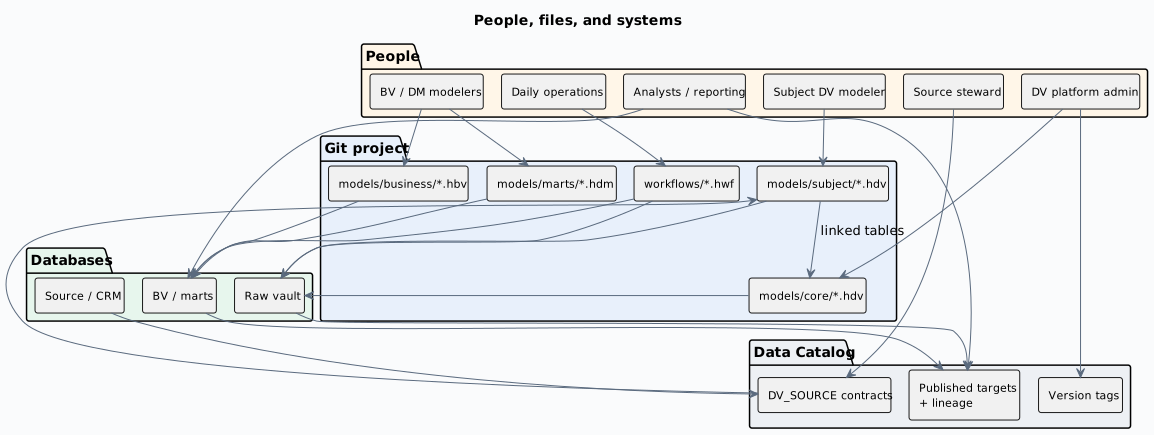
PlantUML source: enterprise-people-files-systems.puml.
Where to go next
-
Mechanism — split DV files: Linked tables and hub aliases
-
Mechanism — catalog and tags: Data Catalog
-
Process — schema change and DTAP: Resource definition validation
-
Discovery — lineage: Source-to-target lineage
-
Run — ops: Operations
-
Learn — small full stack: Retail getting started
-
CI — multi-file DV sample:
integration-tests/tests/basic/shared-dv-core.hdvandcross-model-dv-subject.hdv