Export derived diagrams for architects and analysts. Models and workflows remain the source of truth; exports are projections for Draw.io / ArchiMate-style communication (issue #104).
For a single open model (.hsm / .hdv / .hbv / .hdm / .hem), prefer Hop 2.20 File → Export diagram or hop export -f model.hdm --format drawio (also SVG, PDF, PlantUML, Mermaid). This page is the multi-model Draw.io workflow (hop architecture-export): SOLUTION architecture, DATA inventory, and aggregated DV/BV/DM diagrams.
Four products
| Product | Purpose | Layout |
|---|---|---|
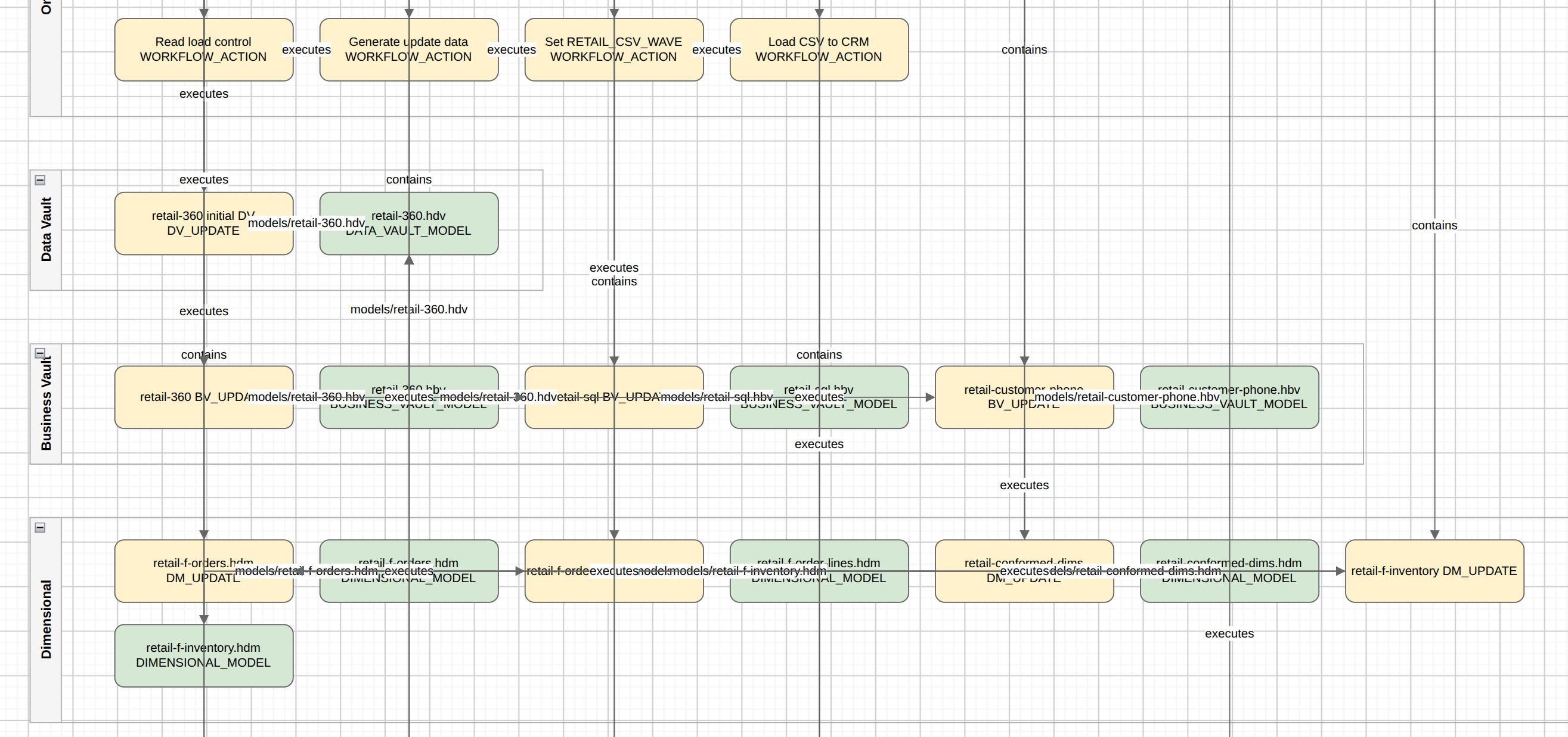
SOLUTION architecture |
What the project implements and runs at process level: workflows, controls/capabilities, and model file references (e.g. |
Layered swimlanes with multi-row wrapping (architecture layout — not ELK / Draw.io auto-layout). |
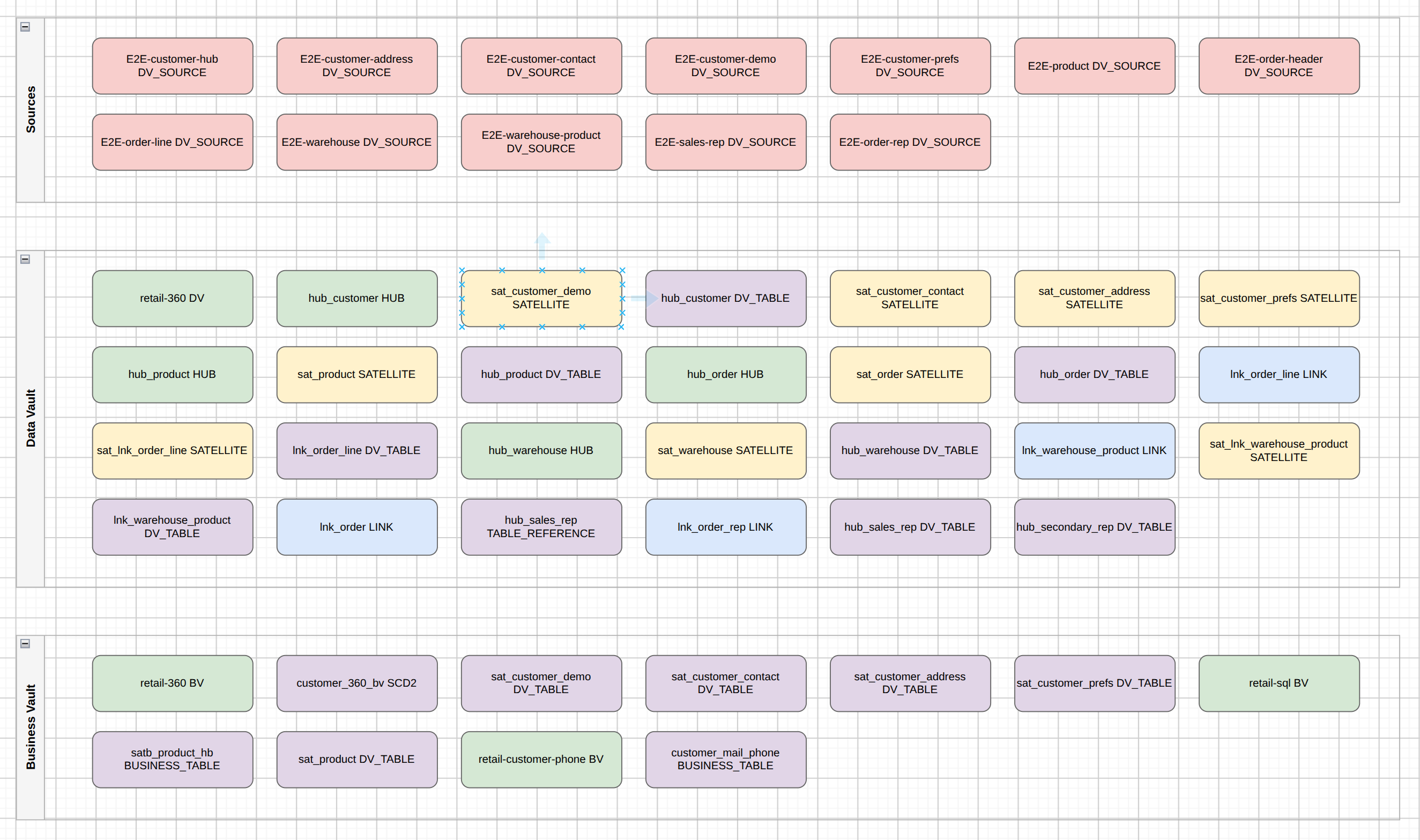
DATA inventory |
Which tables and sources are involved across models (lineage). No relationship arrows. Default file name: |
Swimlanes by layer; multi-row packing. |
MODEL diagrams (aggregated by layer) |
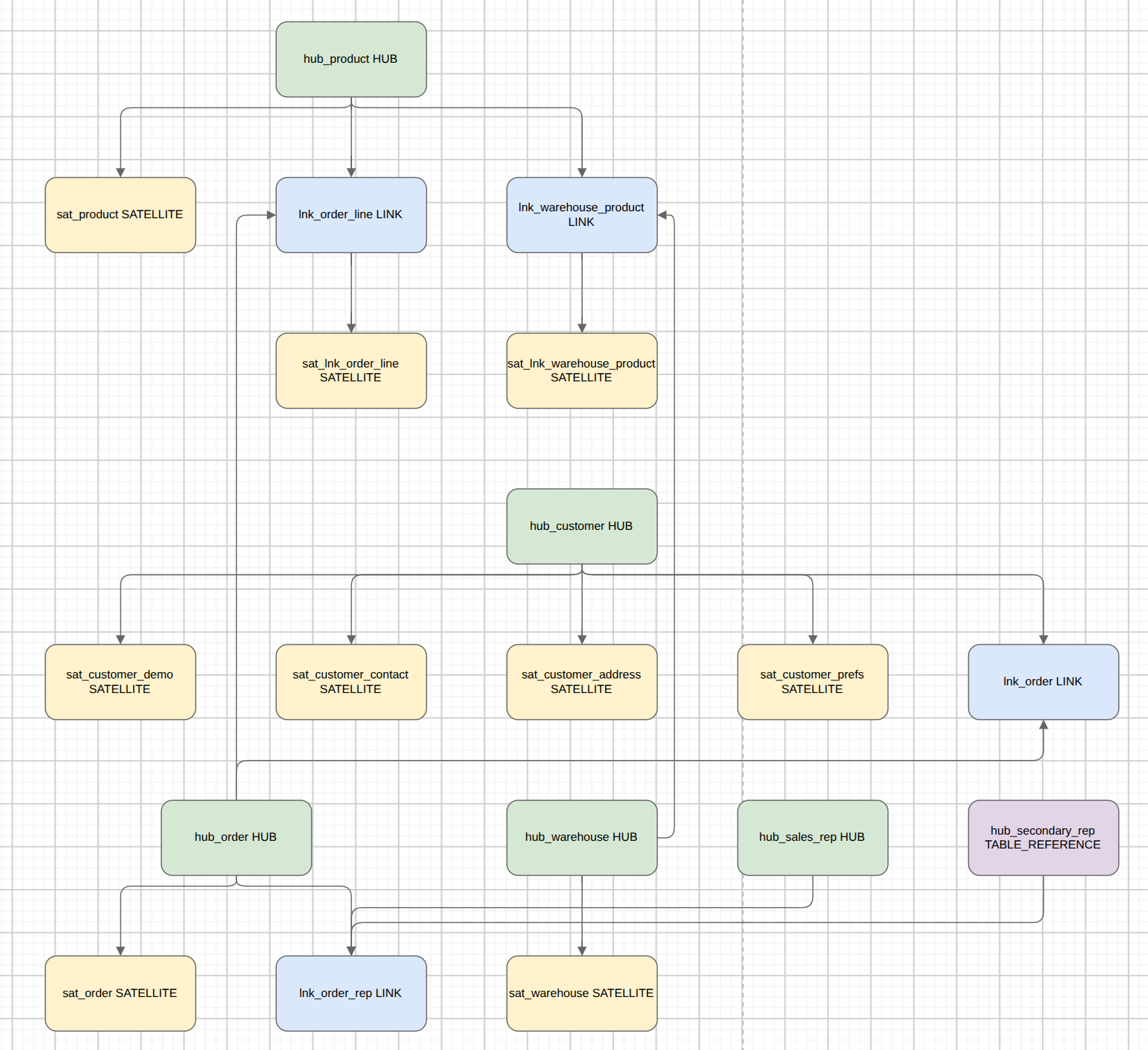
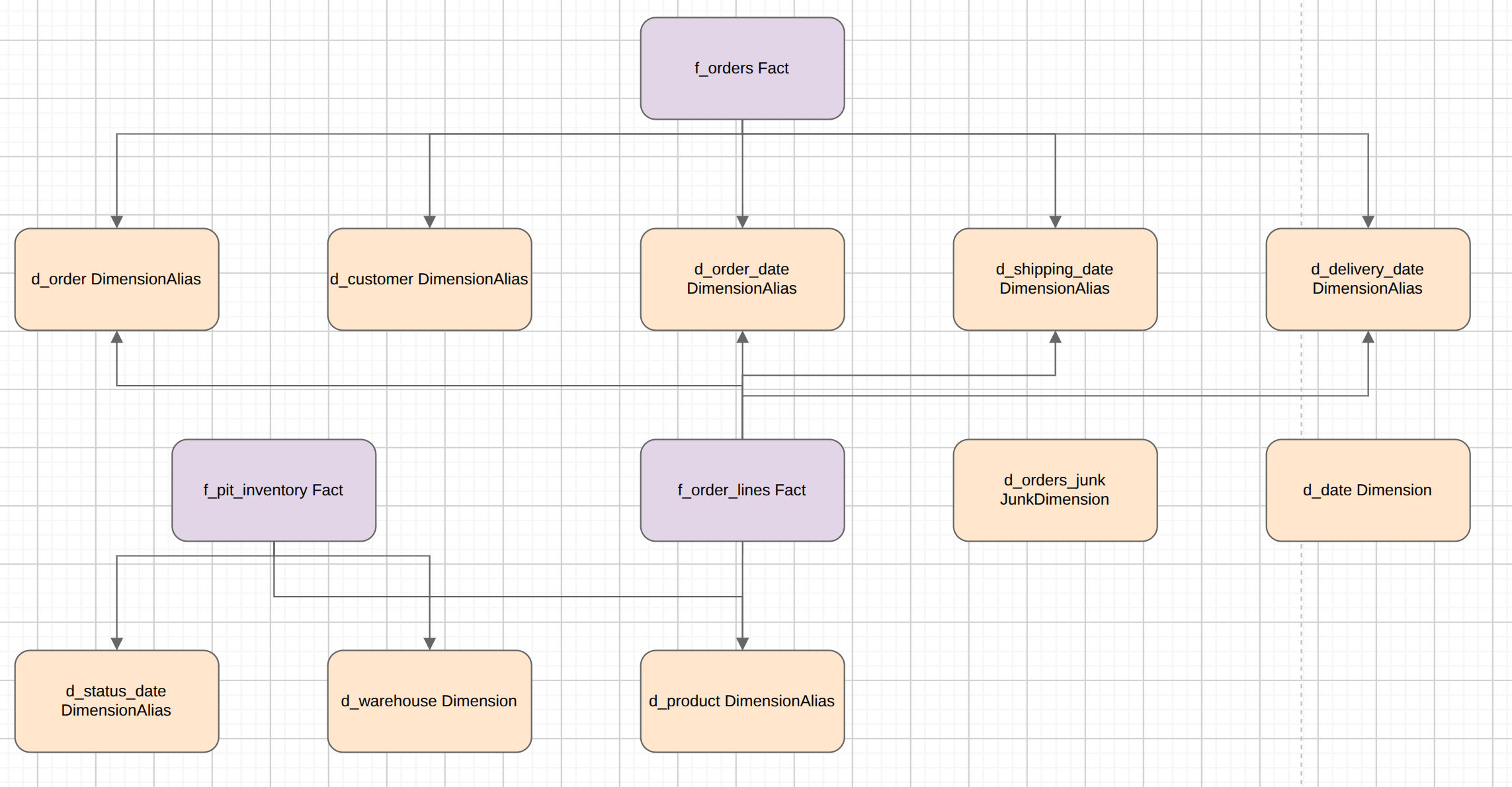
Enterprise multi-file data-model projection: all |
ELK layout (same stack as the Hop GUI canvas). |
MODELS diagrams (one file per model) |
Documentation set for each model listed on a resource definition group (or an explicit path list): one Draw.io per |
ELK layout per model file. |
The point of MODEL export is the aggregate across model files (subject areas, shared core, multiple dimensional stars). Use MODELS when you want a folder of diagrams named after each model for docs or review.
Screenshots (retail example)
Solution architecture — workflows, controls/capabilities, and model file references (no table dump):
Data inventory — tables and sources involved, no relationship edges (default file data-inventory.drawio):
Aggregated Data Vault model — all .hdv tables unioned with ELK layout:
Aggregated dimensional model — all .hdm tables unioned with ELK layout:
Example artifact set (retail)
work/architecture/retail-solution.drawio       # process architecture only
work/architecture/data-inventory.drawio        # short default inventory name
work/architecture/models/data-vault.drawio     # all .hdv tables unioned + ELK
work/architecture/models/business-vault.drawio
work/architecture/models/dimensional.drawio

# MODELS view (per file) — typically from a resource definition group:
work/architecture/models/data-vault/retail-360.drawio
work/architecture/models/business-vault/retail-360.drawio
work/architecture/models/dimensional/retail-f-orders.drawio
work/architecture/models/dimensional/retail-conformed-dims.drawio
Formats (current)
-
Draw.io (
.drawio/ mxfile XML) — open in diagrams.net or the Draw.io desktop app.
ArchiMate Open Exchange XML is planned next (same intermediate graphs).
Workflow action
Export architecture (EXPORT_ARCHITECTURE):
-
Root — workflow path,
.hem, or for DATA/MODEL/MODELS a comma-separated list of.hdv/.hbv/.hdmpaths (optional when a resource definition group supplies models) -
Resource definition group — optional. When set, supplies model files for DATA, MODEL, MODELS, and SOLUTION “also export” options (overrides root path list and execution-map discovery)
-
View type —
SOLUTION,DATA(inventory),MODEL(layer aggregates),MODELS(one file per model under type subfolders), orEND_TO_END -
Output Draw.io file — primary SOLUTION destination
-
Also export DATA inventory — second file from models (group preferred, else crawl discovery)
-
Also export aggregated model diagrams (ELK) — writes
data-vault.drawio/business-vault.drawio/dimensional.drawiounder the models folder -
Models output folder — for
MODELaggregates andMODELSper-file diagrams (default${PROJECT_HOME}/work/architecture/models)
MODELS-only documentation export
To document every model on a resource definition group without solution architecture:
-
Set View type to
MODELS -
Select the Resource definition group
-
Set Models output folder (optional)
-
Leave Root empty
Output layout:
{models folder}/
  data-vault/{basename}.drawio
  business-vault/{basename}.drawio
  dimensional/{basename}.drawio
Basename is the model file name without extension (models/subdir/retail-360.hdv → retail-360.drawio).
CLI
With Data Hopper EDW installed. Enable a Hop project or lifecycle environment the same way as hop-run (projects plugin mixins). Use one of -j / --project or -e / --environment (not both).
Relative paths resolve under ${PROJECT_HOME}. Paths inside diagrams are project-relative (e.g. models/retail-360.hdv).
# Solution + inventory + aggregated layer model diagrams:
hop architecture-export \
  -e retail-example-docker-pg \
  -f workflows/run-retail-update.hwf \
  -o work/architecture/retail-solution.drawio \
  --view SOLUTION \
  --also-data \
  --data-output work/architecture/data-inventory.drawio \
  --also-models \
  --models-output work/architecture/models

# MODEL only — pass every model file; get three layer aggregates:
hop architecture-export \
  -e retail-example-docker-pg \
  -f models/retail-360.hdv,models/retail-360.hbv,models/retail-f-orders.hdm,models/retail-conformed-dims.hdm \
  --view MODEL \
  --models-output work/architecture/models

# MODELS only — one Draw.io per model from a resource definition group:
hop architecture-export \
  -e retail-example-docker-pg \
  -g retail-sources \
  --view MODELS \
  --models-output work/architecture/models
DATA inventory only:
hop architecture-export \
  -e retail-example-docker-pg \
  -f models/retail-360.hdv,models/retail-360.hbv \
  -o work/architecture/retail-data-inventory.drawio \
  --view DATA
Or with a group:
hop architecture-export \
  -e retail-example-docker-pg \
  -g retail-sources \
  -o work/architecture/retail-data-inventory.drawio \
  --view DATA
How it is built
workflow / .hem     →  Execution map crawl  →  ArchitectureGraph (SOLUTION)
model lineage       →  ArchitectureGraph (DATA inventory, no ER edges)
all .hdv / .hbv / .hdm
  →  ElkGraphLayout.from*Models (union + dedupe)
  →  layoutToBoxes (ELK, no model file mutation)
  →  ArchitectureGraph (MODEL freeform)  →  data-vault | business-vault | dimensional .drawio
each .hdv / .hbv / .hdm
  →  ElkGraphLayout (single file)
  →  ArchitectureGraph (MODELS freeform)
→ {type}/{basename}.drawio-
ELK coordinates are computed in memory and do not rewrite table positions in model files on disk.
-
Does not replace OpenLineage/Marquez or
hop svg(canvas fidelity per file). -
Multi-team model organization: Organizing large Data Vault programs.