An execution map (.hem file) captures a crawled graph of how workflows, models, generated pipelines, and source datasets connect for a batch or subject area. Open .hem files in Hop GUI to explore execution structure and lineage without running the load.
What gets captured
Starting from a root artifact (typically a workflow .hwf or model .hdv), the crawler discovers:
-
Root workflow — entry point actions
-
Nested workflows and pipeline references
-
Data Vault / Business Vault / Dimensional models referenced by dedicated update actions or by Update resource definition group (every selected layer on the group, in DV → BV → DM list order; include-layer flags apply)
-
Generated pipelines produced from models (virtual
generated://paths) -
Source datasets resolved from catalog and CRM connections (
dataset://paths)
Expanding a resource definition group requires project metadata for that group (same provider Hop uses when running the workflow). Without it, the RDG action node appears but model children are omitted.
The map stores node positions, parent links, and crawl timestamp for reproducible layout.
Retail example
Generated maps land under the gitignored runtime tree retail-example/work/execution-maps/ (for example after run-retail-initial.hwf / run-retail-update.hwf write their HEM outputs, or after a manual crawl).
Typical roots:
File (under work/execution-maps/) |
Root | |
|---|---|---|
|
|
|
|
|
|
|
|
|
|
multi-month simulation workflow (when crawled) |
Open a .hem file in Hop GUI. Use filters and focus controls to collapse or expand model subtrees and generated pipeline swimlanes.
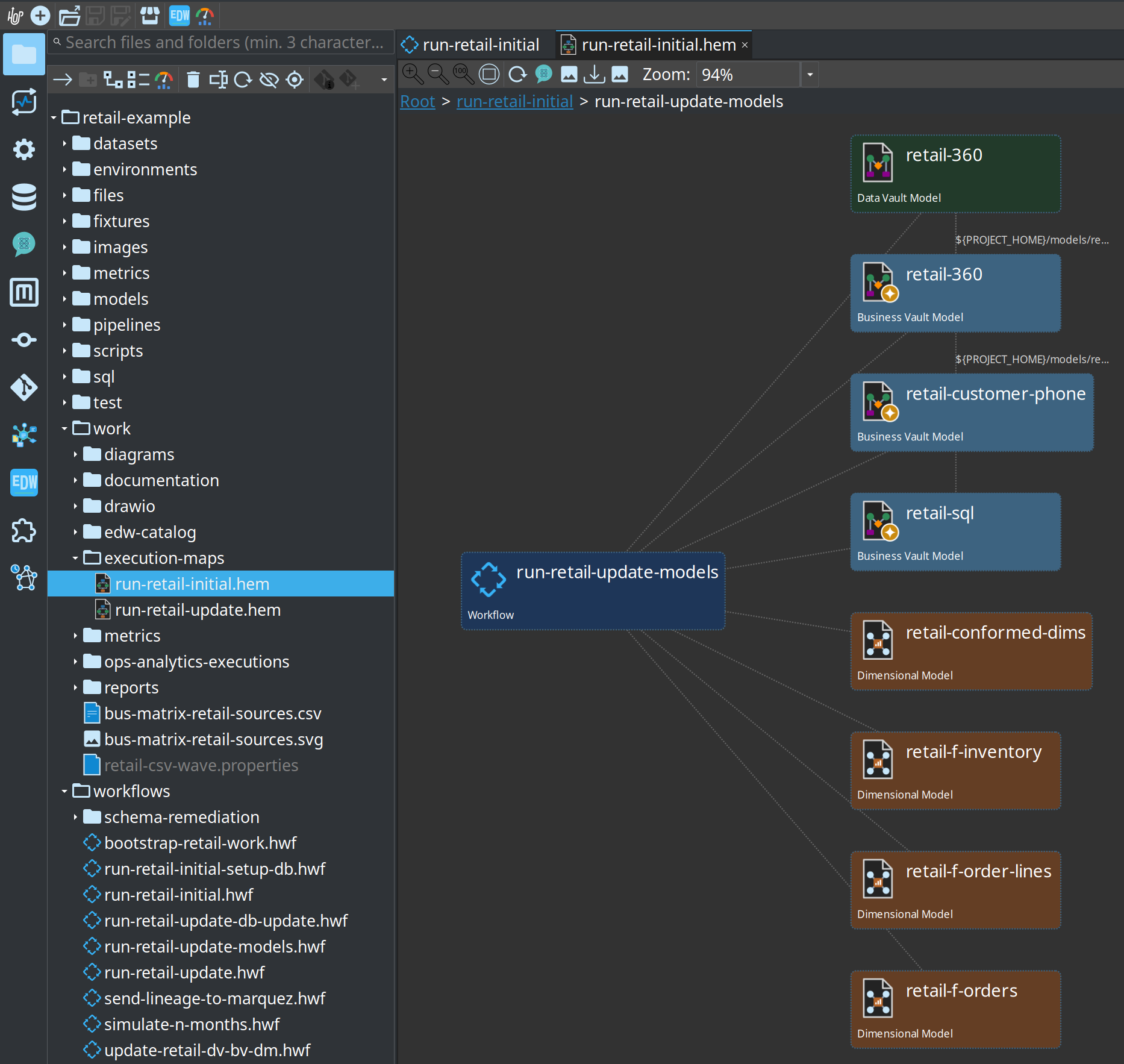
Creating and refreshing maps
Maps are produced by crawling from a workflow or model in Hop GUI (execution map perspective / crawl actions), the Generate execution map workflow action, or tooling that serializes the crawl result to .hem XML.
The generate action writes the .hem file after the crawl. The crawler does not load that output as a nested artifact (the file often does not exist yet, and on Windows a stale VFS cache can report it as "not a file").
Re-crawl after model or workflow changes so generated pipeline nodes stay current.
Relationship to lineage export and Hop Lineage View
Execution maps provide in-project execution graphs and optional table-level OpenLineage JSON next to the .hem file. A .hem is the crawled graph.
A Hop Lineage View (.hlv) is the opposite persistence model: a small view definition that queries Marquez, an export folder, or local model collectors. See Hop Lineage View.
Model-derived table and column OpenLineage export (Marquez / HTTP) is provided by the Export data lineage action — see OpenLineage export.