A Hop Lineage View (.hlv) is an authorable question you keep in the project tree: start at this table (or OpenLineage dataset/job), walk this far, on this backend. Open the file in Hop GUI and the tab queries Marquez, a folder of exported RunEvent JSON, or the current models. The graph itself is not stored in the file.
Use it when you are at the end of the chain — a new fact, a dimension, a Business Vault table — and need to stay in Hop while walking upstream to DV/BV/source, then jump into the responsible .hdv / .hbv / .hdm, catalog record, or generated pipeline.
What it is (and is not)
Surface |
Role |
Hop Lineage View ( |
Saved view definition + live query. Cross-model, usually upstream, table grain. |
Lineage tab on a table dialog |
One table, one model, read-only field grid. See Source-to-target lineage. |
Reverse lineage browser |
Source field → consumers (grid). Opens a model element. |
Execution map ( |
Persisted crawl of workflows, models, and generated pipelines. Opposite persistence model. See Execution maps. |
Marquez UI |
External job/dataset graphs after export. You leave Hop. See OpenLineage export. |
The .hlv file stores backend name, seed, depth, direction, job/layer filters, and whether to overlay OPS times. It does not store node positions or a crawled snapshot.
Export is not a load
Today’s Export data lineage action writes model-derived COMPLETE OpenLineage events. After export, Marquez’s "latest run" is the last export, not the last vault/dimensional load.
Hop Lineage View therefore:
-
Uses Marquez / the export folder / local collectors for structure (who feeds whom)
-
Overlays "how long did the last load take?" from the Hop OPS database (
load_pipeline_metric/LoadRunDurationMetricsLoader) -
Never treats Marquez
latestRun.durationMsorstartedAtas load telemetry
A duration badge labeled export is a stale hop_ops value stamped at export time, not a live OPS row.
Lineage backends
Create a Lineage backend metadata object (Metadata perspective, type Lineage backend, key lineage-backend). The .hlv stores only the name. URLs, API keys, and folder paths stay on the metadata object.
Retail sample: retail-example/metadata/lineage-backend/Marquez-Localhost.json.
Type |
What it queries |
When to use |
Marquez |
Marquez 0.50 |
Shared or local Marquez after an export |
Export folder |
Folder of RunEvent JSON from Export data lineage |
Offline / no Marquez |
Local models |
Current DV/BV/DM collectors → same OpenLineage mapper + BFS as the folder adapter |
No export yet; unsaved model via Show lineage |
Use Test connection on the editor to list Marquez namespaces, count event files, or resolve the resource definition group.
If exactly one backend is enabled, File → New and Show lineage use it. If several are enabled, you pick one. Disable unused backends so the common case is one click.
${MARQUEZ_BASE_URL} vs ${MARQUEZ_API}
These are different variables. Do not treat them as interchangeable without reading the path.
Variable |
Typical retail value |
Used by |
|
Lineage backend Marquez base URL (host root, no |
|
|
Export data lineage HTTP URL ( |
|
|
|
Export and backend default job namespace |
|
|
Export and backend default dataset namespace |
Preferred backend URL: ${MARQUEZ_BASE_URL} = http://localhost:5001.
If you paste ${MARQUEZ_API} (or any URL ending in /api/v1/lineage or /api/v1-beta/lineage) into the backend field, the suffix is stripped so the client does not request /api/v1/lineage/api/v1/lineage. The retail Marquez-Localhost backend currently stores ${MARQUEZ_API} and relies on that strip.
Do not put ${MARQUEZ_API} on the backend and also append /api/v1/lineage in the same string.
Namespaces must match the export
Job names are {layer}/{modelName}/{logicalTable} (for example dm/retail-f-orders/f_orders).
If the configured job namespace has no slash, export and the view append the project key. Retail ${MARQUEZ_NAMESPACE_JOB} = retail-job becomes retail-job/retail-example. Dataset namespace is not rewritten: retail-dataset.
A MODEL_TABLE seed recomputes job and dataset ids from the selected backend on every refresh. DATASET / JOB seeds keep the ids stored in the file.
For Local models, set the same job/dataset namespace variables as the export action so a seed that works on Marquez also works offline.
Create and open a view
-
Create at least one Lineage backend.
-
File → New → Hop Lineage View. The settings wizard runs before a tab opens; Cancel does not create a tab.
-
Choose backend, seed, direction (default upstream), depth (default 6), whether to include jobs, optional layer chips, and Overlay OPS load times.
-
Save. The tab name is the filename without
.hlv. There is no separate name field.
Toolbar: Refresh lineage (background query), Collapse all, Expand all, View settings, zoom, Export SVG of the session graph (not a substitute for hop svg). The right-hand pane shows the selected node as Markdown (identity, hop_export / hop_location, columns) with a View as HTML button.
Cards are round. A job shows the pipeline logo. A dataset shows the hub, link, satellite, dimension, fact, or source logo. On a Marquez graph the table type usually sits on the job, so the output dataset borrows that type when the names match. A chevron at the top-right compacts that card to the logo alone. Hover the circle for the name, type, layer, and load time. Compact choices stay in the session. They are not stored in the .hlv. The exported SVG uses the cards as they are on screen.
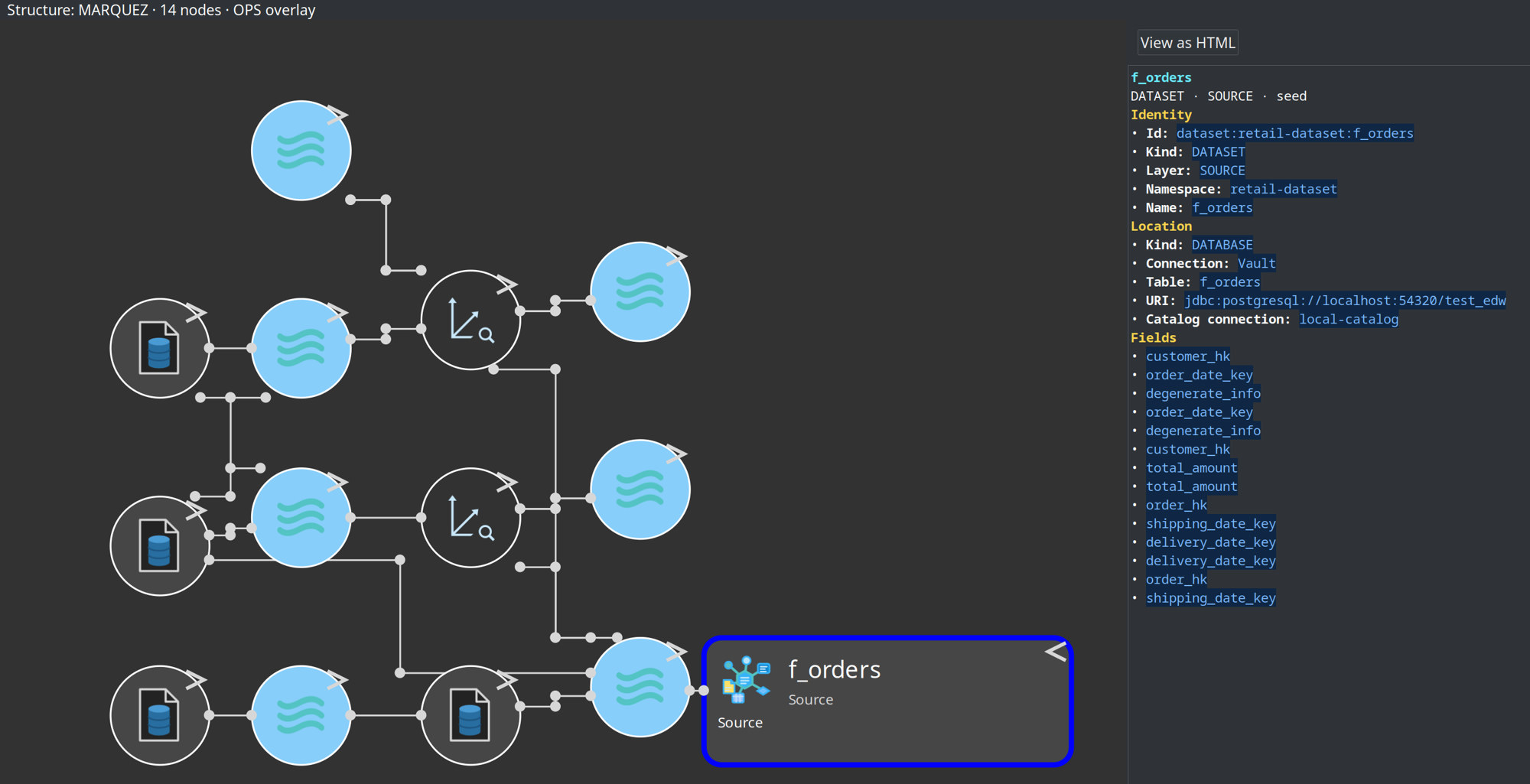
Project search matches backend name, logical table, dataset/job names, and model file on .hlv files.
Seed kinds
Kind |
Start from |
MODEL_TABLE |
Hop layer + model + logical table. Job/dataset ids are rebuilt from the backend namespaces. |
DATASET |
OpenLineage dataset already in Marquez or the export folder ( |
JOB |
OpenLineage job ( |
Empty layer chips means no layer filter. Turning Include jobs off concatenates dataset-to-dataset edges.
Retail samples
File |
Seed |
|
Dimensional fact |
|
Fact |
Before a Marquez-backed view shows a graph, export once:
./scripts/run-marquez.sh up
./scripts/run-hop.sh retail-example workflows/send-lineage-to-marquez.hwf
run-retail-update-models.hwf can also POST lineage after the vault wave when that hop is enabled.
Open models/f_orders-upstream.hlv (or use Show lineage on the fact card). Refresh if the tab was open during export.
Show lineage from a model table
On a Data Vault, Business Vault, or dimensional table, the context menu includes Show lineage. That opens an unsaved upstream .hlv tab seeded on the selected table.
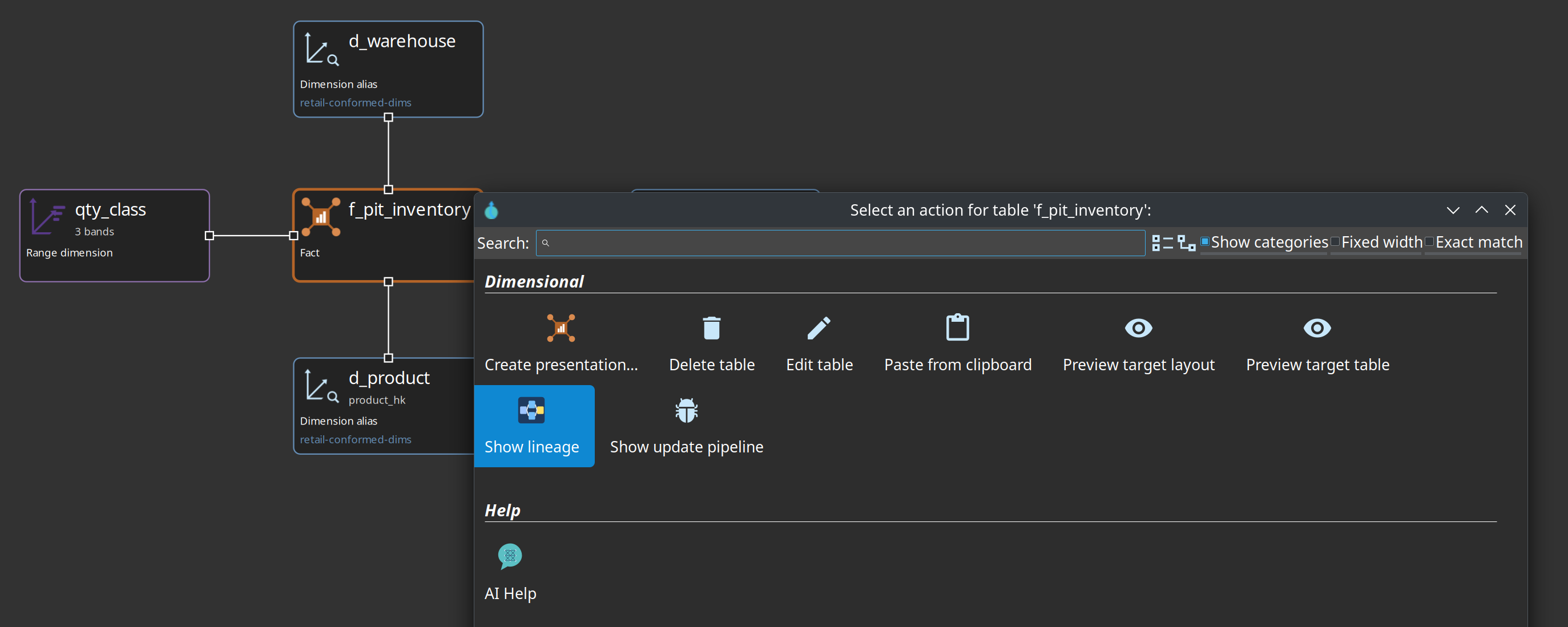
-
One enabled backend → used immediately.
-
Several enabled → a chooser.
-
Local models receives the open (possibly unsaved) model as
extraSnapshotsso you can walk that file without exporting. Cross-layer paths still need a resource definition group on the backend or the view.
Save the tab if you want the question in the project tree.
Navigate from a node
Hover a node name to underline it. Click the name on a source, dimension, fact, job, or any other card to refresh the right-hand details pane only. That pane renders Markdown (same viewer as dialog Help) with a View as HTML button. Click the icon or the rest of the card for the action dialog. A compact circle has no name, so that click opens the dialog. The dialog does not call Marquez. It uses the node already on the canvas. A dataset such as d_date borrows hop_export from the job that writes it when that job is already in the graph. After the view loads, each job that has a run id and no hop_export is filled from that run’s facets once, in the background. A click does not download the dataset document.
Action |
When it appears |
Open model |
A |
Open table |
Data Vault, Business Vault, or dimensional table dialog |
Open source |
Source card on a source model, from the catalog origin |
Open in catalog |
|
Preview rows |
Database table on |
Show update pipeline |
DV or DM table, or the job that loads it |
Show build pipeline |
BV SCD2 or PIT table |
Actions are hidden when the identity is missing. Models remain the source of truth; the view does not edit mappings.
OPS load-time overlay
When Overlay OPS load times is on, cards can show last duration (and recent prior average when it differs).
-
Keyed by
(modelName, dv\|bv\|dm)— never passDVinto OPS SQL. -
Table lookup uses logical name, then physical name; not
schema.tableunless that is the element name. -
Last duration > 2× the average of earlier positive runs is marked slow.
-
No OPS connection or no runs → overlay is omitted (
NO_DATABASE/NO_RUNS/ errors are not painted as zero). -
If OPS has no row, a stale
hop_opsfacet from the last export may appear, labeled export. -
Marquez
latestRun.durationMsis never used.
The same OPS helpers power the duration bars on DV/BV/DM model canvases. See Operations.
Local Marquez and smoke test
From the repository root:
./scripts/run-marquez.sh up          # API :5001, UI :3001
./scripts/run-marquez.sh status
./scripts/run-marquez.sh down
./scripts/run-marquez.sh reset       # wipe volumes
Optional Docker smoke (not part of mvn test, not part of run-tests-all-databases.sh):
./scripts/smoke-lineage-view.sh              # Marquez already up + exported
./scripts/smoke-lineage-view.sh --export     # also run send-lineage-to-marquez.hwf
The script GET`s `/api/v1/lineage for the retail f_orders (then f_order_lines) seed, then follow-up run facets, and checks for hop_export. It does not treat durationMs as a load-time assertion.
Unit tests cover parsers, URL strip, graph clip/depth, XML round-trip, navigation, and OPS math from checked-in fixtures. They do not start Docker.
Troubleshooting
-
Empty canvas / "No lineage graph" — export has not run, wrong backend, or seed not in that backend. For Marquez:
./scripts/run-marquez.sh status, then export. For Local models: set the resource group (or use Show lineage on an open model). -
SEED_NOT_FOUND — job/dataset namespace does not match export. Retail job id looks like
job:retail-job/retail-example:dm/retail-f-orders/f_orders; dataset likedataset:retail-dataset:f_orders. Check${MARQUEZ_NAMESPACE_JOB}/${MARQUEZ_NAMESPACE_DATASET}on both the export action and the backend. MODEL_TABLE retries search when the stored namespace is stale. -
HTTP errors — backend base URL should be the host (
http://localhost:5001or${MARQUEZ_BASE_URL}). A doubled/api/v1/lineagepath means the strip did not run on that string. -
Open model / pipeline missing — facets were not on the graph node and follow-up failed, or the export predates
hop_exportenrichment. Re-export with a plugin that stampshop_export/hop_location. -
Duration looks like 1 second after every export — that is export wall time on Marquez, not the load. Turn on OPS overlay and ignore Marquez run duration.
-
Show lineage asks every time — more than one lineage backend is enabled; disable the extras.
Relationship to other features
Feature |
Relationship |
Same collectors; the view is the cross-model graph, the tab is the per-table grid |
|
Fills Marquez / the export folder the Marquez and folder backends read |
|
How the batch is wired, not field-level mapping |
|
Load-run metrics |
OPS overlay only; not lineage structure |
Column-level path highlight (not a full column hairball) is a later increment. Runtime OpenLineage from update actions (START/COMPLETE/FAIL with load_run ids) is also later — until then, "what happened when" is the OPS overlay.
Hop Web
Hop Lineage View uses the same experimental SVG canvas stack as the other model files (.hsm / .hdv / .hbv / .hdm / .hem). See Hop Web modelers.
What to expect:
-
Open, File → New (wizard first), save, zoom, pan, refresh, and View settings work in the browser.
-
The session graph is an SVG overlay. Empty, loading, and error text are painted on that snapshot as well as the status line.
-
Name-click updates the right-hand details pane. On Hop Web that pane is plain text (RAP has no
StyledText); use View as HTML for formatted markdown. Card-click opens the context dialog after an unmoved mouse-up (same RAP click-vs-drag split as the other modelers). -
Show lineage from a DV/BV/DM table opens an unsaved
.hlvtab. -
Lineage cards are not draggable; ELK still owns positions.
Marquez, the export folder, and OPS are queried by the Hop Web server, not the browser. ${MARQUEZ_BASE_URL} of http://localhost:5001 means localhost inside that JVM (or container). Point the lineage backend at a host the server can reach, or use Local models / Show lineage.