Data Hopper EDW can emit OpenLineage RunEvent documents for every Data Vault (DV), Business Vault (BV), and dimensional (DM) target table. Events are model-derived from the same lineage collectors that power the modeler Lineage tab, explainable DDL, and catalog lineage siblings.
Use this to feed platforms such as Marquez or any OpenLineage-compatible HTTP endpoint (including Collibra OL integrations).
What is exported
Aspect |
Detail |
Source of truth |
|
Granularity |
One COMPLETE |
Column lineage |
Output datasets always get a |
Physical location |
Datasets get OpenLineage |
Source datasets |
Input datasets (catalog feeds, parent tables) get a |
Cross-layer edges |
BV/DM events list parent DV/BV tables as inputs when the model maps them |
Operational facts |
Optional last-load enrichment from |
Destinations |
Folder of JSON files and/or HTTP POST |
Multi-hop paths (source → satellite → BV → fact) appear as chained dataset edges across jobs in Marquez, not as a single job spanning all layers.
Workflow action: Export data lineage
Add Export data lineage to a workflow. Configure the resource definition group, layer filters, destination, and optional job/dataset namespaces:
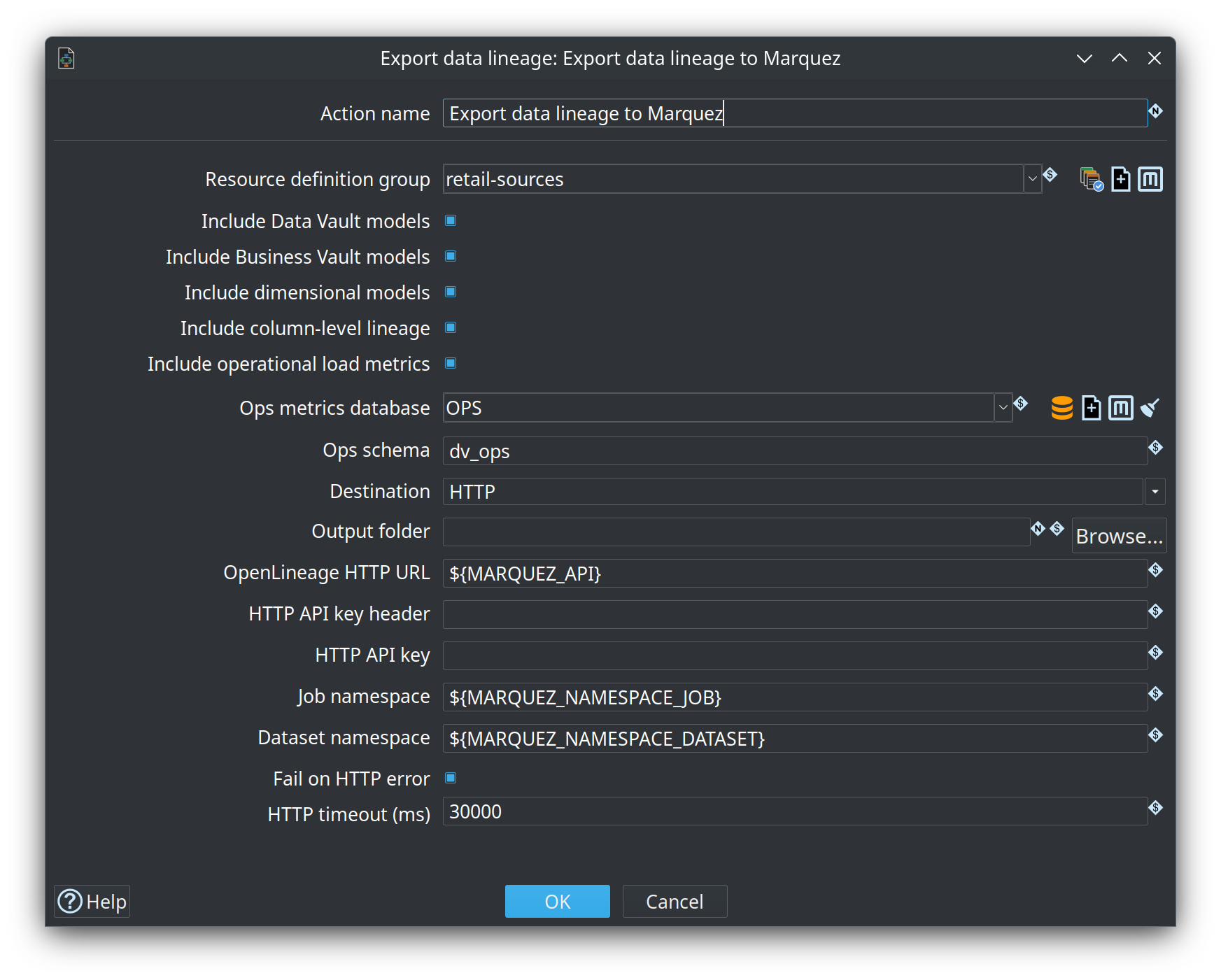
The retail sample includes a dedicated workflow (retail-example/workflows/send-lineage-to-marquez.hwf) and an optional hop after End Vault Update in run-retail-update-models.hwf.
Main settings
Field |
Purpose |
Resource definition group |
All DV/BV/DM model files in the group are exported |
Include DV / BV / DM |
Layer filters (default: all on) |
Include column-level lineage |
Emit OpenLineage column facets (default: on) |
Include operational load metrics |
Attach last pipeline run facts when an ops DB is configured |
Ops metrics database / schema |
Hop connection (and optional schema) for |
Destination |
|
Output folder |
One |
OpenLineage HTTP URL |
e.g. |
Job namespace |
Default |
Dataset namespace |
Optional override for all input/output dataset namespaces. When empty, namespaces are derived from Hop connection names (e.g. |
Fail on HTTP error |
Fail the action when a POST fails (default on) |
HTTP timeout (ms) |
Connect/request timeout (default 30000) |
Viewing lineage in Hop
After export, stay in Hop GUI with a Hop Lineage View (.hlv) pointed at a lineage backend. The view queries Marquez (or the export folder, or local models) and can open the responsible .hdv / .hbv / .hdm, catalog record, or generated pipeline.
Export events are model-derived COMPLETE documents. Marquez “latest run” is the last export, not the last load. Load duration on the view comes from the Hop OPS database — see Hop Lineage View.
The Marquez base URL on a lineage backend is the host root (${MARQUEZ_BASE_URL} = http://localhost:5001). The export action still posts to ${MARQUEZ_API} (http://localhost:5001/api/v1/lineage). Pasting ${MARQUEZ_API} into the backend field is accepted: the /api/v1/lineage suffix is stripped.
Retail sample view: retail-example/models/f_orders-upstream.hlv (backend Marquez-Localhost).
Viewing lineage in Marquez
After export, open the Marquez UI and inspect job and dataset graphs.
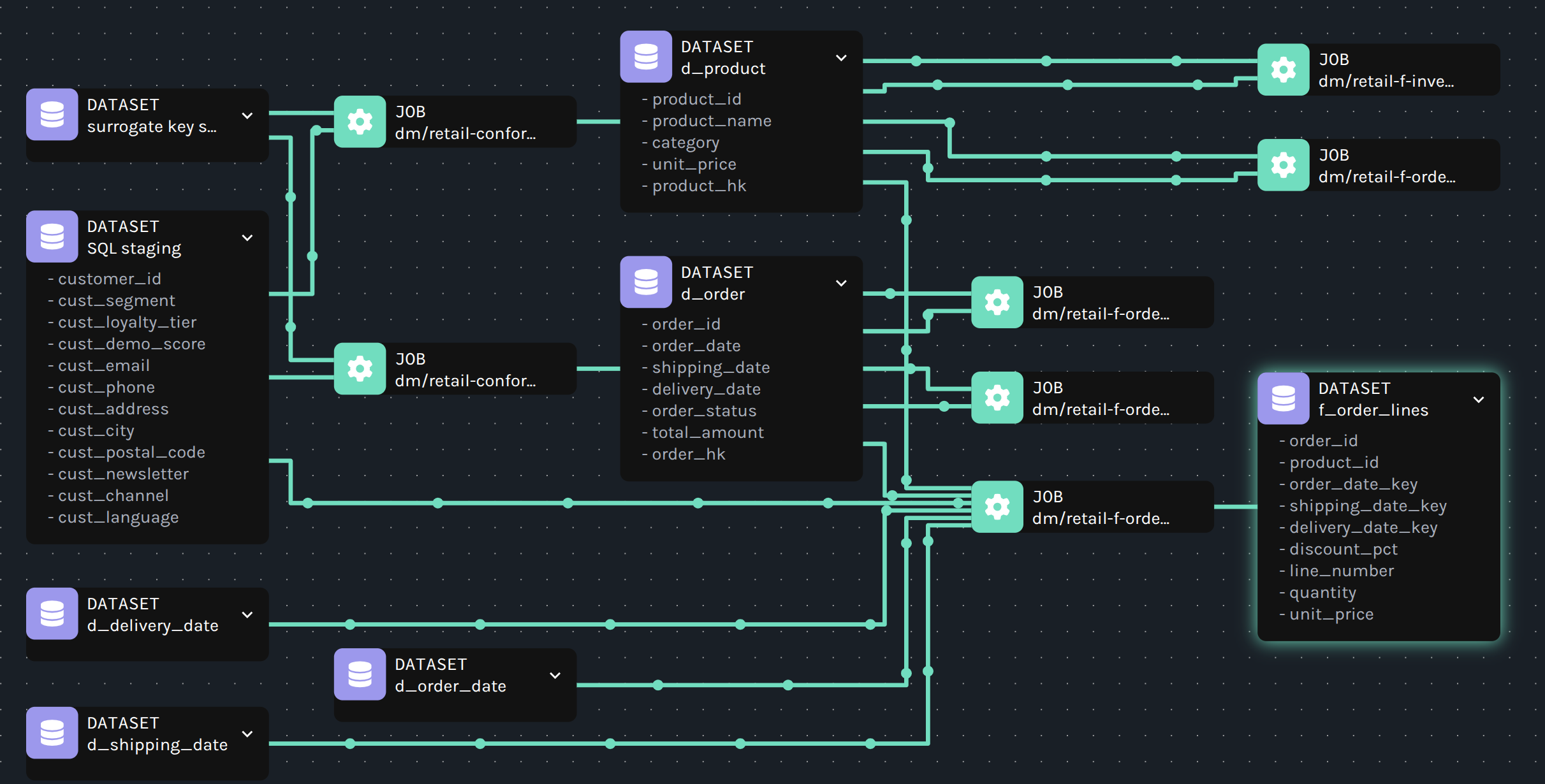
Job lineage graph
Jobs (generated loads) sit between source and target datasets. Expanded nodes show schema fields when facets were exported:
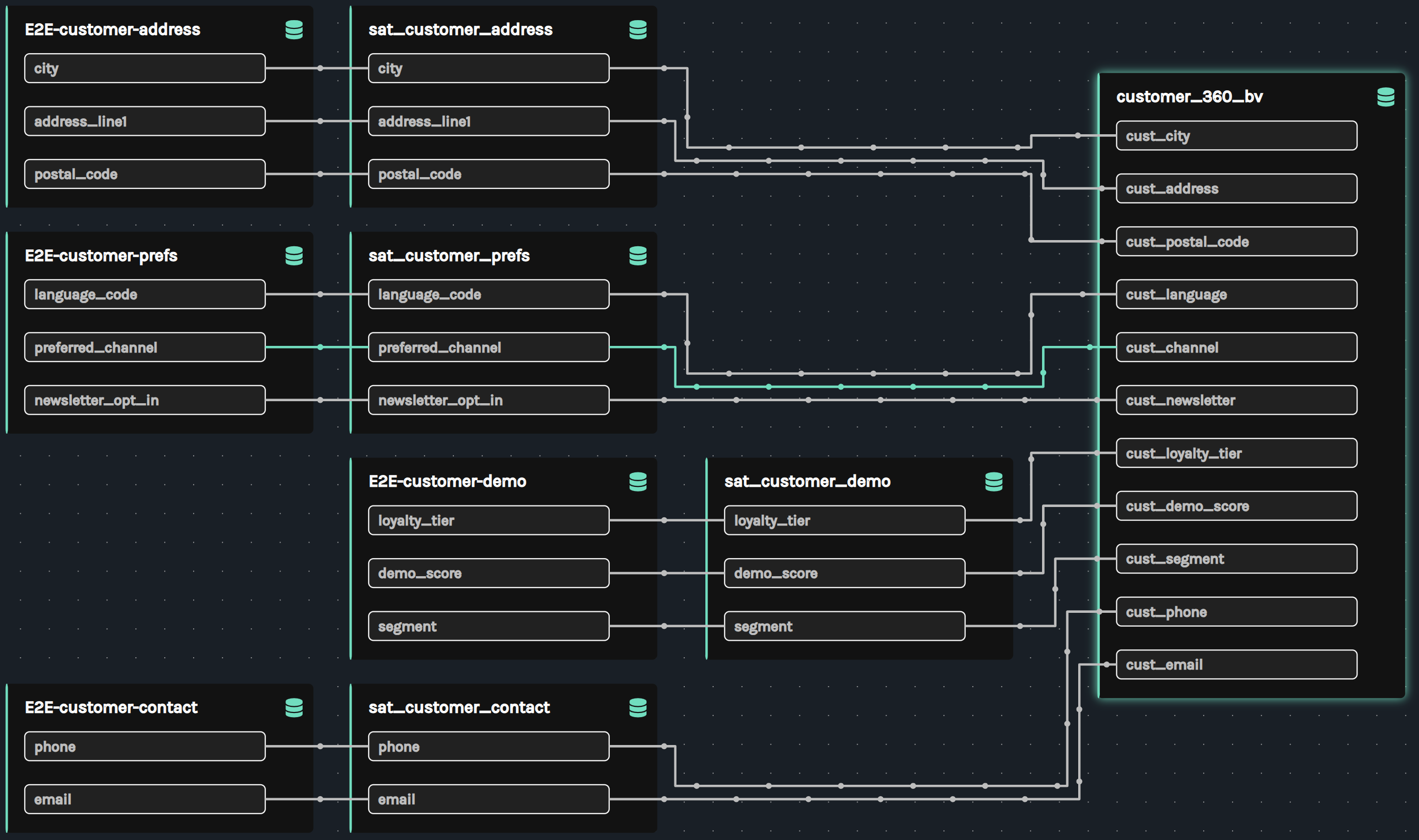
Column-level lineage
Column lineage shows how source feed columns flow through satellites into Business Vault tables (for example customer address, prefs, demo, and contact into customer_360_bv):
Dataset physical location
Opening a dataset in Marquez shows field lists and, under Facets, the physical system details (dataSource / hop_location). See Physical location facets for the full description and screenshot.
Dataset and job naming
Concept |
Convention |
Job namespace |
Action Job namespace, or |
Job name |
|
Dataset namespace (override) |
When action Dataset namespace is set, every input/output uses that value |
Output dataset namespace (default) |
Hop target database connection name (e.g. Vault) |
Output dataset name |
|
Catalog feed input namespace (default) |
Catalog sources namespace prefix from the project |
Catalog feed input name |
Feed / record source name (e.g. |
Parent vault table input (default) |
Target database connection + parent physical name |
Column transforms map from internal FieldTransform values:
FieldTransform |
OpenLineage transformation |
IDENTITY / RENAME |
DIRECT / IDENTITY |
HASH_INPUT |
DIRECT / TRANSFORMAT with |
DERIVED / CONSTANT / NONE |
DIRECT / TRANSFORMAT |
Reason codes and short messages are concatenated into transformations[].description.
Physical location facets
Besides identity (namespace / name) and column schema, each dataset may include:
Facet |
Contents |
|
Standard OpenLineage facet: |
|
Structured Data Hopper EDW details: |
|
|
Hop identity for deep-links: |
|
|
Alternate identifiers: |
Role-playing / linked dimension aliases use the logical name as the dataset id (d_shipping_date) and list the physical dimension under symlinks / hop_location.tableName (d_date). Projected fields from the physical dimension are still exported when the alias target resolves.
Targets (hubs, sats, BV, facts) resolve location from the model target connection and physical table name.
Sources (catalog feeds) resolve from the Data Catalog RecordDefinition physical table, file, or Iceberg ref when a catalog connection is available on the resource group / model.
Dataset namespace override only changes OpenLineage identity. Physical facets still report the real Hop connection, schema, table, or file path so Marquez (or raw JSON) remains operable.
In Marquez, open a dataset and expand Facets to inspect dataSource (JDBC/file/Iceberg URI) and hop_location (connection, table name, kind, …). Field types may show as N/A when only names were exported on source inputs; targets with full model field metadata include types in the schema facet.
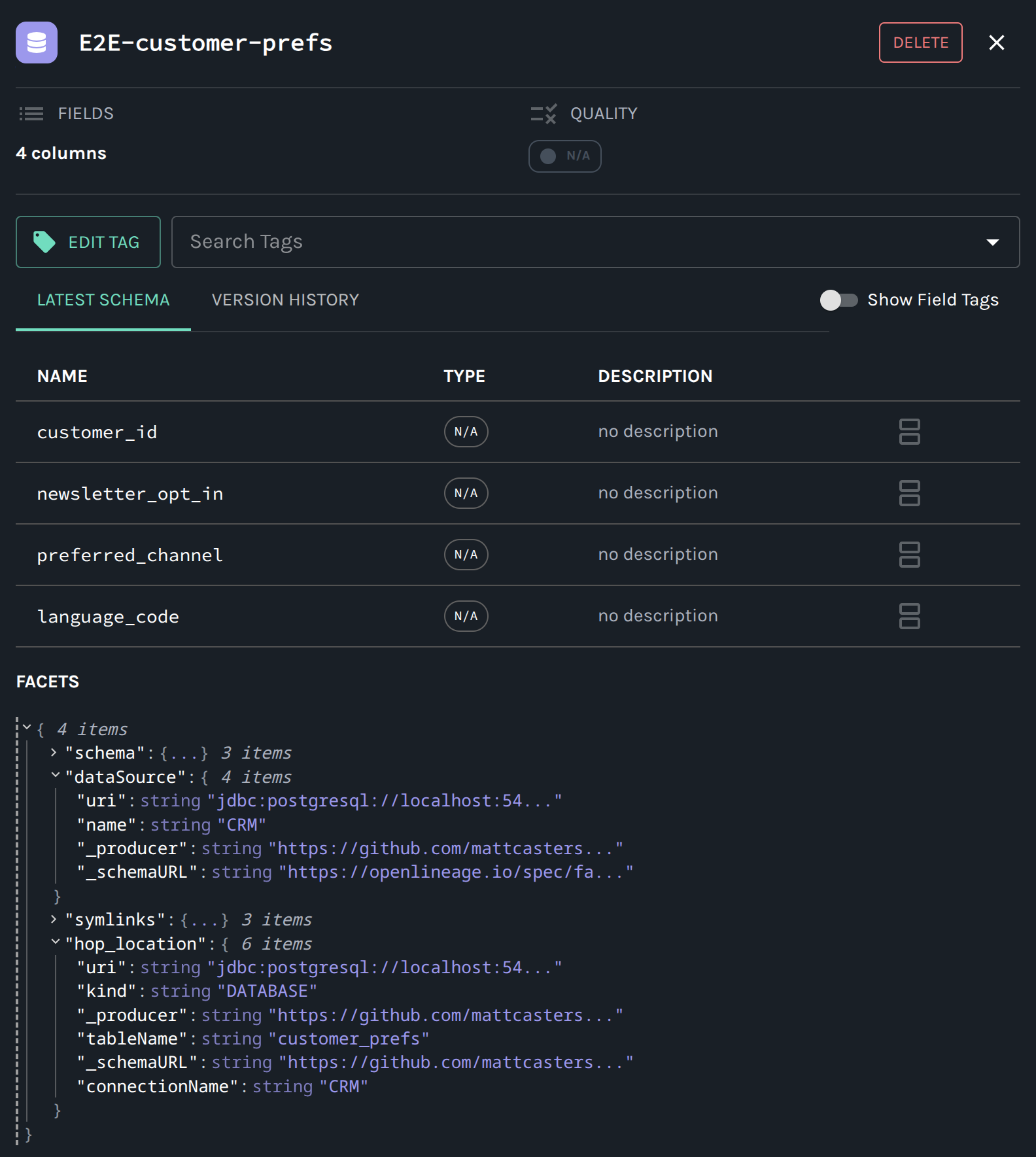
Example hop_location for a database source feed:
"hop_location": {
  "kind": "DATABASE",
  "connectionName": "CRM",
  "tableName": "customer_prefs",
  "catalogKey": "hop/retail/sources/E2E-customer-prefs",
  "catalogConnection": "edw-catalog",
  "uri": "jdbc:postgresql://localhost:54320/..."
}
Local Marquez
From the repository root:
./scripts/run-marquez.sh up
Service |
URL |
API |
|
UI |
Ports avoid common conflicts with macOS Control Center (5000) and local Postgres (5432). Compose file: scripts/docker/compose.marquez.yml.
Example action HTTP URL: http://localhost:5001/api/v1/lineage (or a project variable such as ${MARQUEZ_API}).
A Hop Lineage View backend wants the host root ${MARQUEZ_BASE_URL} = http://localhost:5001. Do not document ${MARQUEZ_API} as the backend URL; if you paste it anyway, the /api/v1/lineage suffix is stripped. See Hop Lineage View.
Stop with ./scripts/run-marquez.sh down. Reset data with ./scripts/run-marquez.sh reset.
Relationship to other features
Feature |
Relationship |
Same collectors; OpenLineage is an external serialization |
|
In-GUI query of this export (or local collectors). Structure from OL; load times from OPS |
|
Optional table-level OpenLineage from crawled pipeline graphs (job names = pipeline names). Complementary, not column-level |
|
Load-run metrics |
Optional enrichment on export; not what Hop Lineage View uses for duration badges |
Catalog lineage siblings |
Internal discovery + drift gate; OpenLineage is for external catalogs |
Troubleshooting
-
HTTP 4xx/5xx — ensure Marquez is up (
./scripts/run-marquez.sh status) and the URL includes/api/v1/lineage. -
Empty export — verify the resource group lists model files and layer checkboxes are enabled.
-
Missing column facets — enable Include column-level lineage.
-
Datasets still show connection name (e.g. Vault) — set Dataset namespace on the action if you want a single override namespace.
-
Dimensions/facts missing after location facets — Marquez 500s when
dataSource.uricontains spaces or unresolved${variables}(maps to nullsources.connection_url). Rebuild with the URI encoding fix; with Fail on HTTP error enabled, a single bad event previously aborted the rest of the export (including later DM jobs). -
Ops enrichment skipped — configure an ops database. Leave Ops schema blank to inherit the Execution metrics profile (retail:
dv_opson OPS). If the log saysrelation "load_pipeline_metric" does not exist, the query ran against the connection default schema instead ofdv_ops, or the tables were never created. Open the Execution metrics profile and use Generate SQL to review or execute the dialect-specificCREATEstatements. Enrichment never fails the export by itself.