Data Hopper EDW captures source-to-target lineage for every Data Vault (DV), Business Vault (BV), and dimensional (DM) target table and field. Lineage answers three questions that production gates and opaque model generators often leave open:
-
Which catalog feed or parent table contributes to a target?
-
How is each target column derived (identity, rename, hash, standard technical column)?
-
Why is that mapping or name present (structured reason codes with human-readable text)?
Models (.hdv / .hbv / .hdm) remain the source of truth for loads and DDL. Lineage is a deterministic, derived projection of those models (plus catalog source resolution). It is not a second place to edit mappings.
Why this exists
Model-driven vault tools can silently rename hubs, satellites, links, or columns between versions. A workflow option such as Fail if DDL is needed correctly blocks structure changes, but without lineage the log only says that DDL is required — not why.
Data Hopper EDW avoids that opacity by:
-
Deriving table- and field-level lineage from model metadata
-
Explaining every required DDL statement with those edges
-
Publishing lineage siblings into the Data Catalog for discovery
-
Diffing current models against the last published lineage baseline (rename / mapping regression gate)
-
Offering a reverse browser from source field to all DV/BV/DM consumers
Concepts
Lineage snapshot
A lineage snapshot is the full set of tables and fields for one model at a point in time. Collectors build it from:
Layer |
Collector input |
DV |
|
BV |
|
DM |
|
Table lineage
For each target object the snapshot records:
-
Logical and physical names, table type, model file
-
Upstream sources (catalog
DV_SOURCEfeeds, parent hub/link, SCD2 satellite inputs, staging SQL, and so on) -
One or more reasons for the table’s existence and naming
Field lineage
For each target column:
-
Data type metadata when known, and whether the column is technical (hash key, load timestamp, record source, …)
-
One or more contributions from upstream feeds or parent tables
-
Per-contribution transform (
IDENTITY,RENAME,HASH_INPUT,DERIVED,CONSTANT, …) -
Per-contribution reason codes and messages
Reason codes (selection)
Code |
Meaning |
|
Table or physical name set in the modeler |
|
Explicit source field mapping (for example hub business key) |
|
Target column uses the same name as the source (typical satellite attributes) |
|
Type-driven or organizational naming |
|
Config-driven technical column ( |
|
Hash key derived from business keys |
|
Parent hub/link hash on a satellite or link |
|
Same BK column fed by multiple record sources |
|
Link maps source columns to participating hub keys |
|
Explicit Business Vault SCD2 field mapping |
|
Parent hub business key copied onto a BV SCD2 table |
|
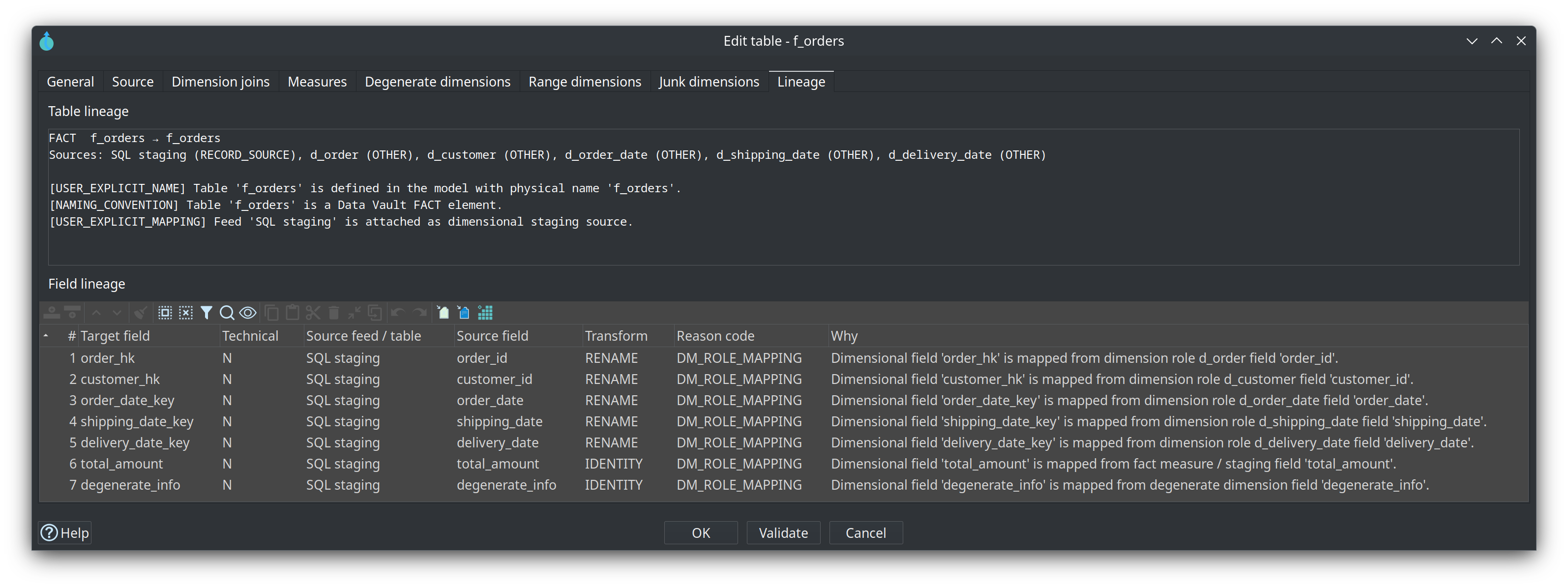
Dimensional role, measure, or staging mapping |
Confidence levels (EXPLICIT, DERIVED, CONVENTION, INFERRED) indicate how strongly the reason is grounded in stored metadata.
Lineage tab in table dialogs
Open any hub, link, satellite, BV SCD2 table, or dimensional table dialog and select the Lineage tab (read-only).
The tab has two areas:
- Table lineage
-
Type, logical → physical name, description, attached sources, and reason list.
- Field lineage
-
Grid of target field, technical flag, source feed/table, source field, transform, reason code, and full Why message.
Data Vault example
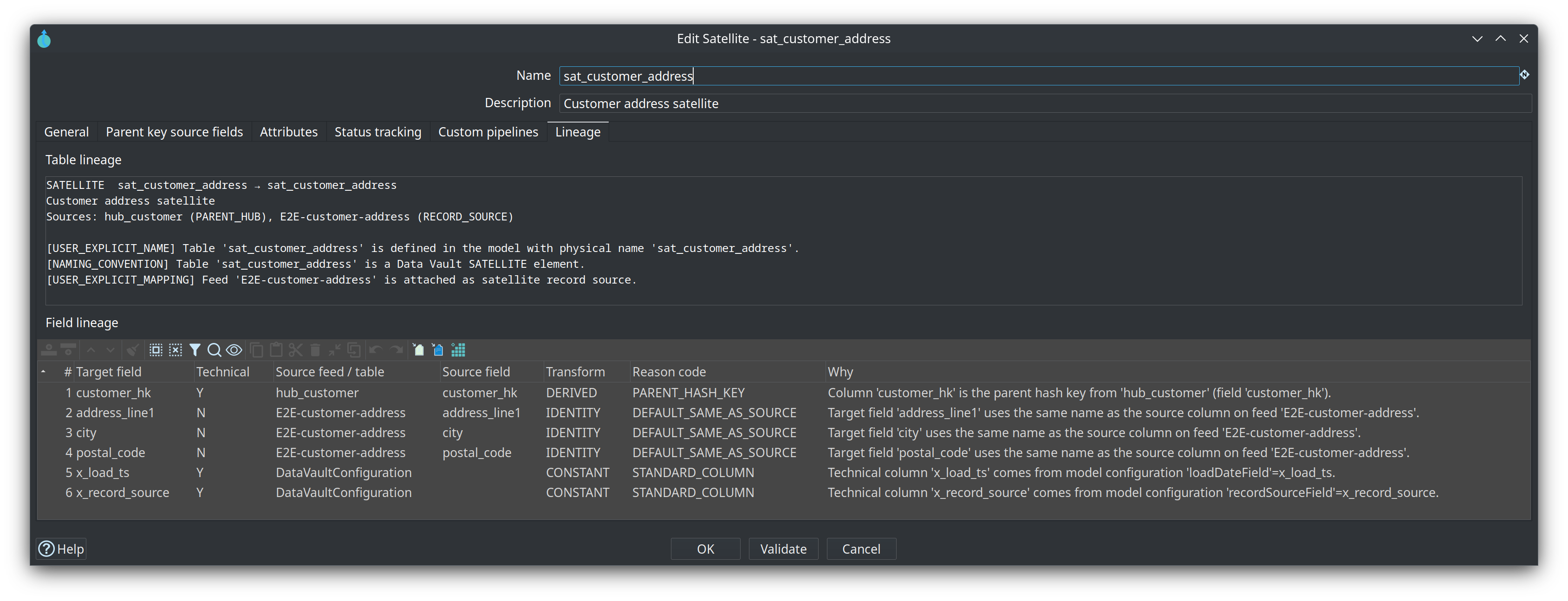
Satellite sat_customer_address shows parent hub hub_customer, feed E2E-customer-address, parent hash customer_hk, attribute passthroughs, and standard columns from model configuration:
Business Vault example
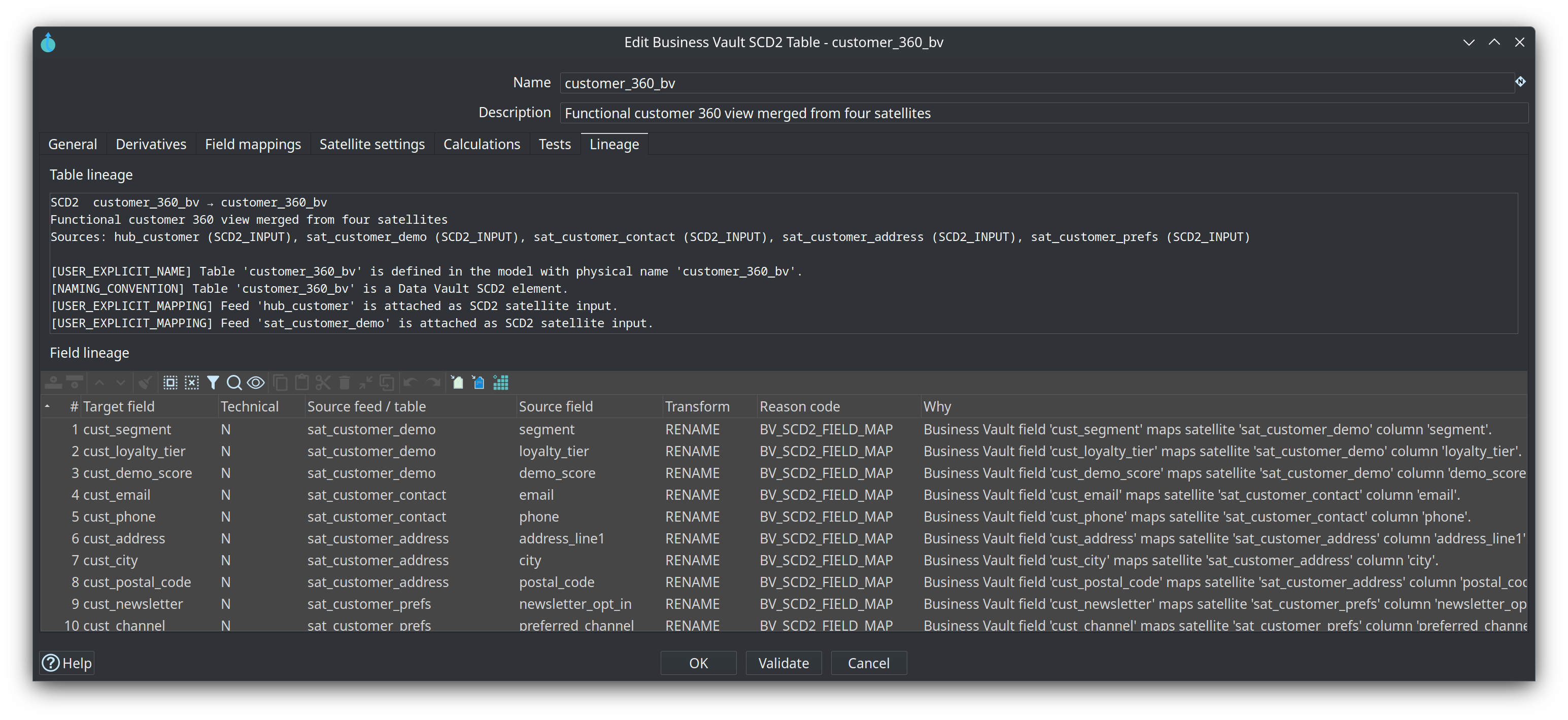
SCD2 table customer_360_bv lists the parent hub and the four satellite inputs, then one field row per cust_* mapping (BV_SCD2_FIELD_MAP):
Explainable DDL
Whenever a DV, BV, or DM Update action generates DDL (apply structure, write SQL file, or Fail if DDL is needed), the action logs a lineage explanation: which tables/columns would change and which model mappings force that structure.
In the modeler toolbars, Generate DDL shows the same explanation in a scrollable dialog before opening the SQL editor (when changes exist).
Example shape (abbreviated):
DDL structural change(s) required: 1. Lineage explanation:
1) ADD COLUMN sat_customer_demo.segment
   Why: model 'retail-360' defines SATELLITE 'sat_customer_demo'
   Sources: E2E-customer-demo (RECORD_SOURCE), hub_customer (PARENT_HUB)
   Column lineage:
   · segment ← E2E-customer-demo.segment [DEFAULT_SAME_AS_SOURCE] …
Production guard Fail if DDL is needed still aborts the load; the explanation is what makes the gate operable.
Catalog publish (sibling records)
When a model publishes target layouts to the Data Catalog (update actions with catalog publish enabled), the plugin also publishes lineage siblings:
hop/{project}/lineage/{dv|bv|dm}/{model-name}/
  _snapshot          # index + table list
  hub_customer       # per-table lineage payload
  sat_customer_demo
  …
Aspect |
Detail |
Record type |
|
Tags |
|
Custom properties |
|
Edit surface |
None — fully derived; republish replaces lineage |
So Models stay authoritative. Catalog lineage is for discovery, ops, and the drift gate.
See also Data Catalog for general catalog layout and version tags (source contracts).
Lineage drift gate
The Validate resource definitions workflow action (and interactive Validate sources on a resource definition group) compares current model lineage to the last published catalog lineage for each DV/BV/DM model in the group.
Drift type |
Typical severity |
Physical / logical table rename without |
Blocking |
Field rename (same source contribution, different target name) |
Warning |
Mapping change (same target, different source) |
Warning |
Table or field removed |
Warning |
Table or field added |
Info |
No catalog baseline yet |
Info (first publish / missing siblings) |
Markdown and HTML validation reports include a Lineage Drift section. Blocking lineage renames can elevate overall simulation status to critical, consistent with schema drift gates.
-
Publish models (writes table layouts and lineage siblings).
-
Change names or mappings only deliberately in the modeler (explicit names stay
USER_EXPLICIT_NAME). -
Run Validate resource definitions before loads; review Lineage Drift if the gate fails.
-
Fix the model or accept intentional renames with explicit naming, then republish.
Reverse lineage browser
From metadata type Resource definition group, use Browse lineage… (alongside Validate sources and catalog version buttons).
The browser:
-
Indexes all models in the group (DV + BV + DM).
-
Lets you filter by source feed / table and source field (substring match).
-
Lists consumers with hop count, layer, model, table, target field, transform, reason codes, and path.
-
Supports multi-hop paths, for example:
E2E-customer-demo.segment → sat_customer_demo.segment → customer_360_bv.cust_segment
-
Open model element (or double-click) navigates to the consumer table in its model file.
Use this when you need the inverse of the Lineage tab: given a staging column, what vault and mart objects depend on it?
Relationship to other features
Feature |
Relationship |
Hop Lineage View ( |
In-GUI upstream graph over Marquez, an export folder, or local models. Same collectors; not a second place to edit mappings |
Execution maps ( |
Workflow / pipeline / dataset execution graph; not field-level mapping reasons |
Marquez / OpenLineage |
External table- and column-level job lineage via Export data lineage action — OpenLineage export (screenshots of the action and Marquez graphs) |
Source schema contracts + impact; lineage drift is an additional section of the same gate |
|
Mapping authoring UI (coach, suggest mappings) |
Creates or refines model mappings; lineage explains the result |