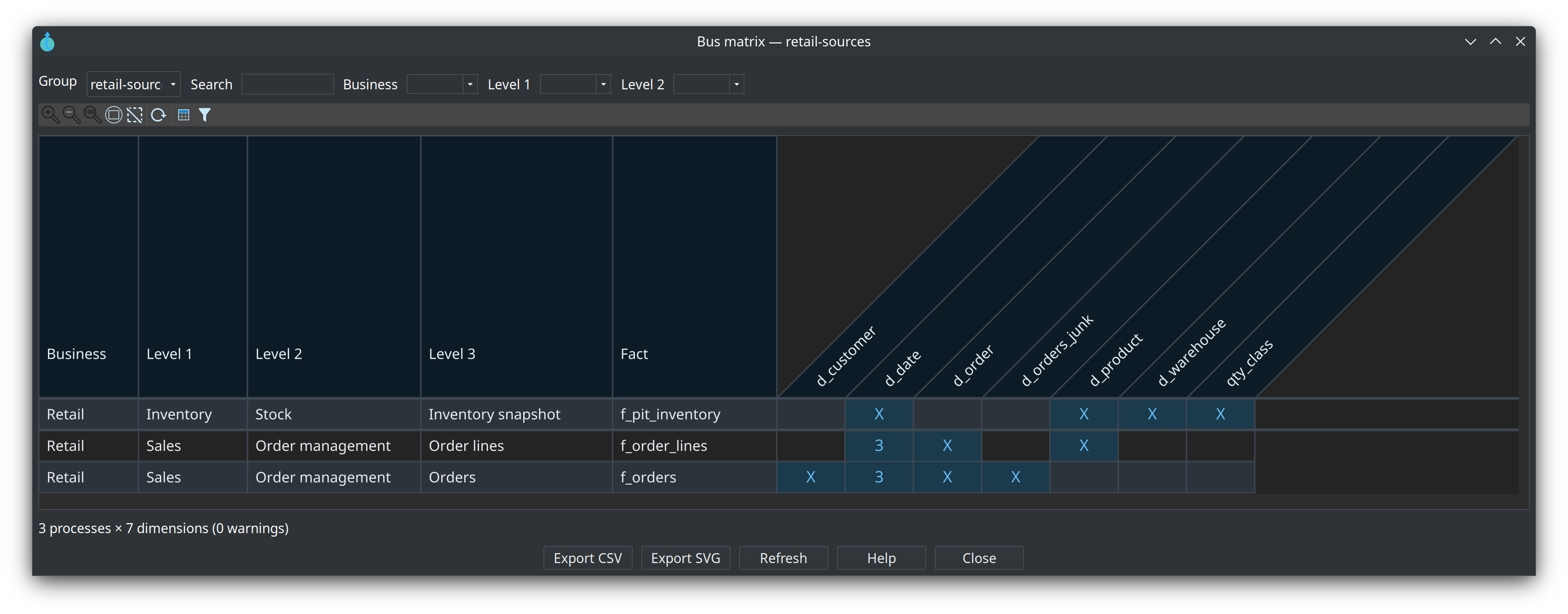
The bus matrix is a Kimball crosstab of business processes (fact-like tables) against conformed dimensions. Data Hopper EDW builds it from every .hdm file listed on a resource definition group.
Issue #177.
Why
-
See which processes share Date, Customer, Product, and other conformed dimensions.
-
Spot coverage gaps (empty columns).
-
Communicate incremental delivery: one process (row) at a time.
Tag facts
-
Create EDW metadata Business process catalog (domains plus process levels 1–3, with descriptions and parents).
-
On each fact (General tab), set Business, Process level 1 / 2 / 3. Combos come from the catalog; you can still type a value while sketching. Business process catalog opens that metadata type in the Metadata perspective.
-
Optionally point the resource definition group at that catalog (Business process catalog). Empty means “union every catalog in the project”.
The catalog editor has a tab per level. Retail retail-bus:




Role-playing date aliases (d_order_date, d_shipping_date) collapse to the physical date dimension. The cell shows X or a role count.
Open the viewer
-
Resource definition group editor → Bus matrix
-
EDW Journey → the group, the Dimensional stage, or the Bus matrix node
-
Dimensional model canvas toolbar
-
Tools → View bus matrix…
Filter by business or process level, switch Group in the viewer, search fact/dimension names, hide unused dimensions, double-click to open a fact or dimension, export CSV or SVG. Dimension names tilt 45° counter-clockwise, each in a trapezium that follows the text. The header row is tall so long names fit.