The Get Record Definition Names transform (plugin id RecordDefinitionInput) reads record definitions from a Hop data catalog connection and outputs their names and metadata as pipeline rows (optionally one row per field). It does not read source data rows — for that use Record Definition Input.
It is an input transform (category Input) and appears in the transform palette with the data catalog icon.
Use it when you want to drive pipelines from catalog metadata instead of hard-coding connection, schema, table, and column details. A common pattern is to read field layouts from the catalog and pass them to Hop’s built-in DDL transform to create or recreate source tables before loading data.
Prerequisites
-
A configured data catalog connection (DataCatalogMeta) that points at your catalog storage. The transform’s Catalog connection dropdown lists every catalog connection in the project.
-
Record definitions published to that catalog (for example Data Vault sources under namespace
hop/integration-tests/sources).
You can inspect and manage catalog entries from the Data Catalog perspective in Hop GUI.
Dialog overview
The transform dialog has two tabs: General Settings and Output Fields.
General Settings
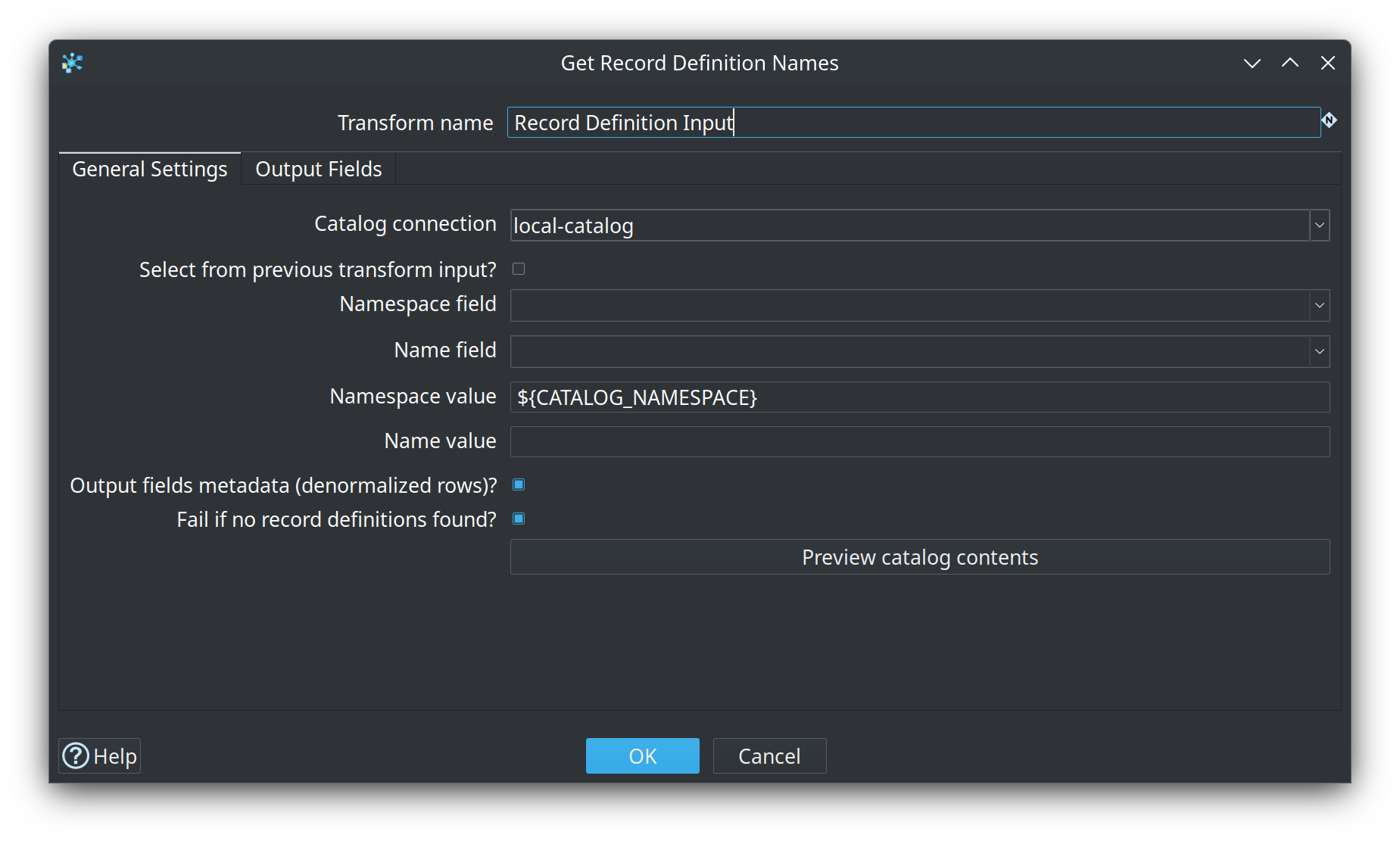
| Option | Description |
|---|---|
Transform name |
The name of this transform in the pipeline graph. |
Catalog connection |
Required. The data catalog connection used to look up record definitions. |
Select from previous transform input? |
When disabled (default), the transform runs as a standalone input: it emits rows without reading from an upstream transform. When enabled, the transform reads every input row and looks up one record definition per row using the namespace and name taken from the input fields you specify. |
Namespace field |
Enabled when Select from previous transform input? is on. Name of the incoming field that holds the catalog namespace (for example |
Name field |
Enabled when Select from previous transform input? is on. Name of the incoming field that holds the record definition name (for example |
Namespace value |
Enabled when Select from previous transform input? is off. Optional namespace. Leave empty together with Name value to list every working-tree record. Set this without Name value to list a namespace prefix. Version snapshots are not listed. |
Name value |
Enabled when Select from previous transform input? is off. Optional fixed record name to read. When set (with or without Namespace value), only that single definition is output. |
Output fields metadata (denormalized rows)? |
When disabled (default), each output row describes one record definition (one row per catalog entry).
When enabled, the transform emits one output row per column in the record’s field layout, repeating the record-level metadata on every row. This is the shape expected by the DDL transform when you map |
Fail if no record definitions found? |
When disabled (default), an empty working-tree list succeeds with 0 rows (and a log warning). When enabled, the transform fails instead. Use this on pipelines such as retail |
Preview catalog contents |
Opens a dialog with the resolved FILE storage directory, working-tree count, skipped unreadable JSON files, and a table of namespace / name / type. Version snapshots are not shown. |
Selection modes
The transform supports these ways to choose which definitions to read:
| Select from input | Namespace / name values | Behavior |
|---|---|---|
No |
Both empty |
List every working-tree record definition in the catalog connection (not version snapshots) and output one row per definition (or one row per field when denormalized). |
No |
Namespace set, name empty |
List working-tree records whose namespace starts with the given value (prefix). |
No |
Name set (with or without namespace) |
Read the single definition identified by the given namespace and name. |
Yes |
— |
For each input row, read the definition whose namespace and name come from the configured input fields. If no definition is found, the transform still outputs a row with null catalog columns appended. |
When Select from previous transform input? is enabled, upstream transforms must supply the namespace and name fields before Get Record Definition Names runs. A Get variables or Get records from stream step works well when values come from pipeline parameters.
Output Fields
The Output Fields tab lets you rename every column the transform adds to the stream. Defaults are sensible for catalog-driven DDL and filtering.
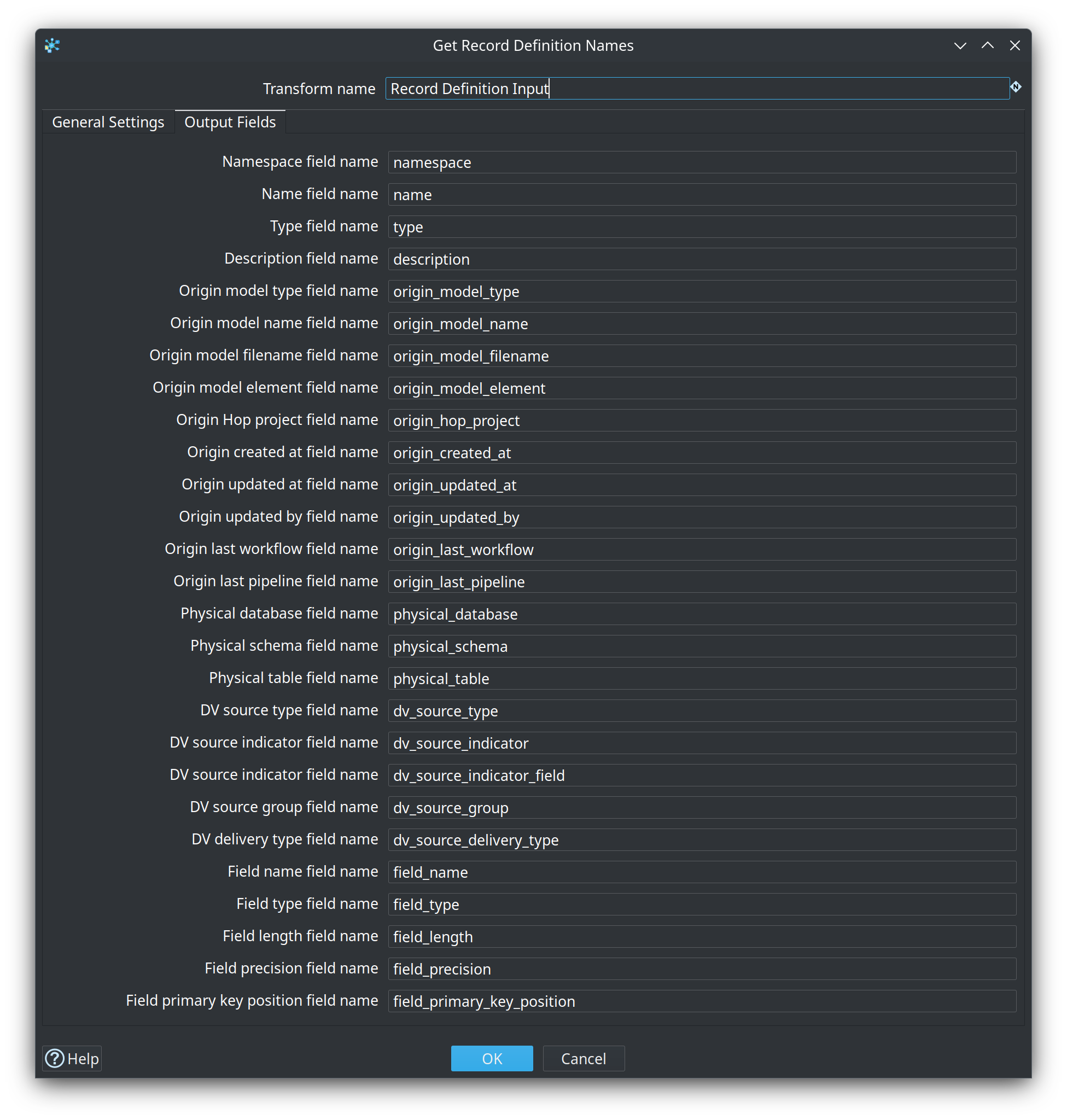
| Default output name | Always present | Description |
|---|---|---|
|
Yes |
Catalog namespace of the record definition. |
|
Yes |
Record definition name within the namespace. |
|
Yes |
Semantic type ( |
|
Yes |
Business description stored on the definition. |
|
Yes |
Type of the Hop model that published this record (when origin metadata is set). |
|
Yes |
Name of the originating model. |
|
Yes |
Filename of the originating model. |
|
Yes |
Element name inside the model (hub, link, satellite, or source name). |
|
Yes |
Hop project that published the record. |
|
Yes |
Creation timestamp ( |
|
Yes |
Last update timestamp. |
|
Yes |
User or process that last updated the catalog entry. |
|
Yes |
Last workflow that touched this record. |
|
Yes |
Last pipeline that touched this record. |
|
Yes |
Hop database connection name for the physical table (from |
|
Yes |
Database schema or catalog for the physical table. |
|
Yes |
Physical table or view name. |
|
Yes |
Data Vault source type (for |
|
Yes |
Fixed record source indicator value. |
|
Yes |
Source column used as record source indicator. |
|
Yes |
Record source group tag. |
|
Yes |
Delivery type metadata on the source. |
|
When denormalized |
Column name from the record’s field layout. |
|
When denormalized |
Hop data type description for the column. |
|
When denormalized |
Column length (Integer). |
|
When denormalized |
Column precision (Integer). |
Origin and physical-table columns are null when the catalog entry does not carry that metadata. DV source columns are populated only for definitions whose type is DV_SOURCE.
Example: create source tables from the catalog
The sample project uses Get Record Definition Names together with the DDL transform to prepare CRM source tables automatically before the Data Vault test suites run.
Orchestrator pipeline
integration-tests/tests/shared/create-source-tables-from-data-catalog.hpl runs at the start of integration-tests/tests/run-tests.hwf:
-
Get Record Definition Names — catalog connection
local-catalog, no input selection, no namespace/name filter (all working-tree definitions), denormalized output off. Enable Fail if no record definitions found? when an empty catalog should stop the pipeline. -
Filter rows — keeps definitions in namespace
hop/integration-tests/sourceswhose name starts withCRM. -
Select values — passes
namespace,name,physical_database,physical_schema, andphysical_tabledownstream. -
Pipeline executor — calls
create-source-table-from-data-catalog.hplonce per filtered record, mapping those fields to pipeline parameters.
Per-table DDL pipeline
integration-tests/tests/shared/create-source-table-from-data-catalog.hpl creates one source table from a single catalog entry:
-
Get variables — supplies
CATALOG_NAMESPACEandCATALOG_NAMEfrom pipeline parameters. -
Get Record Definition Names — Select from previous transform input? enabled; reads namespace and name from input; Output fields metadata enabled so each column becomes its own row.
-
Select values — keeps physical table coordinates plus
field_name,field_type,field_length, andfield_precision. -
DDL — connection, schema, and table from parameters; field metadata from the stream; Execute DDL and Drop table if exists enabled so each test run starts from a clean table that matches the catalog layout.
This replaces hand-maintained CREATE TABLE scripts with metadata that stays in sync with the data catalog (including column types and lengths imported when sources were published or re-imported from the database).
Minimal DDL wiring
When you build a similar pipeline yourself, configure DDL roughly as follows:
-
Connection — use the
physical_databasevalue from the stream, or a pipeline parameter resolved from it. -
Schema name / Table name — from
physical_schemaandphysical_table(or parameters). -
Field name / type / length / precision fields — map to the denormalized output columns (
field_name,field_type,field_length,field_precision). -
Enable Execute DDL when you want the transform to run the generated statements on the database.
Tips
-
Use the standalone mode (no input selection) with an empty namespace and name to discover everything in a catalog, then Filter rows or Switch / case to narrow the set.
-
Turn on Output fields metadata whenever the next step needs per-column detail (DDL, field-level validation, or custom code generation).
-
Keep catalog connection names stable across environments; override physical database connection names in the catalog or via parameters if dev and test use different DatabaseMeta names.
-
After importing tables into the catalog from the Data Catalog perspective, re-run pipelines that depend on Get Record Definition Names so DDL reflects the latest field layout.
-
Variables are supported on catalog connection name, namespace value, name value, and all output field renames.