The source modeler captures source-system structure (tables, primary keys, foreign keys, multi-table source queries, source JSON extractions, and pipeline sources) so Data Vault designers can feed hubs, links, and satellites without hand-written SQL for every join—including cases that need Hop transforms for convert/filter/aggregate.
Models are saved as .hsm files and open in Hop GUI with the same interaction style as .hdv / .hbv / .hdm (canvas, dialogs, undo, notes, check model).
Why a source modeler?
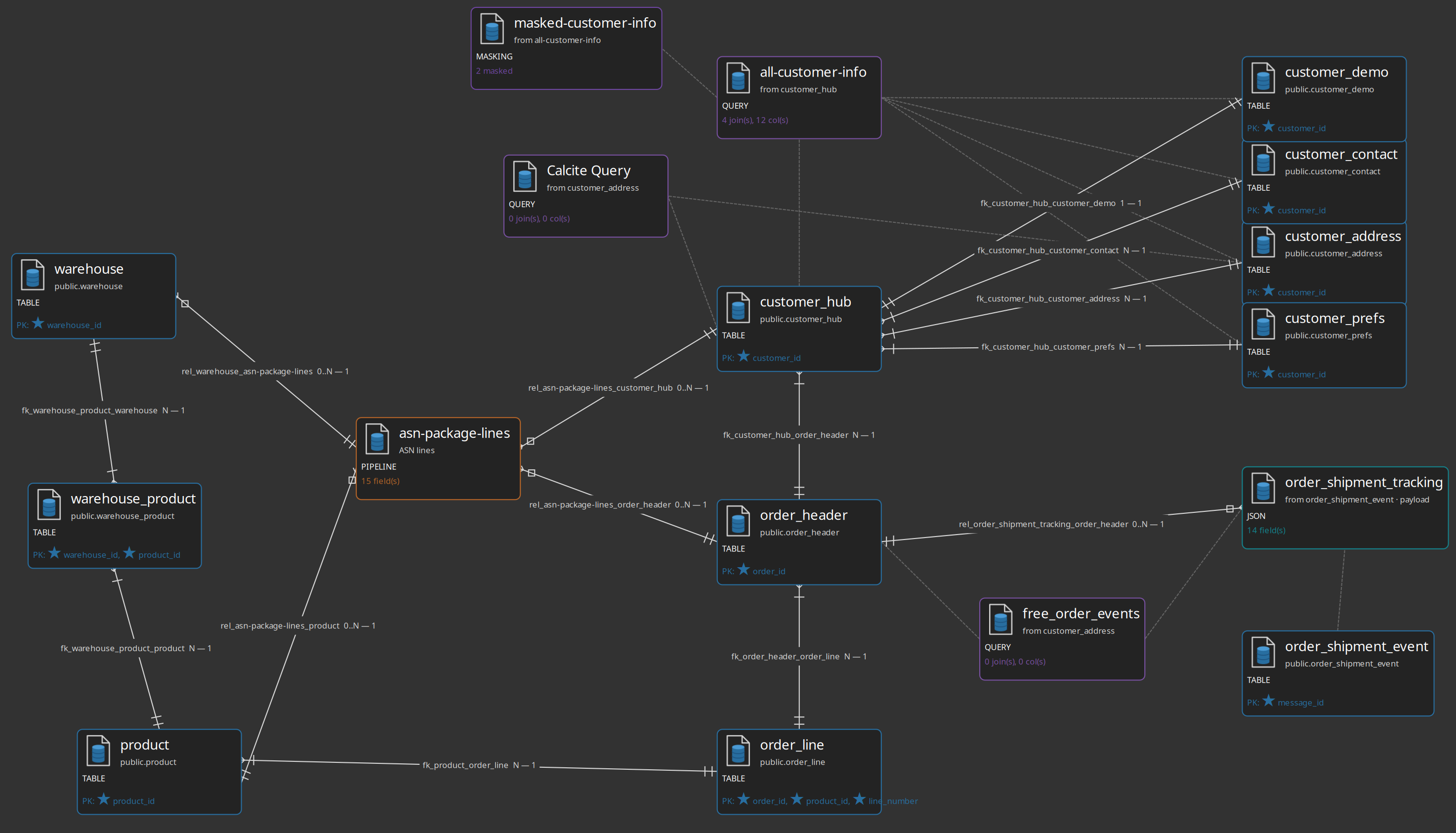
Many source systems expose sparse or normalized tables: product + product type, customer hub + address/contact/demo/prefs, order line + status dictionary. VaultSpeed-style tooling treats the source ER as a first-class model, then composes queries that become load feeds.
Without a source modeler, Data Hopper EDW typically maps each physical table to its own catalog DV_SOURCE and often its own satellite. That is correct for true independent history, but expensive when one satellite (or hub load) should read a join.
Desired flow:
Source Model (.hsm)  ──import PK/FK──► tables + relationships
        │
        │  Source queries (joins / projections)
        ▼
Catalog DV_SOURCE (single-table OR COMPOSITE feed)
        │
        ▼
  Raw Data Vault (.hdv)  → SQL Table Input OR Merge-Join pipeline
Concepts
| Concept | Role |
|---|---|
Source table |
Canvas card for a physical entity (v1: database table). Columns, PK position, optional link to an existing catalog source name. See |
Relationship |
Edge for joins (child → parent columns, join type, crow’s-foot multiplicity). Endpoints may be tables, source queries, or Source JSON extractions (e.g. shipment events |
Source query |
Named multi-table projection: driving table, ordered joins, column list, optional WHERE, generation mode ( |
Source JSON |
Named JSON extraction: parent table/query/JSON source, JSON field, projected fields (JsonPath + pass-through keys). JsonInput rules apply (top-level leaves + at most one array). Publish as catalog type |
Source masking |
Named virtual table over a parent table, query, JSON source, pipeline, or masking card. Selected fields name a Hop masking pattern. Publish as catalog type |
Source pipeline |
Named pipeline-backed feed: path to a |
Note |
Canvas documentation (same note pads as other modelers). |
Hidden sources
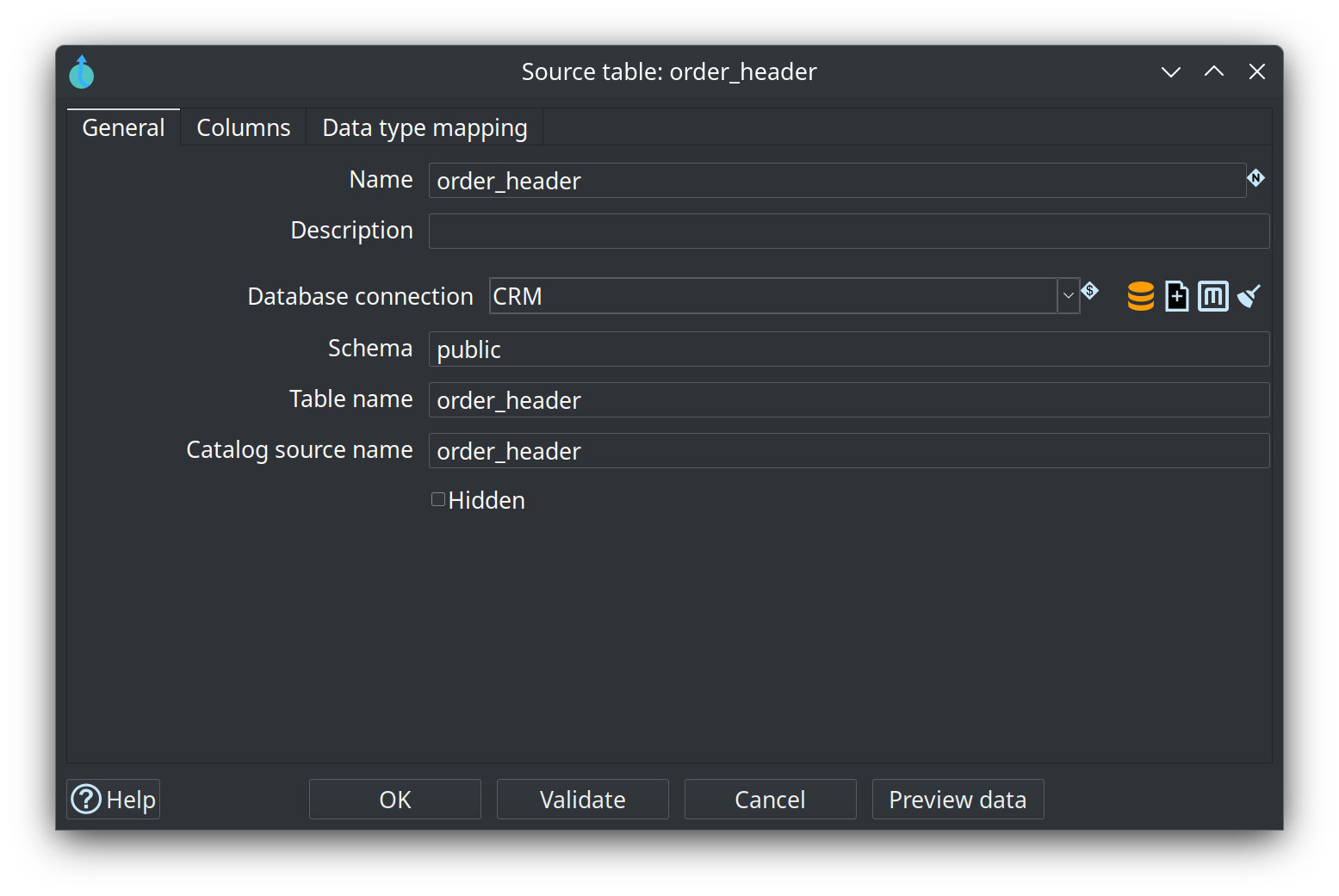
Each source card (table, query, JSON extraction, masking card, pipeline feed) has Hidden on its General tab. A hidden card stays on the canvas. The source modeler prints hidden in the bottom-right corner of the tile.
JDBC clients do not see a hidden card. It is left out of table and column metadata, and SELECT of its name, or of a published catalog alias of that card, fails. A visible child still reads a hidden parent: masking, JSON extraction, and queries (including free SQL inside a visible query) look the parent up on the model. Catalog publish, Data Vault generation, the query dialog Insert tables… list, and the Source model SQL transform also still see hidden cards.
Source pipeline
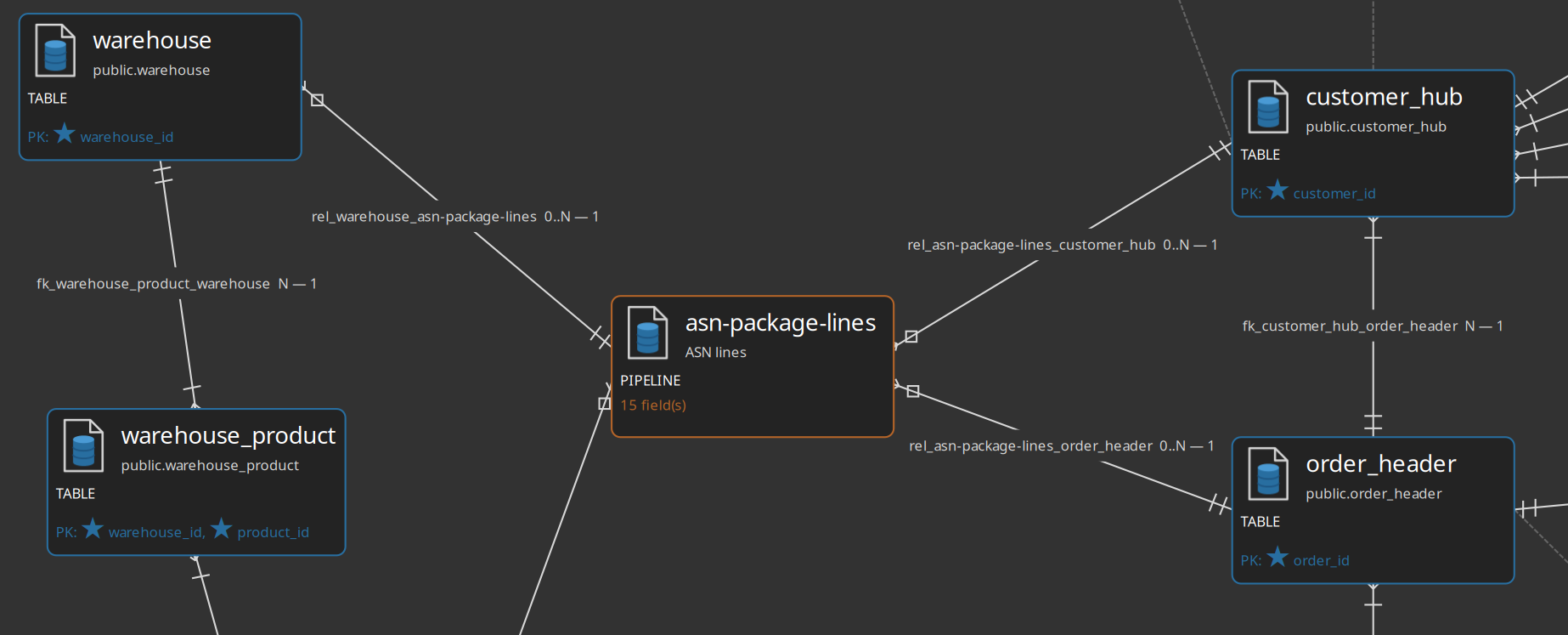
Pipeline sources are for feeds that already exist as a Hop pipeline (Get data from XML, complex transform graphs, MetaInject templates, and so on). The canvas card is not a substitute for designing the .hpl; it declares the contract the vault will load through MetaInject.
-
Add pipeline source (toolbar) or double-click an amber PIPELINE card.
-
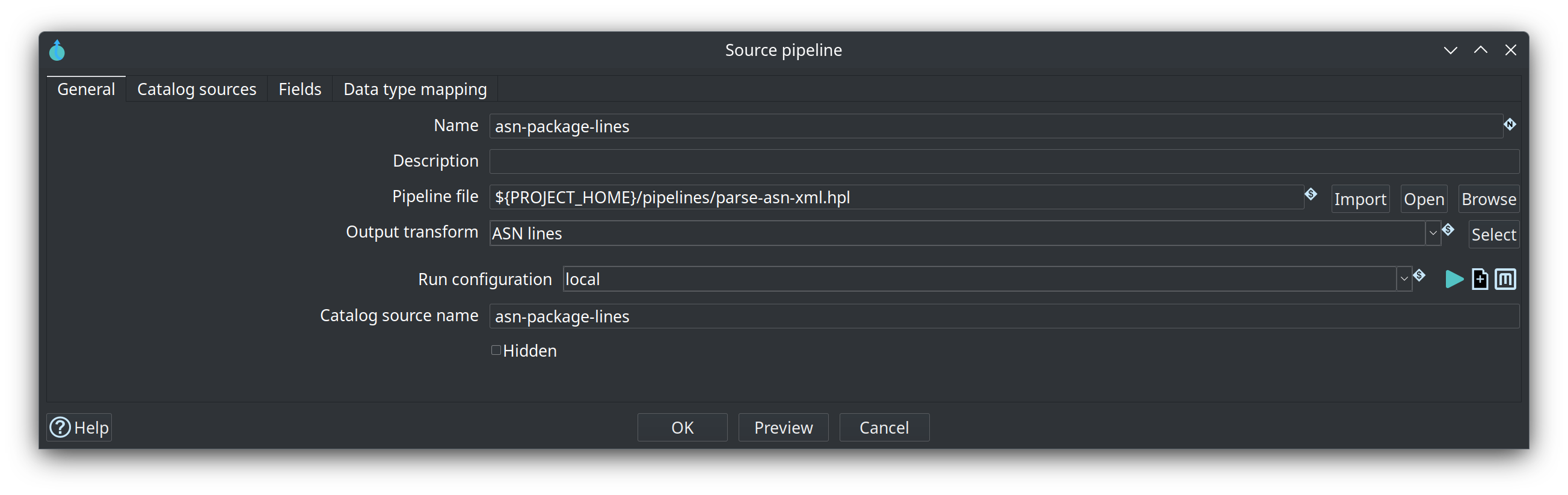
General: name, description, pipeline file (Browse / Open), output transform (Select…), optional run configuration, catalog source name for publish.
-
Import (optional): scan the pipeline for Record Definition Input transforms and record catalog lineage refs (0..n). Not required for load.
-
Fields: declare (or Get fields from the output transform) the feed layout. This list is the catalog / MetaInject contract.
-
Preview: runs the pipeline with parameter defaults activated (same idea as design-time preview when the pipeline defines parameters such as
RETAIL_CSV_WAVE). -
Validate and Publish to catalog / toolbar Push to catalog as type
PIPELINE.
Canvas behaviour matches other cards: drag to move, hover underline + click name to edit, multi-select, lasso, Shift/middle-button relationship drag. Renaming a pipeline (or other endpoint) drops relationships that still pointed at the old name; opening an .hsm also prunes dangling relationship edges.
Catalog origin and schema gate
Published pipeline feeds store source model provenance (portable .hsm path + pipeline card name). In the Data Catalog record definition, Go to origin opens the source model and selects the card.
Schema harvest / resource definition validation rediscovers pipeline feeds by rebuilding fields from the source-model projection (preferred) or the live output transform — same role as JSON/composite rediscovery. They are not treated as “physical table unavailable.”
From the Data Vault modeler
Bind hubs, links, and satellites to the published feed name (for example asn-package-lines). Generated loads inject the pipeline via MetaInject using the declared field layout and the vault record-source indicator.
On a link dialog Hub sources tab, Suggest mappings… matches feed field names to participating hub business keys (exact and simple aliases). Empty maps only are filled; review with Edit hub source mappings…. See Data Vault Link.
Runtime variables such as RETAIL_CSV_WAVE come from the workflow / project variable space (not from a separate parameter map on the source card). Pipeline parameter defaults help GUI preview when those variables are unset.
Sample retail pipeline: retail-example/pipelines/parse-asn-xml.hpl + files/asn_demo.xml (and wave files from pipelines/generate-retail-data.hpl).
Source JSON
-
Add source JSON (toolbar or canvas context), or double-click an existing teal JSON card.
-
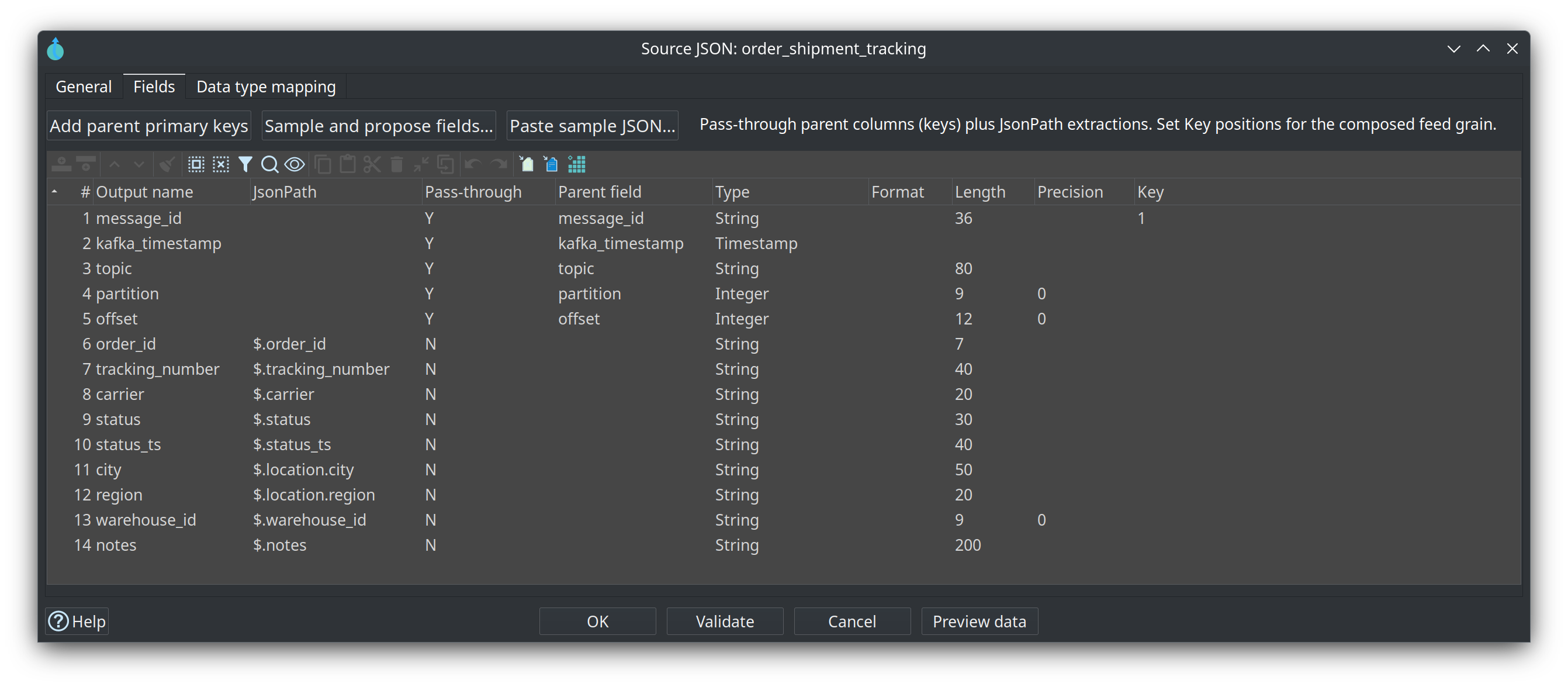
On General: choose parent kind (table, query, or another JSON source), parent name, and the JSON field that holds the document.
-
On Fields:
-
Add parent primary keys — pass-through grain columns.
-
Sample and propose fields… — samples non-empty JSON from the parent (database tables and SQL-mode queries) and proposes JsonPaths + types (including epoch → Date). If multiple arrays exist, pick one to expand; others can be emitted as JSON strings for chaining.
-
Paste sample JSON… — offline / Kafka design without a live parent sample.
-
Preview data — runs the generated parent + JsonInput pipeline with a row limit.
-
Validate — checks parent binding, JSON field, field list, and types (including Hop type resolution from
sourceDataType).
-
-
Publish to the catalog (context menu or toolbar Push to catalog). Bind hubs/links/sats to the feed name like any other
DV_SOURCE.
Parent SourceTable objects currently support database physical types for generation and sampling. File/Kafka payloads should land in a database table (or a Source Query over database tables) first. Nested arrays: first Source JSON projects nested arrays as JSON-string fields; a second Source JSON expands that field.
Table and query dialogs also support Validate, Get columns / live schema compare, and SQL generation checks so drift is caught at design time rather than only at load.
Sample excerpt: hsm-json-excerpt.xml.
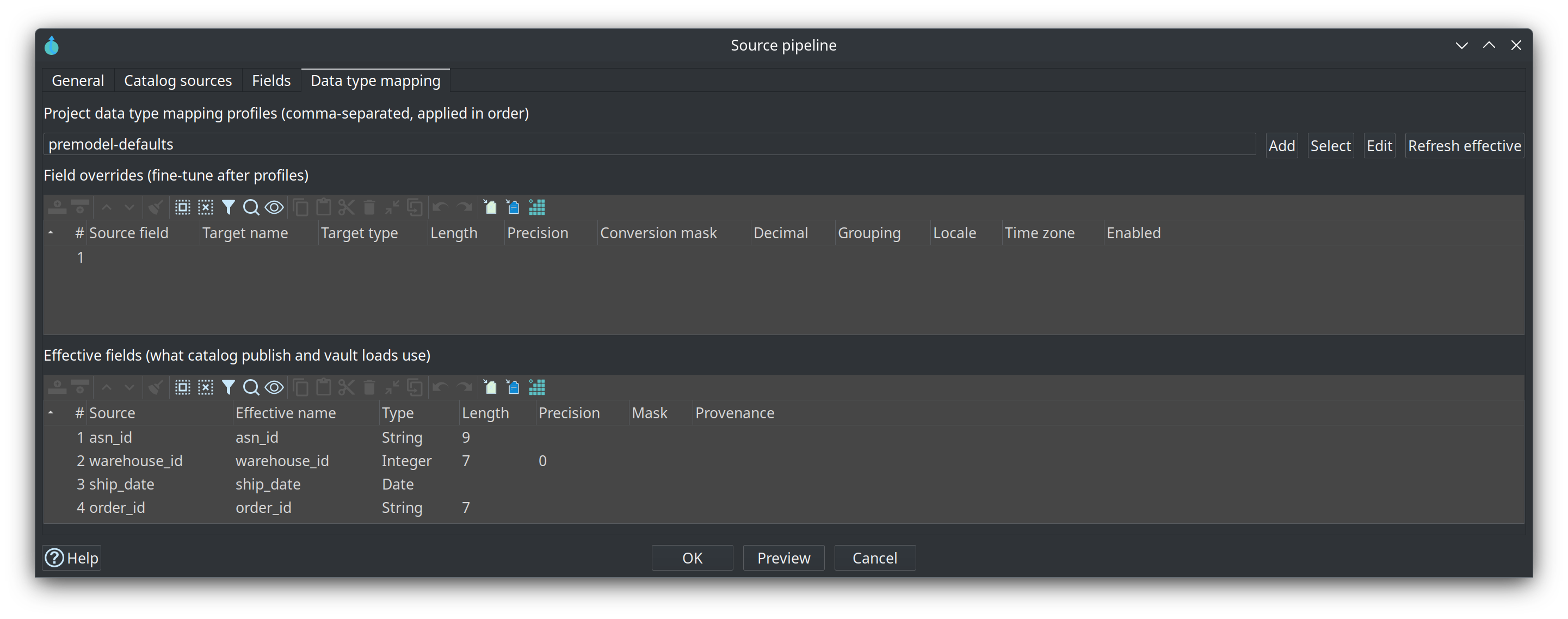
Data type mapping tab
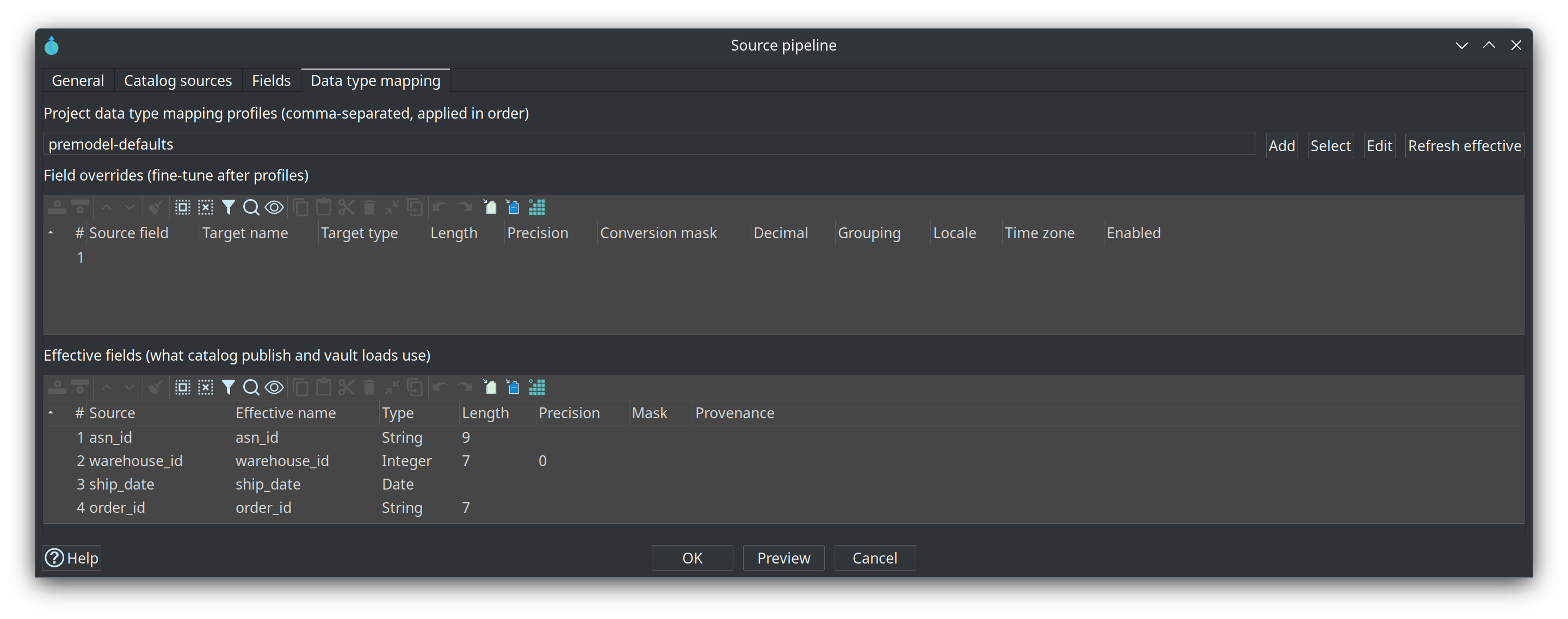
Every source card (table, query, JSON, pipeline) has a Data type mapping tab:
-
Attach project-level Data type mapping profiles (comma-separated, order matters).
-
Add / Select / Edit manage those profiles from project metadata without leaving the dialog.
-
Fine-tune field overrides (rename, type, length, conversion mask, symbols, locale, time zone).
-
Preview the effective field layout used by catalog publish and vault loads.
Project profiles are edited in Metadata (Scope + Rules tabs):
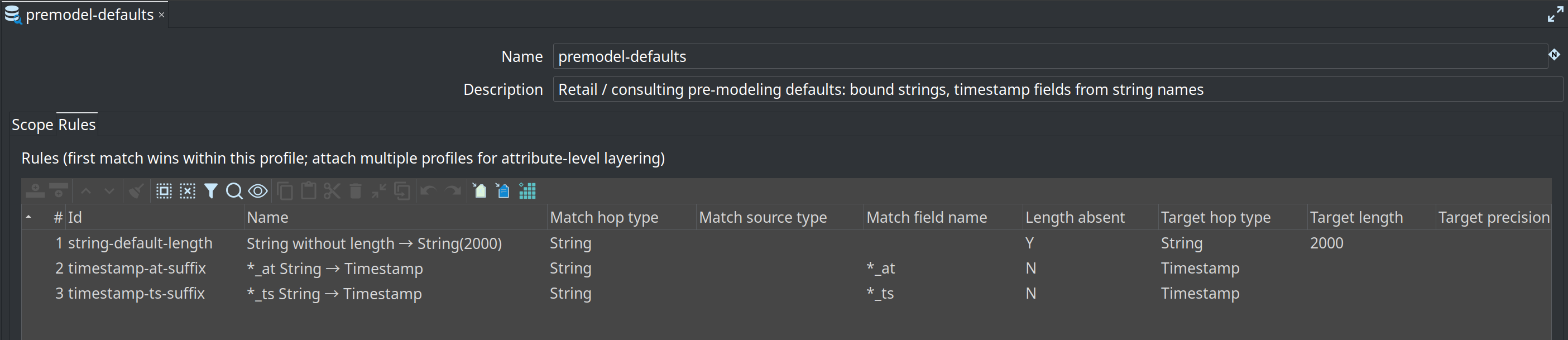
Model-level defaults live under Edit model → Default data type mappings (applied on schema import and when adding new cards). Select and Edit sit to the right of that field. The same controls are on the Source model configuration metadata editor. Full guide: Data type mappings.
Source masking
A masking card is a virtual table over a parent feed. The parent stays available to the modeler and to vault loads. Mark the parent Hidden when JDBC clients should see only the masked card. Pattern definitions live in Hop metadata (metadata/masking-pattern/). The card stores only the pattern name.
-
Add source masking (toolbar or canvas context), or double-click an existing masking card.
-
On General: name, optional catalog name, parent kind (table, query, JSON source, pipeline, or another masking card), parent name, and Hidden.
-
On Fields: Get fields copies the parent projection and keeps pattern names already chosen for the same field. Set Masking pattern on the columns that must be masked. A blank pattern passes the value through. Unlisted parent columns are not on the card. Edit masking pattern opens the Hop metadata editor for the selected row.
-
Validate, Preview, and publish as catalog type
MASKING.
JDBC SELECT from the card name, and Data Vault loads bound to the published feed, run Mask fields once at the source boundary. Help: Source masking.
Schema import
Toolbar Import schema (or canvas context):
-
Choose RDBMS connection and optional schema filter.
-
Multi-select tables.
-
Import columns + primary keys; discover imported foreign keys as relationships.
-
Optional: publish each table as a single-table catalog
DV_SOURCE. -
Auto-layout (ELK) when many tables arrive.
Browse on the source-model toolbar centers one card and draws only its neighborhood, one or two relationships deep. That view does not rewrite the saved layout. For a full rearrangement of a cyclic model, open Graph layout and choose Stress. Layered layout remains the default for pipelines and execution maps. See Graph layout.
If the database has no FKs, import still seeds tables and PKs; draw relationships with Shift+drag (or middle-button drag) between table cards.
Relationship multiplicity (crow’s foot)
Each relationship has a child side (FK) and parent side (PK) multiplicity:
-
1— exactly one -
0..1— zero or one -
N— one or many -
0..N— zero or many -
Unknown
Edit them in the relationship dialog. The canvas draws standard crow’s-foot symbols near each endpoint and spreads anchors when multiple edges share the same side of a table.
Profile… estimates multiplicity from the database using a size-gated strategy: exact key analytics for small tables, sampling for large tables, and a statistics-only heuristic when joins would be unsafe. Full outer joins are not used by default on large tables.
Source queries
-
Add source query (canvas context menu), or double-click an existing query card.
-
Set driving table on the General tab. Optional Catalog feed name overrides the name used when publishing to the data catalog (empty = use the query name).
-
Joins — prefer Add related tables… (graph neighbors via model relationships). Join keys resolve automatically; the Resolved keys column is read-only. Relationship name and left/right column combos are optional overrides when multiple edges exist.
-
Columns — pick table and column from combos (participants only). Set Key (1-based) for the logical primary key of the composed feed. Get primary keys seeds projection + key positions from physical PKs.
-
Optional WHERE (without the
WHEREkeyword). -
Generation mode
-
Automatic — single-connection SQL when all participants are database tables on one connection; otherwise Merge Join pipeline.
-
SQL (Table Input) — force SQL path (fails if mixed connections).
-
Pipeline (Merge Join) — force Sort + Merge Join chain.
-
Free SQL (Calcite) — author full
SELECTSQL against logical canvas names for tables, named source queries (virtual tables), Source JSON, and Source Pipeline feeds (issue #117 / #115). Apache Calcite parses and validates the SQL against the source model schema, then generates a Hop pipeline: full database pushdown (single Table Input) when all referenced tables are DATABASE on one connection; otherwise residual operators (Sort + Merge Join, Filter Rows, Group By, Calculator, SQL Expression, Select Values, MetaInject / JSON / nested query subgraphs). Supported: joins, WHERE, ORDER BY, LIMIT, GROUP BY with COUNT/SUM/MIN/MAX/AVG, residual+ - * /and 2-arg COALESCE/NVL (Calculator), residualCASE/CAST/ N-argCOALESCE(SQL Expression). Use the Free SQL tab, Insert tables…, Explain plan, and Preview data.
-
-
Generate SQL / Preview data / Explain plan — visual-query SQL is pretty-printed with syntax highlighting (desktop). Free SQL explain shows pushdown fragments and residual operators.
Source model SQL transform
Use the Source model SQL pipeline transform (Input category) to run free SQL against a .hsm at runtime:
-
Source model — path to a
.hsmfile (variables allowed) -
SQL — free SQL over logical table / query / JSON / pipeline names
-
Row limit — optional cap (
0= none) -
Dialog actions: Preview, Explain plan, View generated pipeline
The transform plans with Calcite (same engine as Free SQL on the source query dialog), executes the generated pipeline nested in the local engine, and streams the result rows.
JDBC (jdbc:hop-hsm:)
Local (in-process Hop)
-
URL:
jdbc:hop-hsm:file=/path/to/model.hsm(optional;rowLimit=N) -
Driver:
org.hopper.edw.datavault.virtualization.jdbc.HopSourceModelJdbcDriver -
Requires full Hop + plugin on the classpath (GUI / CLI / embedded)
-
Cards marked Hidden are omitted from
getTables/getColumnsand cannot be selected. The same rule applies to the Hop Server source-model service used by the thin client.
Remote Hop Server (thin client)
Expose free SQL without publishing filesystem paths. Each Source model service is a JDBC schema; tables, named queries, JSON feeds, and pipeline feeds appear as tables/views under that schema.
Hop relational connection type
With Data Hopper EDW installed, create a connection of type Apache Hop Source Model (HOPSOURCEMODEL):
| Hop field | Maps to | |
|---|---|---|
Host name |
Hop Server / Hop Web host ( |
|
Port number |
HTTP port (Hop Server often 8888; Hop Web Tomcat 8080) |
|
Database name |
Optional default Source model service (JDBC schema) |
|
Username / password |
Basic: Hop Server user/password. Bearer: leave user empty and paste a JDBC token as the password |
|
Authentication |
Basic, Bearer, or OAuth 2 (driver fetches a token; not used with Google OIDC) |
The driver class is org.hopper.edw.hsm.jdbc.HopHsmJdbcDriver. The thin client jar is shipped under plugins/misc/hopper-edw/lib/ so Table input, Explore database, and other Hop database consumers can use the connection without a separate driver install.
1. Create a Source model service (Hop)
On the Hop project used by Hop Server, open Metadata → Servers and Web Services → Source model service and create an entry:
-
Name — public JDBC schema name (for example
crm) -
Source model file — server-side path to the
.hsm(variables allowed; never sent to clients) -
Default / max row limit — safety caps for remote queries
-
Allow schema metadata — when checked, DBeaver can list tables and columns
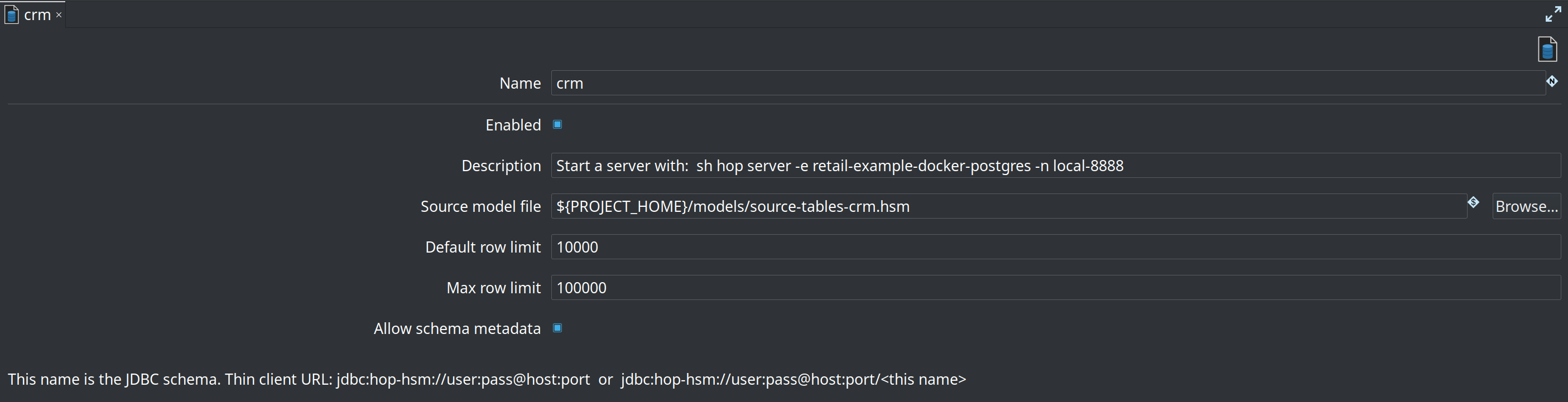
Hop Server must load Data Hopper EDW (servlet path /hop/sourceModelData) and have RDBMS connection metadata for the model’s sources.
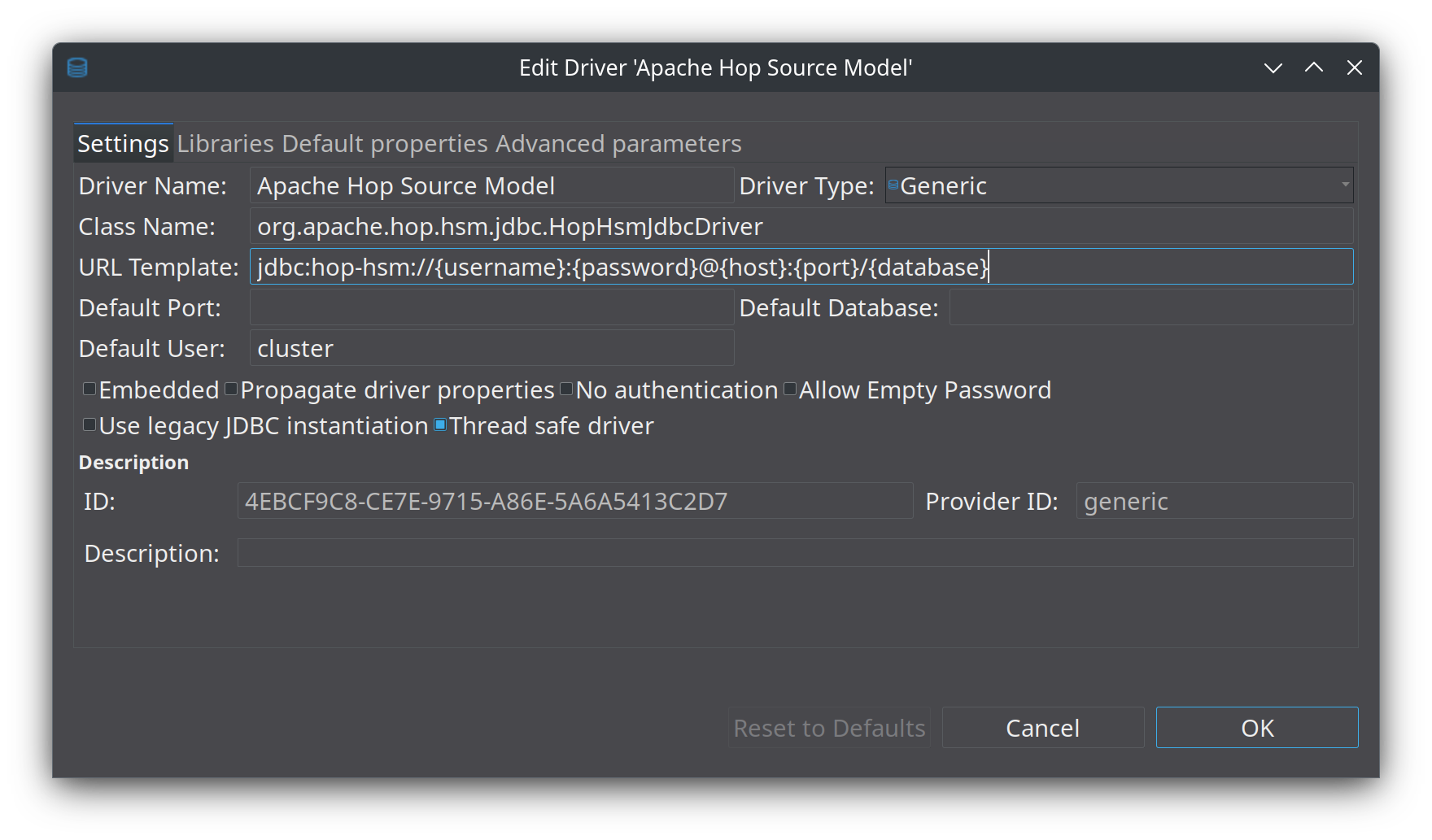
2. Register the thin driver in DBeaver
Build or take the single zero-dependency jar:
mvn -f hop-hsm-jdbc/pom.xml clean package
# → hop-hsm-jdbc/target/hop-hsm-jdbc-*-SNAPSHOT.jar
In DBeaver: Database → Driver Manager → New, then:
| Setting | Value | |
|---|---|---|
Driver Name |
e.g. |
|
Driver Type |
Generic |
|
Class Name |
|
|
URL Template |
|
On the Libraries tab, add only hop-hsm-jdbc-*.jar (no Hop or Calcite jars).
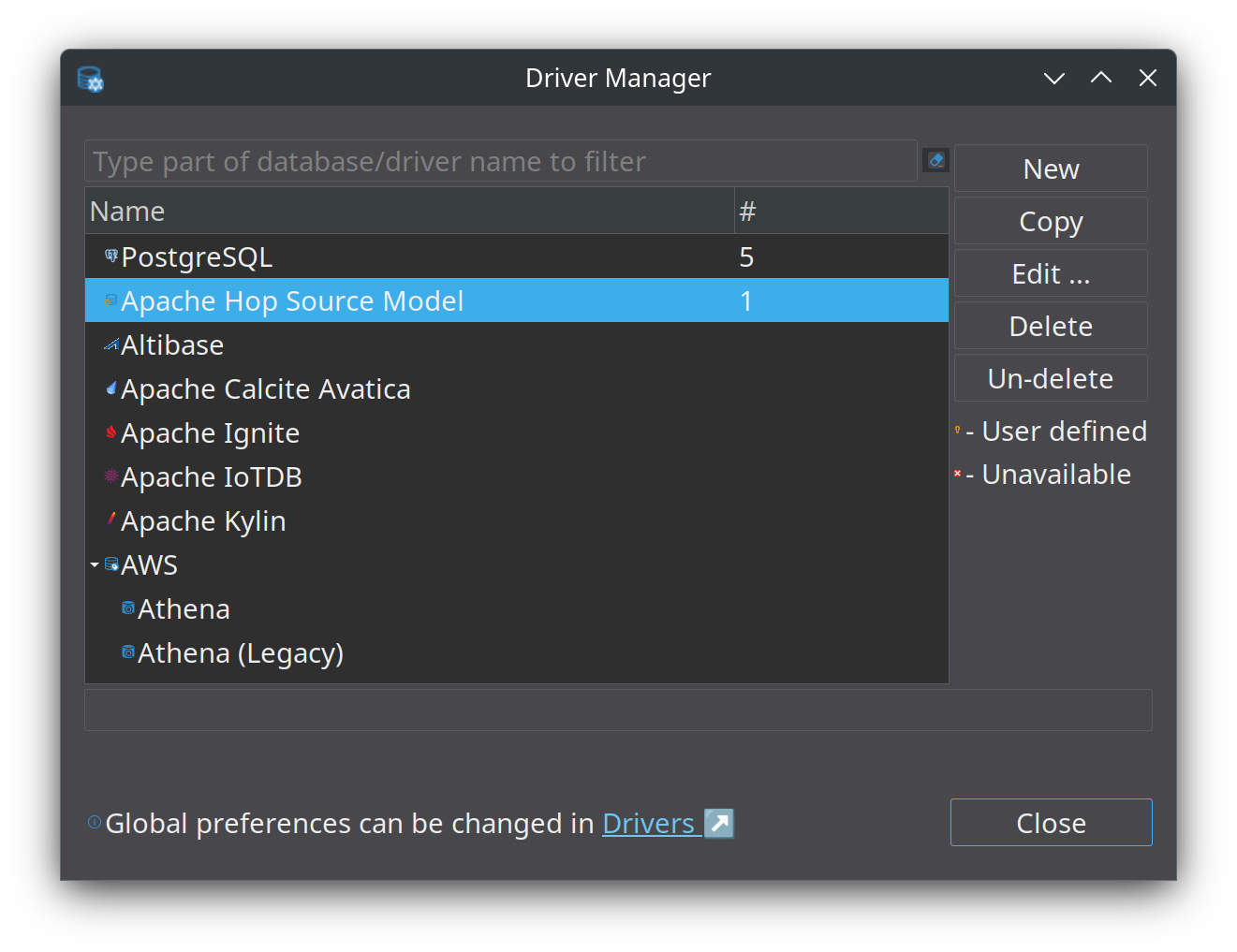
After you save the driver, Apache Hop Source Model is listed with the other drivers.
In the URL template, {database} is the default schema (Source model service name), not a relational database name.
3. Create a connection
| Field | Example | Meaning | |
|---|---|---|---|
Host |
|
Hop Server host |
|
Port |
|
Hop Server port |
|
Database/Schema |
|
Source model service name (JDBC schema) |
|
Username / Password |
Hop Server credentials |
Basic auth. For Bearer, put the token in Password (do not put it in the URL) |
|
Driver properties |
|
Optional. OAuth 2 also needs |
The resolved URL looks like:
jdbc:hop-hsm://{username}:{password}@localhost:8888/crm
Do not put a Bearer token in the URL userinfo. Use the password field or the accessToken property.
On Hop Web with OAuth2 (for example https://hop-web.data-hopper.com/ui): File → Copy JDBC token, then use connection hsm-crm-web (host localhost, port 8080, database crm, Authentication Bearer, paste the token as the password). Open the Database perspective and connect. The token lasts about an hour; do not save it in project metadata.
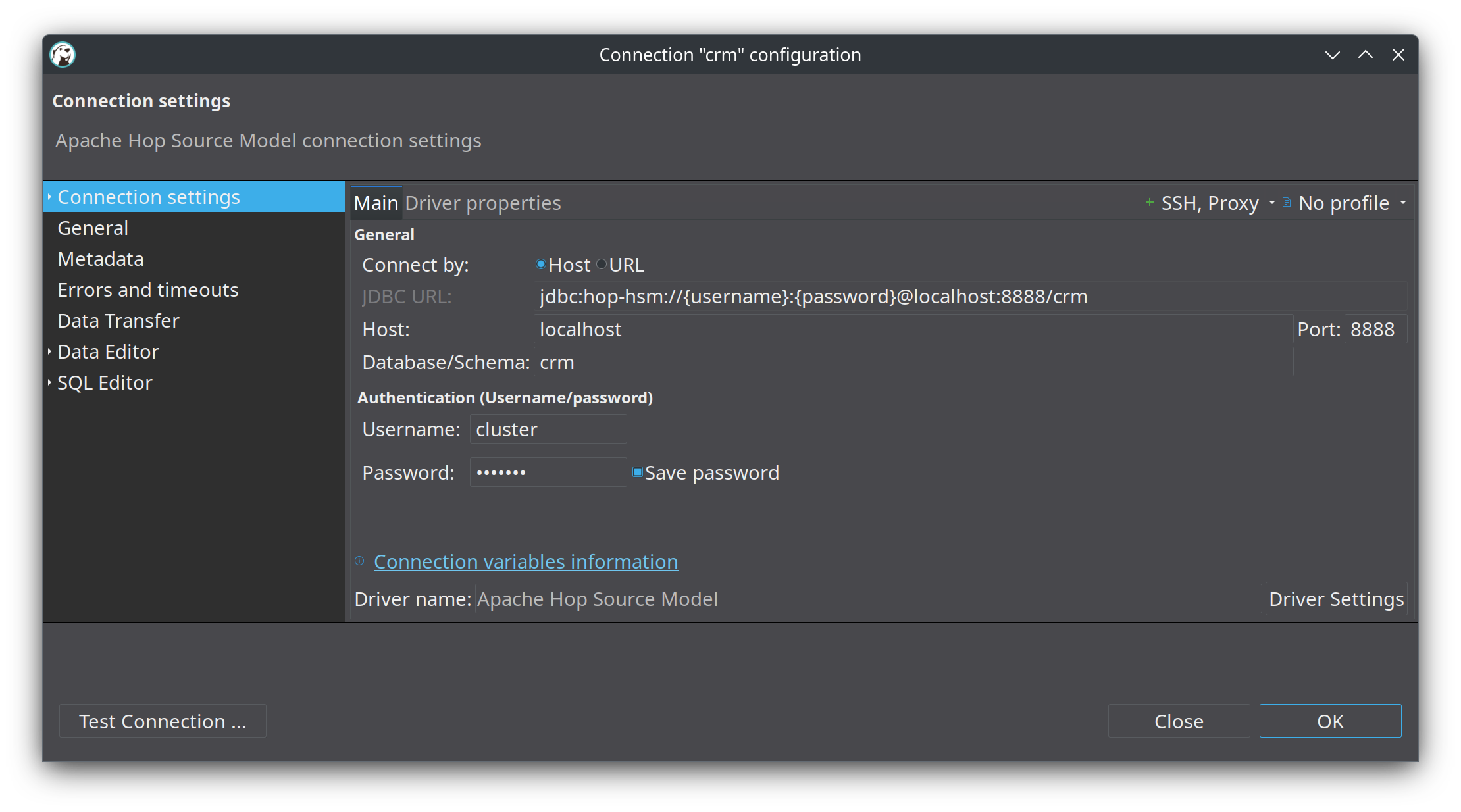
You can also connect without a default schema (jdbc:hop-hsm://user:pass@host:port) and pick a schema in the navigator later. Legacy ?schema=crm / ?modelName=crm still work.
4. Query from the SQL editor
After Test Connection, the navigator shows the service as a schema with tables and views. Open a SQL editor on that schema (or keep the active schema set) and run free SQL. Both bare and schema-qualified names work, for example:
SELECT *
FROM crm.order_header oh
WHERE oh.total_amount > 1000
ORDER BY oh.total_amount desc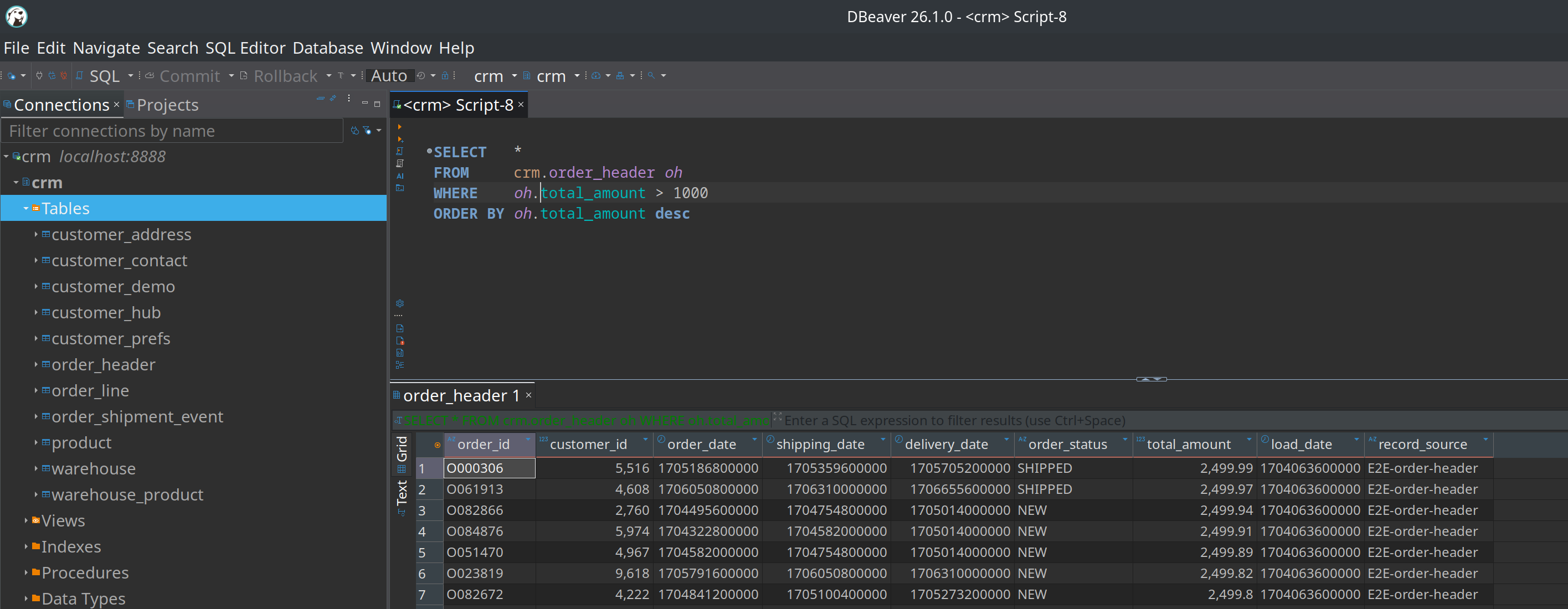
-
Active schema selects which
.hsmfree SQL runs against on the server -
JSON and pipeline feeds appear as JDBC VIEWs so the SQL dictionary includes them
-
After upgrading the jar or plugin, Invalidate/Reconnect so DBeaver rebuilds metadata
See also Source model SQL virtualisation plan and the module README hop-hsm-jdbc/README.md.
Push to catalog
Use the toolbar Push to catalog button to choose which model objects to publish. A multi-select dialog lists:
-
Tables with columns → catalog type
DATABASE -
Queries with a projection → catalog type
COMPOSITE -
JSON sources with fields → catalog type
JSON -
Pipeline sources with declared fields → catalog type
PIPELINE
All items are preselected; deselect anything you do not want. Existing catalog feeds with the same name are overwritten. Set Catalog connection under Edit model (or on the shared Source model configuration) first. The field is a dropdown of project data catalog connections.
Per-object context menus still offer Publish to catalog for a single query or JSON source.
For queries, publish creates or updates a COMPOSITE feed:
-
Field layout from the projection (aliases become source field names).
-
Logical primary key from the Columns tab Key positions (catalog
primaryKeyPosition) so hubs can Get keys from the composed feed. -
Pointer to the
.hsmpath and query name (loads regenerate SQL from the live model when possible). -
Optional cached SQL for fallback when the file is unavailable.
After publish, bind hubs / links / satellites to the feed name (e.g. feed_customer_enriched) like any other DV_SOURCE. Map business keys and attributes to the projected aliases.
Generation at load time
When Data Vault Update builds a pipeline for a composite source:
-
SQL mode —
Table Inputwith an outerSELECTof mapped fields from(generated join SQL) composite_src. -
Pipeline mode — injects the generated Sort / Merge Join / Select Values graph from the source query.
When the bound feed is a JSON source:
-
Injects the parent read + JsonInput graph from the
.hsmSource JSON definition. -
Adds the vault record source column (static indicator Constant, or rename of a source-indicator field) — the same role database SQL plays with
'indicator' AS x_record_source. -
Hub loads also sort and distinct on business-key identity fields so MergeRowsPlus CDC does not re-insert existing keys on incremental waves.
When the bound feed is a PIPELINE source:
-
Injects a MetaInject step targeting the declared
.hpland output transform, with the catalog field contract as MetaInject output fields. -
Adds the vault record source indicator the same way as other source types.
-
Hub loads sort/distinct identity fields for CDC as with JSON/database sources.
Prefer keeping the .hsm in the project so generation always reflects the latest join; re-publish when field layouts change so catalog field lists stay aligned for mapping dialogs.
Retail sample
The retail project includes:
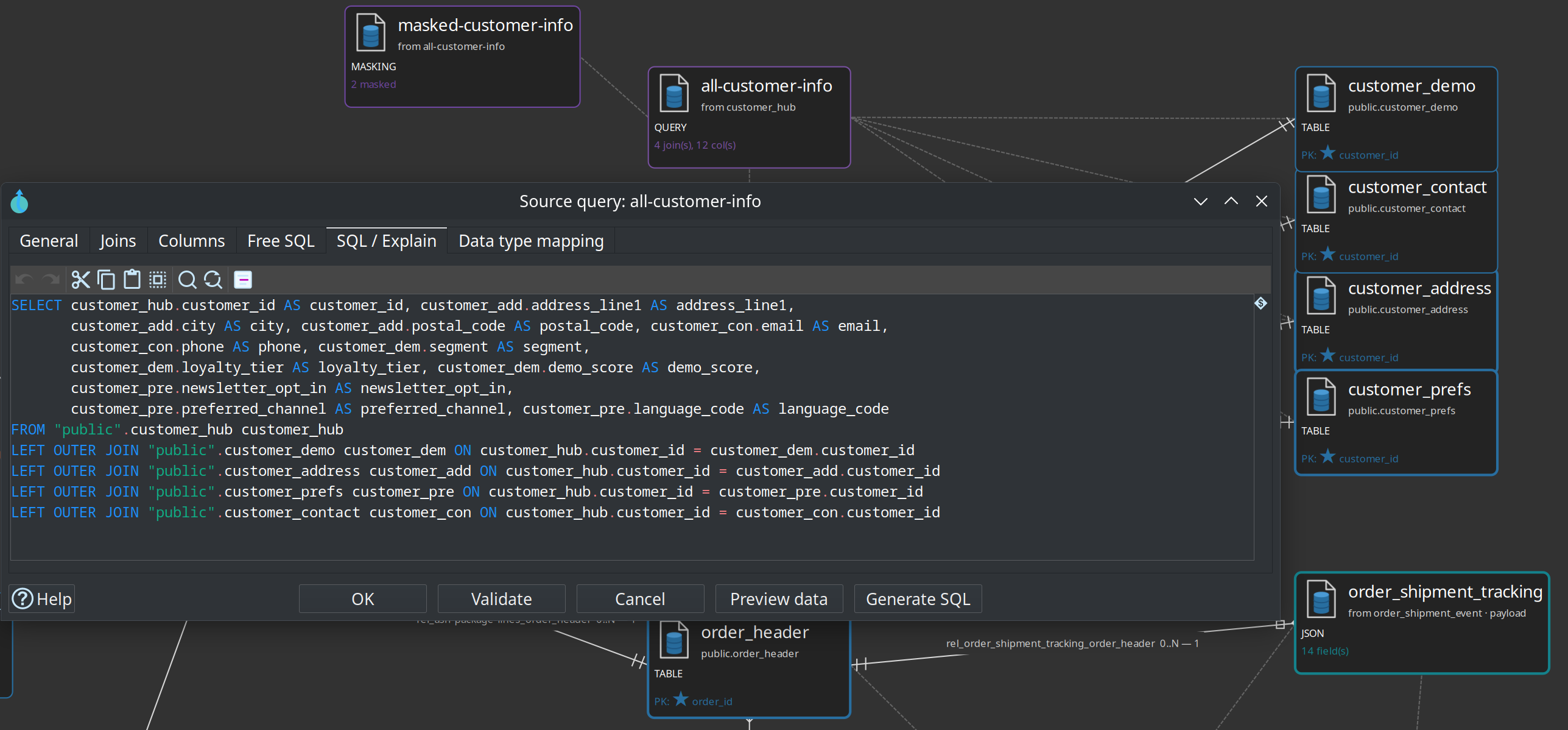
retail-example/models/source-tables-crm.hsmIt models CRM landing tables (customer hub, address, contact, demo, prefs, orders, products, warehouses, order_shipment_event) with relationships, a sample query All customer info (feed_customer_enriched), Source JSON order_shipment_tracking (feed_order_shipment_tracking), and pipeline source asn-package-lines (parse-asn-xml.hpl over ASN XML waves). The screenshots above show the multi-table query dialog, JSON source, and pipeline source graph/dialog.
Workflow:
-
Open
source-tables-crm.hsmin Hop GUI (project retail-example). -
Review tables, the purple query card, the teal JSON card, and the amber PIPELINE card.
-
Open All customer info — use Generate SQL / Preview data / Validate (CRM connection required).
-
Open order_shipment_tracking — sample fields / preview after CRM load; Validate and publish as
feed_order_shipment_tracking. -
Open asn-package-lines — pipeline file
pipelines/parse-asn-xml.hpl, declared package-line fields; Preview / Validate / publish asasn-package-lines. -
Ensure model Catalog connection points at the project catalog (
local-catalog). -
Push to catalog (or publish individual objects); confirm feeds in the Data Catalog. Go to origin on a pipeline feed returns to this
.hsmcard. -
models/retail-360.hdvbindsfeed_order_shipment_trackingfor shipment tracking tables andasn-package-linesfor hub_package_line / sat_package_line / lnk_package_line; classic customer/order sats still use one catalog source per physical table.
Check model
Source model Check model validates:
-
Tables and unique names
-
Relationship endpoints
-
Query driving table / join tables present
-
Non-empty projection (warning)
-
Catalog publish is current — when a table / query / JSON / pipeline card already has a catalog feed name and a catalog connection, Check compares the card’s effective layout (including data type mappings) to the published
DV_SOURCE. A stale catalog is an error: the canvas is not the contract vault loads use. Publish the card (or Push to catalog), then re-harvest / re-validate.
The same catalog-stale check runs from Validate on the table, query, JSON, and pipeline dialogs.
Saving the .hsm also compares published feeds. When any published catalog feed lags the canvas, a dialog asks Do you want to publish these? (with Don’t remind me after save). The reminder is on by default under Configuration → Hopper EDW. Never-published draft cards are not included.
Vault Check model continues to validate hub/sat field mappings against catalog field lists for composite feeds like any other source.
Generate a Data Vault model
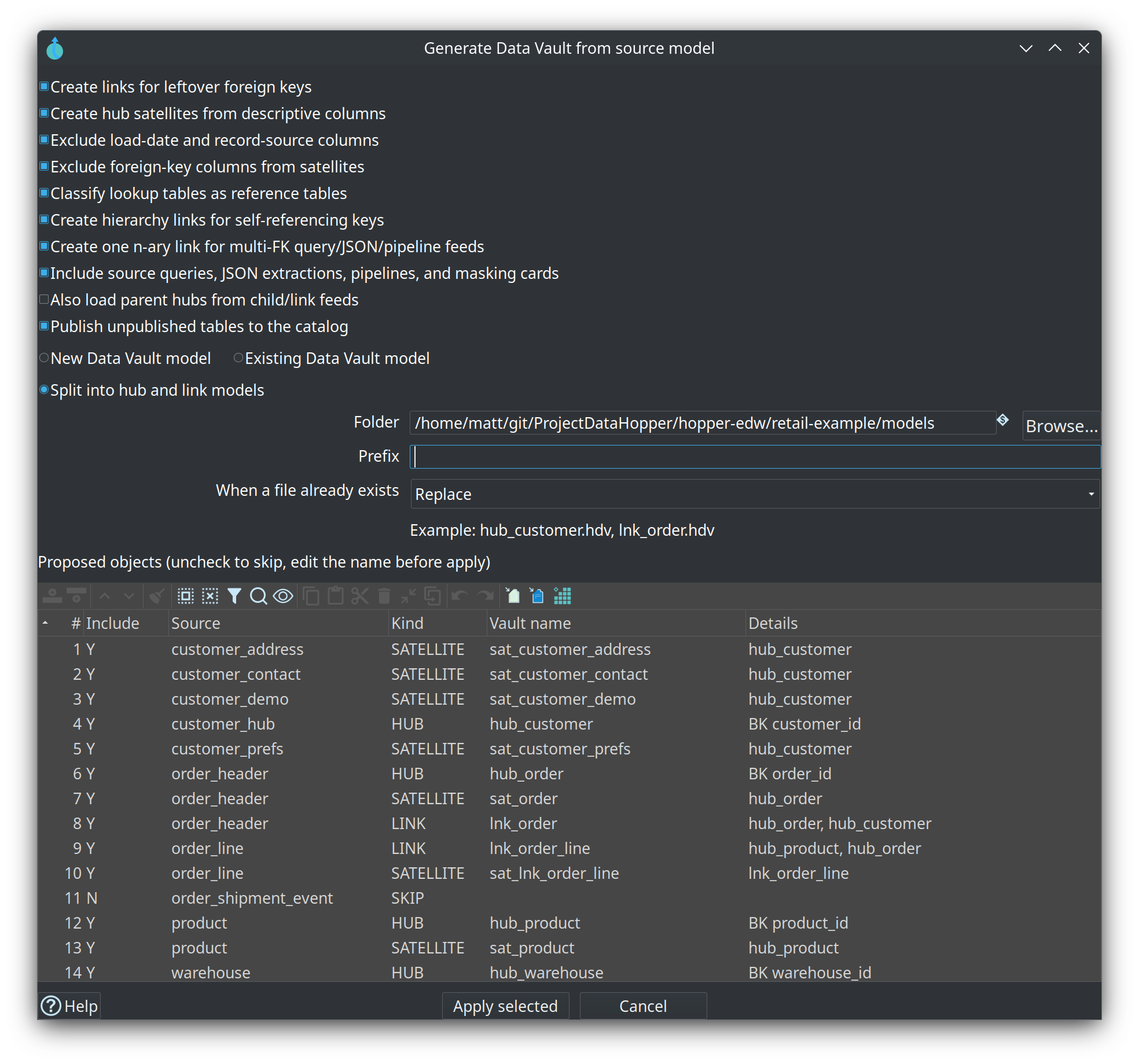
Toolbar Generate Data Vault… (or the canvas context action) classifies selected tables, queries, JSON extractions, and pipeline cards from their primary keys and relationships and adds hubs, satellites, links, and reference tables to a new or existing .hdv after a review screen. Isolated tables with no relationships are skipped; JSON and pipeline children of those tables can still generate. Full walkthrough: Generate a Data Vault from a source model.

Related documentation
-
Data Vault sources — catalog
DV_SOURCEincluding composite feeds -
Metadata harvesting — generate or merge a
.hsmfrom harvested FK inventory