Why it matters
A warehouse that cannot explain itself is not trusted. Three questions come back in every review of a running EDW: where did this value come from, is the data good enough to load, and what ran last night. Data Hopper EDW answers each one with a different surface, and mixing them up leads to the wrong fix — widening a model to silence a content problem, or re-running a load that a schema gate had already rejected.
This module is the operational view of the four controls you met in module 0. It shows where lineage, quality, the schema gate and operations live, what each one compares, and how the retail example wires them into a single update wave. Managers and architects can read it beside module 0: those two modules are the path that explains the layers, the build order and where the controls sit. Budget 30-40 minutes; the steps that need Docker are marked optional.
Concepts
Three questions, three surfaces
Lineage answers where a value came from: which catalog feed or parent table feeds each target table and field, and why each mapping exists. Quality answers whether the rows are good enough, with rules that measure and a gate that decides. Operations answers what actually ran: how the batch is wired, what each run did, how long it took, and the history behind those numbers.
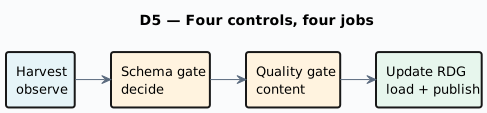
Module 0 named the four controls: Check model (build time), metadata harvest (live schema), the schema gate (contract policy) and data quality (row content). This module goes deep on the last three, and on the lineage and operations surfaces around them.
Lineage is derived from the models
The .hdv / .hbv / .hdm model files stay the source of truth for loads and DDL. Lineage is a
deterministic projection of those models plus catalog source resolution — not a second place to edit
mappings. For every target table the collectors record the upstream sources (catalog feeds, parent hubs
or links, staging SQL) and the reasons the table and its names exist. For every target column they
record the source contributions, the transform (IDENTITY, RENAME, HASH_INPUT, DERIVED,
CONSTANT), and reason codes with human-readable text.
The same explanation makes DDL operable. When an update action needs structural changes, or when Fail if DDL is needed stops a load, the log says which table or column would change and which model mapping forces it — the gate no longer says only "DDL is required", it says why.
Where lineage surfaces
| Surface | What it gives you |
|---|---|
Lineage tab |
One table in one model: table sources and reasons, then a read-only field grid of target field, technical flag, source feed/table, source field, transform, reason code and the Why message. |
Reverse lineage browser |
Browse lineage… on the resource definition group: filter by source feed or source field and list every DV/BV/DM consumer with its hop count, target field and transform. |
Catalog lineage siblings |
When a model publishes target layouts, lineage payloads are written into the project’s lineage namespace in the catalog — used for discovery and for the drift gate. |
Hop Lineage View ( |
A cross-model, usually upstream graph, queried live from a lineage backend. The file stores the backend name, seed, depth, direction and filters; the graph itself is not stored. |
OpenLineage export |
The same collectors serialized as |
An execution map (.hem) is a different graph: it captures how the batch is wired and what ran, not
how fields map.
The lineage drift gate
The Validate resource definitions action — and the interactive Validate sources on a resource definition group — also compares current model lineage with the last lineage published to the catalog. A physical table rename without an explicit name is blocking; a field rename, a mapping change or a removal is a warning; an addition is info. The validation report carries a Lineage Drift section per model, and a blocking rename can raise the overall status to critical.
Quality: measure, then dispose
Data quality is a reusable measure → disposition stack, deliberately separate from schema validation: it checks row content (counts, domains, ranges, nulls, patterns, custom SQL asserts), not contracts.
-
Measure Data Quality runs the rules against catalog subjects, logs a formatted report, and can persist run, profile and finding history to the OPS database. On rule findings it does not fail the workflow — only on infrastructure errors, so the findings can always be read.
-
Evaluate Quality Gate applies policy to that report:
FAIL_ON_BLOCKING,FAIL_ON_WARNINGS, orALERT_ONLY, with optional alert sinks (log,ops_table).
Rules live in Data quality rule set metadata — the retail example ships retail-source-quality and
retail-target-quality — and are bound on catalog record definitions, by library reference or inline.
Before a load, measure the sources and gate with FAIL_ON_BLOCKING to stop bad extracts. After a load,
measure the published vault tables and alert with ALERT_ONLY: a post-load check observes, and cannot
un-load. Run facts land in the quality_* OPS tables, which operational analytics reads later.
Harvest observes; the schema gate decides
Two controls work on schemas, and each has one job:
-
Harvest source metadata observes. It rediscovers live source schemas, compares them to the catalog (or to a catalog version tag), and persists snapshots and drift into the
schema_harvest_*OPS tables. It is connection-batched, it never rewrites the catalog, and drift does not fail the harvest. -
Validate resource definitions decides. It applies a failure policy to one comparison: expected contracts on one side, actual schemas on the other. The compare mode chooses that pair —
LIVE_SOURCE(live discovery),WORKING_VS_VERSION(the working catalog against a frozen tag such asv1.0.0),VERSION_VS_VERSION(two frozen tags), andHARVEST_RUN(rebuild the report from the persisted harvest, with no second discovery).
The recommended chain is Harvest → Validate → quality → update. Both steps write Markdown and HTML
reports under work/reports/, and the gate report restates the resource group, the baseline, the
compare mode and the status.
Operations: what ran, and for how long
-
The execution map (
.hem) is a crawled graph from a root workflow or a model: nested workflows, generated pipelines, the models a group update covers, and source datasets resolved from the catalog. It stores node positions and a crawl timestamp, so it opens with the same layout; re-crawl after model or workflow changes. -
The OPS database holds the run facts: load pipeline metrics, workflow load overviews, quality history and harvest history. The retail update wave also writes a load overview report per run and a metrics file per pipeline run.
-
Operational analytics turns that database into a warehouse of the warehouse — source model, raw vault, Business Vault, a star with twelve facts, and initial and incremental workflows — so "what ran last night" is a query, not a log search.
-
On a Hop Lineage View, duration badges come from OPS, never from the Marquez latest run: an export is not a load.
Guided walkthrough
Read lineage from a model table
-
Open the
retail-exampleproject in Hop GUI (File → Open project) and openmodels/retail-360.hdv. -
Double-click a satellite — for example
sat_customer_address— and select the Lineage tab. The Table lineage area lists the physical name, the attached sources (the parent hub and the catalog feed) and the reasons; the Field lineage grid maps every target field to its source feed, source field, transform, reason code and Why message.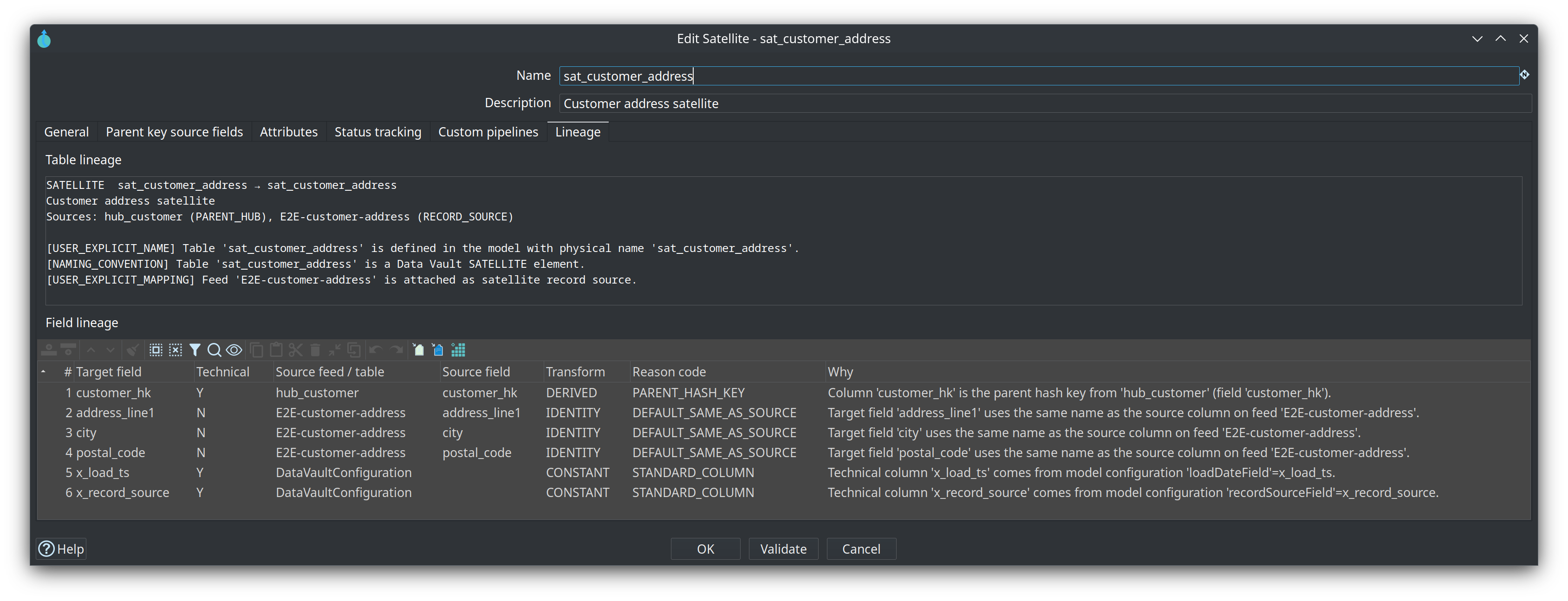
-
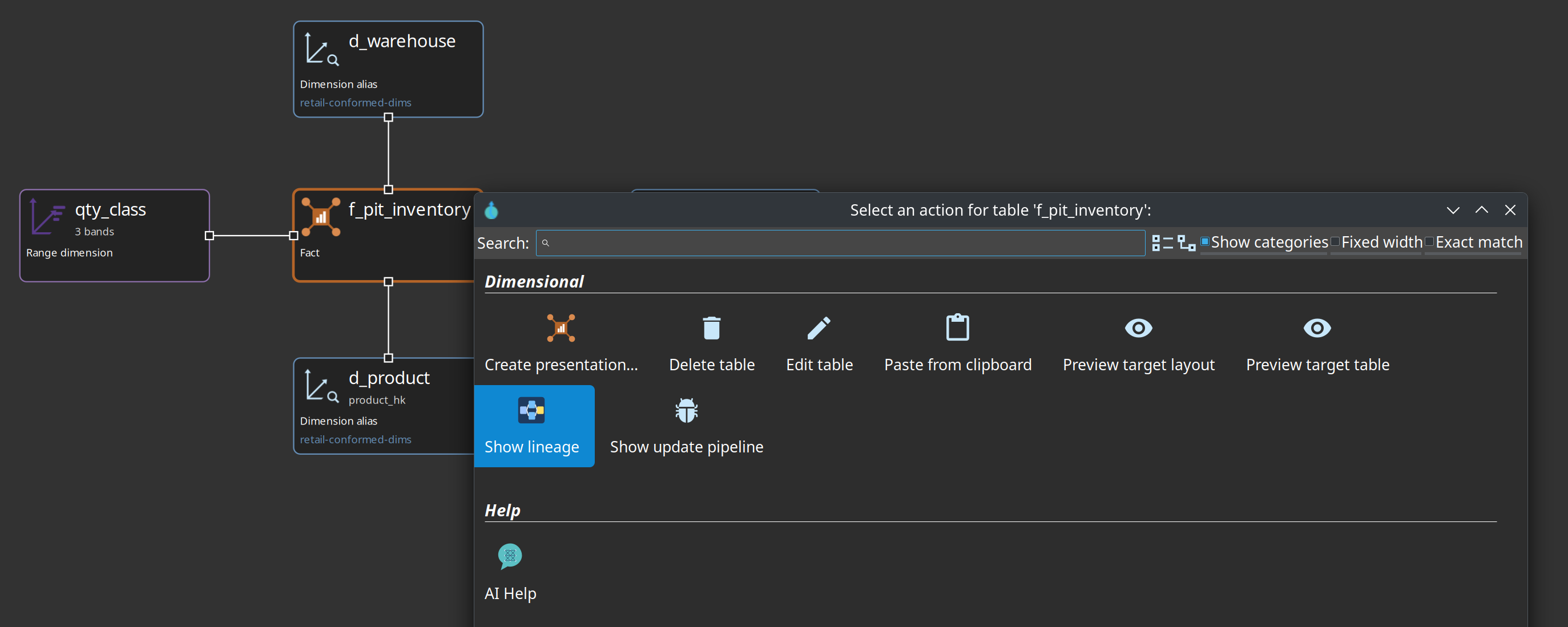
Right-click a table card and choose Show lineage in the action dialog: a Hop Lineage View tab opens, seeded on the selected table and left unsaved, so you can walk upstream without leaving the model.
Walk a Hop Lineage View
-
Open
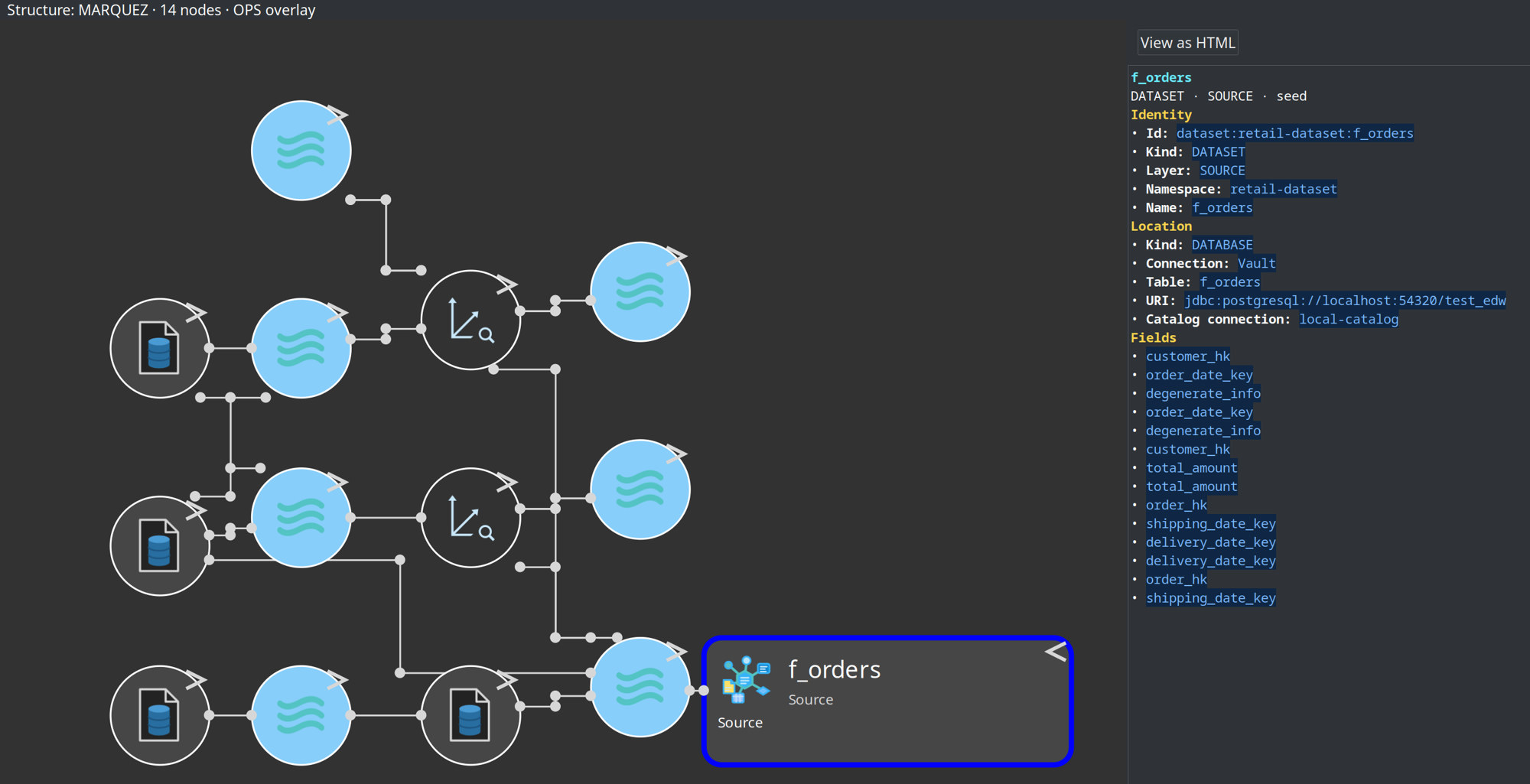
models/f_orders-upstream.hlv. Its seed is the dimensional factf_ordersand its backend isMarquez-Localhost. The status line above the graph names the structure source, the node count and whether the OPS overlay is on. -
Click a node name to select it: the right-hand pane renders that node as Markdown (identity, location facets, columns) with a View as HTML button, while a click on the rest of the card opens the context menu (Open model, Open in catalog, Show update pipeline, Show build pipeline).
-
If the canvas is empty, the export has not run. Optional, with Docker:
./scripts/run-marquez.sh up, then./scripts/run-hop.sh retail-example workflows/send-lineage-to-marquez.hwf, then Refresh lineage. -
Keep the distinction in mind: Marquez holds structure derived from the export, while the duration badges come from the Hop OPS database. Marquez’s latest run is the export, not the load.
Run the gates and read the reports
-
Open Metadata → EDW → Resource definition group and select
retail-sources. The bottom bar carries the harvest buttons, Browse lineage…, the catalog version buttons and Validate sources. -
Press Validate sources and read the options dialog before running anything: Baseline (truth for this run) is the current working catalog or a catalog version tag such as
v1.0.0; What to check covers live source systems, the working catalog against a version, target models, target databases (DDL needed?) and downstream impact; the remaining fields set parallelism and an optional report. Close the dialog with Cancel.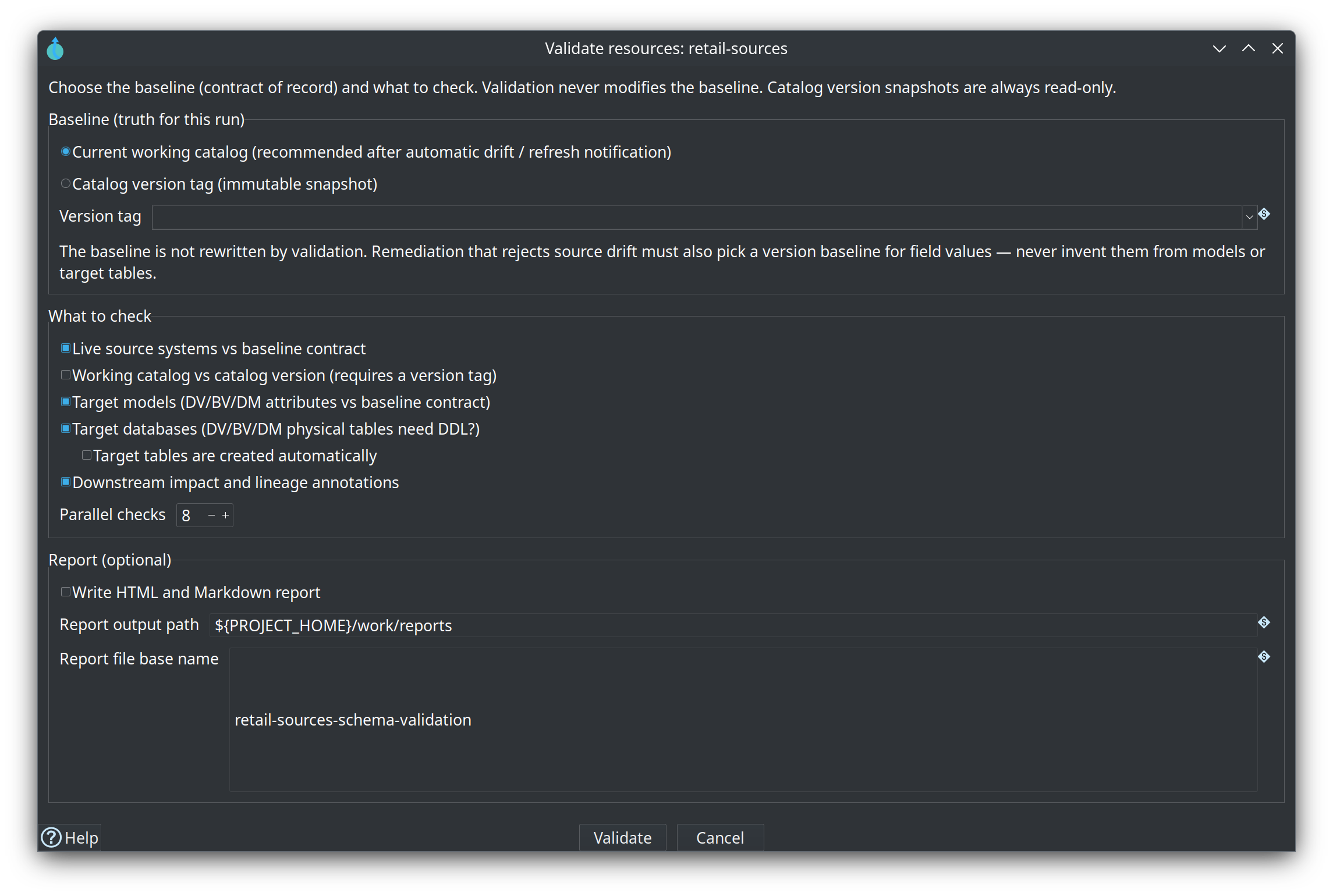
-
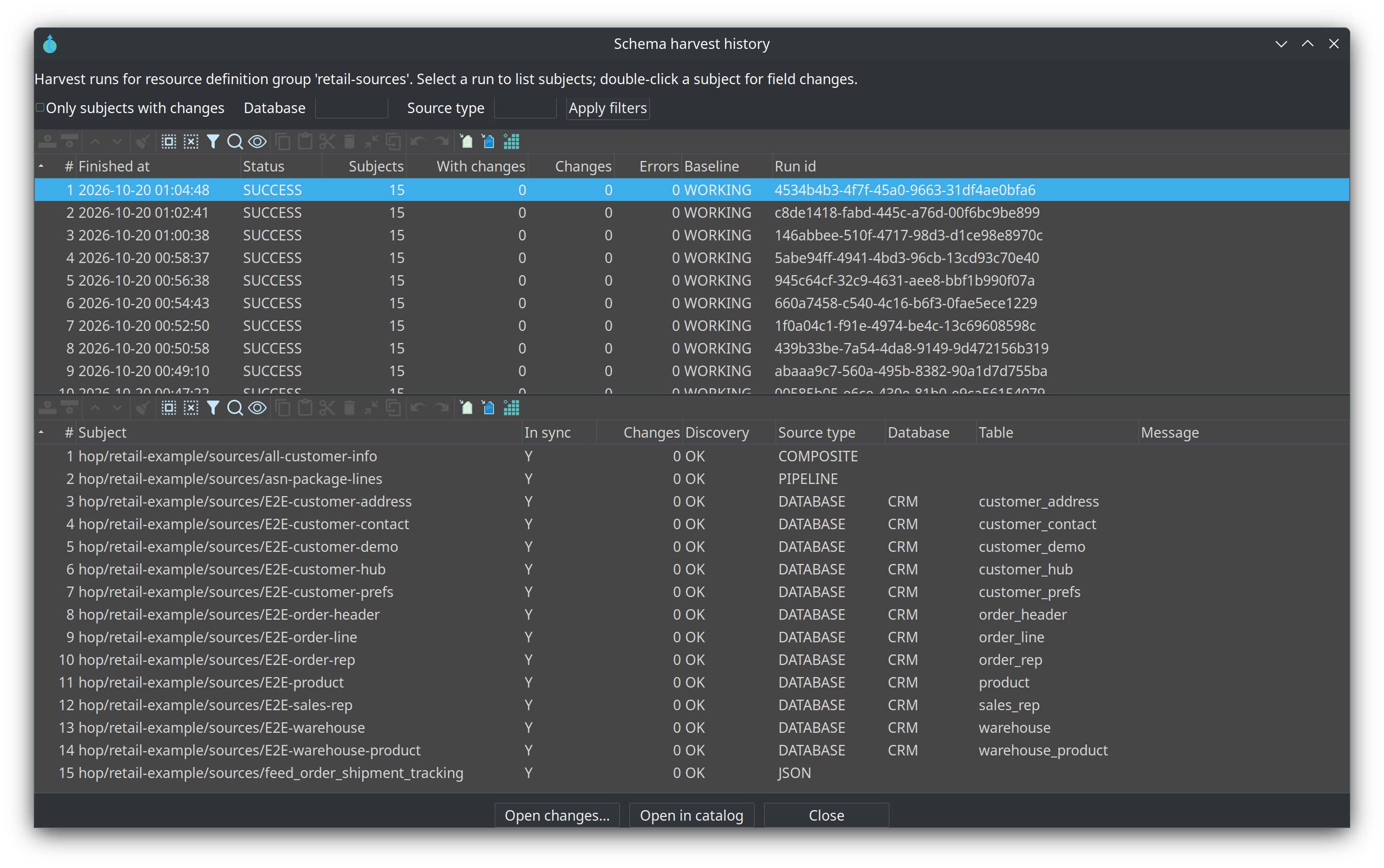
Press Harvest history… to browse the persisted harvests for the group: the upper table lists runs with status, subject and change counts, baseline and run id; the lower table lists the subjects of the selected run with their discovery status, source type, database and table, and Open changes… drills into field-level changes.
-
Read the two rule sets shipped with the project:
retail-example/metadata/data-quality-rule-set/retail-source-quality.jsonandretail-target-quality.json. Then find one binding in the Data catalog perspective: open anE2E-*source and read its Quality tab, which shows the rule set, the rule id and any field or severity override. -
Run the update wave (optional, Docker; start the local database first with
./scripts/run-postgres.sh up):./scripts/run-hop.sh retail-example workflows/run-retail-update.hwf. It checks the database connections and refreshes the source data, then calls the models sub-workflow, whose order is Harvest source metadata → Validate resource definitions (the schema gate on groupretail-sources) → Measure source data quality → Evaluate source quality gate → Update resource definition group; after the update it runs Measure target data quality (post) and Alert on target quality (post), and the group update also triggers Export data lineage to Marquez. The wave then runs operational analytics, records the load and exports the architecture. -
Open
retail-example/work/reports/retail-schema-validation.mdand its.htmlsibling: the schema gate report, with the resource group, the target catalog version, the compare mode and the status, the issue table, and a Lineage Drift section per model.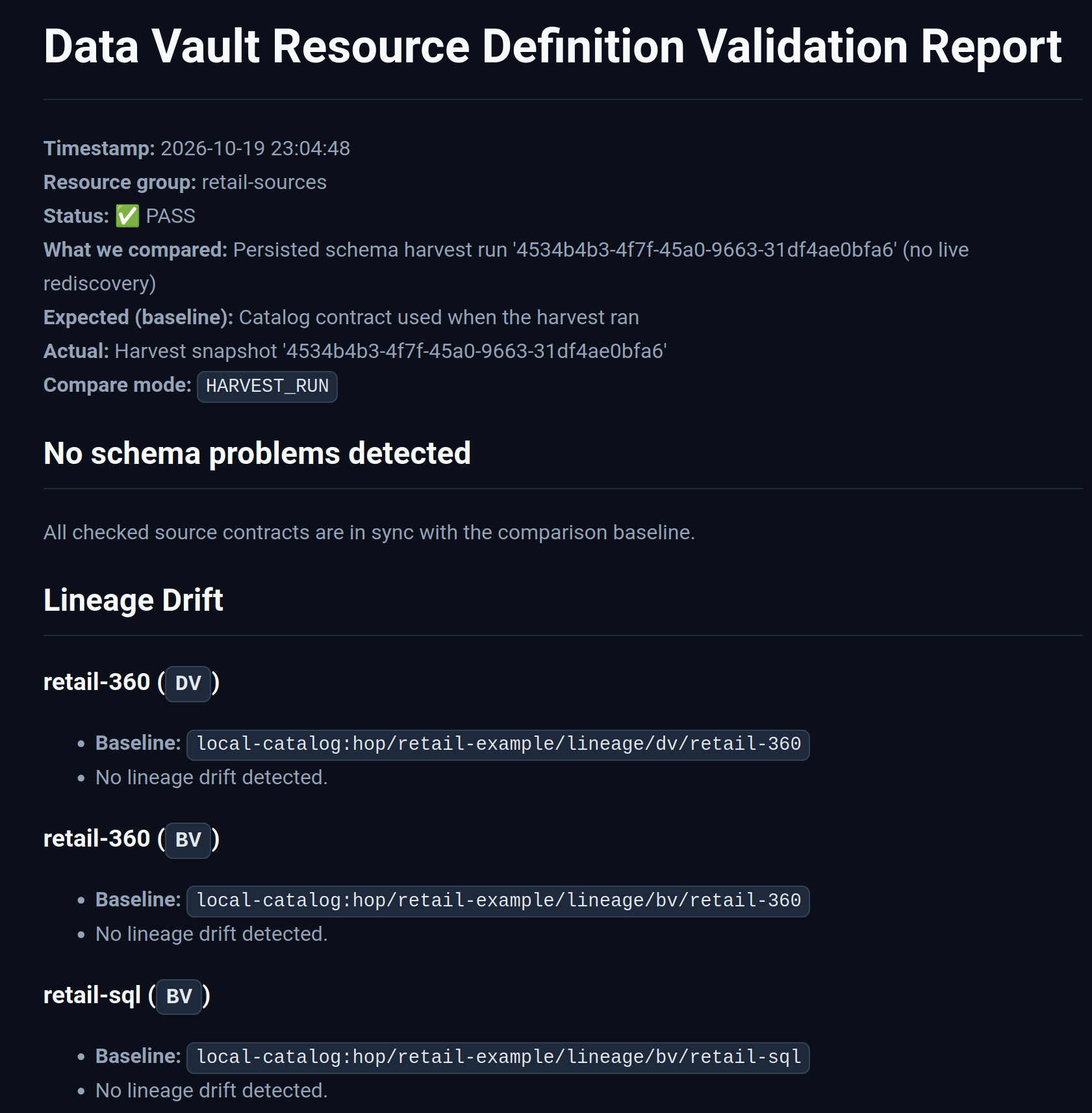
-
Open
retail-example/work/reports/retail-dv-update-report.md: the load overview of that run — the models and pipelines that ran, the total duration, the rows inserted and the per-model status, with a section per layer and model. -
Open
retail-example/work/reports/retail-dv-initial-report.mdif you also ran the initial wave; it has the same shape for the first load.
Operations: maps, metrics and a warehouse of the warehouse
-
Under
retail-example/work/execution-maps/, open a crawl — for examplerun-retail-update.hem— in Hop GUI. A breadcrumb shows the path the crawler took, and the canvas draws the workflow node together with the models it covers and the pipelines it can reach.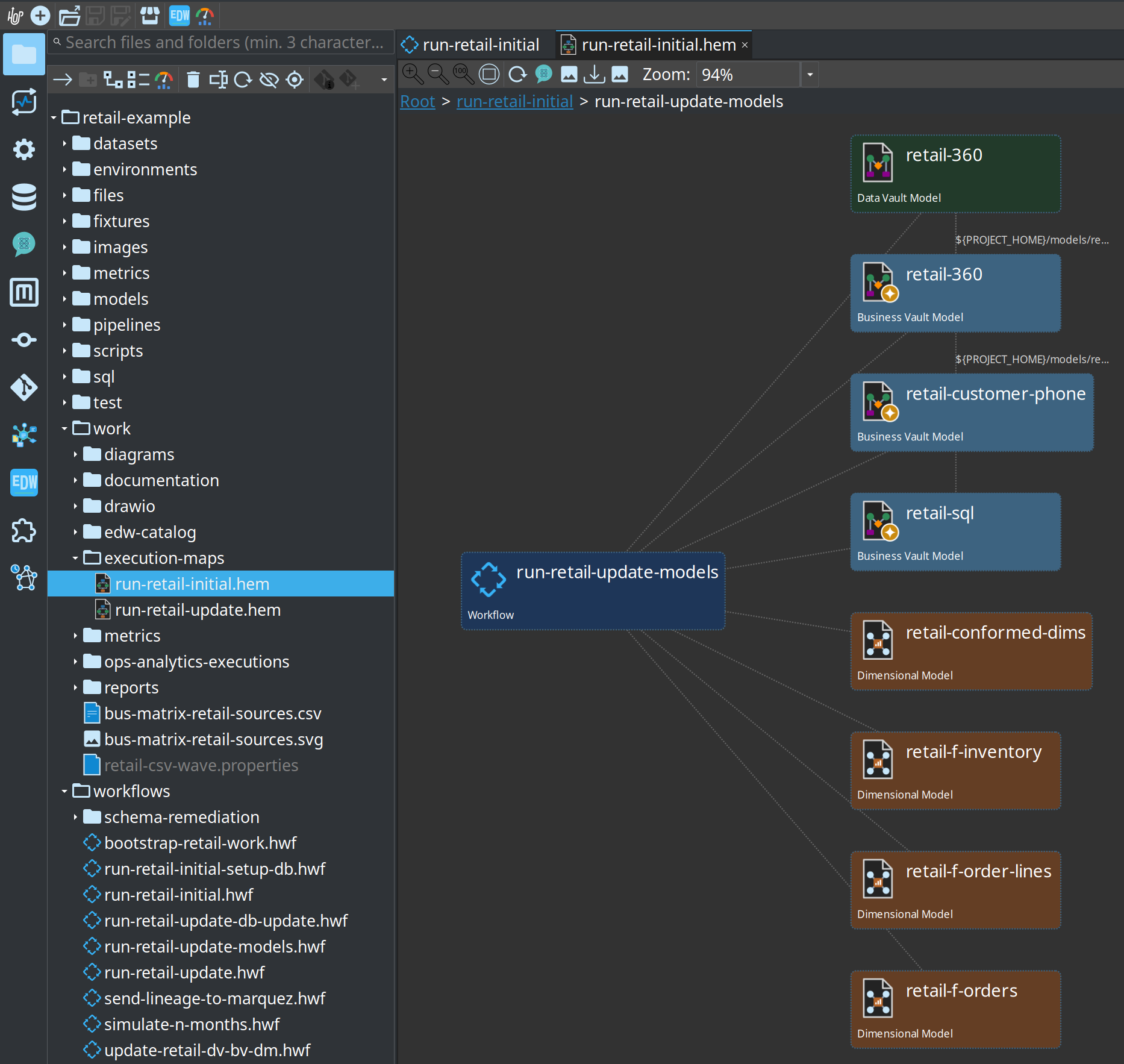
-
Remember the crawler’s limits: expanding an Update resource definition group node needs that group’s metadata, and generated pipeline nodes go stale until you re-crawl after a model or workflow change.
-
Look at
retail-example/work/metrics/: one JSON file per pipeline run, written by the run itself. These are the measurements behind the load overview report and the OPS tables. -
Optional (GUI): press Create operational analytics… on the EDW Journey toolbar and read the dialog — OPS connection, OPS schema
dv_ops, the three target connections, the folder, the resource group and Include hop_executions. The retail project already ships the generated stack undermodels/ops-analytics/, so this dialog is for your own project.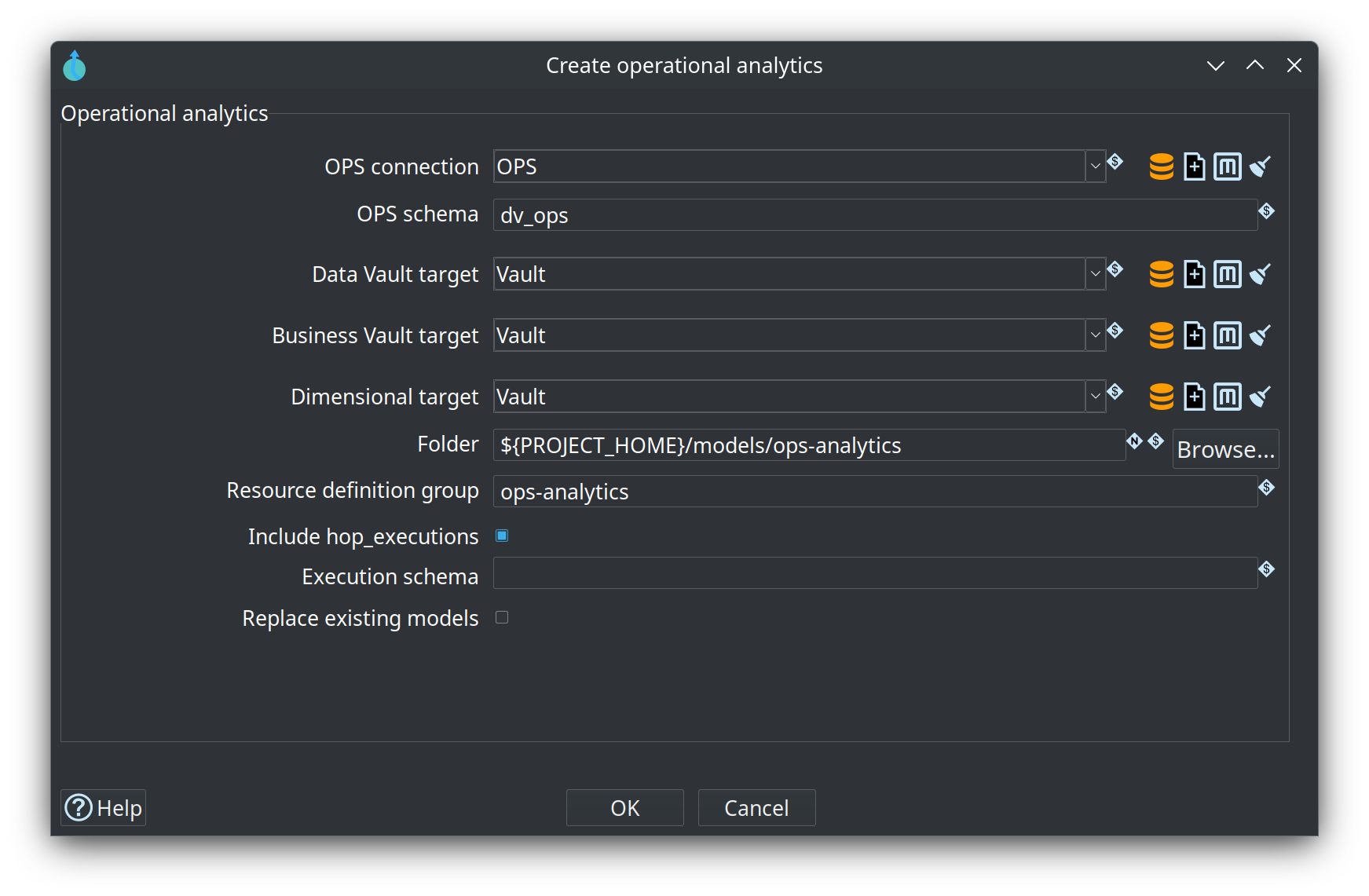
-
Optional (Docker): with Marquez up and the export done, open
http://localhost:3001and inspect column-level lineage — how columns of theE2E-*feeds flow through satellites into the Business Vault tablecustomer_360_bv.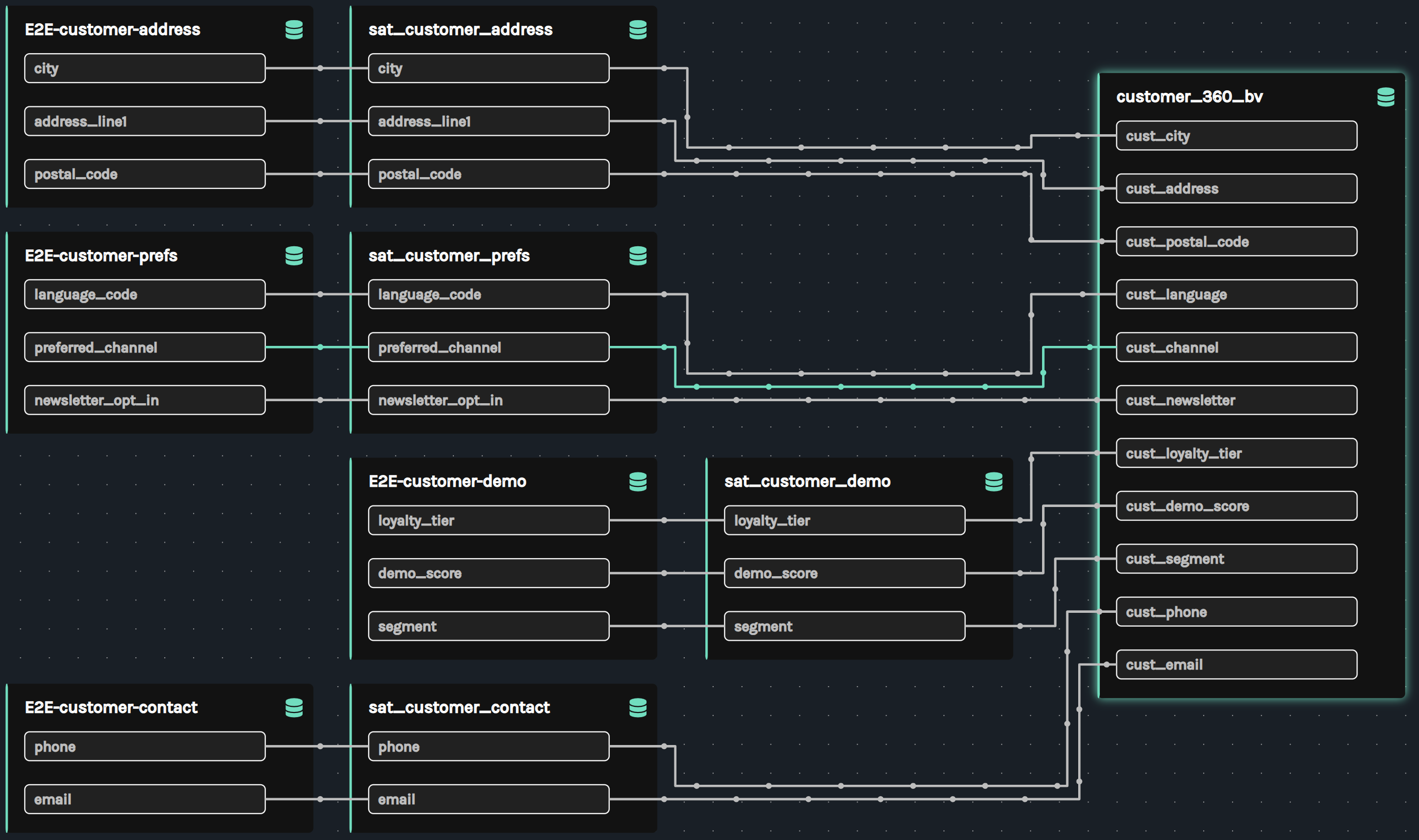
Try it yourself
Take one data quality rule and decide whether it should measure or gate the load. Work only with the shipped retail material.
-
In the Data catalog perspective, open one
E2E-*source that feedsretail-360.hdv— for example the customer address feed behindsat_customer_address. -
Read its Quality tab: which rule set and rule id are bound, and whether a field or severity override is set.
-
Open
retail-example/metadata/data-quality-rule-set/retail-source-quality.jsonand pick one rule from it. Note its type, its severity and its parameters. -
Decide whether that rule should measure (report and observe) or gate (stop the load), and write one line naming the consequence of each choice.
-
Find the run the rule would have caught: open
retail-example/work/reports/retail-dv-update-report.mdand locate the row counts and inserted rows of the model that depends on your feed. That is the number a row-count rule watches.
Check your work. You can name the record definition, the rule, and the step that evaluates it: the
source gate runs Measure source data quality and then Evaluate source quality gate before the
group update, so a FAIL_ON_BLOCKING finding stops the load there. Your one-line justification should
say what happens instead when you choose measure: the run continues and the finding is kept in the
report and in the OPS quality_* tables.
Questionnaire
Answer the seven questions. Every answer comes with its reasoning, and Copy my results gives you a text summary to keep.
1. What does the Lineage tab on a table dialog show that the model canvas does not?
b) The tab is read-only and derived from the model: table sources and their reasons on top, then a field grid with the source feed or parent table, the source field, the transform, the reason code and a Why message. The canvas shows structure; the models stay the source of truth. Source-to-target lineage.
2. What is a lineage backend?
c) The .hlv file stores the backend name, seed, depth, direction and filters; the URL or folder stays on the backend metadata object. When exactly one backend is enabled, File > New and Show lineage use it without asking. Hop Lineage View.
3. How do measure and disposition divide the work in data quality?
b) Measure fails only on infrastructure errors, so the findings can always be read. The gate decides: a pre-update FAIL_ON_BLOCKING stops a bad load, while a post-update ALERT_ONLY logs or writes alerts, because a post-load check cannot un-load. Data quality.
4. What does the schema gate compare?
d) The compare mode picks the pair: LIVE_SOURCE, WORKING_VS_VERSION (the working catalog against a frozen tag such as v1.0.0), VERSION_VS_VERSION, or HARVEST_RUN, which reuses the persisted harvest with no second discovery. The report restates the baseline, the mode and the status. Resource definition validation.
5. What does an execution map contain?
c) A .hem file is the crawled graph, so it opens with the same layout; it shows how the batch is wired, not why a field maps where it does. Re-crawl after model or workflow changes so generated pipeline nodes stay current. Execution maps.
6. Scenario: a nightly load has failed silently for a week and nobody watched the logs. Which surface would have shown it?
d) Every run records its outcome: the load overview report lists the models that ran with their status, errors and inserted rows, the metrics folder keeps one file per pipeline run, and operational analytics turns the OPS tables into a star you can query by day. Lineage, version tags and Check model say nothing about whether a run happened. Operational analytics.
7. When is harvest the right tool, and when is the schema gate?
c) Drift never fails the harvest action, and harvest never rewrites working-tree contracts: promoting a live layout is a separate, deliberate step. The gate rebuilds a report from a persisted harvest run or from live discovery and can fail the workflow by policy. The recommended chain runs harvest first, then the gate, then quality, then the update. Metadata harvesting.
Where to go next
-
Source-to-target lineage — the Lineage tab, reason codes, explainable DDL and the drift gate
-
Hop Lineage View — backends, seeds, node navigation and the OPS load-time overlay
-
OpenLineage export — the Export data lineage action, Marquez and the physical-location facets
-
Data quality — rule types, the Measure and Evaluate actions, the ops tables
-
Resource definition validation — compare modes, remediation packages and the DTAP recipe
-
Metadata harvesting — harvest history, the HARVEST_RUN mode and model-check reuse
-
Execution maps — what a .hem crawl captures and when to re-crawl
-
Operational analytics — turning the OPS database into a warehouse of the warehouse
-
Module 0 — Orientation: the EDW Journey — the manager and architect path pairs module 0 with this one
-
Module 8 — AI help and MCP — next step
-
Training index — all modules as they land