Why it matters
Data Hopper EDW turns Apache Hop into a warehouse factory: you describe sources, vaults, and marts as model files and Hop generates and runs the pipelines that build them. Without a map, six model file types and four layers look like six products. With the map, every later module is one more step on the same road.
This module gives you that map and shows where each job happens in Hop GUI. No database is needed:
you only read the retail-example project. Budget 25 minutes.
Concepts
Four layers, one road
Source systems land in a catalog, the catalog feeds a raw Data Vault, that feeds a Business Vault, and that feeds dimensional marts. Each layer has one job: sources are contracts, the raw vault is history, the business vault is interpretation, the marts are consumption.

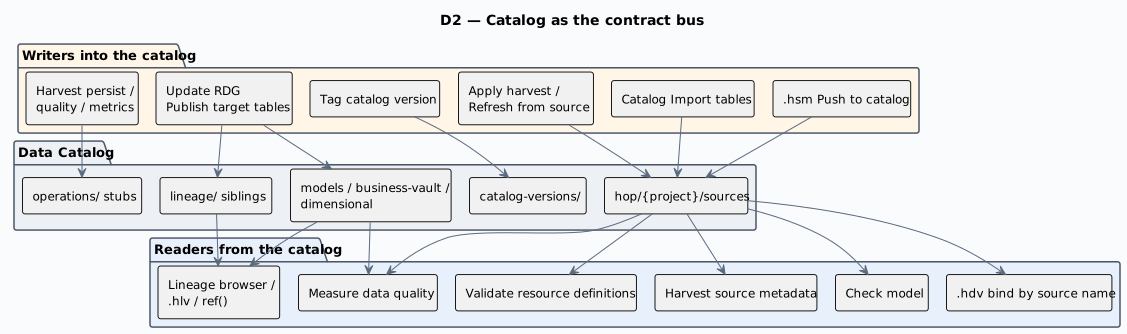
The catalog is the contract bus
Nothing is wired by JDBC URL. A source model publishes feeds into the Data Catalog under
hop/{project}/sources, hubs and satellites bind to those feed names, and a load publishes the
target layouts back. Rename a column in the catalog and every model that uses it knows.
The resource definition group is the spine
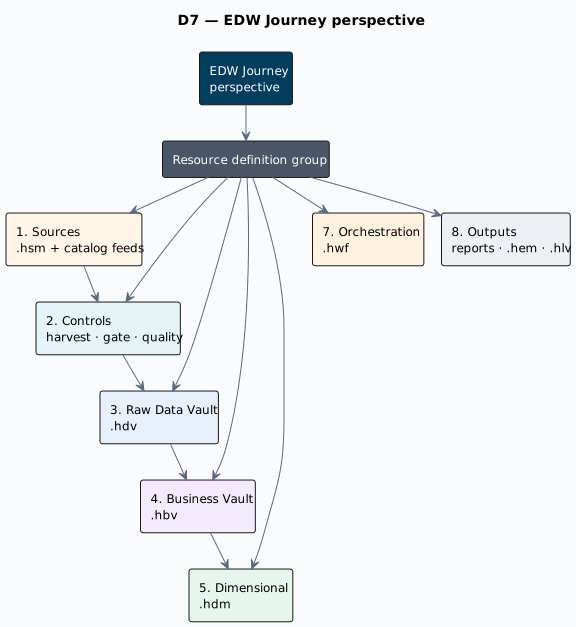
A resource definition group is the list of warehouse models one warehouse consists of. Harvest, schema validation, version tags, and loading all take the group as their scope — which is why you create the group early and grow it, instead of starting a new one per subject area.
Model files
| Extension | What it describes |
|---|---|
|
Source model: tables, primary/foreign keys, joins, JSON and pipeline feeds |
|
Raw Data Vault model: hubs, links, satellites, reference tables |
|
Business Vault model: SCD2, PIT, bridges, SQL business tables |
|
Dimensional model: facts, dimensions, date dimensions |
|
Semantic layer over a |
|
Execution map: what ran, in what order, with what result |
|
Hop Lineage View: a graph definition over a lineage backend |
Build order and the four controls
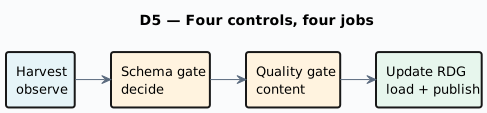
Build in the order the catalog allows: source model → publish to catalog → generate the raw vault → create the resource definition group → first load → Business Vault → dimensional marts. Around that run four controls: Check model (build time), metadata harvest, the schema gate, and data quality. Confusing those four is the most common beginner mistake — they answer different questions.
Guided walkthrough
Open the finished warehouse
-
Start Hop GUI and open the project folder
retail-example/(File → Open project). -
Open the EDW Journey perspective (perspectives row, after Data catalog).
-
In the group combo at the top, select
retail-sources. -
Expand 1. Sources: you see the source model
.hsmfiles discovered from the catalog, then the catalog feeds themselves (namespacehop/retail-example/sources). -
Expand 3. Raw Data Vault and its child
retail-360.hdv: the hub, link, and satellite table names appear under it. -
Select
retail-360.hdvand press Documentation — the offline HTML guide for that model opens. This is the same documentation set these training modules ship in (toolbar EDW button, or Help → EDW documentation), and it works with no network. -
Expand 4. Business Vault, 5. Dimensional, 7. Orchestration, and 8. Outputs to see the rest of the same warehouse:
.hbvand.hdmfiles, the workflows that name the group, and where reports and execution maps land.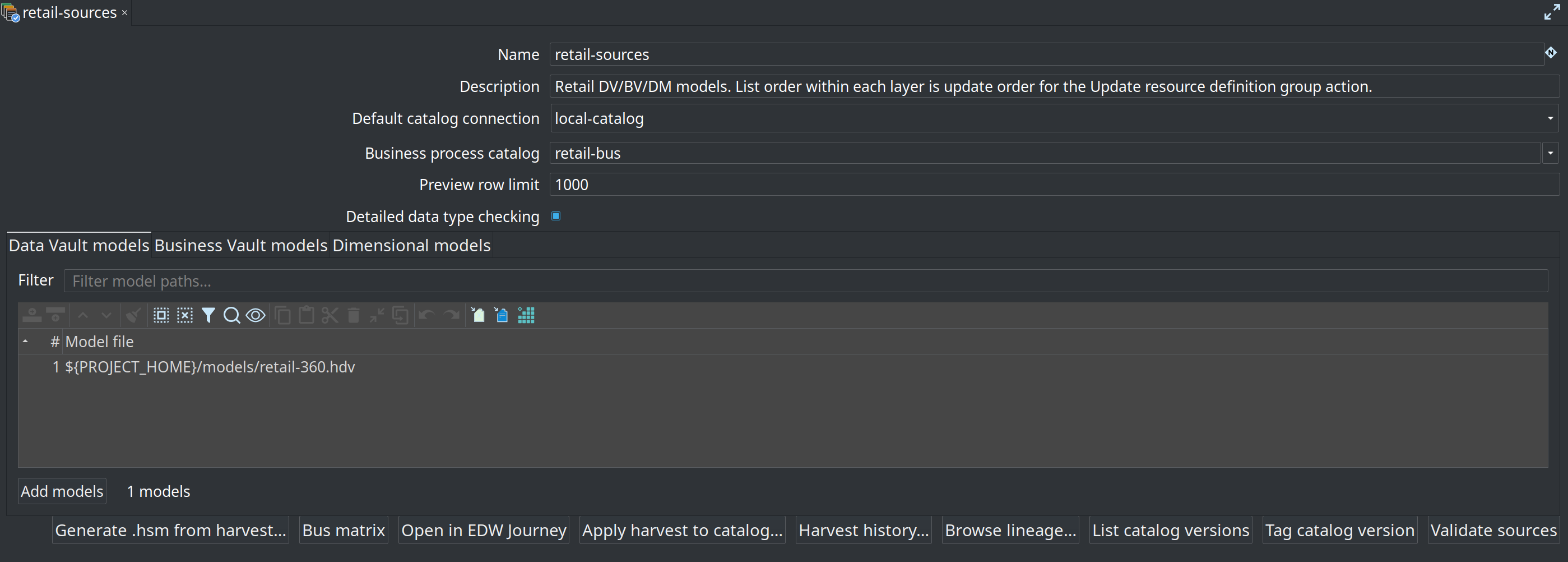
-
Select 1. Sources and press Details → Open catalog to see the published feeds that the whole warehouse is wired to.
-
Open
models/retail-360.hdvin the modeler and use Browse on one hub: the canvas centers the table and its neighbours, which is the fastest way to read a vault you did not write.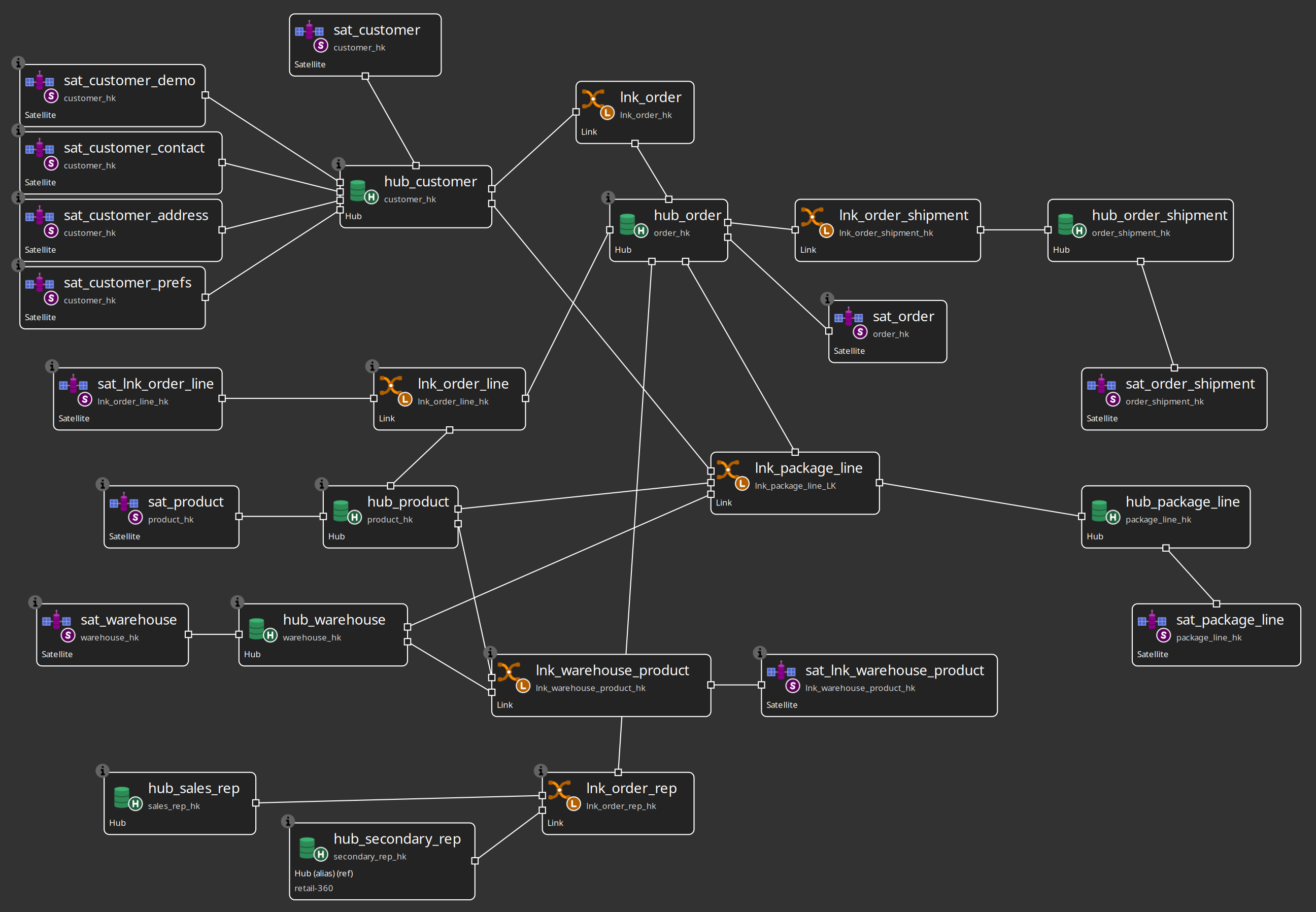
Try it yourself
Pick one business concept that matters to you (customer, order, product) and write down its path through the warehouse, from the journey tree only:
-
Find the hub for that concept under 3. Raw Data Vault.
-
Find at least one satellite of that hub and note the descriptive columns it would carry — open the table dialog (Details → Open model, then double-click the table) and read the Fields.
-
Find the catalog feed the satellite’s hub binds to under 1. Sources.
Check your work: the hub name starts with hub_, the satellite name with sat_, and the feed name
is a catalog entry — not a database table. If you wrote a test_edw table name, re-read the
Concepts section on the catalog above.
Questionnaire
Answer the six questions. Every answer comes with its reasoning, and Copy my results gives you a text summary to keep.
1. Which file extension holds the raw Data Vault model?
b) .hdv is the raw Data Vault model. .hsm is the source model, .hbv the Business Vault model and .hdm the dimensional model.
2. Where does a hub get the name of the source it reads?
b) Contracts live in the Data Catalog and models bind to feed names. The physical table is an implementation detail of the feed; nothing in the vault points at a JDBC URL.
3. What is a resource definition group?
c) The group is the scope of harvest, schema validation, version tags and loading. Growing the warehouse means adding models to the same group, not creating a second one.
4. In the recommended build order, when is the raw Data Vault generated?
b) Contracts first (source model → catalog), then the vault model (generate from the source model, Check model until it is clean), then the resource definition group, then the load. Generation creates no tables and no pipelines by itself.
5. Which statement about the four controls is correct?
c) Check model validates the model itself at build time; harvest reads what the databases actually contain; the schema gate compares expected contracts to found schemas against a version tag; data quality measures row content. Architecture — D5.
6. Scenario: your team wants to add a Business Vault customer view on top of the existing warehouse. What is the right next step?
c) One warehouse is one group. The group lists DV, BV and DM models; the update action always loads all DV, then all BV, then all DM on the group, in list order.
Where to go next
-
Architecture — D1 to D7: layers, catalog bus, group spine, build vs run, the four controls, growth
-
EDW Journey perspective — every node and button of the tree
-
Feature overview — the capability list with maturity
-
Module 1 — Installation and EDW setup — next step