Why it matters
Installing the plugin is one command or one unzip; understanding what the install changed is what saves the next hour. Two install details decide whether a first session works:
-
the plugin is not just a jar — the assembly zip also updates
lib/core/so Jinja-based SQL resolves, and -
the version pins are hard: the plugin requires Apache Hop 2.20 (development builds run
2.20.0-SNAPSHOT) and Java 21. Nothing else is supported.
This module installs the plugin by either supported route — Hop Marketplace or the assembly
zip into $HOP_HOME — runs the first-time Configure EDW setup helper, and proves the local
training database answers. That foundation is what modules 2 to 8 build on. Budget 30 minutes.
Concepts
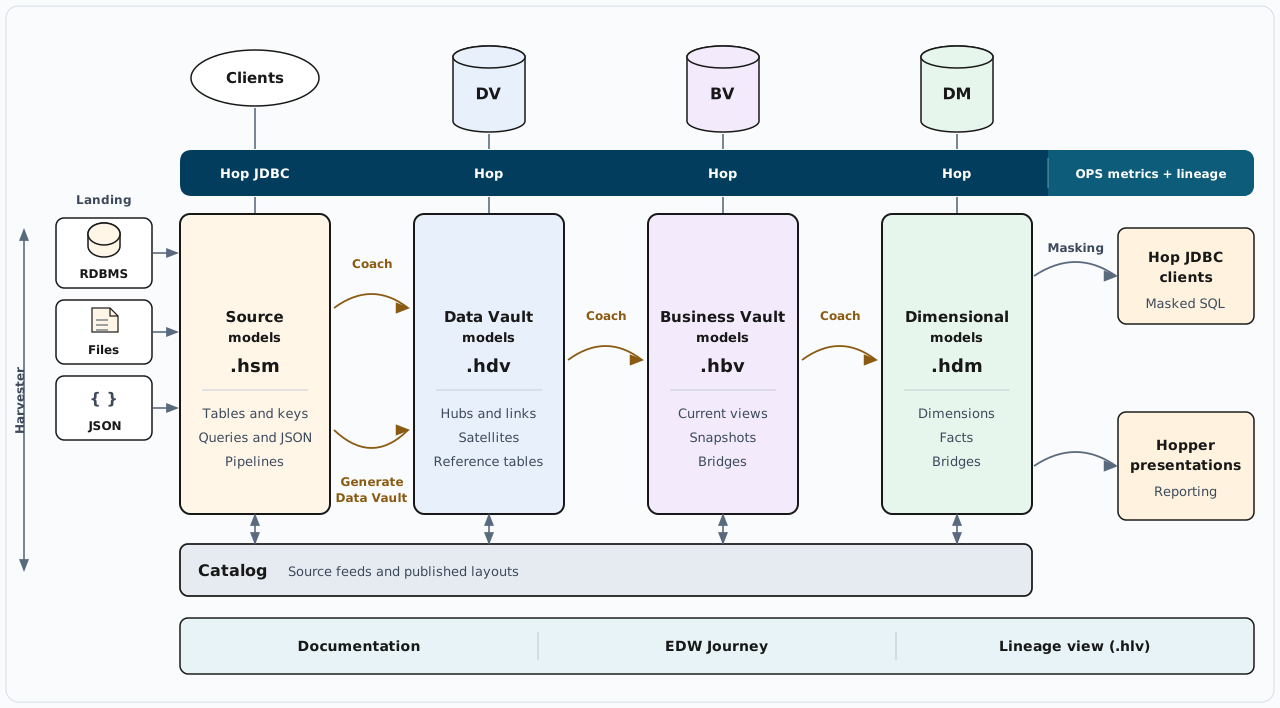
The plugin in one picture
The plugin adds four model families to a Hop project — source (.hsm), Data Vault (.hdv),
Business Vault (.hbv) and dimensional (.hdm) — plus the catalog and the run outputs around
them. This module builds only the ground floor: the plugin itself, the shared project metadata, and
a database that answers.
Where the plugin installs
The assembly zip is a complete plugin layout, not a single file. Unzipped into $HOP_HOME it
writes two places:
$HOP_HOME/
  plugins/misc/hopper-edw/    plugin jar, icons, and the offline documentation (docs/)
  lib/core/                   Jinja (Jinjava) SQL support
Both lines matter. The folder under plugins/misc/hopper-edw/ is what Hop loads: after a restart,
new metadata types appear under Metadata → EDW, the update and validation actions are available
in workflows, and .hsm, .hdv, .hbv, .hdm and .hlv files open in Explorer tabs. Inside it,
plugins/misc/hopper-edw/docs/ carries the offline guides — the same folder these training modules
ship in. lib/core/ receives the Jinja SQL support; copying only the plugin jar is not enough for
Jinja SQL.
What Configure EDW setup creates
A new Hop project is offered the standard catalog and the four shared configuration objects the first time you open a source, Data Vault, Business Vault, or dimensional model. Accept that first-time prompt, or run Tools → Configure EDW setup… from the menu if you dismissed it — the same dialog appears either way, and it creates, when missing:
-
the Data catalog connection
local-catalog— a FILE catalog with default storage${PROJECT_HOME}/catalog-data(retail-exampleuses a gitignoredwork/edw-catalog/instead), and -
the shared model configurations
source-model,data-vault,business-vaultanddimensional— the objects each model points at with Configuration on the Edit model dialog.
It never recreates what exists: elements already present stay selected and disabled in the dialog,
and only missing ones can be created. And it deliberately does not create a resource definition
group — you create that yourself once the first .hdv checks clean (module 4).
Plugin-wide options
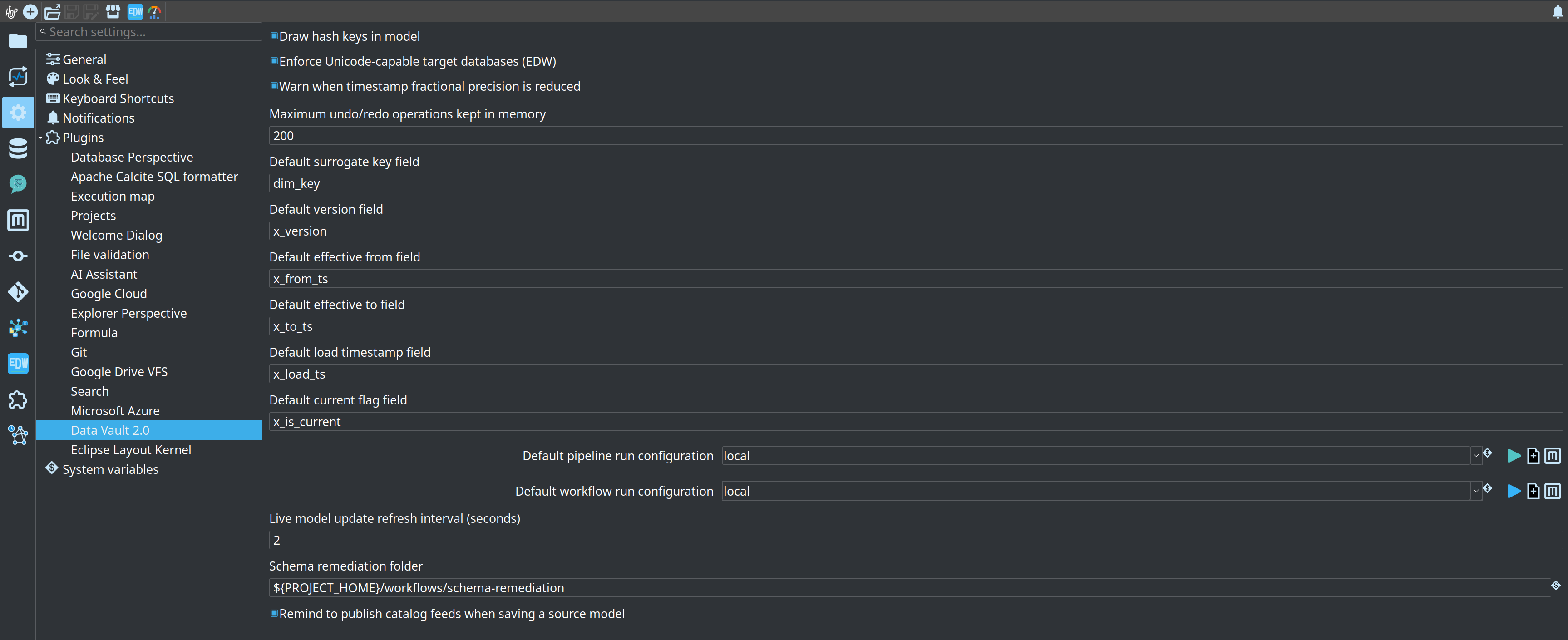
The per-model settings have a global counterpart. Hop GUI keeps the plugin-wide Hopper EDW options under Configuration → Hopper EDW — for example whether hash key columns are drawn in the model, and the default-on Enforce Unicode-capable target databases (EDW) check. These settings live in the Hop GUI configuration, not inside the model files.
Guided walkthrough
Install the plugin
Route 1 — Hop Marketplace (needs Hop 2.20.0-SNAPSHOT). Import the shareable repository definition, install the plugin, then restart Hop:
./hop marketplace repo import \
  https://raw.githubusercontent.com/ProjectDataHopper/hopper-edw/refs/heads/main/hop-marketplace-repo.yaml
./hop marketplace install hopper-edw
In Hop GUI the same route runs from Tools → Marketplace…: import the repository on the Repositories tab, then install from the Plugins tab.
Route 2 — assembly zip (works offline). Take hopper-edw-<version>.zip from a release, or build
your own with mvn clean package, and unzip it into $HOP_HOME. The zip updates both
plugins/misc/hopper-edw/ and lib/core/; do not copy only the plugin jar out of it, because Jinja
SQL then fails. If you ever installed 0.9.0 as hop-datavault, remove
$HOP_HOME/plugins/misc/datavault first so the old and new folders do not stack.
Restart Hop after either route so the plugin registry reloads. The install is complete when
Metadata → EDW shows the EDW metadata types and a .hdv file opens in an Explorer tab.
Open the training project
-
Start Hop GUI and open the project folder
retail-example/(File → Open project). -
Confirm the connections
CRM,VaultandOPSexist in Metadata → Relational database connection. Onretail-examplethey ship with the project metadata:CRMis the source,Vaultis the warehouse,OPSis the operations database. On your own project, these three are the first connections you create. -
From the repository root, start the local database once:
./scripts/run-postgres.sh up -
Check the success line — it names the endpoint and the extra databases:
PostgreSQL is ready (test@localhost:54320/test; also test_source, test_edw, test_ops, test_ops_analytics for retail-example; …). Remember port 54320 and user/password/databasetest/test/test; the container ishop-data-vault-postgres-local. -
Optional, and only needed for module 7 (lineage, quality and operations): start the local Marquez stack the same way. It holds the lineage structure that a Hop Lineage View reads, while load durations keep coming from the
OPSconnection../scripts/run-marquez.sh up -
Check its success lines —
Marquez is ready.followed byAPI: http://localhost:5001/api/v1/lineageandUI: http://localhost:3001. The containers arehop-marquez-api,hop-marquez-webandhop-marquez-db;./scripts/run-marquez.sh statusreports whether the API answers,downstops the stack andresetwipes its database too.
Configure EDW setup
-
Open Tools → Configure EDW setup… and read the dialog. On
retail-exampleeverything the dialog offers already exists, so its elements appear selected and disabled; on a fresh project the same dialog creates the FILE catalog connectionlocal-catalogand the shared configurations.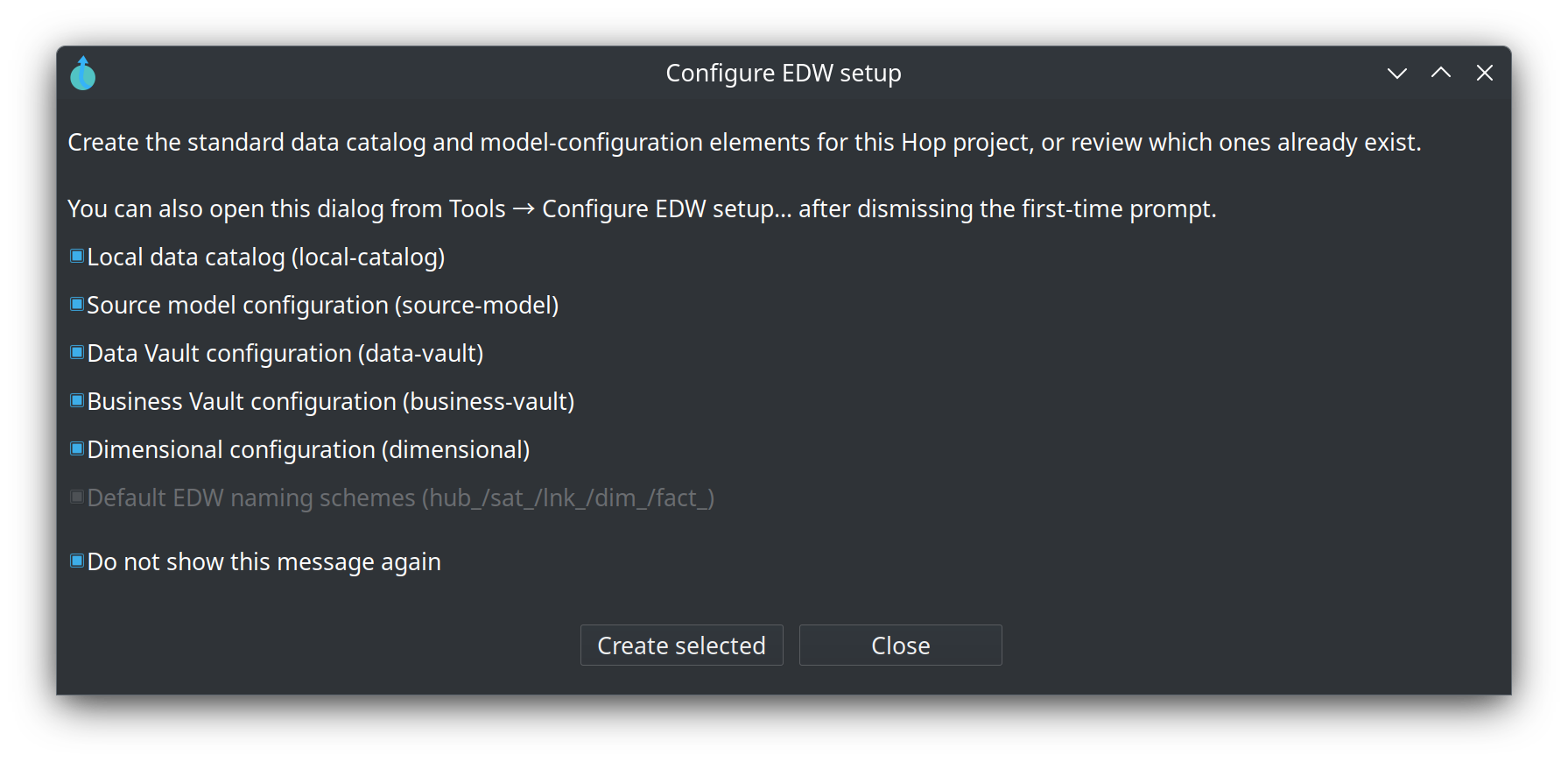
-
Open the toolbar EDW button (or Help → EDW documentation) and confirm the offline documentation opens — the guides and these training modules ship inside the plugin at
plugins/misc/hopper-edw/docs/and load with no network. -
Optional, only on a fresh project: create an empty source model or Data Vault model file (Explorer → New) so the first-time prompt can appear; if you dismissed it, reopen Tools → Configure EDW setup… from the menu. Uncheck Do not show this message again if you want the automatic prompt back.
Try it yourself
Run the training environment end to end, from the repository root:
# 1. local PostgreSQL (container hop-data-vault-postgres-local, port 54320)
./scripts/run-postgres.sh up

# 2. the finished retail warehouse, so you can compare with your own work later
./scripts/run-hop.sh retail-example workflows/run-retail-initial.hwf

# 3. optional, for module 7: the local Marquez stack a Hop Lineage View reads
./scripts/run-marquez.sh up
The first run-hop.sh call builds or reuses the local Hop image (docker-hop:latest); if you
rebuilt the plugin and want the image refreshed, force it with ./scripts/rebuild-hop.sh. The third
command answers with Marquez is ready. and the API/UI URLs; skip it if you are not going to do
module 7, and stop the stack later with ./scripts/run-marquez.sh down.
Check the warehouse the way the later modules do — in Hop GUI:
-
Open the Database perspective (the database icon in the perspective bar).
-
Select connection Vault and press Connect: schemas and tables load, so expanding Vault → public lists the warehouse tables — empty before the first load, or
hub_*,sat_*,d_*andf_*after it. The otherretail-exampleconnections are CRM (source tables), OPS (the operations database) and OpsAnalytics. -
Press Open SQL editor on Vault and run a query with Run (
Ctrl+Enter):select count(*) from f_orders;relation "f_orders" does not existbefore the initial load is expected: that is the state a hand-built warehouse starts from in modules 2 to 4.
Checkpoint — you can show all five:
-
retail-exampleopens in Hop GUI, -
Tools → Configure EDW setup… opens and shows
local-catalogand the four shared configurations, -
connection
Vaultconnects in the Database perspective and lists the warehouse tables under public, -
a query in Vault's SQL editor returns a result (after the initial load), and
-
./scripts/run-marquez.sh statusreports the API accepting requests onhttp://localhost:5001.
Questionnaire
Answer the seven questions. Every answer comes with its reasoning, and Copy my results gives you a text summary to keep.
1. Which Apache Hop version does this plugin require?
b) The plugin is built against the Hop 2.20 line and requires 2.20.0-SNAPSHOT until 2.20.0 is released. The pin is deliberate and does not move without a human decision.
2. Which JDK is the required one?
d) Java 21 is a hard version pin of this project and the prerequisite the training index lists. Older JDKs are not the supported combination.
3. What does Configure EDW setup create, when the elements are missing?
b) The dialog creates the standard catalog connection and the four shared configuration objects, each only when it is missing. Models point at them with Configuration on the Edit model dialog.
4. What does Configure EDW setup deliberately NOT create?
c) It does not create a resource definition group — you create that yourself once the first .hdv checks clean (getting started, chapter 3; module 4). Data Vault configuration — Configure EDW setup.
5. After the install, where does the plugin live inside $HOP_HOME?
b) The assembly zip unpacks under plugins/misc/hopper-edw/ — jar, icons, and the offline documentation — and updates lib/core/ alongside it. The layout has been plugins/misc/hopper-edw/ since 0.10.0; 0.9.0 installed as plugins/misc/datavault/.
6. Scenario: a colleague copied only the plugin jar out of the assembly zip into their Hop installation. Hop starts, but pipelines that generate Jinja-based SQL fail. What is the missing piece?
b) Unzip into $HOP_HOME so both plugins/misc/hopper-edw/ and lib/core/ (Jinjava) are updated. Copying only the plugin jar is not enough for Jinja SQL.
7. The local training database: which endpoint and credentials does run-postgres.sh up prepare?
b) The script starts the container hop-data-vault-postgres-local on port 54320 with user/password/database test/test/test, and prints PostgreSQL is ready (test@localhost:54320/test; ...). The same server carries test_source, test_edw, test_ops and test_ops_analytics for the sample.
Where to go next
-
Data Vault configuration — Configure EDW setup, the Edit model dialog, and the plugin-wide options in full
-
Data Catalog — what the
local-catalogconnection serves and how namespaces work -
Getting started — building an EDW — chapter 0 bootstrap and the troubleshooting table
-
Module 2 — Data Catalog and source models — next step
-
Training index — all modules and the training environment