Operational analytics is a warehouse of the warehouse. Hopper already writes load timings, workflow overviews, data-quality history, and schema-harvest history into the operational (OPS) database. Create operational analytics… turns that database into a source model, a raw Data Vault, a small Business Vault, a dimensional model, a semantic layer, and two load workflows.
Dialog reference: Create operational analytics.
Create the models
Open Create operational analytics… from the EDW Journey toolbar or from Tools.
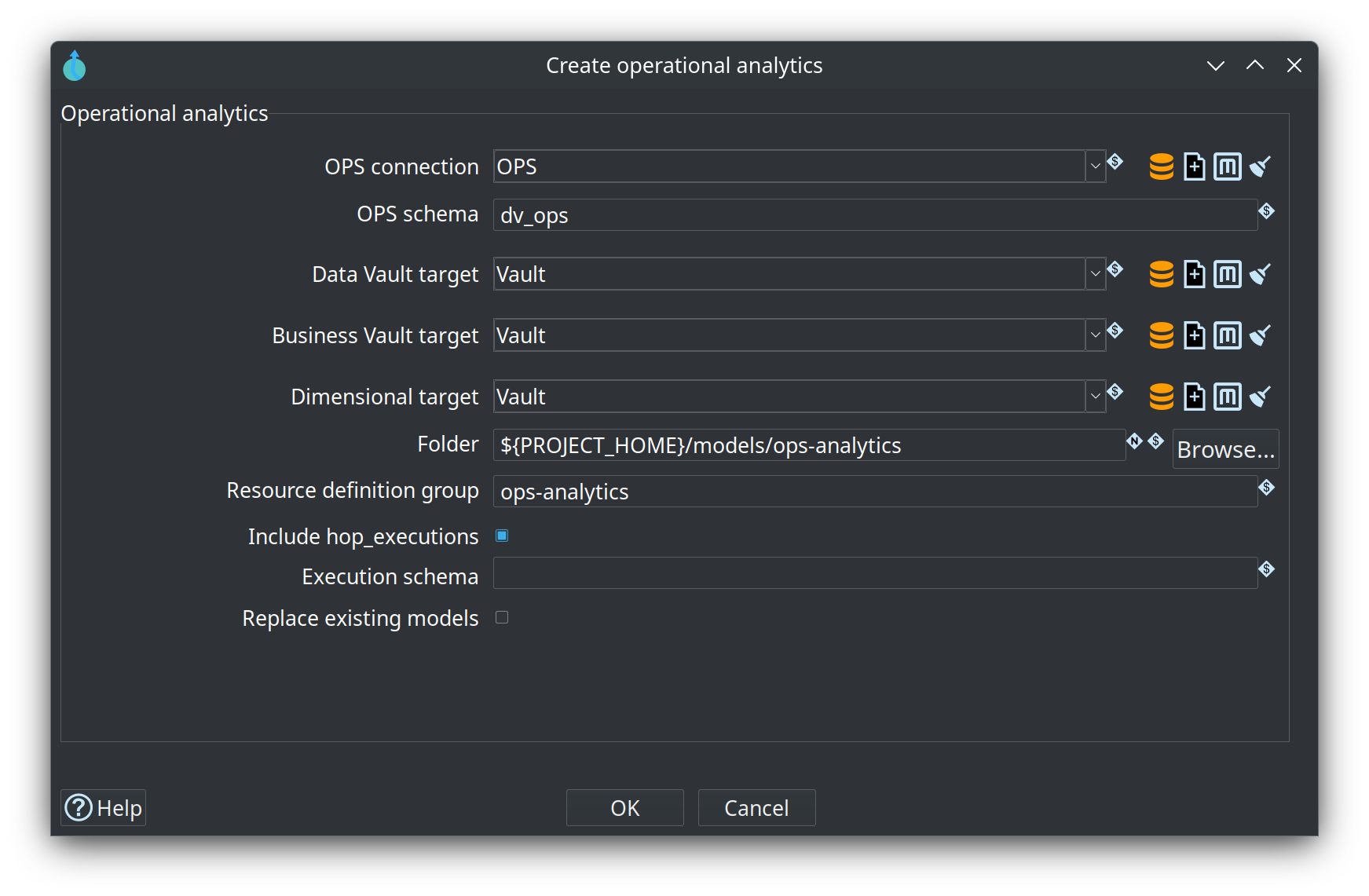
The picture is the retail project. Connection OPS, schema dv_ops, and all three targets are Vault. The folder is ${PROJECT_HOME}/models/ops-analytics and the group is ops-analytics. Include hop_executions is selected and the execution schema is blank, so that table is read from the connection default schema. Replace existing models is off. The models already in that folder were generated without hop_executions. Checking Replace and confirming is what overwrites them.
-
OPS connection and OPS schema. The retail sample uses connection
OPSand schemadv_ops. -
Data Vault, Business Vault, and dimensional target connections. Leave a target blank to reuse the OPS connection. The dialog does not change a connection’s preferred schema.
-
Folder. Default
${PROJECT_HOME}/models/ops-analytics. -
Resource definition group. Default
ops-analytics. -
Include hop_executions only when that table should be its own hub. It is not joined to
workflow_execution_id. -
Replace existing models is required when the folder already exists. Hop then asks you to confirm. That overwrites the folder and the
ops-analyticsconfigurations.
An empty OPS database still generates. If a catalog table is missing, the dialog lists it and generation continues. The first load of that table is empty. The source model opens when generation finishes. The two workflows show on the Journey orchestration stage for the group.
What gets written
| Path | Contents |
|---|---|
|
Source model of the OPS tables and six conformed-key queries |
|
One file per hub and per link. The group lists hubs before links. |
|
Duration view, latest-load view, and workflow-to-model bridge |
|
Conformed dimensions, including |
|
One file per fact. Dimension roles alias the dimensions file. Named selections sit on that fact. |
|
Creates the analytics tables, then loads them |
|
Loads again. Creates a Data Vault table that is missing and does not alter tables that already exist |
Metadata saved with the project:
-
Data Vault configuration
ops-analytics-dv -
Business Vault configuration
ops-analytics-bv -
Dimensional configuration
ops-analytics-dm -
Resource definition group
ops-analytics -
Business process catalog
ops-analytics
These are new metadata objects. They do not replace an existing warehouse configuration such as retail’s data-vault. The generated Data Vault configuration keeps the plugin defaults: HEX hash keys and load end date field LOAD_END_DATE.
Where the tables land
Data Vault and dimensional tables use the preferred schema of their target connection. An empty preferred schema uses the database default. Business Vault objects are created in schema ops_bv on the Business Vault target. The load qualifies the view and bridge names with ops_bv and does not create the schema. ./scripts/run-postgres.sh up creates database test_ops_analytics and schema ops_bv. retail-example/sql/create-ops-analytics.sql creates the schema again when the retail database setup workflow runs.
To keep the three layers apart, set preferred schemas such as ops_dv and ops_dm on the target connections before you generate.
Source surface
Sixteen publisher tables, in the OPS schema:
-
Load metrics:
load_run,load_pipeline_metric,load_transform_metric,load_insight -
Workflow overview:
workflow_load_overview,workflow_load_overview_model -
Quality history:
quality_run,quality_alert,quality_profile_subject,quality_profile_field,quality_finding -
Schema harvest:
schema_harvest_run,schema_harvest_subject,schema_harvest_field,schema_harvest_change,schema_harvest_fk
Those tables declare primary keys. They do not declare foreign keys, so Generate Data Vault on an imported schema would skip them. This generator adds the logical relationships and six conformed queries that are not tables: workflow_execution, pipeline, transform, model, subject, and rule. Each query is a UNION of SELECT DISTINCT values that are not null.
quality_run is drawn as quality_run_hub, so quality_alert is satellite sat_quality_alert on hub_quality_run. workflow_execution_id is a business key of that query hub. It is not hop_executions.id.
Business Vault
ops-analytics.hbv has three objects, all in schema ops_bv:
| Object | Meaning |
|---|---|
|
View. Milliseconds from |
|
View. One row per |
|
Bridge from the workflow-execution hub to the model hub through |
Duration SQL follows the Business Vault target connection: Postgres uses EXTRACT(EPOCH FROM …) * 1000, MySQL and SingleStore use TIMESTAMPDIFF, SQL Server uses DATEDIFF_BIG, and Snowflake uses DATEDIFF. Other plugin ids use the Postgres expression. There is no SCD2, identity map, or survivorship in this model.
Dimensional model and reports
The star keeps twelve facts, each in its own file under dm/. dm/ops-analytics-dimensions.hdm holds the conformed dimensions. The group lists that file first, then the facts, so the dimension tables exist before a fact load.
Conformed dimensions are Type 1: dim_pipeline, dim_transform, dim_model, dim_subject, and dim_rule (physical tables d_pipeline, d_transform, d_model, d_subject, d_rule). dim_date (physical table d_date, calendar 2000-01-01 through 2030-12-31) is in the same file. A fact file does not copy those tables. Each dimension role is an alias of the dimensions file. Date roles are dim_load_date, dim_measured_date, dim_harvest_date, and dim_alerted_date, and a fact file includes only the roles it uses.
A load date uses started_at when that column is on the fact, otherwise execution_start_date. A measured date uses measured_at, otherwise captured_at. A harvest date uses started_at. Facts with neither timestamp have no date role. dim_alerted_date is the alias for alerted_at. None of the twelve facts carry that column, so the alias is not written.
| Fact | Physical table | Process | Date role |
|---|---|---|---|
|
|
Load |
|
|
|
Load |
|
|
|
Load |
|
|
|
Load |
|
|
|
Load |
|
|
|
Quality |
|
|
|
Quality |
|
|
|
Quality |
|
|
|
Quality |
|
|
|
Harvest |
|
|
|
Harvest |
|
|
|
Harvest |
Repeating strings and run keys that are not already dimension roles are degenerate dimensions on the fact. A run key that lives on a parent hub is selected from that hub. Type 1 dimensions select the vault load date as load_dt. Facts are insert-only. Data Vault and Business Vault loads insert a row only when the hash differs. There is no watermark: each run reads the OPS tables again.
Open a fact file such as dm/ops-f-pipeline-load.hdm, right-click the fact, and choose Create presentation…. Named selections live on that fact’s .hsl:
-
pipeline-duration-by-day— pipeline name by load date, measureduration_msonfact_pipeline_load -
model-load-trend— model name and success by model type, measureduration_msonfact_workflow_model. That fact has no timestamp, so the selection has no date axis. -
quality-findings-by-severity— subject by severity, measurefinding_count(a count ofseverity) onfact_quality_finding
The bus catalog ops-analytics has domain Operational analytics and level-1 processes Load, Quality, and Harvest. Open the bus matrix from the group or from the dimensional canvas. See Bus matrix.
Load the warehouse
Both workflows run Update resource definition group on ops-analytics (Data Vault, then Business Vault, then dimensional). The update uses pipeline run configuration ops-analytics-pipeline and workflow run configuration ops-analytics-workflow. Neither is the project default local. The pipeline configuration has no data profile, so it does not keep row samples. Both write execution information to the file location ops-analytics-executions (${PROJECT_HOME}/work/ops-analytics-executions), not to the OPS hop_executions table that the warehouse reads.
Before the load, the action publishes ops-analytics.hsm into the project sources namespace of the data catalog (hop/<project>/sources on local-catalog). The vault reads load_run, transform, and the other OPS feeds from that catalog. Retail keeps the catalog under work/edw-catalog, which a fresh bootstrap replaces, so each analytics run publishes again.
-
ops-analytics-initialcreates and alters target tables, then loads. -
ops-analytics-incrementaldoes not alter existing tables. It still creates a Data Vault table that is not in the target database yet, then loads.
The group update has no truncate switch. Metrics publication is off, so this load does not write a new OPS history of itself.
Run the initial workflow once. Later runs can use the incremental workflow. Because facts insert on every run, a second pass over the same OPS history appends another copy of those fact rows. Hub, link, and satellite rows stay on the hash diff. Truncate the fact tables yourself when you want a single copy of history.
Retail example
The retail project already contains this stack under retail-example/models/ops-analytics/. Source connection is OPS, schema dv_ops. Configurations ops-analytics-dv, ops-analytics-bv, and ops-analytics-dm all target connection OpsAnalytics. That connection uses database ${DB_OPS_ANALYTICS_NAME} (test_ops_analytics) and an empty preferred schema, so the raw vault and the star use public. Business Vault objects use schema ops_bv in the same database. Retail’s vault stays in test_edw.
workflows/run-retail-initial.hwf and workflows/run-retail-update.hwf call ops-analytics-incremental.hwf after run-retail-update-models succeeds. That is the step that has just written OPS. The database-setup workflows are not chained, because they finish before that write.
The chained workflow is the incremental one. It creates a Data Vault table that is not in the target yet and does not alter tables that already exist. Run models/ops-analytics/workflows/ops-analytics-initial.hwf once first so the Business Vault views and dimensional tables exist. An empty OPS load is valid; the next retail update then loads new keys. Each later retail update inserts fact rows again for the OPS history it re-reads.
If the analytics workflow fails, action Continue after analytics clears the error and the retail workflow continues. The initial workflow still generates the execution map and exports architecture. The update workflow still records retail_load_log and exports architecture.
Retail’s calendar stays on Vault (d_date, load timestamp x_load_ts). This model loads its own d_date on OpsAnalytics (load timestamp load_dt). The two calendars do not share a table.