Why it matters
The raw Data Vault records history: satellites are insert-only, and every row carries the timestamp of when the warehouse loaded it. That is the right shape for storage, but a poor shape for reading. A customer timeline exists only as a pile of version rows, and an as-of question has to re-find the row that was effective at that moment every time it is asked.
The Business Vault is the interpretation layer. It turns satellite history into consumption-ready tables — effective-dated SCD2 timelines, technical as-of PIT snapshots, bridges — and most of that work is generated from the model rather than written by hand. Get this layer right and every mart above it inherits clean history and stable keys; skip it and each report re-implements effective-dating logic on its own.
Prerequisites: the local database is up (./scripts/run-postgres.sh up) and the retail warehouse has
been loaded once — ./scripts/run-hop.sh retail-example workflows/run-retail-initial.hwf. Budget 30-40
minutes. The walkthrough works on retail-example/ and repeats the same steps on your own models.
Concepts
The interpretation layer
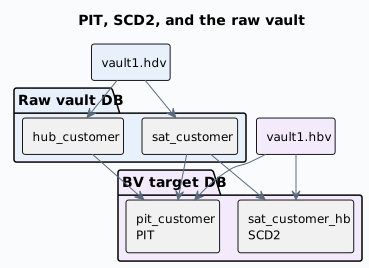
A Business Vault model is an .hbv file that references a linked Data Vault model (.hdv). It
reads hub and satellite history from the Data Vault target database and writes its tables to
the Business Vault target database. The two connections are configured separately (the DV one on the
.hdv, the BV one on the .hbv) and may or may not be the same; both must resolve in the Hop project,
and Check model validates that before any pipeline is generated.
Choose the table type for the question
| Table type | The question it answers |
|---|---|
SCD2 ( |
"What did this customer look like at business time T?" — one functional timeline merged from one or more satellites, with validity bounds. |
PIT ( |
"Which satellite row was effective at technical time T?" — one row per hub key and snapshot date, with a load-timestamp pointer per satellite. |
Bridge ( |
"Which customers bought which products?" — two or more hub hash keys, usually taken from a Data Vault link, flattened for reporting joins. Optional weight. |
SQL view / table ( |
"Anything else we can express in SQL" — business rules, enrichments and lookups you author on the
canvas, materialized as a view or a table with |
Source query ( |
A satellite-shaped input that lives outside the Data Vault target (a corrective view on another database, for example). SCD2 and PIT can read it; Business Vault Update does not load it. |
Identity map ( |
"Are these two records the same customer?" — a shared raw-hub-hash to durable-hash map for one hub. |
Source calendar ( |
"When may each source system contribute rows?" — shared cutover windows. Metadata only: nothing is created or loaded for it. |
Data Vault hubs, links and satellites are referenced on a .hbv canvas as Linked Hub, Linked
Link and Linked Satellite cards, so a table names the vault objects it reads.
SCD2: functional timelines
An SCD2 table merges satellite history into version rows. Every functional change opens a version with
validity bounds (valid_from / valid_to by default; the retail project’s configuration uses
x_from_ts / x_to_ts). The functional timestamp decides where a version starts — the moment the
source system said the value became true. It resolves in this order: per-satellite override, then the
per-table field, then the model default, then the load-date fallback. The retail 360 model sets it to
x_load_ts on the table.
An SCD2 table is pure Type 2: a value change becomes a new version row and the older rows stay queryable. There is deliberately no per-column Type 1 switch that would rewrite historical versions when a "current" value changes — mixing the two would make some columns look historical while they are not. When users need a value as it is now (say, the current sales rep on old facts), resolve it downstream: join the open SCD2 row, read the latest satellite row, use a separate current-state view or table, or use hybrid Type 1 + Type 2 in the dimensional model.
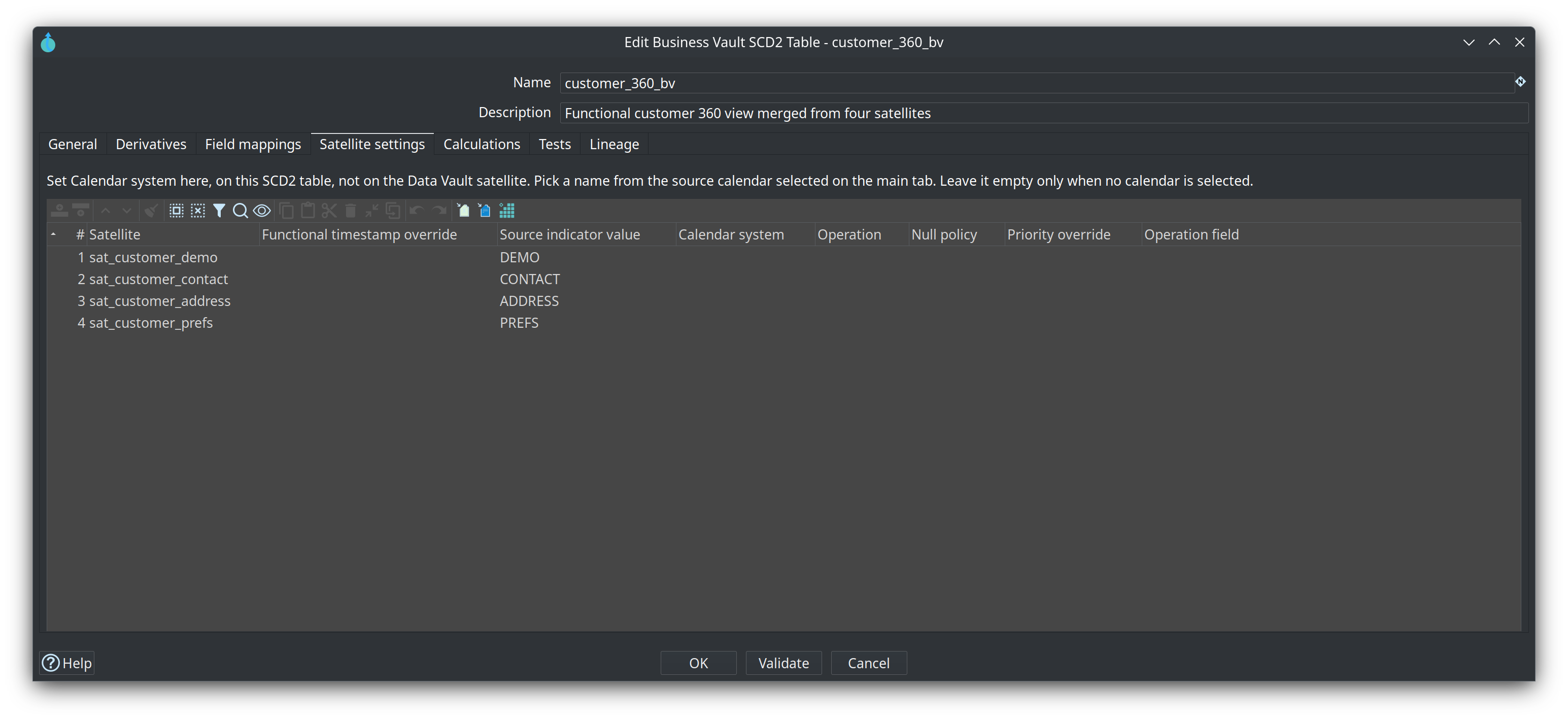
Field mappings are required when two or more inputs feed one table, and Suggest mappings fills the unmapped attributes of the satellites and source queries you select. On Satellite settings, each satellite can override the functional timestamp, carry a source indicator value (the merge tag used when several satellites are merged), and name the calendar system it belongs to when a source calendar is selected.
PIT: technical as-of snapshots
A PIT table materializes the as-of lookup once, so consumers join instead of re-deriving it: one row per
(hub hash key, snapshot date), plus one pointer column per satellite (default suffix _ldts) holding
the load timestamp of the satellite row that was effective at that snapshot. A query then joins
sat.x_load_ts = pit.sat_customer_ldts for the snapshot it wants.
PIT reads raw hub and satellite history — not SCD2 output. SCD2 and PIT are independent siblings in
the same run, and SCD2 tables run first. The snapshot spine is a schedule: Snapshot cadence (daily
only today; the other cadences validate but cannot be generated yet), Snapshot anchor (end of
period by default), Horizon days (default 1 — skips the most recent days as a late-arriving-data
buffer), and Range start / Range end (default: the earliest participating satellite load to
now minus the horizon). A PIT table that already exists only receives snapshot dates newer than its
highest snapshot_date.
Identity maps and survivorship
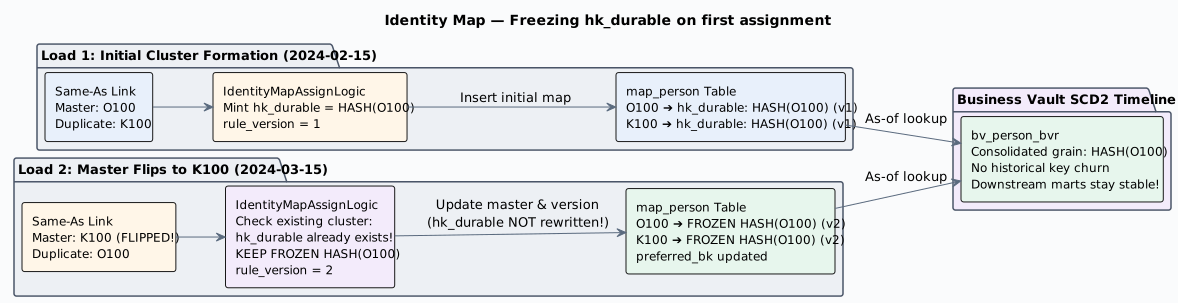
An identity map resolves many raw hub hashes to one durable hash. Add it with Add identity map
(a parent hub and a same-as link are what it needs), and an SCD2 table opts in with Identity map;
leave that blank and the timeline keeps the raw hub hash as its grain. The generated map upserts and
never truncates: a raw key that already has a durable key keeps it, so hk_durable is frozen on first
assignment and survives the next run. Rows that predate the mapping follow the unmapped policy — self
keeps the raw hash, quarantine and drop leave the row out of the timeline.
Survivorship decides values when several sources feed the same target column. Give each of those
mapping rows a Rank — 1 wins over 2 — and the merge keeps the best-ranked value at every
timestamp. Null policies decide what a null does (inherit skips to the next rank, apply writes it).
A table with no ranks keeps the normal merge behaviour.
Source calendars
A source calendar is shared metadata — not a warehouse table — that says when each source system may
contribute rows. Each entry is a half-open window: a calendar system name you choose (ORACLE,
KAFKA, …), an effective-from and an effective-to, where an empty effective-to means the source is
still in use. An SCD2 table opts in with Source calendar and then names the calendar system per
satellite on Satellite settings; leave it blank and every satellite row is kept. The documented
example: Oracle rows count through 2024-02-29, Kafka rows from 2024-03-01.
How a Business Vault load runs
Business Vault Update (BUSINESS_VAULT_UPDATE) mirrors Data Vault Update: model check, optional DDL
on the target, pipeline generation, staging, parallel execution, and optional catalog publish. Within
one run the order is fixed: SCD2 tables, then PIT, then bridges, then SQL business tables. Inside a
full warehouse wave, Update resource definition group runs all Data Vault models first, then all
Business Vault models, then all dimensional models — each layer in list order.
Debug (toolbar) and Show build pipeline (table context menu) generate a build pipeline and open it without writing any data. That is the fastest way to read what a table will actually do before a load touches the warehouse.
Guided walkthrough
Read the finished Business Vault
-
Open the project folder
retail-example/in Hop GUI and openmodels/retail-360.hbv(or select it under 4. Business Vault in the EDW Journey perspective). -
Read its tables:
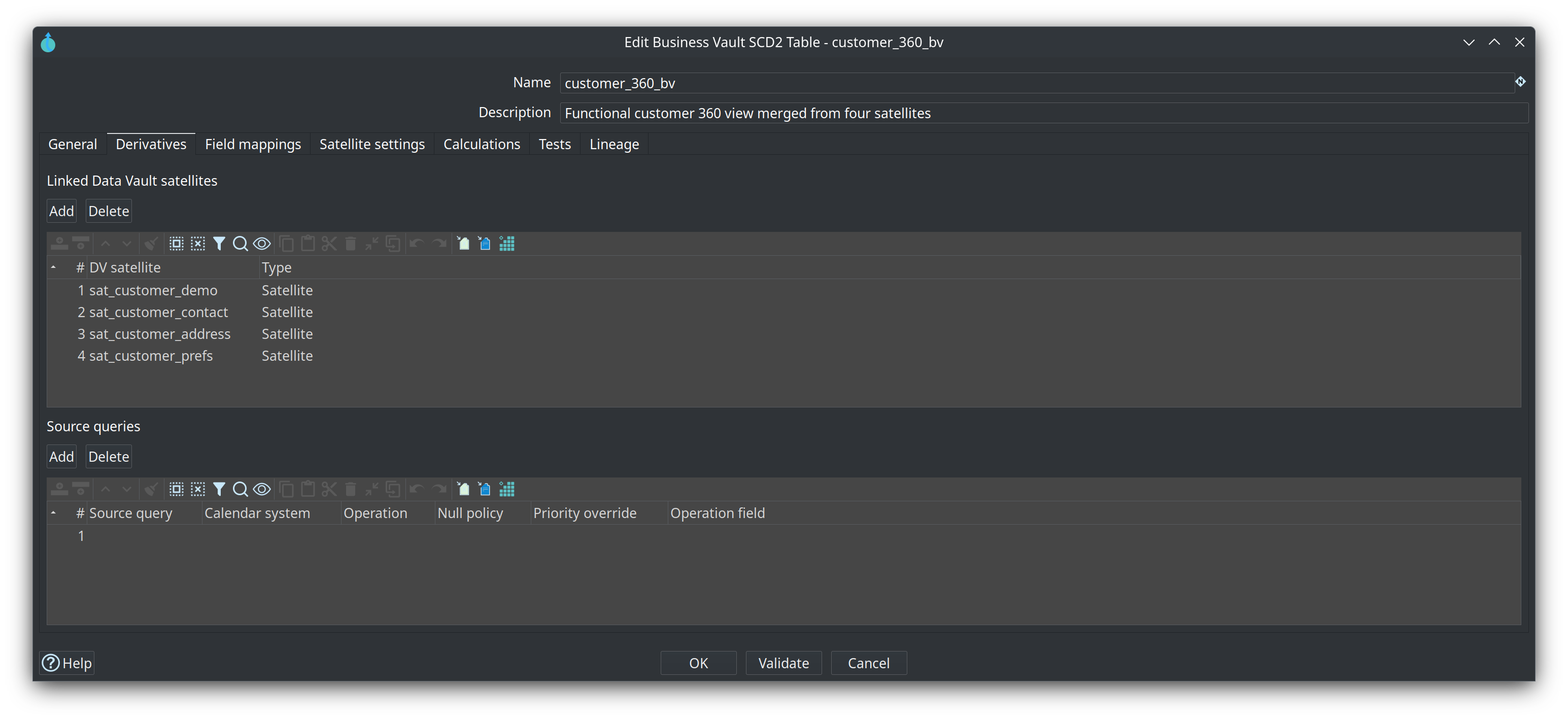
customer_360_bvis one SCD2 table that merges four satellites —sat_customer_demo,sat_customer_contact,sat_customer_address,sat_customer_prefs— aroundhub_customer. The model also carries a source calendar (Oracle-Kafka-Calendar) and a SQL calculation (online_indicator). The group’s Business Vault tab also listsretail-sql.hbv, which materializessatb_product_hb, a historical view oversat_product.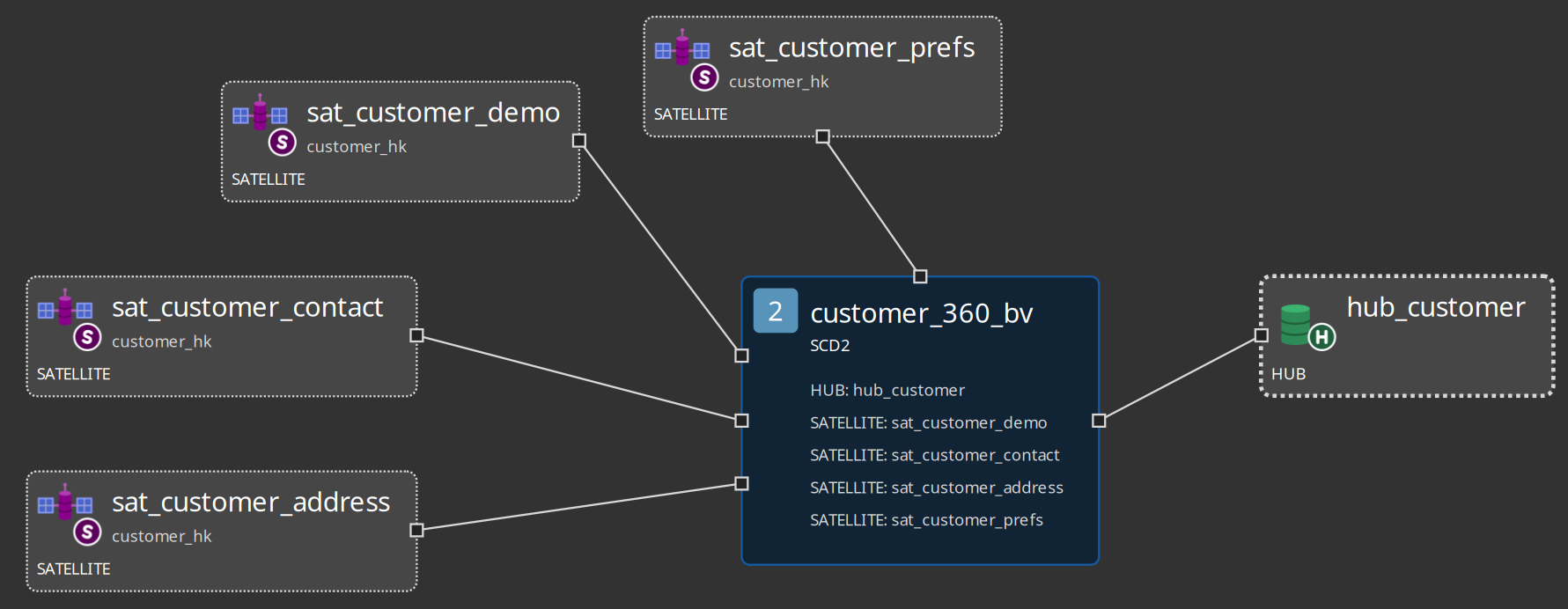
-
Open the table dialog (double-click
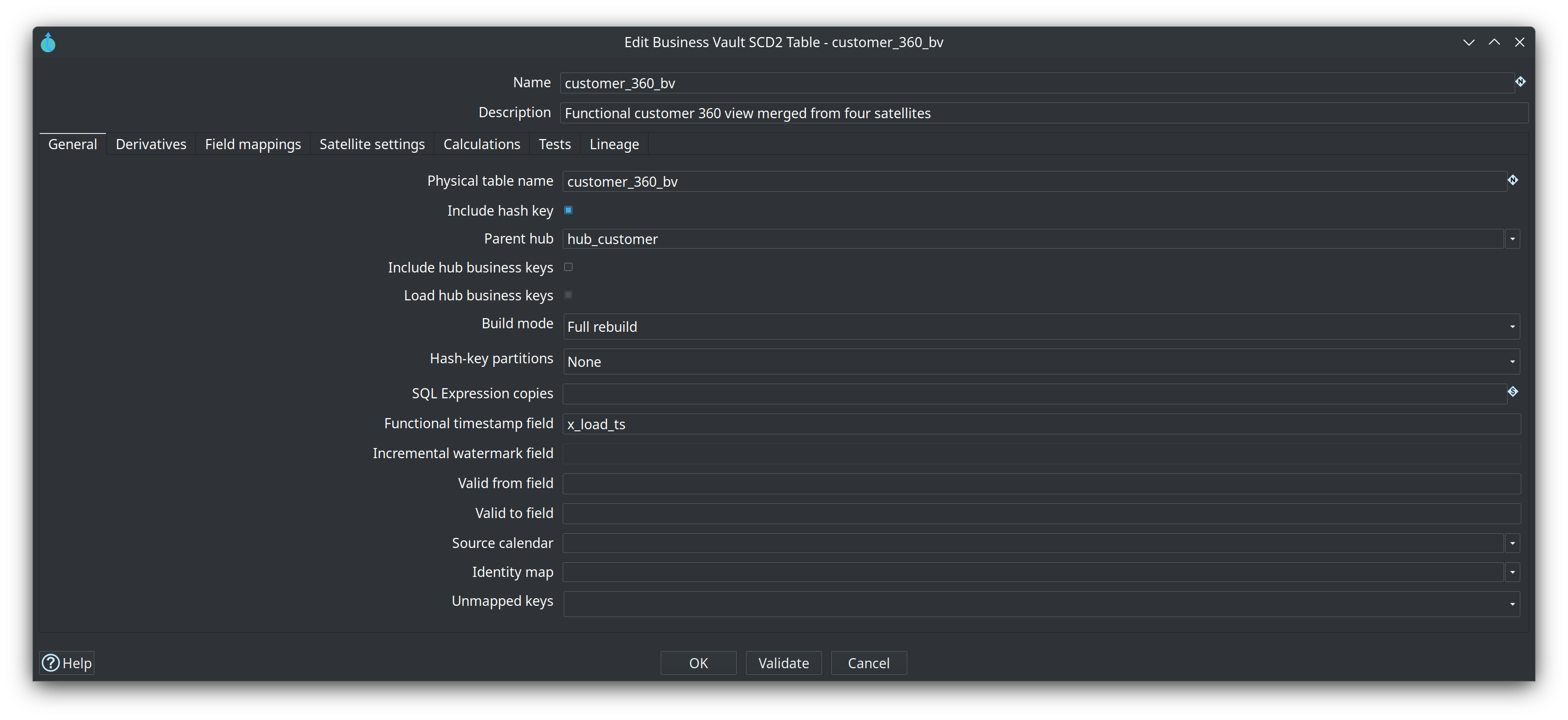
customer_360_bv) and walk its tabs: General (physical table name, Include hash key, Include hub business keys, Build mode, validity fields), Derivatives (the hub and the four satellites), Field mappings, Satellite settings and Calculations. -
Note the interaction model: the canvas uses left-click context menus (there is no right-click menu), and those menus are where you add your own tables.
Build your own SCD2 table
-
In your own project, open (or create) a
.hbvand set Edit model → Data Vault model file to your.hdv. On the canvas, place the vault cards you need: Add Linked Hub for the hub, then Add Linked Satellite for each satellite that feeds the table. -
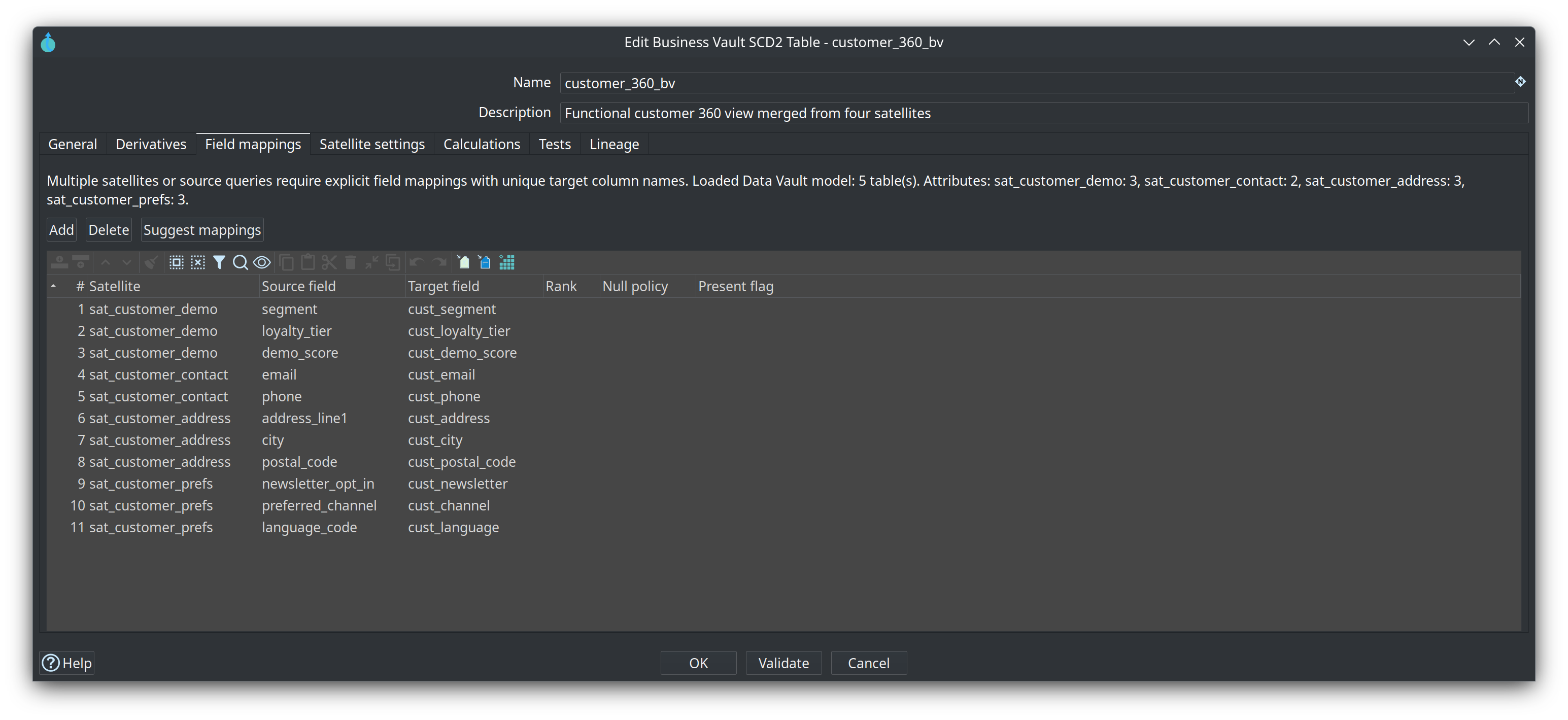
Add SCD2 table, then set Parent hub in the dialog and pick the satellites on the Derivatives tab. On Field mappings, press Suggest mappings and select the satellites to fill; keep, rename or drop the proposed target columns.
-
Read the Field mappings list: each row maps one satellite attribute to one Business Vault column, and every mapped attribute is history (Type 2). Pick one attribute you would want to be always current — a loyalty tier, a current sales rep — and note that the plugin keeps SCD2 pure Type 2, so that value will be resolved downstream instead.
-
Use Show build pipeline on the table to read the generated pipeline: satellite reads, the sorted merge, the
LAG/LEADvalidity computation, and the load into the target. Nothing is written by opening it. -
Open Satellite settings and read the per-satellite overrides: functional timestamp, source indicator value, and the calendar system used when a source calendar is selected on the table.
-
Add a PIT table over the same hub: Add PIT table, set exactly one hub and at least one satellite as derivatives, and read the snapshot schedule — Snapshot cadence, Snapshot anchor, Horizon days, Range start and Range end.
-
Check model until it reports no errors.
Register and load the model
-
Add the
.hbvto your warehouse: Metadata → EDW → Resource definition group, open your group, add the file on the Business Vault models tab and save. -
Run Update resource definition group again. The action loads all Data Vault models first, then all Business Vault models, then all dimensional models, each layer in list order; watch the log for the SCD2 and PIT pipelines.
-
Prove it in the database. In the retail example the SCD2 table is
customer_360_bv; use the name your own model generated if you followed the steps on your own vault. In the Database perspective, connect Vault, expand Vault → public, select the table and press Show object information:Expected in the column list: the parent hash key, the hub business keys, the validity columns (
x_from_ts/x_to_tsin this project), and one column per field mapping. Preview table shows the rows themselves.
Try it yourself
Take one attribute your SCD2 table will carry that users will always want as it is now — a loyalty tier, a current sales rep — and decide its fate:
-
Map the attributes that are history. Every mapped column is Type 2 by design; there is nothing to mark.
-
Write one line: where will the current value come from? (Join the open SCD2 row; read the latest satellite row; use a separate current-state view or table; or keep the rule for hybrid Type 1 + Type 2 in the dimensional model.)
-
Run Check model and fix whatever it reports.
Check your work: no model check errors, and your line matches the Type 1 vs Type 2 rule in Concepts — history stays clean Type 2 on the SCD2 table and "current" is resolved downstream. If your note says "switch the column to Type 1 on the SCD2 table", re-read that section: the plugin deliberately offers no such switch.
Questionnaire
Answer the eight questions. Every answer comes with its reasoning, and Copy my results gives you a text summary to keep.
1. What does the Business Vault add over the raw Data Vault?
b) The Business Vault reads hub and satellite history from the Data Vault target database and writes its tables to the Business Vault target database. The merge, validity and pointer logic is generated from the .hbv model; only SQL business tables are SQL you author yourself.
2. SCD2 table or SQL view / table — how do you choose?
b) SCD2 is the mechanical pattern: collapse history into version rows. SQL business tables are for business rules, enrichments and lookups you must author; Business Vault Update orders and materializes them after the SCD2 and PIT loads. See Business Vault SQL views and tables.
3. What does a PIT table solve?
b) A PIT table materializes the lookup once: join sat.x_load_ts = pit.sat_customer_ldts for the snapshot you want. It reads raw hub and satellite history, not SCD2 output; deciding whether two records are the same customer is the identity map's job.
4. Which statement about Type 1 and Type 2 is correct for a Business Vault SCD2 table?
c) SCD2 history stays clean: each functional change is its own version. For a value "as it is now", join the open SCD2 row, read the latest satellite row, use a current-state view or table, or keep hybrid Type 1 + Type 2 for the dimensional model.
5. What does an identity map freeze?
b) The durable hash is assigned once and sticks; a new duplicate inherits the durable key of its cluster. An SCD2 table opts in with Identity map; leaving it blank keeps the raw hub hash as the timeline grain.
6. Scenario: two source systems disagree about a customer's name, and both changes arrive in satellites that one SCD2 table merges. Which Business Vault feature decides the value?
b) When several sources feed one target column, the ranked merge keeps the best-ranked value at every timestamp. Identity maps decide whether two records are the same customer; ranks decide whose value wins.
7. In which order does the Update resource definition group action load the warehouse models?
b) The group is the scope of the wave: every DV model loads, then every BV model, then every DM model, and the list order inside a layer is the update order. Within one BV model the order is SCD2, then PIT, then bridges, then SQL business tables.
8. What is a source calendar?
b) An SCD2 table opts in with Source calendar and then names the calendar system per satellite on Satellite settings; blank keeps every row. The documented example: Oracle rows count through 2024-02-29, Kafka rows from 2024-03-01.
Where to go next
-
Training index — all modules and the learning paths
-
Business Vault overview — every table type on one page
-
Business Vault SCD2 — field mappings, satellite settings, identity maps, survivorship, source calendars, build modes
-
Business Vault PIT — snapshot schedule, pointer columns and current limits
-
Business Vault bridge tables — multi-hub-key tables for reporting joins
-
Business Vault SQL views and tables — authoring SQL with
ref()/source() -
Business Vault Update action — every option of the workflow action
-
Business Vault configuration — target database, sentinels and SCD2 defaults
-
Data Vault integration modes — when the raw vault is loaded outside Hop
-
Module 6 — Dimensional models — next step: facts, dimensions and the bus matrix