Why it matters
Dimensional marts are the layer people actually query. Data Hopper EDW adds Kimball star and
snowflake modeling to Hop: a .hdm file describes dimensions, facts, grains, measures and SCD
policies, and the plugin generates and runs the load pipelines for them — the same model-first way
the vault layers are built.
Generation removes the manual work, but it cannot make two modelling decisions for you: the grain of every fact and the conformed dimensions that facts share. Get them wrong and every report on the mart quietly inherits the mistake; get them right and the mart is reproducible from the same vault that feeds it. Budget 30-40 minutes.
Concepts
A fact states a grain; a dimension carries attributes
A dimensional model is one .hdm file: configuration (target database, standard column names such
as dim_key, date_from, date_to), tables, a conformed dimension registry, and notes. The
table types cover the whole Kimball toolbox: dimensions (SCD1, SCD2 or SCD3), transaction facts, junk
dimensions, bridges, factless facts, periodic and accumulating snapshots, and aggregates.
Every fact states a grain — what one row represents. The retail models say it out loud:
f_orders is grain order, f_order_lines is grain order-line, and f_pit_inventory is grain
warehouse-product-day. At load time the fact resolves each dimension role with a dimension lookup;
junk dimensions are built with a combination lookup, bridges carry many-to-many weights, and factless
facts carry dimension foreign keys only.
Dimensions carry a natural key and attributes with per-attribute policies (Type 1 / Type 2), and the
modeler generates the matching pattern: Insert/Update for Type 1, a merge chain for SCD2, a Dimension
Lookup with update for hybrid Type 3. Surrogate keys are generated by default and can be overridden
per dimension — the retail dimensions use the Data Vault hash keys (customer_hk, order_hk,
product_hk) straight from the vault. Check model runs the Kimball validation: grains, roles,
source SQL, references.
Conformed dimensions and role-playing dates
One physical dimension table shared by several facts is what conformed means: every fact joins the
same d_customer, so their reports agree about the customer. The retail project keeps its shared
dimensions in retail-conformed-dims.hdm — d_customer, d_order, d_product, d_warehouse and
the calendar d_date — and the fact models reference them as dimension aliases instead of rebuilding
them.
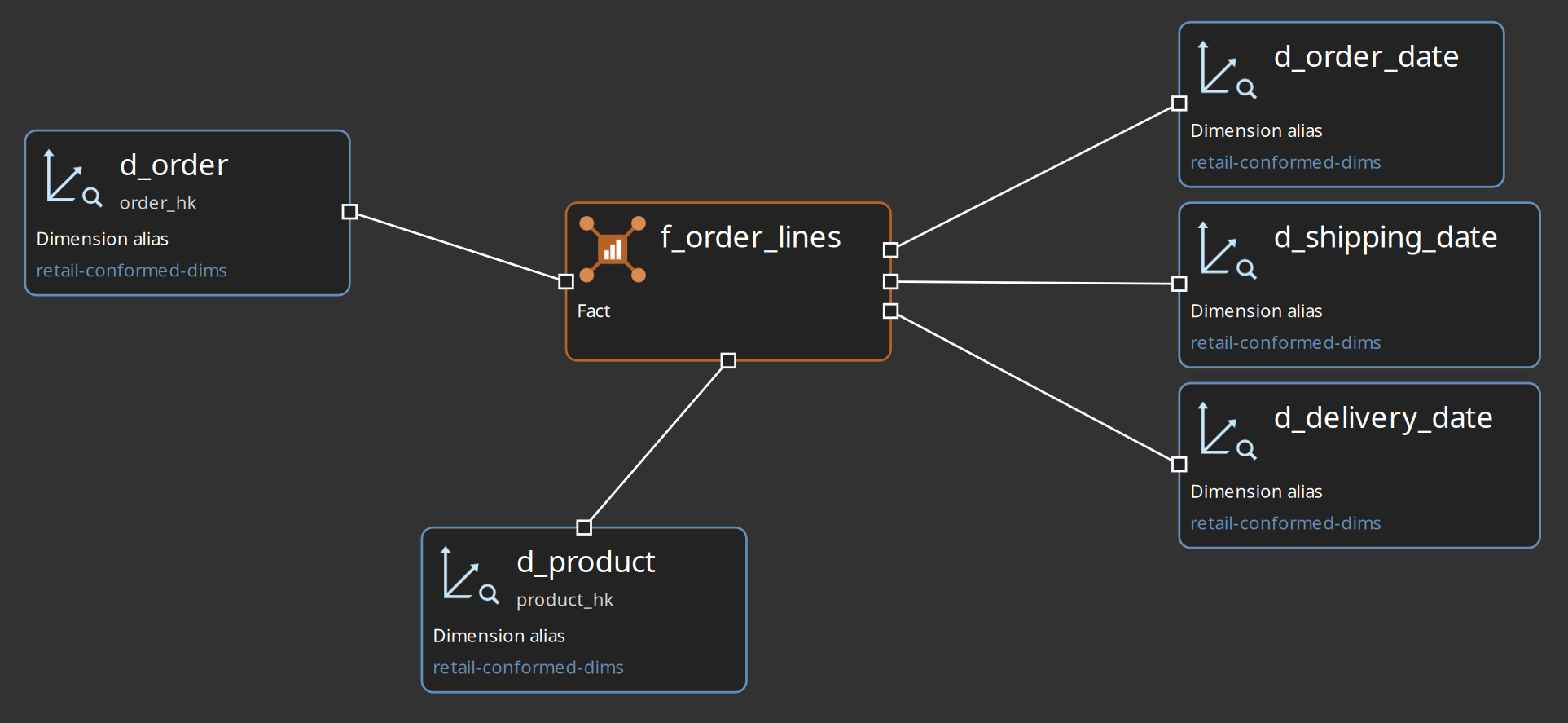
Role-playing dates are the same idea inside one star: d_order_date, d_shipping_date and
d_delivery_date are three roles of the single physical d_date. The f_order_lines canvas shows
both ideas at once — conformed dimension aliases and three date roles on one fact:
The date dimension is generated
A dimension can get its rows from a Date generator source instead of SQL: the model embeds the
Date Dimension Generator transform in the generated load pipeline, so the standard calendar needs no
external pipeline at all. The retail d_date covers 2000-01-01 to 2030-12-31 and emits one row
per day, with the standard field pack (date_key, full_date, day_of_week, …) plus a load
timestamp (x_load_ts); it loads with Type 1 — skip unchanged, which sends only new and changed
calendar rows to the table.
The bus matrix is the conformance map
The bus matrix is a crosstab of business processes (facts) against conformed dimensions, built
from every .hdm file listed on the resource definition group. Facts are tagged on their General tab
with Business and Process level 1 / 2 / 3 from a business process catalog — the retail
catalog is retail-bus. Role-playing date aliases collapse into the physical d_date, and a cell
can show a role count instead of a single mark. An empty column is a coverage gap: a dimension no
process uses yet.
Publish a draft, then update
Two workflow actions cover the layer. Dimensional Publish converts a .hdv into a draft
.hdm for human review — hub to dimension, satellite to attributes (SCD2 when historized), link to
bridge or factless fact — and runs no ETL; the GUI equivalent is Publish draft dimensional model
on the .hdv canvas. Dimensional Update is the load: it runs the model check, skips tables whose
source is None (logical) (contracts, not loads), optionally generates CREATE TABLE DDL and lookup
indexes on the target database, generates one pipeline per table from native Hop transforms, and
runs them through the parallel orchestrator. A table needs a complete source configuration — SQL,
pipeline, record definition or date generator — before the update will run it.
Guided walkthrough
Open the finished marts
-
Start Hop GUI and open the project folder
retail-example/(File → Open project), then openmodels/retail-f-orders.hdmin the modeler. The canvas holds the factf_orders, its dimensions (d_customer,d_order, the junk dimensiond_orders_junk) and three date aliases that all point at the singled_date:d_order_date,d_shipping_date,d_delivery_date.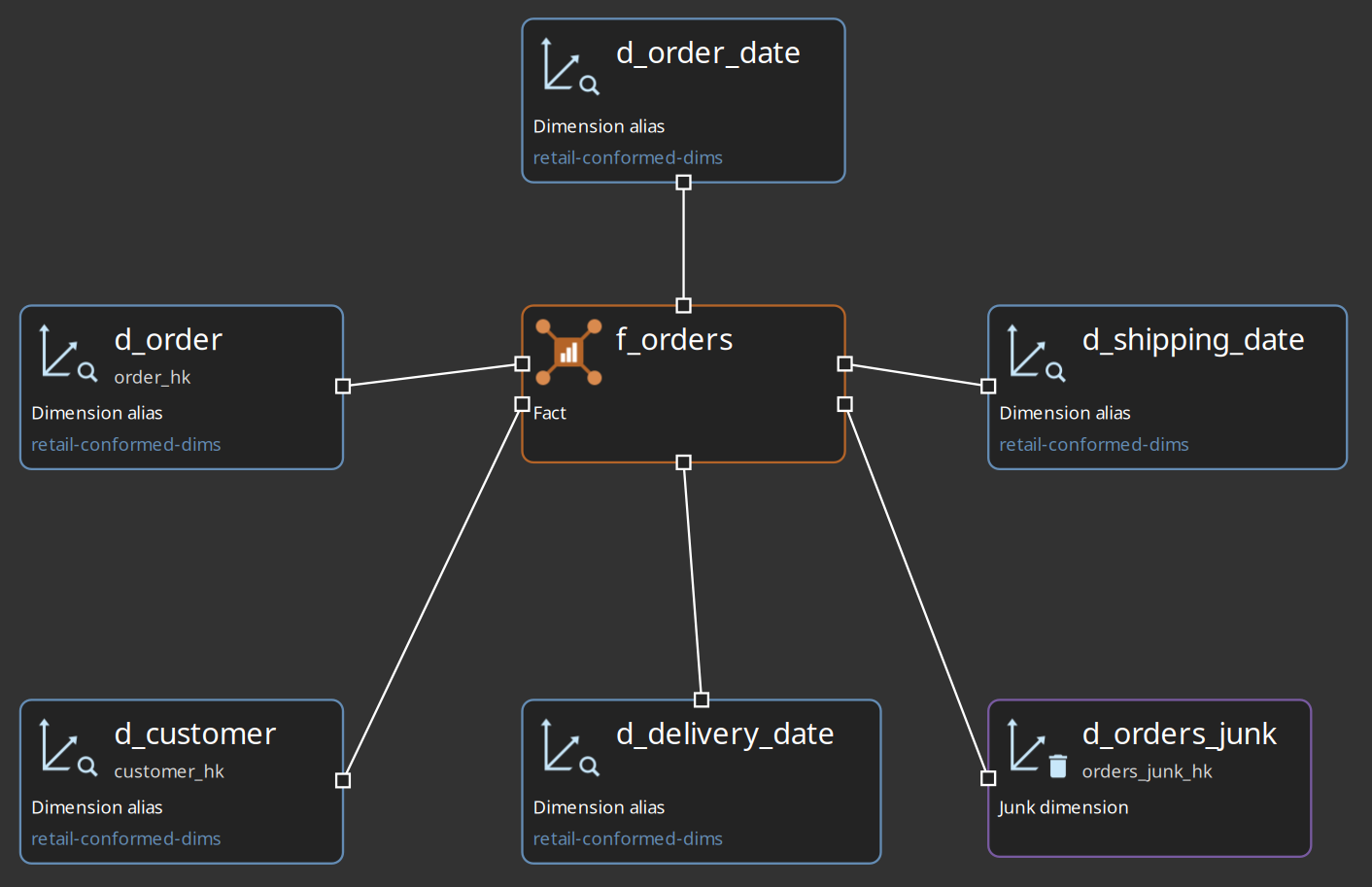
-
Open the fact
f_ordersand read it: the grain isorder,total_amountis the measure, anddegenerate_infois a degenerate attribute. Its Source tab shows where the rows come from — SQL against the raw vault in theVaultdatabase (hub_order,hub_customer,sat_order,lnk_order). Its General tab is where the business process tags live. -
Open
models/retail-f-order-lines.hdmto see the same pattern one grain finer:f_order_lineshas grainorder-line, reuses the conformed dimensions fromretail-conformed-dims.hdm, and points the same calendard_dateat three roles.
-
Open
models/retail-conformed-dims.hdmand selectd_date. On the Source tab the source type is Date generator: range2000-01-01to2030-12-31, the standard field pack plus the load timestampx_load_ts, and load strategy Type 1 — skip unchanged.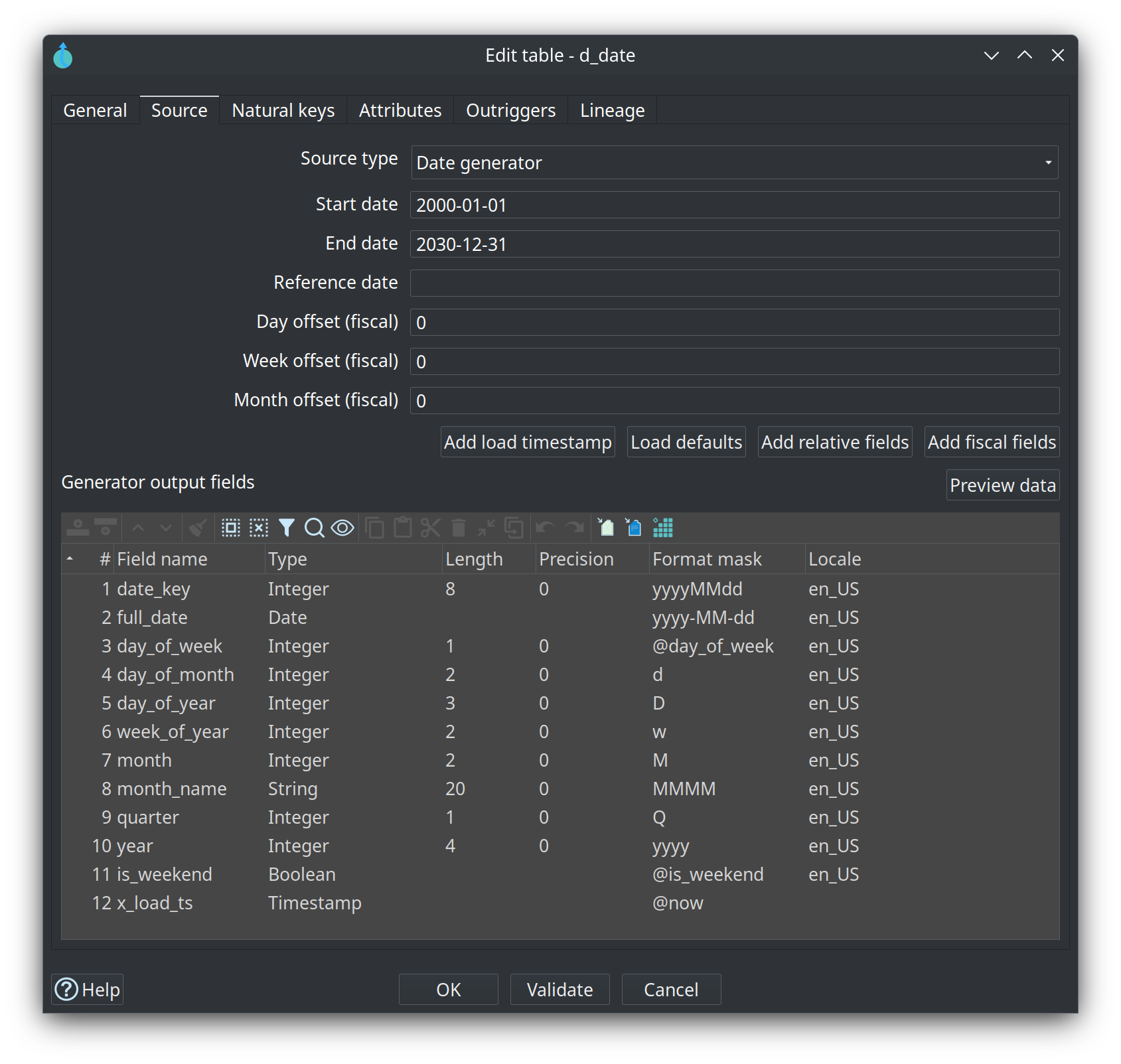
-
On the dimensional canvas, left-click the background: the context menu offers Add date dimension, which creates its own
dim_date/d_datewith source type Date generator and the default field pack. Load defaults, Add relative fields, Add fiscal fields, Add load timestamp and Preview data manage that pack from the Source tab. -
In your own project from modules 2-5, add a fact over your hub and its satellite: state the grain explicitly, map one foreign key per dimension role, and pick the measures.
-
Check model until the Kimball validation is clean. A table still on source type None (logical) is a contract only: the check warns and Dimensional Update skips it.
-
Add the
.hdmto the Dimensional models tab of your resource definition group and run the group update (Update resource definition group). With Update target database structure on, the run creates the tables and their lookup indexes; the action always loads all DV, then all BV, then all DM, in list order. -
Tag each fact on its General tab — Business and Process level 1 / 2 / 3 from metadata
retail-bus— and open the bus matrix from the resource definition group editor (Bus matrix) or Tools → View bus matrix…. Rows are business processes, columns are conformed dimensions; the date aliases collapse intod_dateand the cell shows a role count.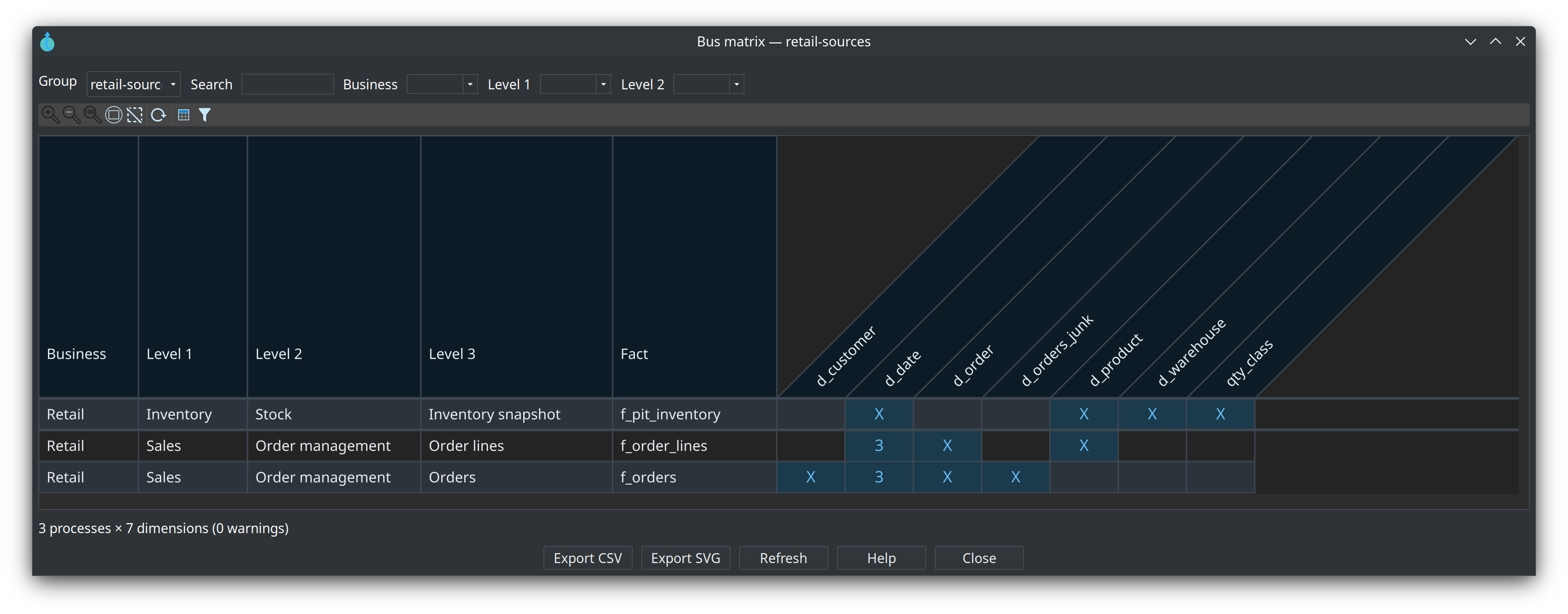
-
Query a loaded fact on the
Vaultconnection to prove the grain — in the Database perspective, Open SQL editor on Vault, then Run (Ctrl+Enter):select count(*) from f_orders;One row per order — the grain you read on the fact in step 2, now in the database.
Try it yourself
Add one degenerate attribute and one new dimension to your own star:
-
On your fact from the walkthrough, add a degenerate attribute — a text field carried straight from the source, like
degenerate_infoonf_orders. -
Add a new dimension with a natural key and one Type 1 attribute, point a dimension role on the fact at it, and register it in the model’s conformed dimension registry (logical name to physical table).
-
Check model, then re-run the group update so the dimension is created and loaded.
Check your work: no model check errors, the fact still loads, and the bus matrix for your group shows your fact against the new dimension next to the existing ones — if the fact’s row is missing, give it a Business / process level tag first. The new table is in the tree too: in the Database perspective, Vault → public lists it next to the other marts. To read the fact’s columns instead of its rows, select it and press Show object information.
If you have not built your own models yet, do the reading version instead: write down the grain, the
measures and the three date roles of f_order_lines, then find its row in the retail bus matrix and
read the cell for d_date.
Questionnaire
Answer the seven questions. Every answer comes with its reasoning, and Copy my results gives you a text summary to keep.
1. What does the grain of a fact state?
b) The retail models write it down: f_orders is grain order, f_order_lines is grain order-line, f_pit_inventory is grain warehouse-product-day. Set it before mapping roles and measures.
2. What makes a dimension conformed?
c) Conformance is one physical table loaded once. retail-conformed-dims.hdm holds d_customer, d_order, d_product, d_warehouse and d_date; the fact models reference them instead of rebuilding them.
3. What does the bus matrix show?
b) It is built from every .hdm listed on the group. Facts are tagged Business / process level 1-3 from a business process catalog, role-playing date aliases collapse into the physical d_date, and an empty column is a coverage gap. See Kimball bus matrix.
4. Where does the retail d_date calendar come from?
c) One row per calendar day between the start and end date, with a field table instead of SQL. Retail uses 2000-01-01 through 2030-12-31, the standard field pack plus x_load_ts, and load strategy Type 1 — skip unchanged, so a later run writes only new and changed rows.
5. Scenario: f_orders and f_order_lines must report the same customer attributes. What keeps the two facts in agreement?
b) Conformance is a shared physical table: d_customer is loaded once from the vault and both facts carry a foreign key to it, resolved by a dimension lookup at load time.
6. How do Dimensional Publish and Dimensional Update differ?
b) The draft follows starting rules — hub to dimension, link to bridge or factless fact, link satellite with measures to fact — and you review it in the modeler first. Update also has the optional Update target database structure step that creates tables and lookup indexes.
7. Where does a dimensional mart read its rows from?
c) Sources are per table: Database/SQL, a Hop pipeline, a catalog record definition, or the date generator. What matters is that the source delivers rows at the stated grain — raw vault, Business Vault or both.
Where to go next
-
Dimensional modeler overview — table types, staging sources, pipeline generation strategy, DDL options
-
Date Dimension Generator — format masks, field packs, relative and fiscal attributes
-
Kimball bus matrix — tagging facts, the viewers, CSV/SVG export and the CLI
-
Dimensional Update and Publish actions — the two workflow actions, option by option
-
Module 7 — Lineage, quality and operations — next step
-
Training index — all modules and the training environment