The dimensional modeler adds Kimball star/snowflake modeling to Data Hopper EDW. Models are saved as .hdm files and drive native Hop warehouse transforms for dimension and fact loads.
Why a separate modeler
Data Vault and Kimball semantics differ enough that they use separate model files:
-
.hdv— hubs, links, satellites, hashing, insert-only history -
.hdm— dimensions, facts, bridges, grains, measures, SCD policies
The plugins share infrastructure (graph shell, ELK layout, orchestrator, workflow action pattern) but keep domain metadata separate.
Dimensional model (.hdm)
A dimensional model contains:
-
Configuration — target database, default standard column names (
dim_key,date_from,date_to, …), pipeline naming, optional Generate primary keys / Generate foreign keys for CREATE TABLE DDL -
Per-dimension surrogate keys — optional override of strategy (none, auto-increment, source field such as a DV hash key) and column name; fact foreign key columns remain per join
-
Tables — dimensions, facts, junk dimensions, bridges, factless facts, snapshot facts, aggregates
-
Conformed dimension registry — logical name → physical dimension table
-
Notes — canvas documentation only
-
Logical contracts — source type None (logical) lets you sketch stars and field lists before staging SQL exists. Canvas cards show a Logical badge. Check model warns; Dimensional Update skips those tables until a load source is set.
-
Field documentation — Edit field… on attributes, natural keys, measures, and degenerates stores a description plus Markdown notes and requirements (the old Excel mapping comments). Project documentation renders that Markdown.
-
Bus matrix — facts carry Business / process level 1–3 from a Business process catalog. Open the crosstab from the resource definition group, EDW Journey, or Tools → View bus matrix…. See Kimball bus matrix.
-
Fact presentation — bind a semantic layer (
.hsl) to this model and Create presentation…, or right-click a fact → Create presentation…. Pick groups, axes, and measures, then generate a Hopper crosstab against the target warehouse. See crosstab editor.
Optional DDL constraints (both off by default):
-
Generate primary keys — dimension and junk surrogate keys, and bridge composite keys, as
PRIMARY KEYon CREATE TABLE. Fact tables do not receive a primary key in this release. -
Generate foreign keys — fact/bridge roles and dimension outriggers emit
FOREIGN KEYclauses when the target engine supports them (not SingleStore). Parent dimensions receive a primary key when FK generation is enabled so references are valid. CREATE only; no ALTER retrofit. -
Lookup indexes — update DDL also creates a non-unique index on the columns the load looks up: dimension natural keys (plus
date_fromon a versioned dimension), the surrogate key when it is not already the primary key, junk hash or key fields, bridge foreign keys, and accumulating-snapshot grain keys. A calendar dimension such asd_dateis indexed ondate_key. Run Update target database structure again to add these indexes on tables that already exist. Snowflake is skipped. Insert-only fact foreign keys are not indexed.
Open a .hdm file in Hop GUI for the visual editor (same interaction model as the Data Vault canvas).
The retail example retail-f-order-lines.hdm shows a transaction fact with conformed dimension aliases and multiple date roles on one canvas:
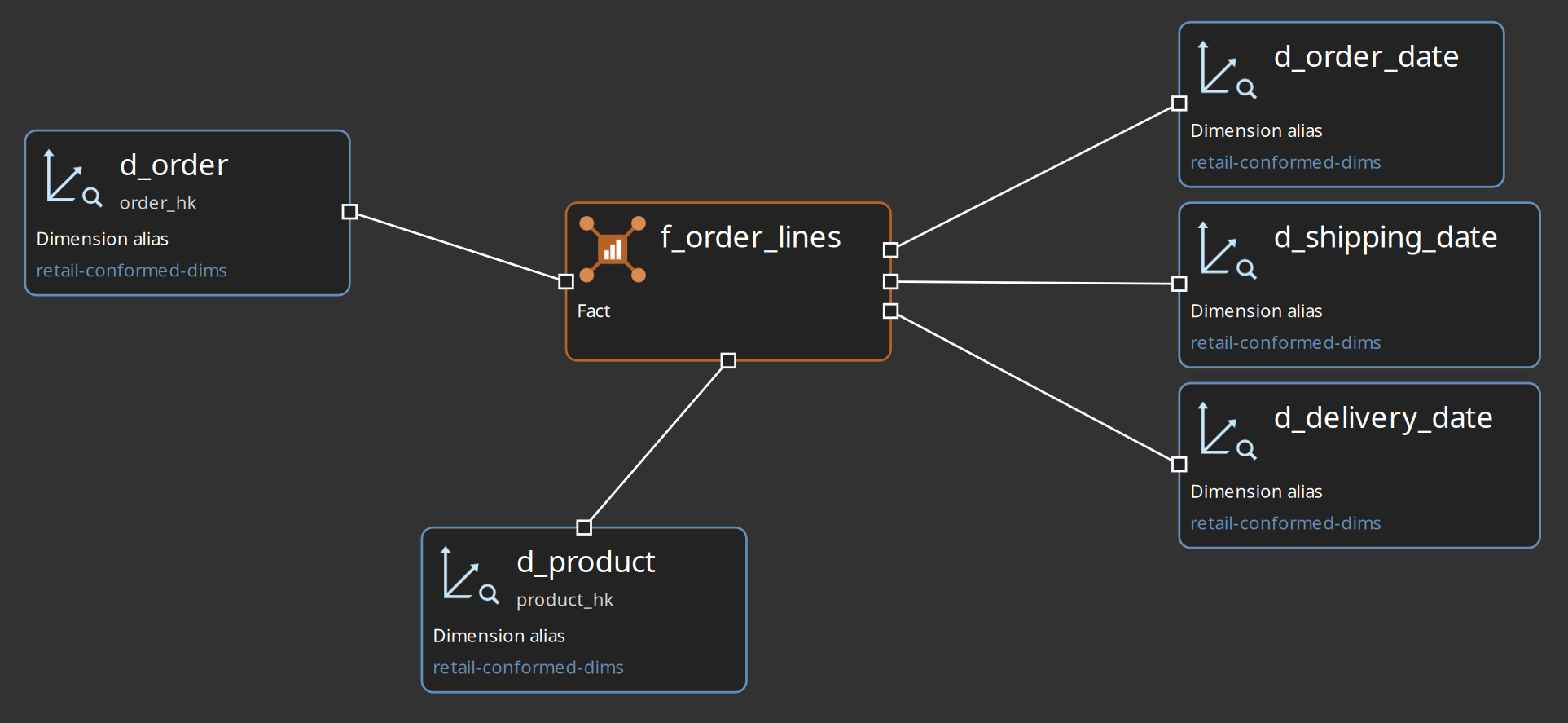
Table types
| Type | Kimball role |
|---|---|
Dimension ( |
SCD1, SCD2, or SCD3/hybrid dimension loads |
Fact ( |
Transaction fact with dimension roles and measures |
Junk dimension ( |
Low-cardinality flag combinations via Combination Lookup |
Bridge ( |
Many-to-many resolution between two or more dimensions |
Factless fact ( |
Coverage/attendance pattern — dimension FKs only |
Periodic snapshot ( |
Grain includes snapshot period |
Accumulating snapshot ( |
Milestone grain with row updates across a lifecycle |
Aggregate fact ( |
Pre-computed rollup from a base fact |
Staging sources
Each dimension or fact has a Source tab that defines how staging rows are obtained for generated load pipelines. Supported source types:
-
Database / SQL — SQL executed by a generated
TableInput(the traditional path) -
Pipeline — a Hop
.hplwhose output is injected via MetaInject -
Record definition — a data catalog record definition
-
Date generator — built-in calendar generation (dimensions; see below)
Model validation requires a complete source configuration for the selected type before running Dimensional Update.
Date dimension (dim_date)
For the standard calendar dimension:
-
Canvas action Add date dimension creates
dim_date/d_datewith source type Date generator, default calendar fields, TYPE1 attributes, and load strategy Type 1 — skip unchanged. -
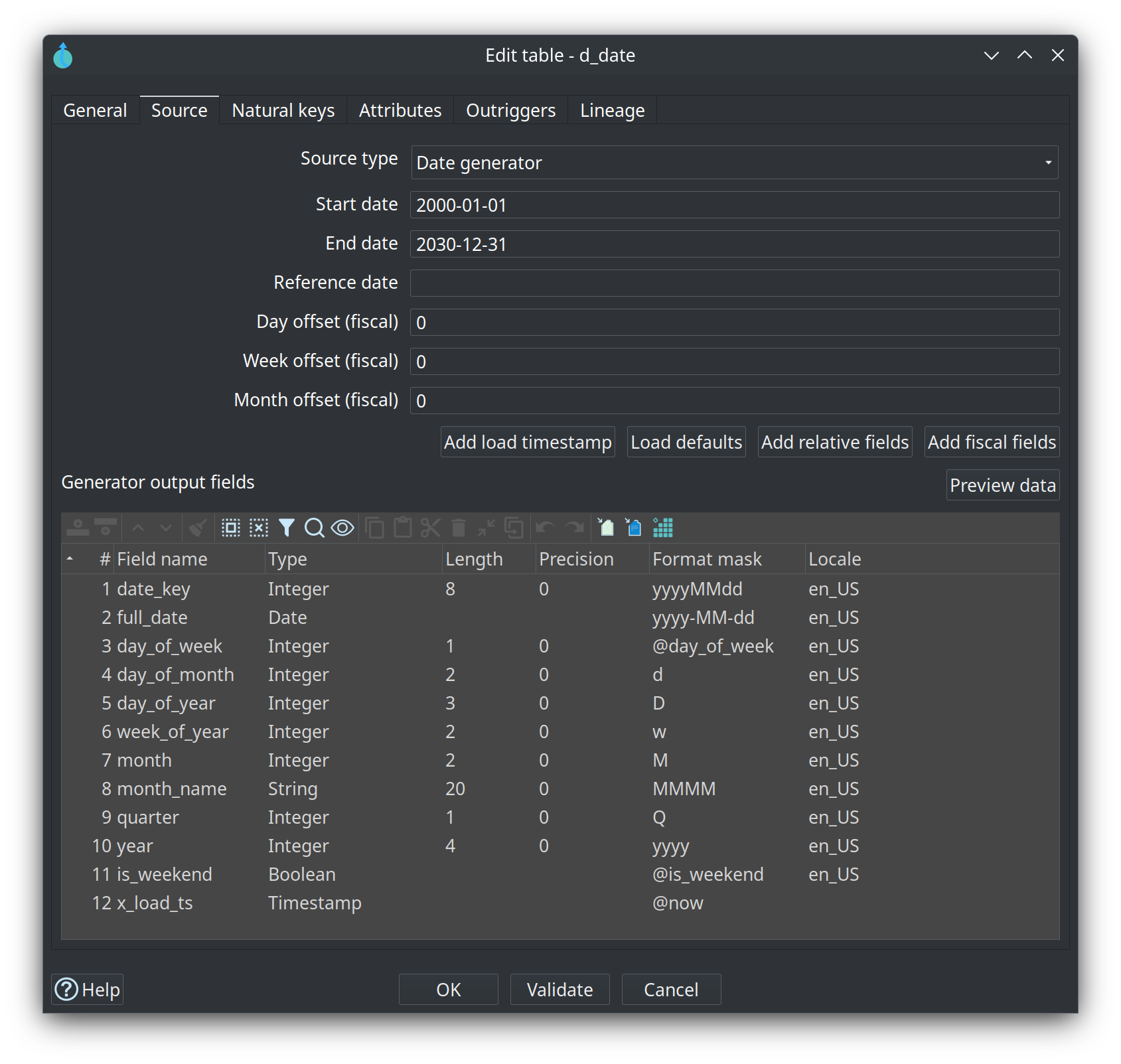
On the Source tab, Date generator embeds the Date Dimension Generator in the generated Dimensional Update pipeline: start/end dates, optional reference date, fiscal day/week/month offsets, and a field table. No external
.hplis required for the standard calendar. -
Use Load defaults, Add relative fields, Add fiscal fields, and Add load timestamp to manage the output field pack; Preview data generates sample rows with the same logic as the transform.
-
Type 1 loads need the model load timestamp column (for example
x_load_ts) on the source stream. The date generator adds that field automatically as aTimestampwith mask@nowwhen it is not already in the field table. -
Type 1 — skip unchanged compares the generator with the rows already in the dimension and sends only new and changed rows to Insert/Update. The load timestamp is not part of that comparison, so an unchanged row keeps the timestamp already stored. Relative attributes such as
month_relare compared, so those rows still update when they move. Choose Type 1 — overwrite on the General tab to write every source row. Rows that leave the generator range are left in the table. -
Advanced customizations (holidays, bespoke SQL) can still use Pipeline or SQL sources.
The generator’s Load defaults field pack matches the modeler template (date_key, full_date, day_of_week, and related columns). Optional relative and fiscal field packs support dynamic reporting filters (month_rel = 0, YTD) and fiscal calendars.
Workflow integration
Production loads and DV-to-dimensional publish use workflow actions documented in Dimensional Update and Publish actions.
GUI workflows
Canvas context menu
Left-click the dimensional canvas background to:
-
Import database tables — scaffold draft tables from an existing database schema
-
Add date dimension — standard calendar
dim_datewith Date generator source (see Date dimension (dim_date)) -
Add dimension, fact, junk dimension, bridge, factless fact, or note
Left-click a table for Preview masked rows. That runs the modeled columns through the Safe masking policy. Preview target table still reads the warehouse directly.
Pipeline generation strategy
Generators are thin builders over native Hop warehouse transforms:
| Kimball pattern | Hop transform | Notes |
|---|---|---|
SCD Type 1 (all attributes Type 1) |
Insert/Update |
Type 1 — overwrite. Every source row is written on the natural key |
SCD Type 1, skip unchanged |
Merge rows (diff), then Insert/Update |
Type 1 — skip unchanged. Identical rows are not written. Add date dimension uses this mode |
SCD Type 2 (all attributes Type 2) |
MergeRows chain (satellite pattern) |
Ported from |
Hybrid / Type 3 (mixed attribute policies) |
Dimension Lookup ( |
Per-attribute update types; optional source→target rename; |
Junk dimension |
Combination Lookup |
Key field combinations → surrogate key |
Fact FK resolution |
Dimension Lookup ( |
One lookup per dimension role. Copies on the join (empty = 1; variable expressions allowed) is the lookup transform’s copies. Date-key joins use the same value on the generated date-key transforms. |
Bridge / factless / snapshots |
Mix of above + TableOutput/InsertUpdate |
Catalog-specific builders |
Database import heuristics
Import database tables infers table type from naming:
-
d_*,dim_*→ dimension -
f_*,fact_*→ fact -
bridge_*→ bridge -
factless_*,f_factless_*→ factless fact
Column heuristics:
-
Skip standard warehouse columns (
dim_key,version,date_from, …) -
*_id/*_code→ natural key candidate on dimensions -
Integer
*_keycolumns → dimension roles on facts/bridges/factless facts -
Numeric columns → measures on facts
Imported tables are draft metadata — review grains, roles, and source SQL before production loads.
Test fixtures
| Fixture | Purpose |
|---|---|
|
Minimal customer/product/sales star (SCD1 dims + transaction fact) |
|
Full Phase C catalog: SCD3, junk, bridge, factless, snapshots, aggregate |
|
DV → draft dimensional publish golden path |
Unit tests: DmBasicStarPipelineTest, DmCatalogPipelineTest, DvToDimensionalPublishTest, DmDatabaseTableImportTest, DmGoldenFixtureTest.
Dimensional model service
A Dimensional model service publishes one .hdm as a JDBC schema on the same Hop Server virtual database as a Source model service. DBeaver, Oracle Analytics, and MicroStrategy keep the thin driver jdbc:hop-hsm: and the URL jdbc:hop-hsm://user:pass@host:port/<service name>. The service name is the schema. The .hdm path stays on the server.
A Hop database connection of type Apache Hop Source Model with authentication Embedded uses the same schemas in-process: jdbc:hop-hsm:embedded or jdbc:hop-hsm:service=<service name>. Masking and the audit table apply there too. The embedded principal is the operating-system user name, which is what Allowed users is matched against.
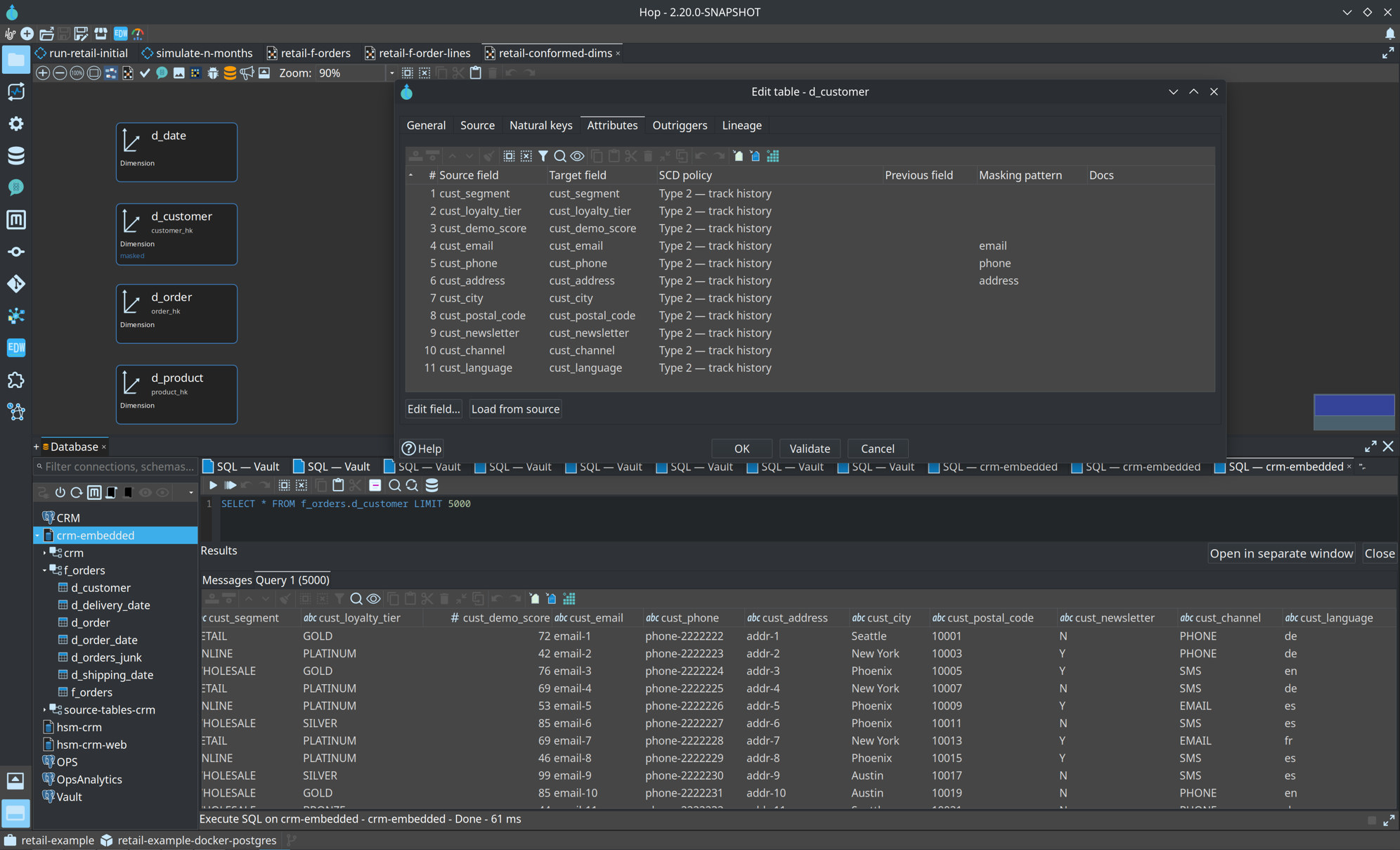
One connection lists every enabled service as a schema. A qualified name such as f_orders.d_customer runs on that service, including when the connection default is another source or dimensional service. The database explorer preview uses that form (SELECT * FROM f_orders.d_customer). A bare table name stays on the connection’s default schema.
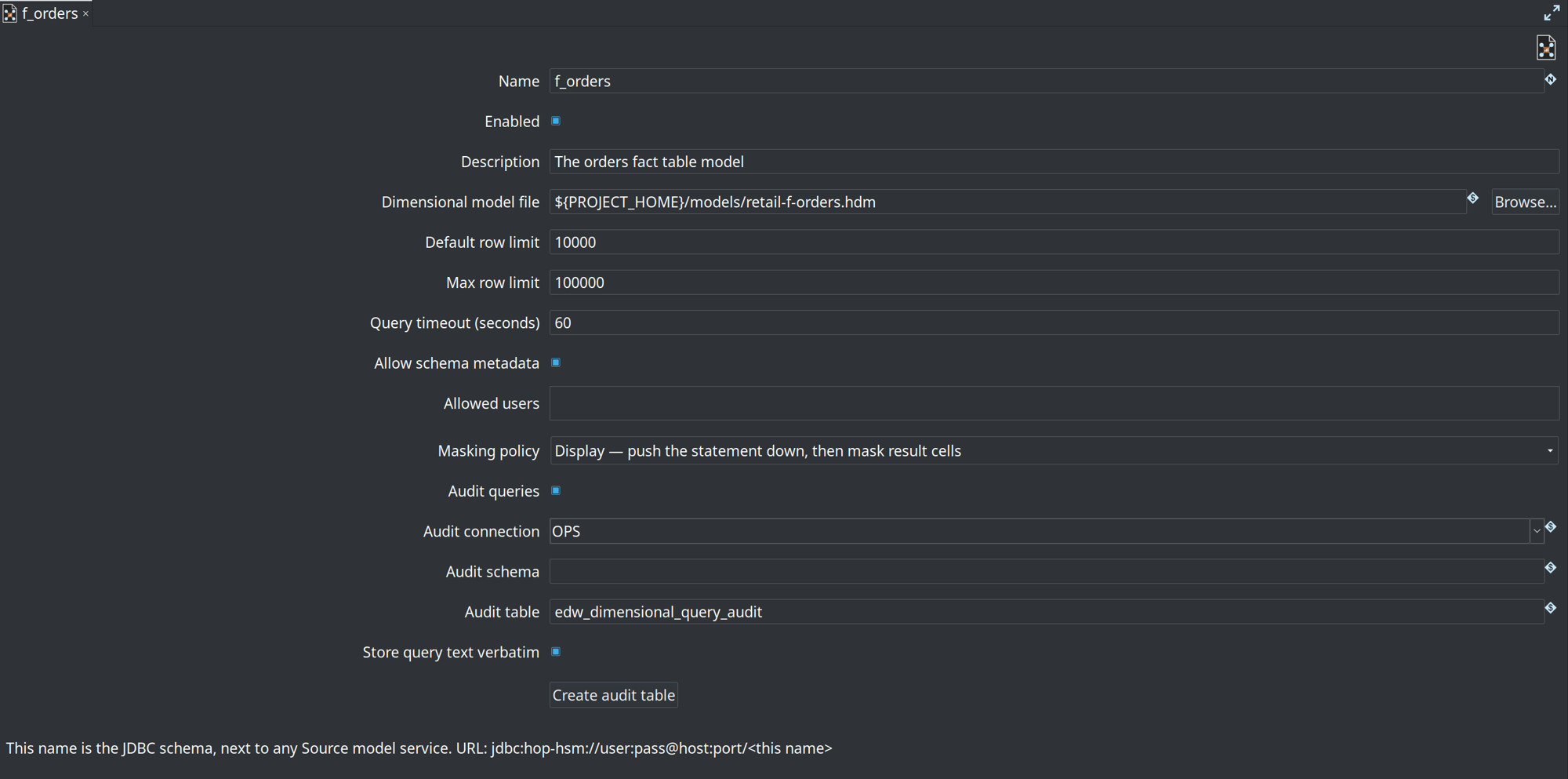
Create it under Metadata → Servers and Web Services → Dimensional model service:
-
Dimensional model file — server-side
.hdm(variables such as'${PROJECT_HOME}'are allowed) -
Default / max row limit and query timeout
-
Allowed users — one Hop Server user per line. Empty allows every user who can already run on the server
-
Masking policy — Safe (default) or Display
-
Audit queries — one row per attempt in
edw_dimensional_query_audit. Create audit table builds that table on the chosen connection. When auditing is on and the insert fails, the client receives no rows
Each dimension, junk dimension, fact, factless fact, bridge, and conformed dimension alias is a table. Columns are the modeled ones: surrogate key, natural keys, attributes, a Type 3 previous column, date_from and date_to on a versioned dimension, measures, degenerate dimensions, and fact foreign keys. SELECT * expands to that list. Two roles against one date dimension are two foreign keys to the same primary key, which getImportedKeys returns.
On a dimension attribute, natural key, measure, or degenerate dimension, Masking pattern names a Hop masking pattern. The warehouse runs the statement. Mask fields then rewrites the flagged cells before they leave Hop Server. The Type 3 previous column uses the attribute’s pattern. Surrogate keys and fact foreign keys are not masked.
In the retail example, d_customer names patterns on email, phone, and address. From the crm-embedded connection, SELECT * FROM f_orders.d_customer LIMIT 5000 still runs on the f_orders service. Those three columns come back as tokens. City and the other attributes stay as stored.
| Policy | What the client can do |
|---|---|
| Safe | A masked column may appear only as a bare select item. WHERE, JOIN, GROUP BY, ORDER BY, DISTINCT, and expressions on that column are rejected. Counts and sums of unmasked measures still run on the warehouse. |
| Display | The statement is pushed down, including predicates on masked columns. Result cells are still masked. |
The canvas shows masked on a table that has at least one pattern. Preview masked rows on the table runs SELECT * through the Safe policy and opens the rows a JDBC client would receive.
The audit row stores the principal, the time, the service, the SQL, the status (OK, REJECTED, or ERROR), the row count, and the duration. String and numeric literals in the logged SQL are replaced with ? unless Store query text verbatim is checked. Parameter values are not stored.
Non-production tools use only the Hop Server login. The warehouse password stays on the server, and non-production databases stay empty of production rows.