Every hub, link, and satellite in a .hdv model has an integration mode that controls how Hop treats the physical table in the warehouse.
To document an entire existing raw vault (Hop must not load or alter any table) use Read-only existing vault on the Data Vault configuration instead of setting External read-only on every card. See Data Vault configuration. That flag refuses Data Vault Update, Generate DDL, and Debug, and model check keeps referential integrity only so Business Vault and dimensional models can sit on top. Per-table External read-only remains the mixed-ownership mode (Hop still runs Update and skips those tables).
Integration mode is set on the Options tab of the hub, link, or satellite dialog (combo: Hop managed, External read-only, Custom pipelines).
Why integration modes exist
Real enterprises rarely have a single tool loading every raw vault table. Teams use dbt, hand-written SQL, legacy ETL, or bespoke Hop pipelines alongside model-driven loads.
Integration modes let all of those tables participate in one Data Vault model for:
-
Visual lineage and documentation
-
Model validation
-
Business Vault and dimensional generation (metadata-driven)
-
Data catalog publish
-
Workflow orchestration (where applicable)
Downstream features read metadata (getTargetTableLayout(), table names, attributes) — not generated DV update pipelines.
Modes
| Mode | Hop behavior | Typical use |
|---|---|---|
Hop managed (default) |
Generates DDL, sentinel rows (hubs/links), and update pipelines. Data Vault Update runs generated |
Greenfield vault tables owned by Hop. |
External read-only |
Skips DDL, sentinels, and pipeline generation for this table. Data Vault Update logs and continues. Canvas label: |
Tables loaded by dbt, SQL, or another ETL; Hop documents structure for BV. |
Custom pipelines |
Skips generated pipelines; Data Vault Update loads |
Hop-maintained loaders that do not match the generator pattern. |
Data Vault Update behavior
For each table, ActionDataVaultUpdate branches on integration mode:
| Phase | Hop managed | External read-only | Custom pipelines |
|---|---|---|---|
DDL generation |
Yes |
Skip |
Skip |
Sentinel rows (hub/link) |
Yes (if enabled) |
Skip |
Yes for hub/link if enabled |
Update pipelines |
|
Skip (info log) |
Load |
Empty pipeline list |
Error |
OK |
Error if paths empty |
The parallel pipeline orchestrator runs both generated and custom pipelines the same way.
Validation differences
| Check | Hop managed | External read-only | Custom pipelines |
|---|---|---|---|
Record source required |
Yes |
Warning if missing |
Per custom pipeline |
Source field mapping |
Strict |
Relaxed |
N/A for generation |
Target table layout |
From sources |
Modeler must define columns |
From sources or overrides |
Physical table name |
Required |
Required |
Required |
External tables must still have accurate attribute lists, hash keys, and table names so Business Vault SQL and catalog publish are correct.
Business Vault compatibility
BvScd2PipelineSupport reads satellite history with TableInput SQL built from DV metadata. It does not call DV update pipelines.
Therefore external read-only satellites work in Business Vault models as long as:
-
The linked
.hdvmodel has a target database configured -
Satellite tables exist in that database with the modeled layout
-
Field mappings reference valid attribute names
See integration-tests/tests/multi-satellite-bv/customer-360-external.hdv and customer-360-external.hbv.
Custom pipeline paths
When mode is Custom pipelines, set customUpdatePipelinePaths on the table (list of .hpl files, variables allowed).
-
Paths resolve relative to the Hop project / VFS like other file references
-
Model check warns if paths are empty or files are missing
-
Hubs with multiple record sources: one path list per table in v1; use multiple paths or separate tables if feeds need distinct pipelines
Canvas indicators
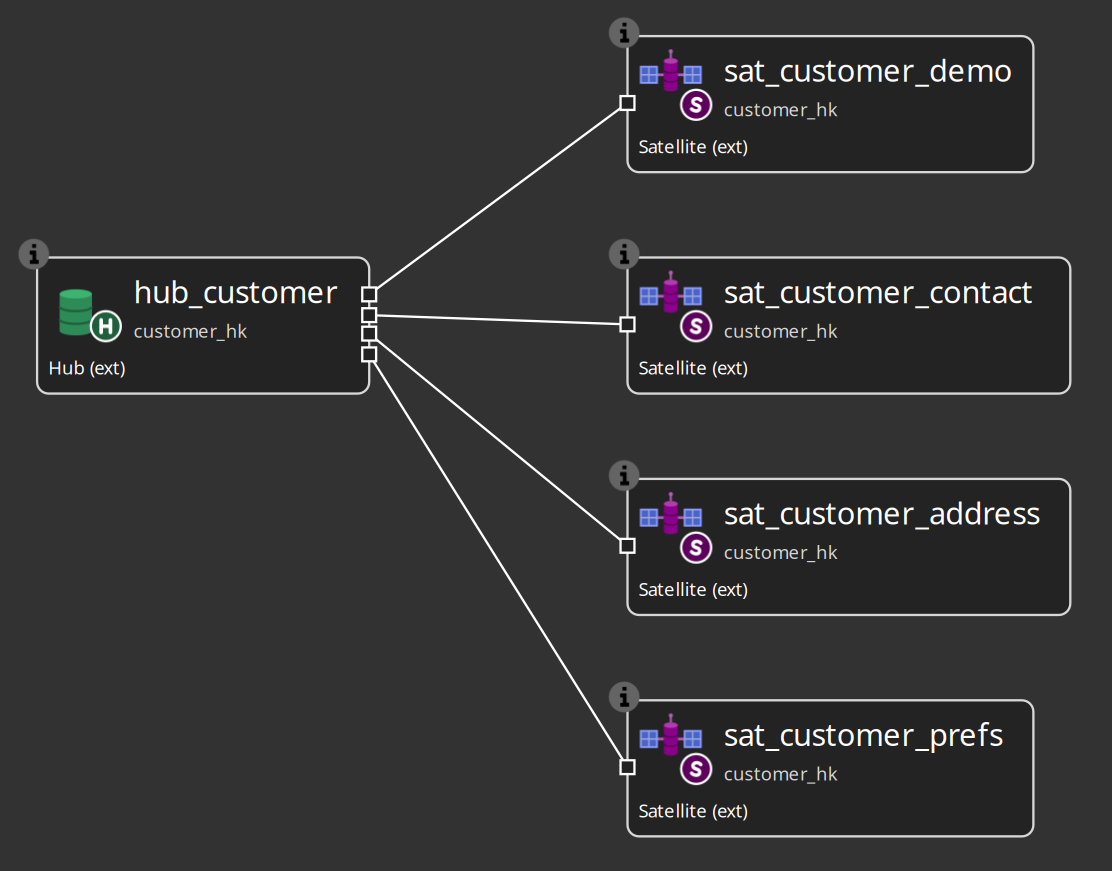
The Data Vault model painter appends a suffix to table cards:
-
(ext)— external read-only -
(custom)— custom pipelines
Hop-managed tables show no suffix.
In the Customer 360 external sample, every satellite shows (ext):
Modeling guidelines
-
Start new subject areas as Hop managed until loads stabilize
-
Switch to external read-only when another tool owns DDL and loads but you want Hop BV / catalog / checks
-
Use custom pipelines when you have proven Hop loaders that predate or extend the generator
-
Keep one
.hdvas the contract for both Hop and non-Hop consumers — avoid duplicate metadata in spreadsheets