SQL business tables let you author consumption SQL on the Business Vault canvas with explicit dependencies, instead of maintaining opaque dbt models outside the vault graph.
Why
Raw Data Vault and generated SCD2/PIT tables cover the mechanical patterns. Real projects still need arbitrary SQL for business rules, enrichments, and lookups. dbt handles this with ref() / source() and dependency ordering. Data Hopper EDW brings the same idea onto the .hbv model:
-
Author SQL with templates
-
Declare sources used by the query
-
Resolve references to other BV or DV objects
-
Materialise as a view or table
-
Order Business Vault Update pipelines by dependency
Table type
Add SQL view / table from the Business Vault canvas (type BUSINESS_TABLE in the .hbv file).
|Property |Description
|Name / physical name |Logical canvas name and target object name in the BV database
|Materialization
|VIEW or TABLE (see dialect-specific SQL below)
|Reference style
|dbt only in the current release
|SQL query |Authoring SQL with optional macros and Jinja
|Schema
|Optional target schema for CREATE and {{ this }}
|Sources
|Explicit list for {{ source('name', 'table') }}
|References |Parsed from SQL; used for canvas edges and update order
Template language (dbt + Jinja)
Simple SQL that only uses single-quoted ref() / source() still uses the original regex fast path. Anything else ({% %}, {# #}, other {{ }} expressions, user macros) is rendered with sandboxed Jinjava.
Macros live in project metadata: Jinja macro library. Enable the library, then call {{ my_macro(…) }} from SQL. {{ var('name') }} reads a Hop variable of that name first, then a library default.
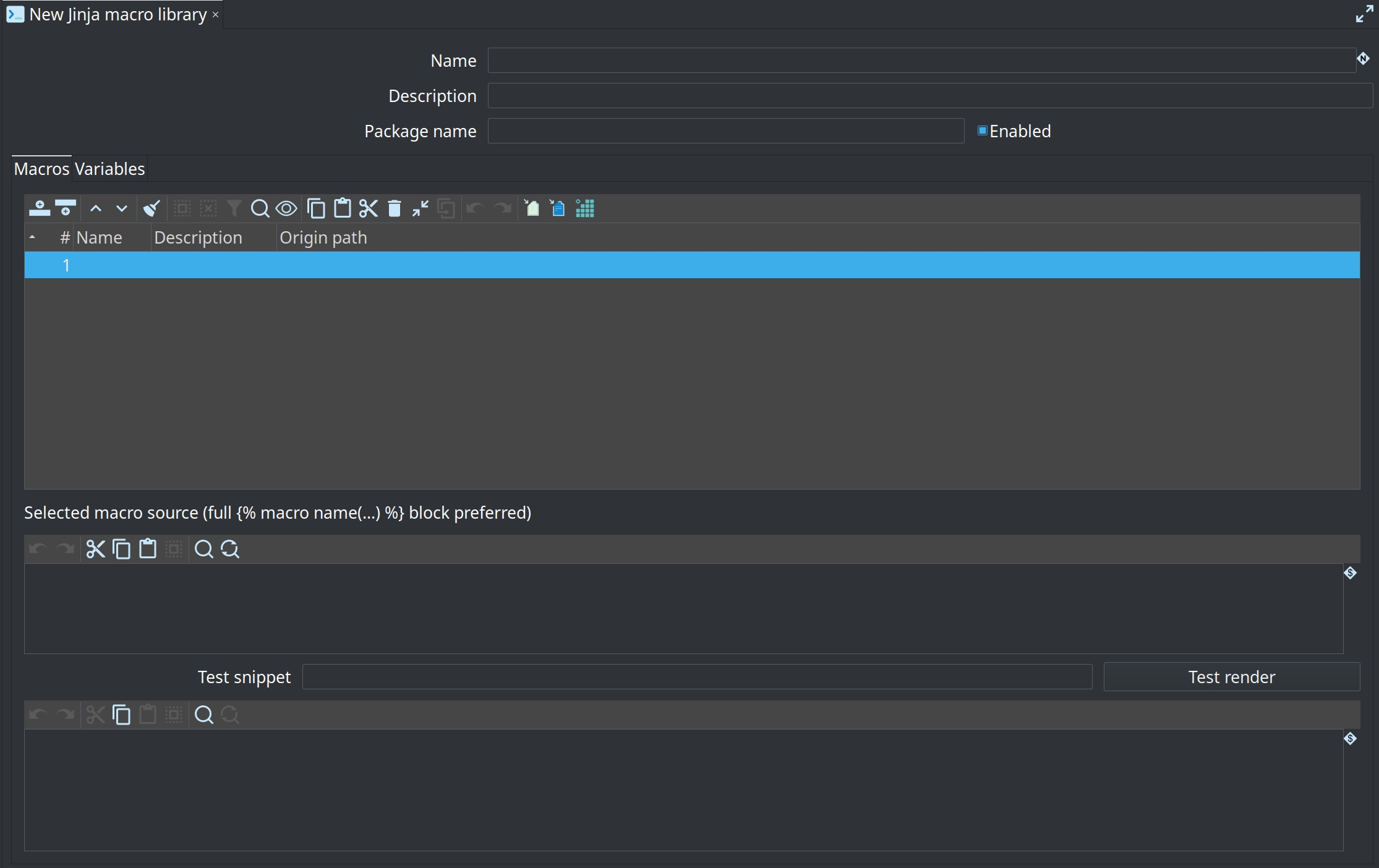
Built-ins: ref, source, config() (empty at render), var, this, is_incremental() (always false), adapter.quote. Unsupported dbt calls such as run_query and adapter.dispatch fail at Check model / materialization with a clear error.
To load a dbt-core macros/ folder (and the models that call them), use Import dbt models on the Business Vault canvas. See Import dbt-core models.
Template language (dbt style) — ref / source
| Macro | Resolution |
|---|---|
|
Object in this |
|
Loads another model and finds * Relative path to the current Also matches current BV / linked DV by basename when no file load is needed. |
|
Must match a row on the Sources list (schema/database optional) |
Parse / sync refs resolves paths (and catalog model registry basenames when published), fills the References tab (resolvedModelFilename, kind, physical table), and can place canvas aliases:
-
DV aliases for external or linked DV tables (
referencedModelFilenamewhen multi-model) -
BV aliases for tables in another
.hbv(multi-step historize → harmonize → rename layers)
Business Vault → Business Vault references
Multi-step Business Vault work often needs several models or several SQL objects chained across files:
-
Historize — e.g. phase-1 VIEW with
x_from_ts/x_to_tsover a satellite -
Harmonize — cast types, coalesce keys, standardise codes
-
Rename / publish — stable business column names for dimensional or export consumers
You can:
-
Use
{{ ref('other-bv-model', 'table') }}or{{ ref('../models/bv-historize', 'satb_product_hb') }}in SQL -
Or place a canvas Business Vault reference (context menu: Add Business Vault reference): pick a catalog-registered BV model or browse a
.hbv, then choose a table
Canvas BV references store bv_reference entries with referencedModelFilename (portable ${PROJECT_HOME}/… preferred). Click the name on a BV reference card to open the source .hbv and select that table.
Catalog model registry
When a DV / BV / DM Update publishes to a data catalog, Hop also upserts a model registry entry:
-
Namespace:
hop/{project}/models-registry -
Name: model basename (e.g.
vault1,retail-360) -
Types:
DV_MODEL,BV_MODEL,DM_MODEL -
origin.modelFilename: portable path such as${PROJECT_HOME}/tests/basic/vault1.hdv
Then short two-arg refs work without relative paths:
{{ ref('vault1', 'sat_customer') }}
{{ ref('retail-360', 'sat_product') }}
Lookup order for ref('model', 'object'): current/linked model basename → catalog registry candidates (DV and BV when both share a basename) → filesystem path relative to the BV file (including same-basename sibling .hdv/.hbv when the object is not in the first file found).
Same basename DV + BV: Projects often use retail-360.hdv and retail-360.hbv. Short refs try the Data Vault model first, then the Business Vault model, and succeed when the object exists in either file. Example data product:
SELECT customer_hk, segment
FROM {{ ref('retail-360', 'customer_360_bv') }}
resolves to the BV table even if the catalog also has retail-360.hdv.
Multi-model DV aliases on the BV canvas
Add hub / satellite / link reference now supports more than the single linked DV:
-
If multiple sources exist, pick Linked: … or a catalog-registered DV model (
basename → path). -
Then pick an unused table of that type from the chosen model.
-
External aliases store
referencedModelFilenameand showmodelBasename (linked)on the card. -
Clicking the alias name opens that model file and selects the table (not only the config-linked path).
Parse/sync of SQL ref() into external models uses the same alias field so canvas and SQL stay aligned.
Example:
SELECT
  p.product_hk,
  p.product_name,
  l.lookup_code
FROM {{ ref('s_product') }} p
LEFT JOIN {{ source('refdata', 'ref_lookup_something') }} l
  ON p.category_id = l.category_id
On save / Business Vault Update, Hop rewrites macros to dialect-quoted physical names and generates an Execute SQL pipeline that materialises the object.
The Generated SQL tab in the table dialog shows the full CREATE script for the current target database dialect.
Dialect-specific materialization SQL
The BV target database plugin id selects the script shape (same dialect detection as PIT):
| Materialization | Dialect | Generated script (conceptually) |
|---|---|---|
VIEW |
PostgreSQL, MySQL, Snowflake, other |
|
VIEW |
SQL Server |
|
VIEW |
SingleStore |
|
TABLE |
MySQL, SingleStore, Snowflake |
|
TABLE |
PostgreSQL |
|
TABLE |
SQL Server |
|
Multi-statement scripts (Postgres/SQL Server TABLE, SingleStore VIEW) run with Exec SQL single statement disabled so DROP + CREATE both execute.
Canvas and lineage
-
Resolved DV
ref()values create or reuse DV reference alias cards and derivative links. -
Same-model BV
ref()values draw a dependency edge between business tables. -
Resolved external BV
ref()values create or reuse BV reference alias cards (bv_referencesin the.hbv). -
Business Vault Update runs SQL materialisations after SCD2/PIT (and after referenced BV tables) using topological order.
Model check (validation)
Check model on the Business Vault canvas (and the Business Vault Update action when abort-on-check is enabled) validates SQL business tables:
| Severity | Rule | Notes |
|---|---|---|
ERROR |
SQL query required |
|
ERROR |
Only dbt reference style |
|
ERROR |
Malformed template braces |
Residual |
ERROR |
Jinja render failed |
Control tags, macros, or other expressions could not be rendered |
ERROR |
Every |
Same model BV table, linked DV table, or two-arg model basename |
ERROR |
Self |
|
ERROR |
Every |
Physical table name required |
ERROR |
BV target database configured (and resolvable when metadata is available) |
|
ERROR |
No |
Reported once for the model |
WARNING |
Declared source unused in SQL |
|
WARNING |
Duplicate source rows |
|
WARNING |
Bare known table name without |
Dependency may be invisible to ordering |
WARNING |
Materialization unset |
Defaults to VIEW |
Use Validate in the SQL business table dialog for a single-table check without saving.
Execution notes
-
Create view/table runs in a generated pipeline (not the early DDL batch), so dependents of SCD2/PIT loads see populated tables when the SQL runs in the same update.
-
Pipeline name prefix comes from BV configuration (
businessTablePipelineNamePrefix, defaultbv-biz-). -
Portable timestamp literals: authoring SQL may use Postgres/ANSI
TIMESTAMP 'yyyy-MM-dd HH:mm:ss'. At materialization time those literals are rewritten for the BV target dialect (SQL Server →CAST('…' AS datetime2), MySQL/SingleStore →CAST('…' AS DATETIME)). Prefer that form in shared fixtures over engine-specific casts. -
Iceberg / engines without classic CREATE VIEW support are not specially handled yet — treat as generic Postgres-style SQL and verify on your warehouse.
-
Incremental merge, dbt packages,
run_query, Relation methods (.identifier), snapshots, tests, and export back to dbt are out of scope.{% set %}/{% if %}/{% for %}and project macros are supported via Jinja.
Samples and integration fixture
Retail example
retail-example/models/retail-sql.hbv defines satb_product_hb: a phase-1 historical VIEW over sat_product that adds x_from_ts / x_to_ts with LEAD. Equivalent multi-model form when the DV lives elsewhere:
FROM {{ ref('../models/retail-360', 'sat_product') }}or, if the BV file sits next to the DV:
FROM {{ ref('retail-360', 'sat_product') }}Integration tests (integration-tests/tests/basic/)
vault1.hbv includes two SQL business tables exercised by update-vault1.hwf after Data Vault + Business Vault Update:
| Table | SQL idea | Assertion |
|---|---|---|
|
|
|
|
|
Created by BV Update (existence required for view materialisation); content not golden-tested yet |
|
Jinja |
|
Drop SQL in the suite removes both views before vault tables.