- Type 1 vs Type 2 and hybrid attributes
- What gets generated
- Calculations (SQL expressions)
- Source queries (other tables, views, or SQL)
- Identity, cutover, and survivorship pipeline
- Identity maps
- Survivorship
- Source calendars
- Single-satellite SCD2
- Multi-satellite SCD2
- SCD2 table dialog (key fields)
- Target databases
- External satellites
- Running loads
SCD2 tables are the primary Business Vault output today. They materialize functional timelines from raw Data Vault satellite history.
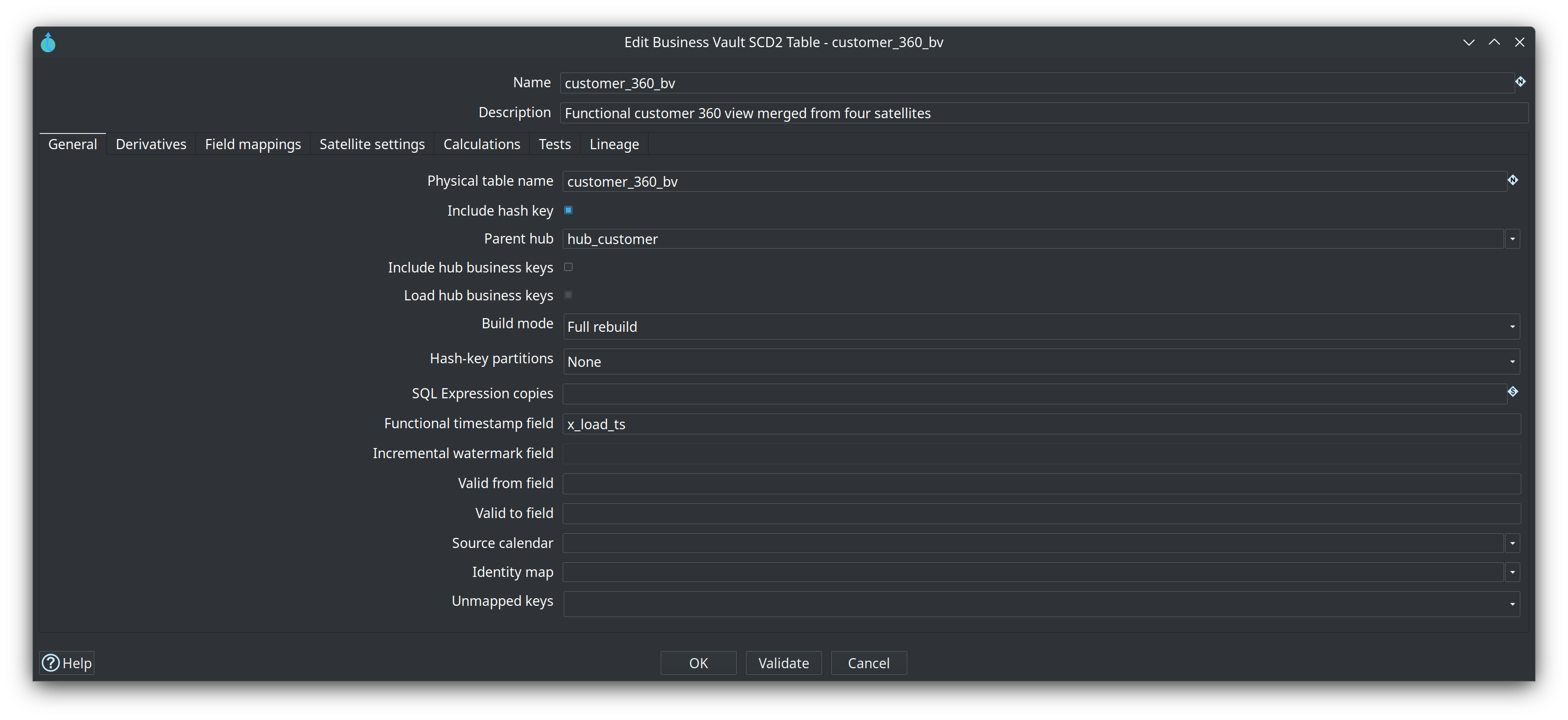
On the .hbv canvas, link one parent hub to the SCD2 table (drag a Linked Hub, or set Parent hub on the table dialog). That line is the grain: it shows which hub the timeline belongs to and where the business key(s) live. Satellite derivatives remain the history feeds. Optional Include hub business keys copies those keys onto the SCD2 stream/table; the hub link is still useful when keys stay on the hub.
The hash-key column type and length come from that hub’s Data Vault configuration (BINARY + MD5 → BINARY(16) on SingleStore, not unbounded VARBINARY). A Linked Hub is enough to resolve the grain even when a satellite has no parent hub of its own.
Type 1 vs Type 2 and hybrid attributes
Business Vault SCD2 tables are pure SCD Type 2: each functional change produces a version row with valid_from / valid_to (or your configured validity columns). The plugin does not support a per-column Type 1 mode that rewrites every historical version when a “current” value changes.
That is intentional. BV SCD2 is organizational memory made consumable (harmonized names, multi-satellite merge, business-effective intervals). Hybrid Type 1 + Type 2 presentation rules usually belong further downstream.
| Need | Recommended approach |
|---|---|
Historized attributes (as-of correct) |
Map them on the SCD2 table (Type 2). |
Always-current attributes (e.g. current sales rep on old facts) |
Keep Type 2 history clean; resolve “current” at mart or query time by joining the open SCD2 row, a latest satellite, or a separate BV current table/view (see Business Vault SQL views and tables). Prefer hybrid SCD in the dimensional model when product owners want Type 1 and Type 2 columns on one dimension. |
Mix Type 1 and Type 2 in the same BV SCD2 table |
Not a field-mapping feature. Mixing would make some columns look historical while they are not, weaken audit-friendly intermediate history, and is expensive under incremental watermarks. |
Type 1 / Type 2 modes on a PIT table |
Wrong layer. PIT tables store hub grain × snapshot dates with satellite load-timestamp pointers only. Compose attributes (including always-current ones) when joining raw or BV tables. See Business Vault PIT. |
In short:
-
Prefer pure Type 2 BV SCD2 for mapped attributes.
-
Prefer a separate current-state object (or open-row filter) for always-current values.
-
Prefer hybrid Type 1 + Type 2 in the dimensional / information mart layer for reporting rules.
-
Treat hybrid Type 1 inside a historized BV SCD2 table as a last resort outside this builder, not core plugin behaviour.
Dialog help (Hop GUI Help on the SCD2 table dialog): SCD2 table dialog.
What gets generated
For each SCD2 table the plugin builds a Hop pipeline that:
-
Reads satellite history via
TableInputSQL (grain + functional timestamp + attributes),ORDER BYhash key in JavaString.compareToorder (PostgresCOLLATE "C", SQL ServerBIN2, MySQLBINARY) soSortedSchemaMergesees a stream that is already sorted the way Hop compares strings. Locale collations such as Postgresen_US.utf8sort10-before1-and would split the same key across satellite legs. The vault record-source / source-indicator column is not selected when a satellite has Store record source indicator off (VaultSpeed-style mono-source sats). Multi-satellite pipelines never read that physical column; merge identity is the synthetic_bv_sourcevalue. -
Adds source indicators when multiple satellites feed one BV table. When a satellite omits the physical column, a Constant supplies the BV record-source value from the satellite config (or the satellite name).
-
Merges streams (multi-satellite) with
SortedSchemaMerge -
Repeats sparse attribute columns across merged rows
-
Computes validity bounds with
Analytic Query(LAG/LEAD) -
Applies open-interval sentinels with
If Null -
Collapses duplicate timestamps with
Group By -
Loads the Business Vault target table with
TableOutput(full rebuild) or runs the incremental write path below
Use Debug or Show build pipeline on an SCD2 table in the .hbv editor to inspect the generated pipeline before running a workflow.
Hash-key partitions (large full rebuilds)
When a satellite is too large to ORDER BY hash key and load date in one pass, set Hash-key partitions to 4, 8, or 16 on the SCD2 table. Full rebuild then:
-
Truncates the BV target once with a workflow SQL action (
TRUNCATE TABLEvia the Hop database dialect). -
Generates partition numbers
0 .. N-1and runs the SCD2 pipeline once per part, passing'${PARTITION_COUNT}'and'${PARTITION_NUMBER}'. -
Filters each satellite
TableInputwith a first-byte modulus of the parent hash key (BINARY: first octet; HEX: first two hex characters; STRING: first dash-separated token). Every version of a hub/link key stays in one partition. STRING/HEX hash keys stillORDER BYwith a Java-matching binary collation inside each slice. -
Writes with
TableOutputtruncate off, so later partitions append.
Show build pipeline opens the parameterized SCD2 pipeline, the partition driver, and the wrapper workflow. Running the inner pipeline alone with defaults loads partition 0 of N.
Constraints:
-
Full rebuild only (Incremental already filters by watermark).
-
Target load mode is honored: Table Output and Native bulk append after the SQL truncate; Staging file writes one CSV set per partition (
…-${PARTITION_NUMBER}-${Internal.Transform.CopyNr}.csv) then bulk-loads those files in the wrapper workflow. -
Sequential partition execution (lower peak memory, not parallel wall-clock).
Integration test: integration-tests/tests/multi-satellite-bv/update-customer-360-partitioned.hwf uses customer-360-partitioned.hbv (4 parts) and the same golden current-state dataset as the unpartitioned full rebuild.
Incremental build mode
Set Build mode to Incremental on the SCD2 table when you want to append new functional versions instead of truncating and reloading the BV table on every run.
Incremental pipelines extend the shared analytic tail with:
-
Watermark resolve — at pipeline generation time the plugin queries the Business Vault target with
SELECT MAX(watermark) …(BV connection only; null → open-start sentinel in Java) -
Parameter Generate Rows —
param_incremental_watermark(Generate Rows, limit 1) holds the Timestamp value;param_open_row_filterholds the open-end sentinel (and watermark when DV/BV share a connection). Generate Rows is used instead of Constant because Constant only enriches incoming rows and would emit nothing as a pipeline start. -
Satellite filter — each DV-connected
TableInputuses JDBC positional parameters (source_ts > ?) with the watermark transform as its Insert data from stream. SQL stays dialect-neutral and never references BV tables -
Open target baseline — BV-connected
TableInputwithvalid_to = ?(open-end bound from the param transform). When DV and BV share the same Hop connection name, hash keys are further restricted withIN (SELECT … FROM sat WHERE ts > ? UNION …)— one watermark?per satellite leg (JDBC does not reuse bind values; the param transform repeats the same watermark once per leg). When connections differ, all open BV rows are read -
Watermark attach — a stream
Constant(after the analytic chain) adds_incremental_watermarkto every computed row -
Incremental row filter —
FilterRowskeeps computed rows wherefunctional_timestamp > _incremental_watermark -
Append —
TableOutputwithtruncate=false -
Close open version —
Updatesetsvalid_to = valid_fromon the prior open row (match hash key + openvalid_to) before new open versions are inserted
Watermark field resolution:
-
Per-table Incremental watermark field override (optional)
-
Per-table Functional timestamp field
-
Model-level functional timestamp default
-
Load-date fallback from Data Vault configuration
The watermark is always read from the Business Vault target table (MAX(watermark_field)), matching the PIT incremental pattern. DV satellite history may live on a different database connection than the BV target.
On the first incremental run against an empty BV table the sentinel (1900-01-01 00:00:00) applies, so behaviour matches a full rebuild. Later runs process only satellite deltas and close prior open rows in place.
Integration test: integration-tests/tests/multi-satellite-bv/update-customer-360-incremental.hwf loads four DV satellite waves, runs Business Vault Update once on customer-360-incremental.hbv, then validates current open rows against the same golden dataset as the full-rebuild fixture. Multi-run close-and-append behaviour is covered by unit tests in BvScd2PipelineSupportTest. Hash-key partitioned full rebuild: update-customer-360-partitioned.hwf / customer-360-partitioned.hbv (4 parts, same golden).
Calculations (SQL expressions)
After collapse, each SCD2 table can compute extra target columns with deterministic SQL scalars. This is the replacement for per-entity CASE / COALESCE / CAST in dbt-core SCD2 models.
-
Expressions run after Group By collapse and before Table Output / incremental write.
-
They do not create new versions. Mapped satellite attributes remain the grouping keys.
-
Target names must be new columns (they cannot overwrite mapped attributes, hash keys, hub business keys, or validity fields). Raw mapped columns stay on the table so incremental runs can recompute expressions, unless Load is No on the mapping (calculation-only; full rebuild only).
-
Optional Include hub business keys (General tab) left-outer Merge Joins parent-hub BK columns onto the collapsed stream immediately before SQL calculations. They are identity fields: available for calculations, but they do not open new versions. Load hub business keys (default on) writes them to the BV table; uncheck to keep them on the stream only. The SCD2 merge / repeat / incremental chain is unchanged. The Lineage tab lists every loaded column, including hub business keys when those are loaded.
-
Syntax is SQL:
CASE WHEN …,COALESCE,CAST(x AS VARCHAR(n)).x :> VARCHAR(n)andx::TYPEare accepted. MySQL / SingleStore-styleCONCAT,HEX,UNHEX,MD5,DATE_FORMAT, andTO_DATEare available for migration. -
Not allowed:
NOW(),CURRENT_TIMESTAMP,RANDOM, subqueries, aggregates, Jinja.
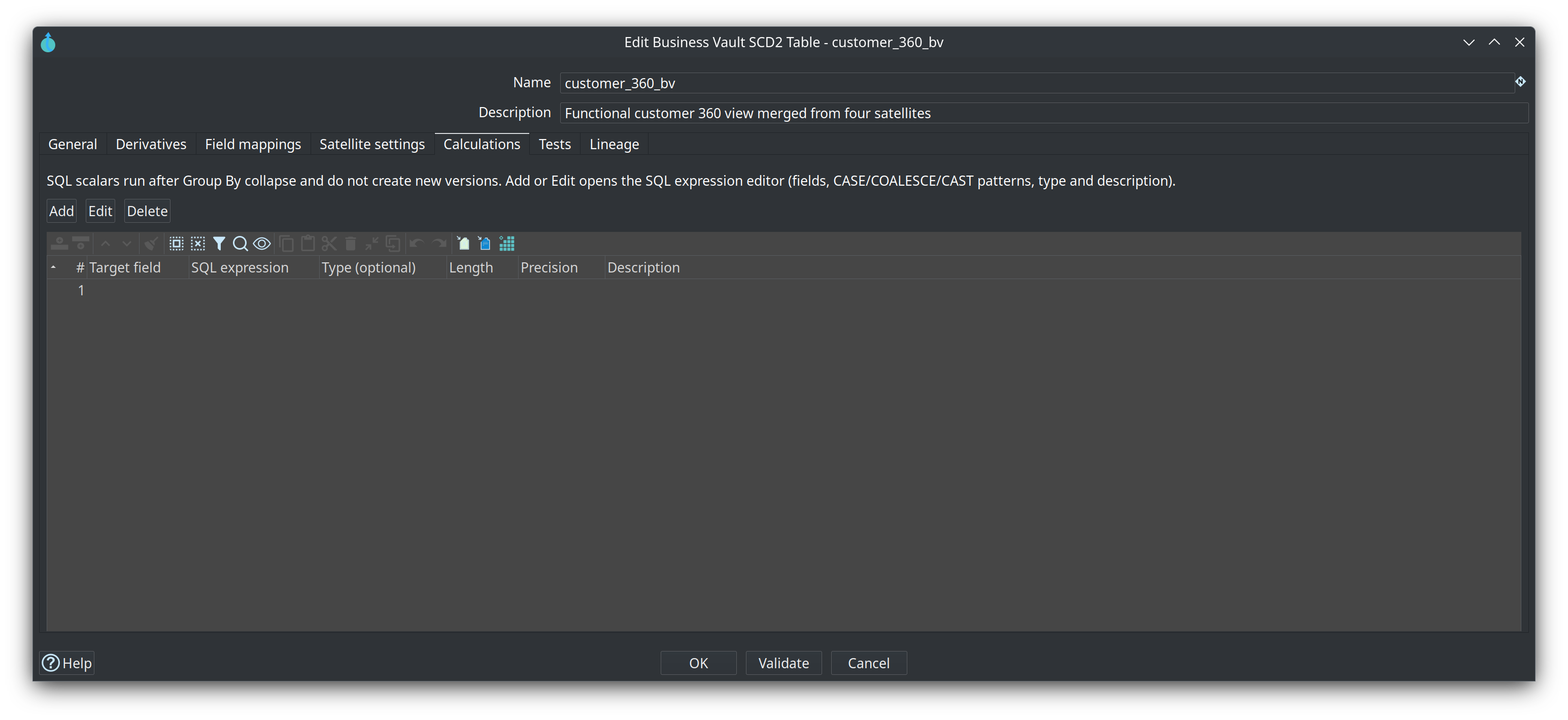
Configure them on the SCD2 table Calculations tab. Add / Edit opens the SQL expression editor (fields + CASE / COALESCE / CAST patterns, large SQL widget, type and description). Generated production pipelines insert an SQL Expression transform (calculate_<table>) after collapse_* with a copy of the expressions.
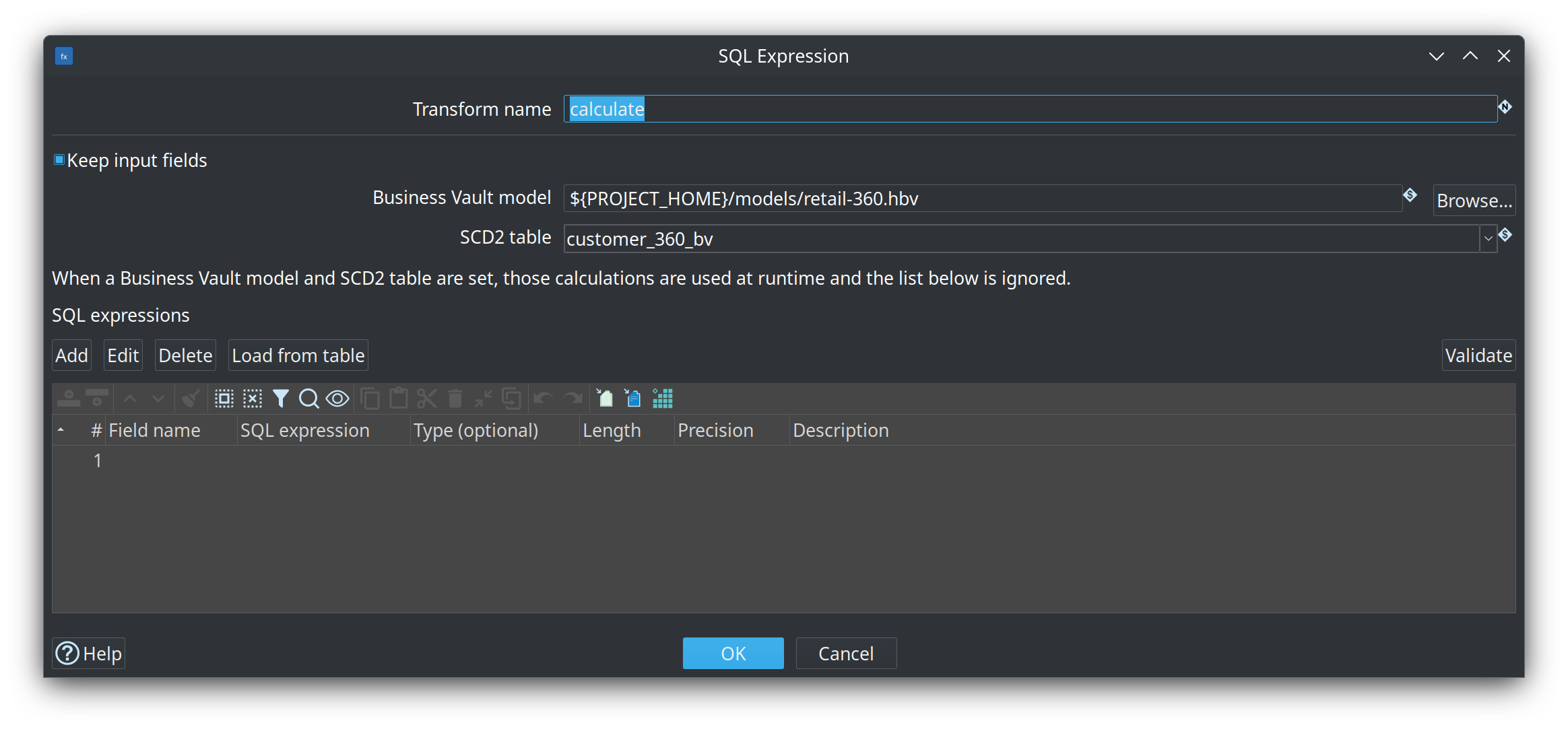
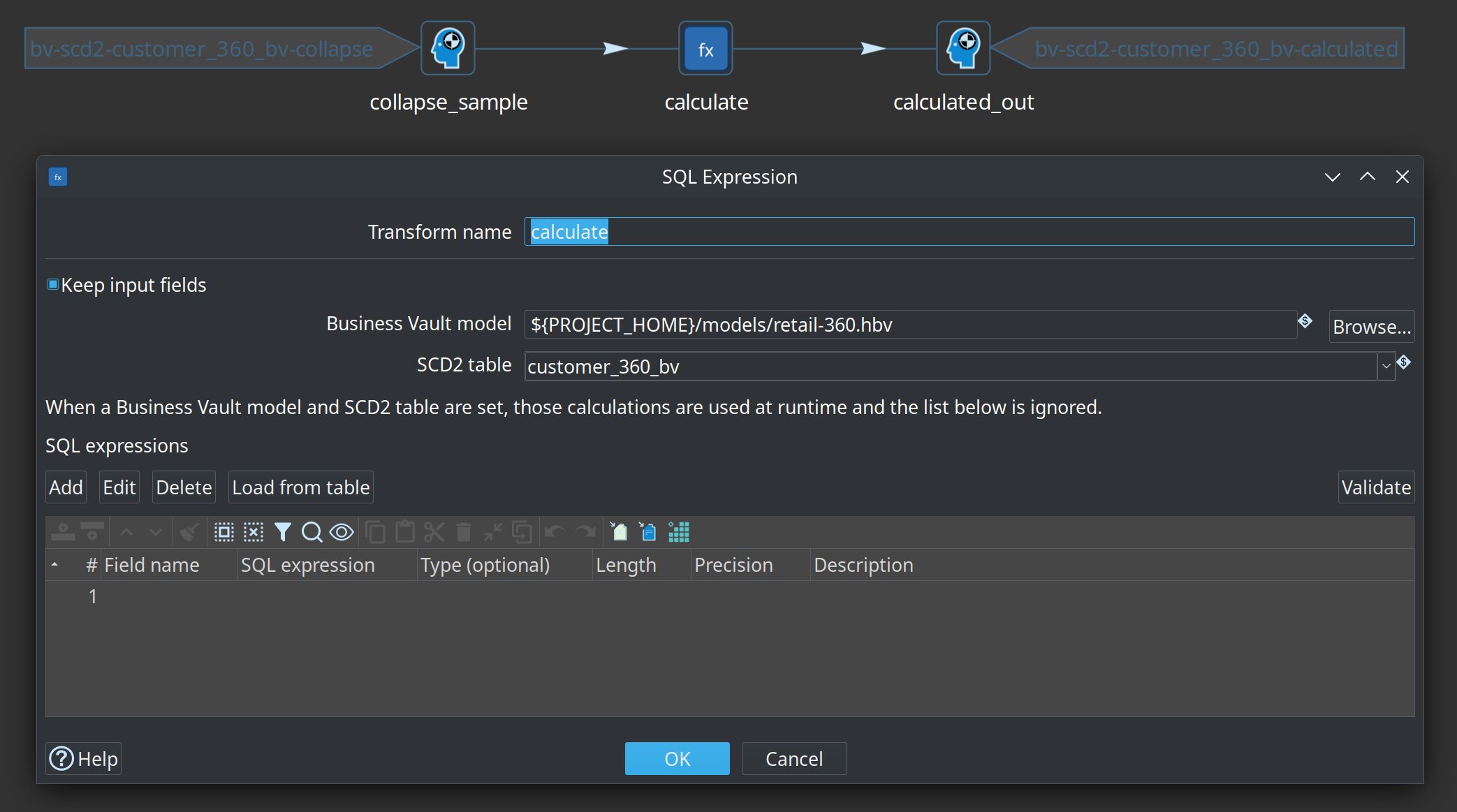
The SQL Expression transform can also link a Business Vault model file and SCD2 table. When both are set, it loads calculations from that table at runtime (inline expressions are ignored). Production generate still copies expressions so load pipelines do not depend on opening the .hbv at run time. Help for the transform: SQL Expression.
Integration fixture: integration-tests/tests/scd2-calculations/update-scd2-calculations.hwf — deleted-flag CASE plus CAST('Default value' AS VARCHAR(720)) on a single-satellite SCD2 table, golden current-state after initial and update loads. The same workflow also builds sat_customer_calc_hub_bv (issue #153): hub customer_id on the stream/table, deleted_flag mapped with Load=No.
Tests
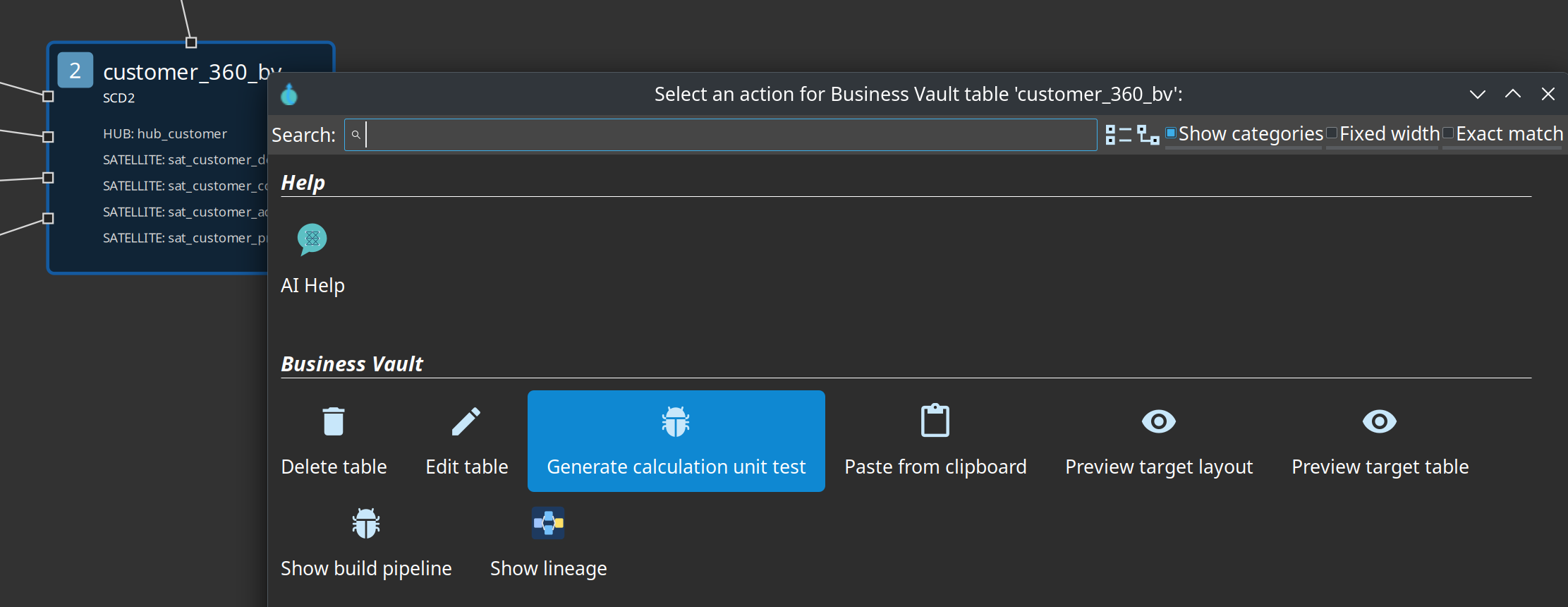
When the table is ready, use Generate calculation unit test on the SCD2 table (canvas context menu or the Tests tab).
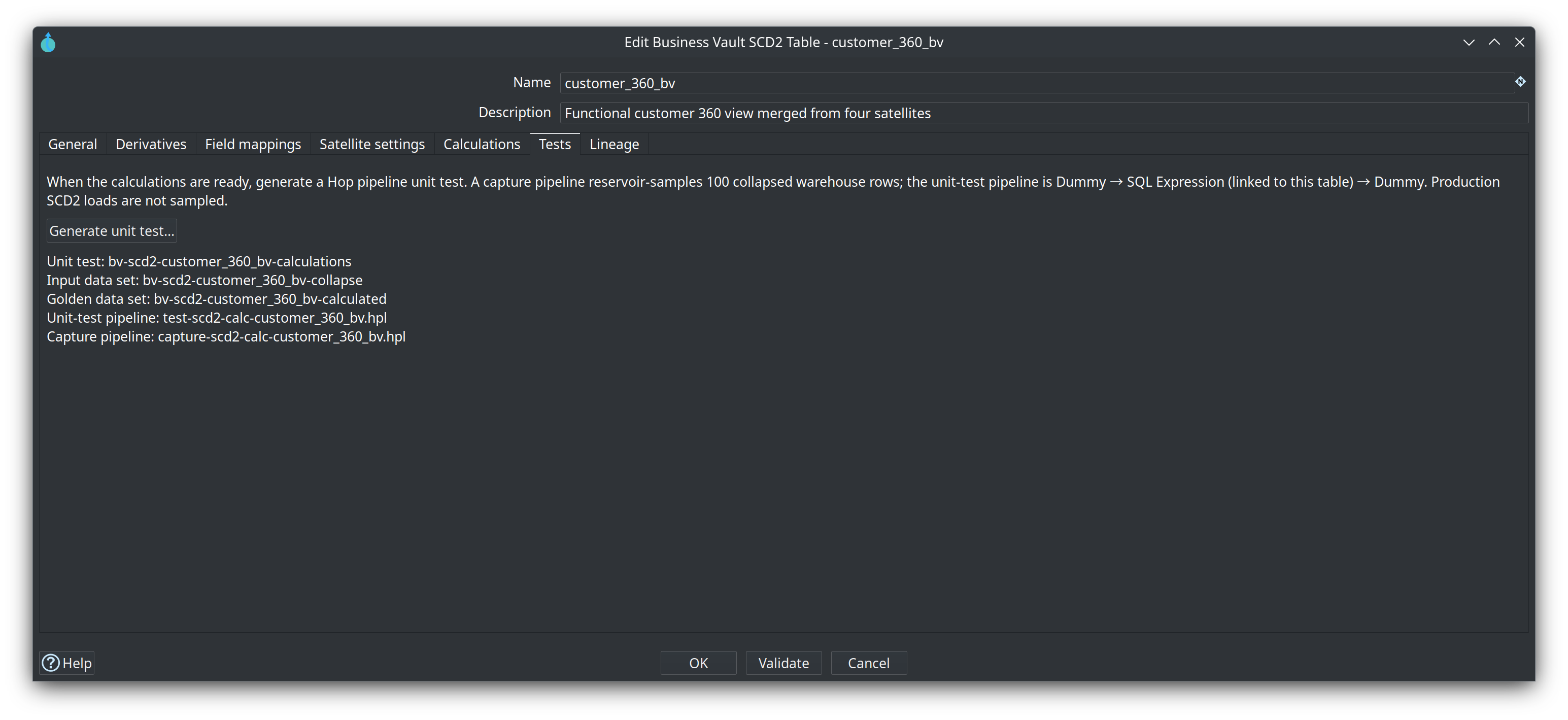
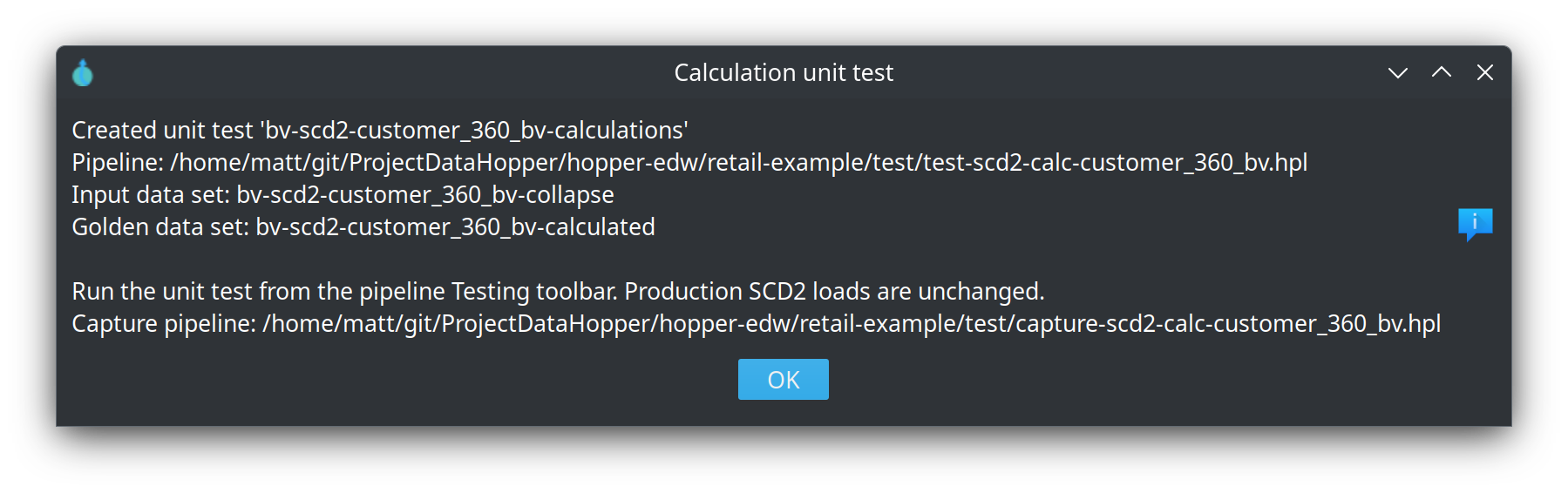
That creates:
-
A slim pipeline
Dummy collapse_sample→ SQL Expression (linked to this table) →Dummy calculated_out -
Input data set
bv-scd2-<table>-collapseand golden data setbv-scd2-<table>-calculated -
A Hop pipeline unit test that injects at
collapse_sampleand compares golden output atcalculated_out -
A capture pipeline: the SCD2 build up to Group By, then Reservoir Sampling (100 rows), then the linked SQL Expression. Optional: run it once against the warehouse to fill the data sets

Production SCD2 loads are not reservoir-sampled. After capture, re-run the unit test from the pipeline Testing toolbar (no database).
Check model still compiles expressions. Legacy column-level / CSV tests stored on older .hbv files still run if present.
Migrating from dbt SCD2 SQL
Keep using Import dbt models for arbitrary SQL business tables. For SCD2-like models:
-
Model the raw satellites on
.hdv(Hop-managed or External read-only). -
Create a BV SCD2 table with field mappings, including CASE inputs such as deleted flags.
-
Copy SELECT-list expressions onto Calculations.
-
Generate a Hop pipeline unit test and sample collapsed rows once.
-
Optional: a BV SQL view that projects the calculated columns without the raw flags.
Source queries (other tables, views, or SQL)
When a satellite-shaped input is not on the Data Vault target — for example a corrective view on another database — add a Source query on the BV canvas and hop it to the SCD2 table. The Data Vault model still has one target database; the source query is the BV-side exception.
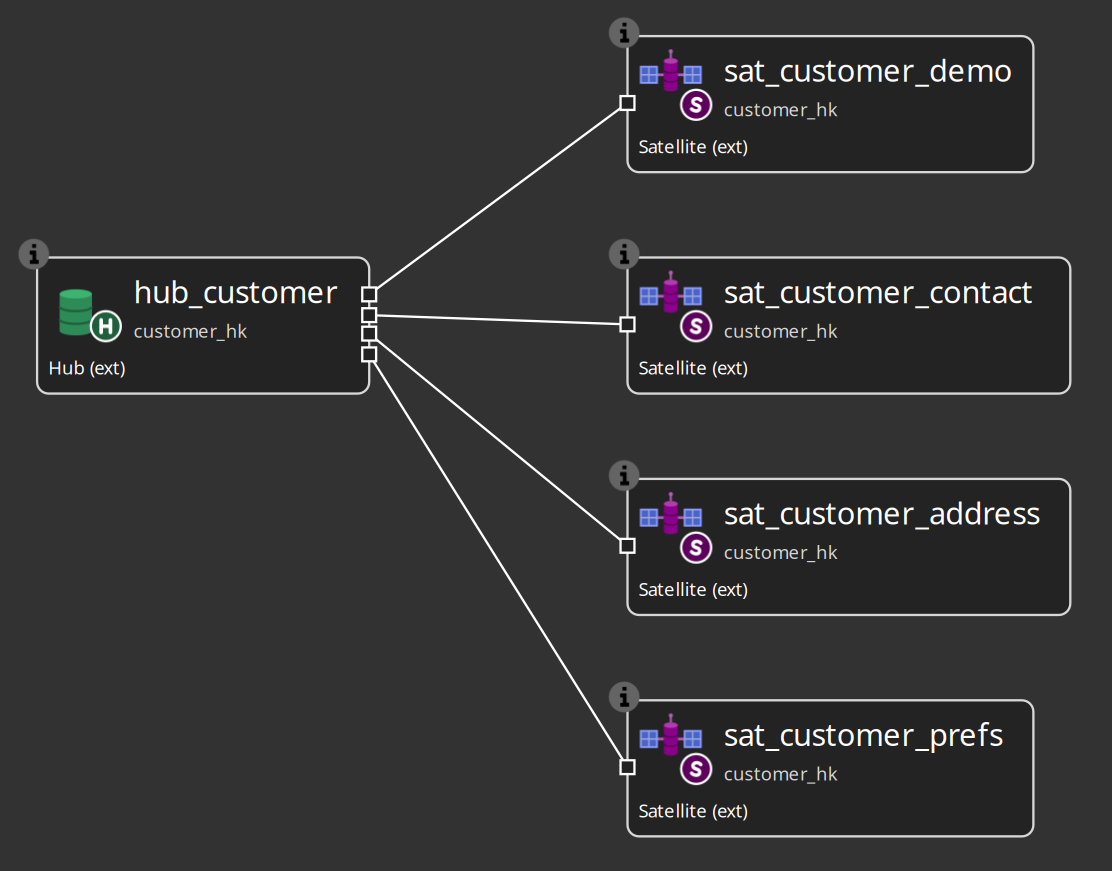
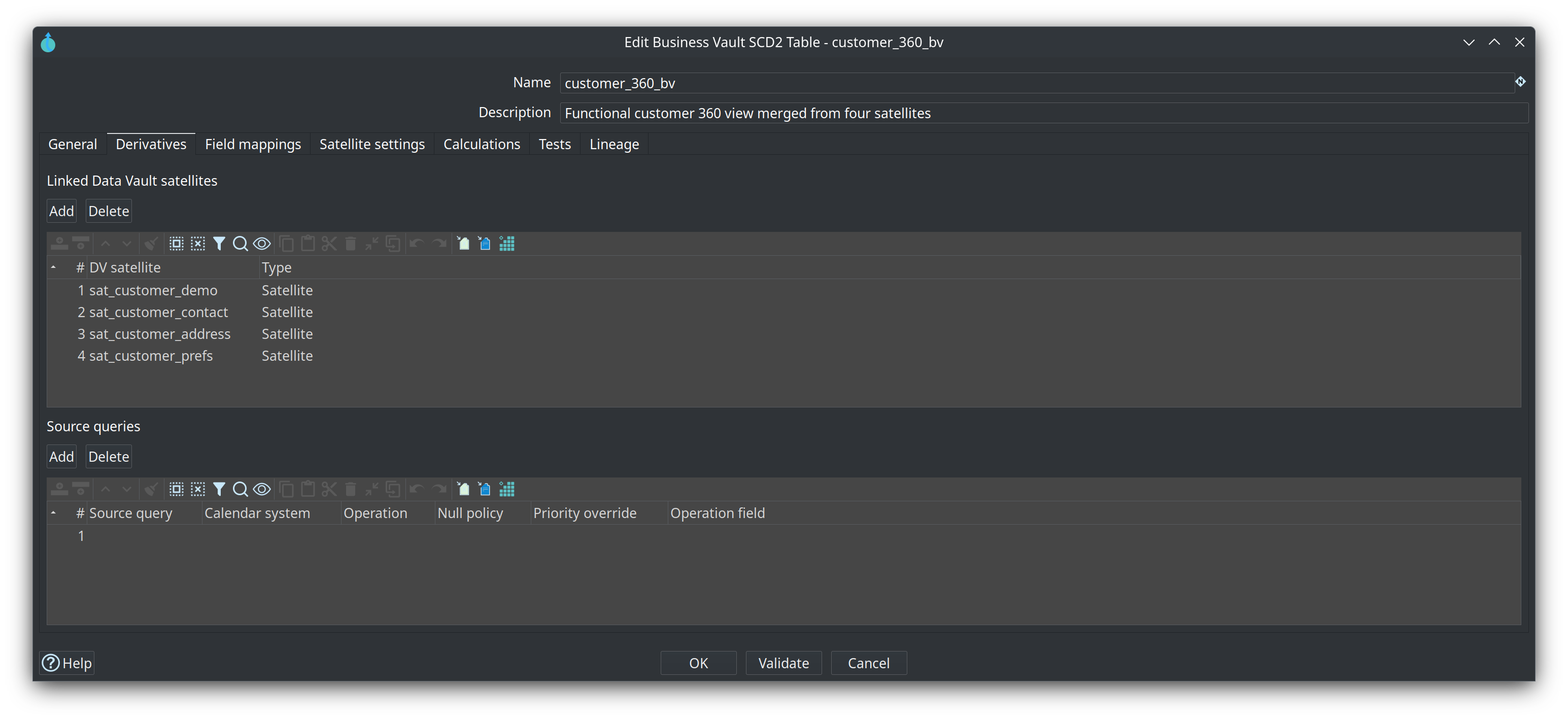
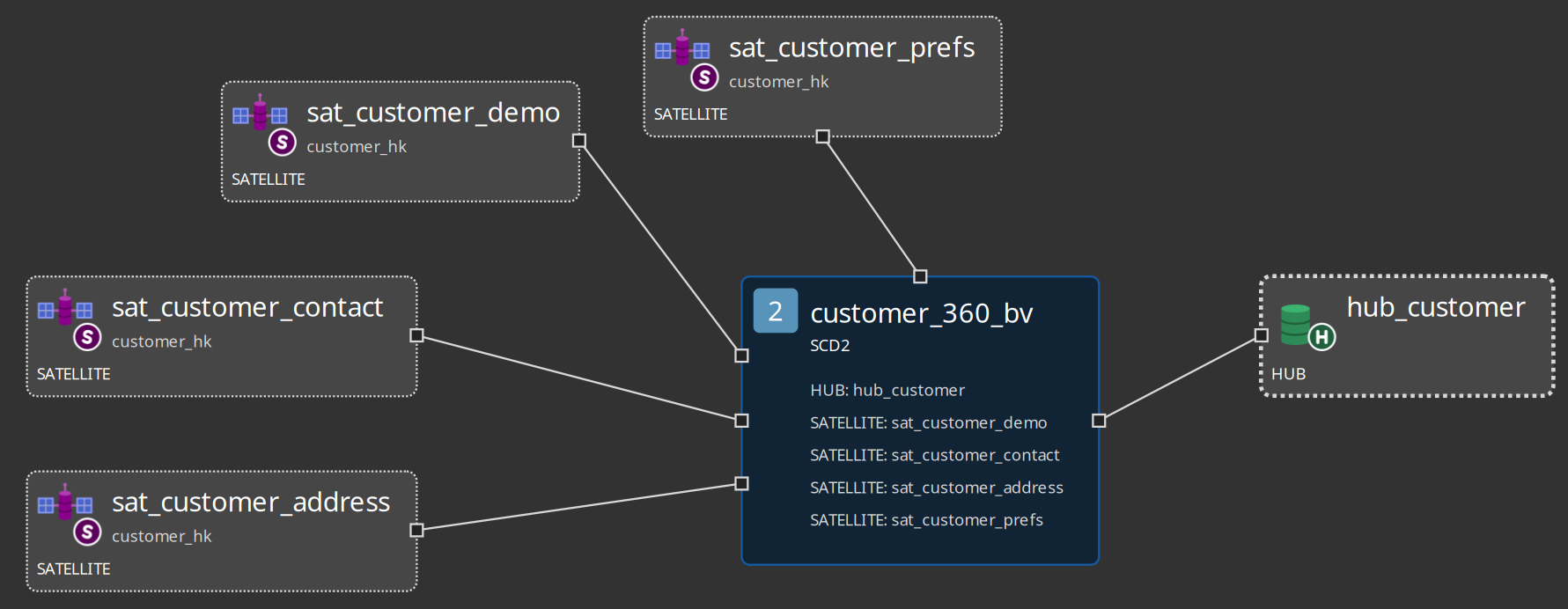
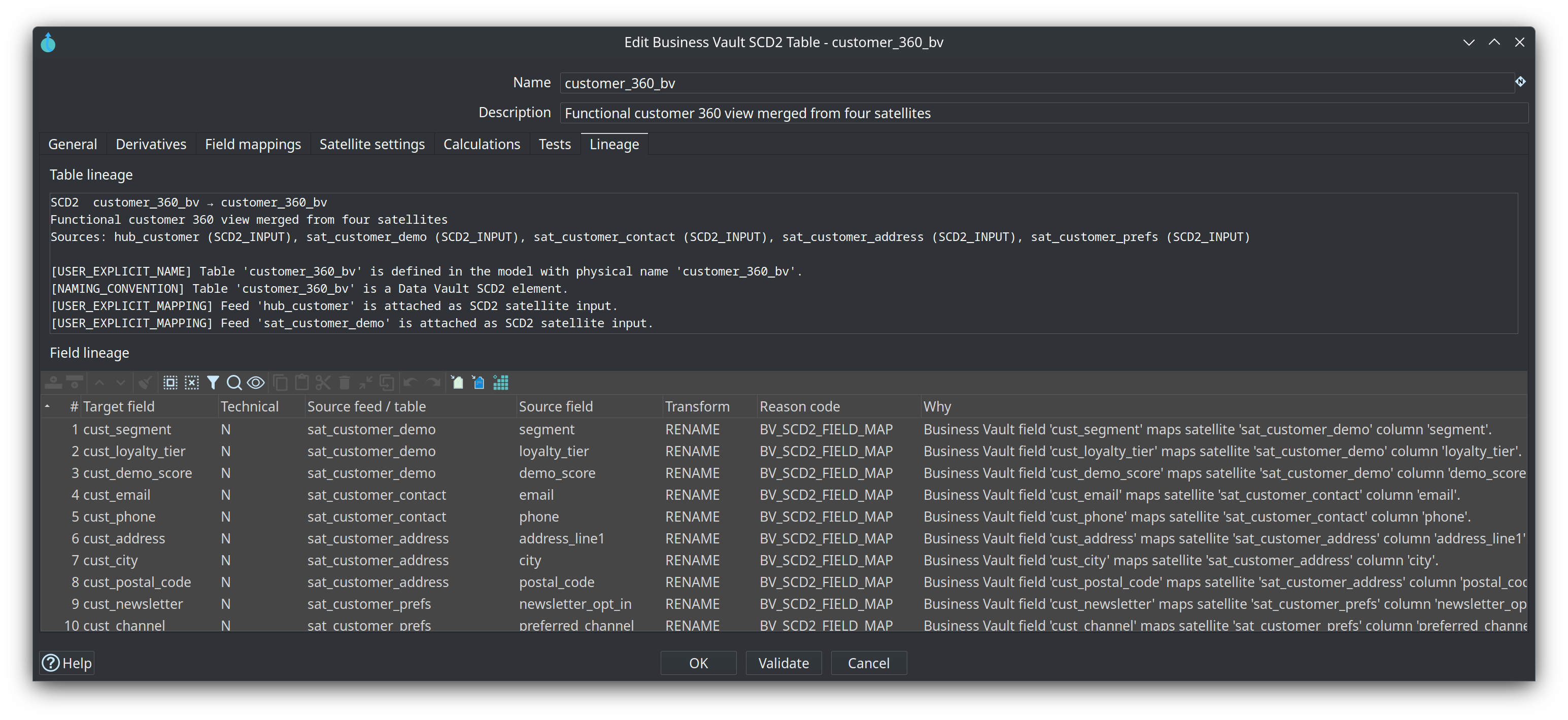
Linked satellites and source queries are listed on the SCD2 Derivatives tab. Customer 360 links sat_customer_demo, sat_customer_contact, sat_customer_address, and sat_customer_prefs.
Each generated TableInput uses that source’s Hop connection. Table/view names are read directly. Authored SQL has -- line comments and /* */ block comments stripped, then is wrapped as a subquery so the plugin can add partition WHERE and hash-key/date ORDER BY outside the inner statement.
On the source query, set Hash key (source column) to the physical name (burger_hkey) and Hash key (hub field) to the hub grain name when they differ (hub_burger_hkey). The pipeline maps that with Select Values after Table Input; it does not rename columns in SQL.
SCD2 merges those streams with satellite history on the same hub grain. Set Parent hub on the SCD2 table. Origin does not matter.
Mixed SCD2 (DV satellites plus source queries) is supported; two or more inputs still require field mappings. The mapping Source column is the satellite name or the source-query name. Suggest mappings lets you pick one or more of those linked satellites and source queries, then fills unmapped fields from the selection.
Identity, cutover, and survivorship pipeline
Show the infographic
Identity, Cutover & Survivorship
"Three contracts, three homes, wired only by name." Zero regression; decoupled grains, time windows, and attribute ranks.
BvIdentityMap
Clusters raw hub hashes (hk_raw) into a single durable surrogate key (hk_durable).
identityMapNameBvSourceCalendar
Declares temporal eligibility windows for source systems. Compiled directly into SQL WHERE bounds.
sourceCalendarNameSurvivorshipMerge
Field-level rank arbitration (Rank 1 > Rank 2) across multi-satellite timeline histories.
field_mapping.rankEnd-to-End Pipeline Data Flow
How raw Data Vault assets pass through the three stages to materialize a consolidated BV SCD2 table
WHERE ts >= from AND ts < to
hk_raw ➔ hk_durable
Rank 1 > Rank 2
Identity Map: Freezing the Durable Hash
An identity map resolves duplicate raw keys (hk_raw) across disparate source systems into a unified durable surrogate key (hk_durable).
BvIdentityMapIdentityLookupFreeze on First Assignment
When a cluster forms, hk_durable is created from MDM ID or the initial master raw hash. Once created, it is frozen forever.
Master Flip Resiliency
If CRM flips the preferred master from O100 to K100, hk_master and rule_version update, but hk_durable never changes. Downstream marts never break!
Preferred BK is Payload
The human-readable preferred_bk is carried as payload. It can be corrected in place without driving a spurious new SCD2 version row.
Durable Key Stability Mechanism
Durable key is minted and snapshotted into map_person table.
Master pointer updates to K100, but the durable key remains immutable!
Unmapped Key Policies (unmappedPolicy)
| Policy | Action When No Map Interval Found | Timeline Impact |
|---|---|---|
| self (default) | Substitutes hk_durable = hk_raw. |
Entity passes through with its own raw identity until mapped. |
| quarantine | Suppresses the row from main SCD2 stream and routes to quarantine. | Only explicitly resolved business keys enter the Business Vault. |
| drop | Silently discards the unmapped raw satellite row. | Strict whitelist: unmapped history is ignored. |
Source Calendar: Half-Open Cutover Filtering
Controls when legacy and modern source systems are authorized to feed Business Vault timelines. It is pure shared metadata—not a warehouse table!
BvSourceCalendarTableInput SQL pushdownHalf-Open Interval Semantics: [effectiveFrom, effectiveTo)
Zero Garbage Overhead via SQL Pushdown
// Generated TableInput SQL for sat_person_oracle leg
SELECT person_hk, x_load_ts, email, city
FROM sat_person_oracle
WHERE x_load_ts >= '1900-01-01 00:00:00' AND x_load_ts < '2024-03-01 00:00:00'
ORDER BY person_hk COLLATE "C", x_load_ts;
SurvivorshipMerge: Granular Rules Engine
When multiple satellite streams disagree on a column value, SurvivorshipMerge deterministically resolves the winning value based on explicit column ranks, null policies, and delta operations.
rank on SCD2 field mappingSortedSchemaMergeField-by-Field Priority
Rank 1 beats Rank 2. Ranks can disagree across fields! Kafka can win email while Oracle wins city.
inherit vs. apply
inherit: null skips rank & keeps existing value (delta/event stream).
apply: null explicitly clears the field (full snapshot/CRUD).
Present Flags & Seed
Present Flag tells "omitted from JSON" from "explicit null". seed fills initial gaps without overwriting existing upsert values.
Interactive Rule Evaluation Sandbox
Explore how rules evaluate at timestamp T'oracle@example.com'
Because Kafka is inherit, null is treated as sparse omission. It falls back to Rank 2!
NULL
Present flag explicitly confirms the field was cleared, overriding inherit!
The Postgres Integration Fixture Simulation
Step through the exact scenario tested by update-bv-resolution.hwf. Straddles calendar cutovers, same-as link master flipping, and survivorship resolution.
O100 (Oracle): KEPT (in window)K100 (Kafka, Liege): EXCLUDED (Kafka starts 03-01)O100 ➔ Dup: K100hk_durable = MD5('O100')rule_version = 1| Cluster Keys | City | Active Source | |
|---|---|---|---|
| K100 | O100 | oracle@old.example | Brussels | ORACLE |
| O200 | only-oracle@example | Ghent | ORACLE |
Three contracts, three homes, wired only by name. A blank pointer keeps today’s SortedSchemaMerge pipeline:
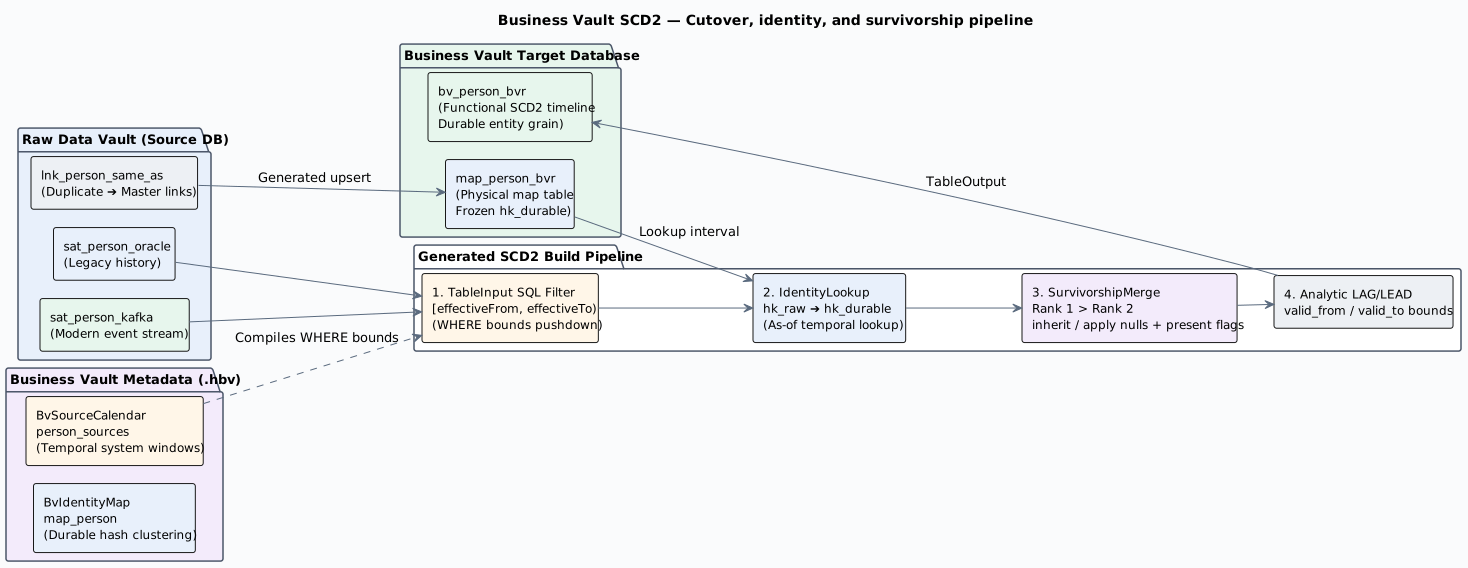
PlantUML source: bv-identity-cutover-survivorship.puml.
Identity maps
An identity map on the canvas resolves many raw hub hashes to one durable hash. Add it with Add identity map. An SCD2 table opts in with Identity map. Leave that blank and the timeline stays on the raw hub hash.
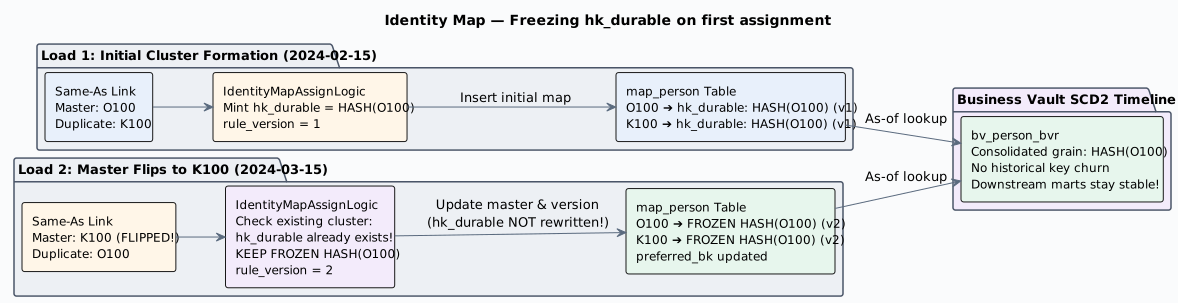
PlantUML source: bv-identity-map-freeze.puml.
The generated map pipeline reads the same-as link and the map rows already stored, then upserts. It does not truncate. A raw key that already has a durable key keeps it. A new duplicate in that cluster inherits it. A new cluster hashes the MDM id when one is present, otherwise the current master raw hash, and that value sticks. The preferred business key is updated in place and does not open an SCD2 version.
On each SCD2 leg the generator looks up the map as of the row timestamp, writes the durable hash into the grain column, and keeps the raw hash as hk_raw. The preferred business key is carried as preferred_bk and is not a version driver. The map rule_version is stored as map_rule_version, also not a version driver. Rows before the mapping starts follow the unmapped policy: self uses the raw hash, quarantine and drop leave the row out of the timeline. Partitions, when set, use the durable hash and stay a full rebuild. Hub business keys, when loaded, join on hk_raw so the durable grain still finds the raw hub.
Incremental build is allowed with a map. Rows after the watermark load as usual. A raw key whose rule_version no longer matches the open SCD2 row is read again from the earlier of that map row’s valid_from and the watermark, and the open row for its durable key is closed. That extra read is generated only when the satellite uses the Business Vault database connection. Otherwise run a full rebuild after the map changes. Survivorship still forces a full rebuild.
Naming an effectivity satellite requires both the from and to columns. Empty effectivity means the same-as match applies for the whole timeline.
Survivorship
Field mappings can name more than one source for the same target column. Give every one of those rows a Rank. 1 wins over 2. Leave rank blank when the target has a single source. If any rank is set, that SCD2 table uses SurvivorshipMerge instead of SortedSchemaMerge and Repeat. A table with no ranks is unchanged.
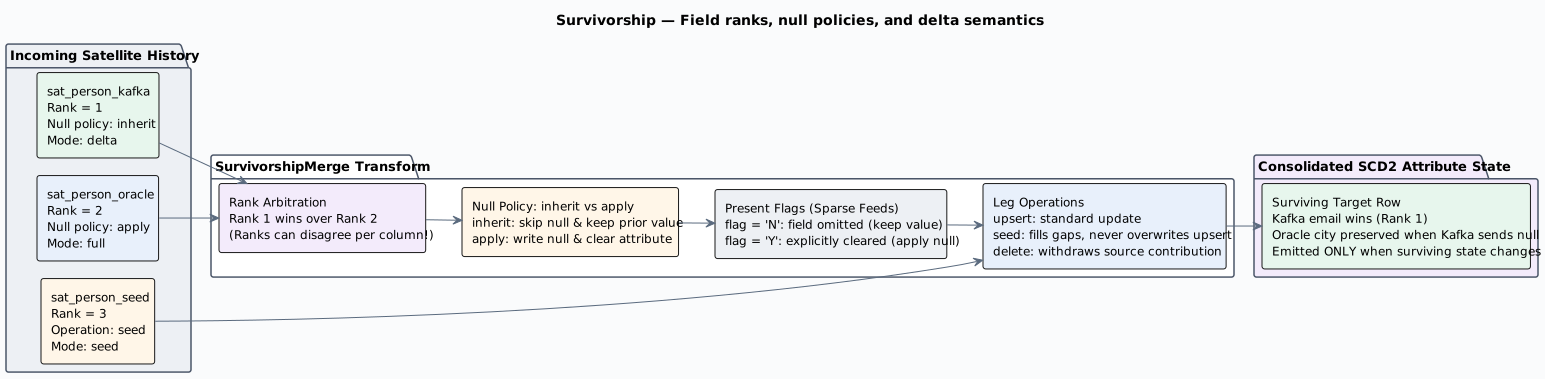
PlantUML source: bv-survivorship-rules.puml.
The merge reads the legs already sorted by hash key and functional timestamp. At each timestamp it keeps the best-ranked value. Null policy inherit skips a null and tries the next rank. apply writes the null. A blank null policy uses the leg default, then the calendar: a delta-only source inherits, a full or seed source applies. seed fills a gap and does not replace a value already held by an upsert source. delete withdraws that source. A row is emitted only when the surviving values change. The build is a full rebuild even if the dialog says Incremental.
Present flag is an optional source column on a mapping. When the flag is false, a null was left out of the message and does not change the stored value. When the flag is true, a null clears the value even if the null policy is inherit. Blank means the column arrived, so the null policy decides.
Operation field is an optional column on a satellite or source query.A row value of upsert, delete, or seed overrides the leg operation.A key that does not appear on a delta feed is not deleted.A source query lists either a functional timestamp or a load date, not both.
Calendar priority and the leg priority override are still stored.They are not the field rank.
Source calendars
A source calendar says when each source system may contribute rows. Add it with Add source calendar. It is shared metadata, not a warehouse table. An SCD2 table opts in with Source calendar. Leave that blank and every satellite row is kept.
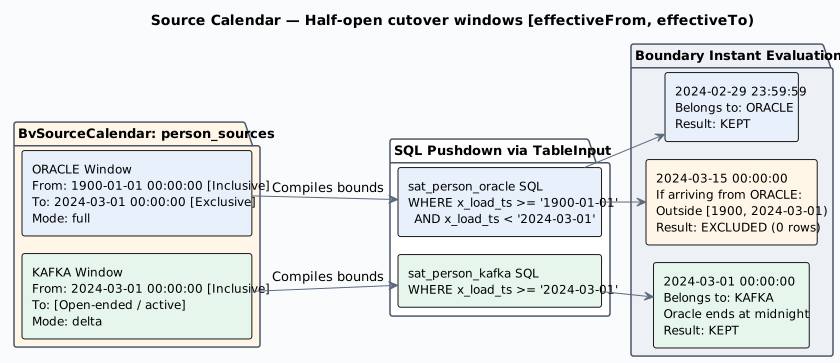
PlantUML source: bv-source-cutover-calendar.puml.
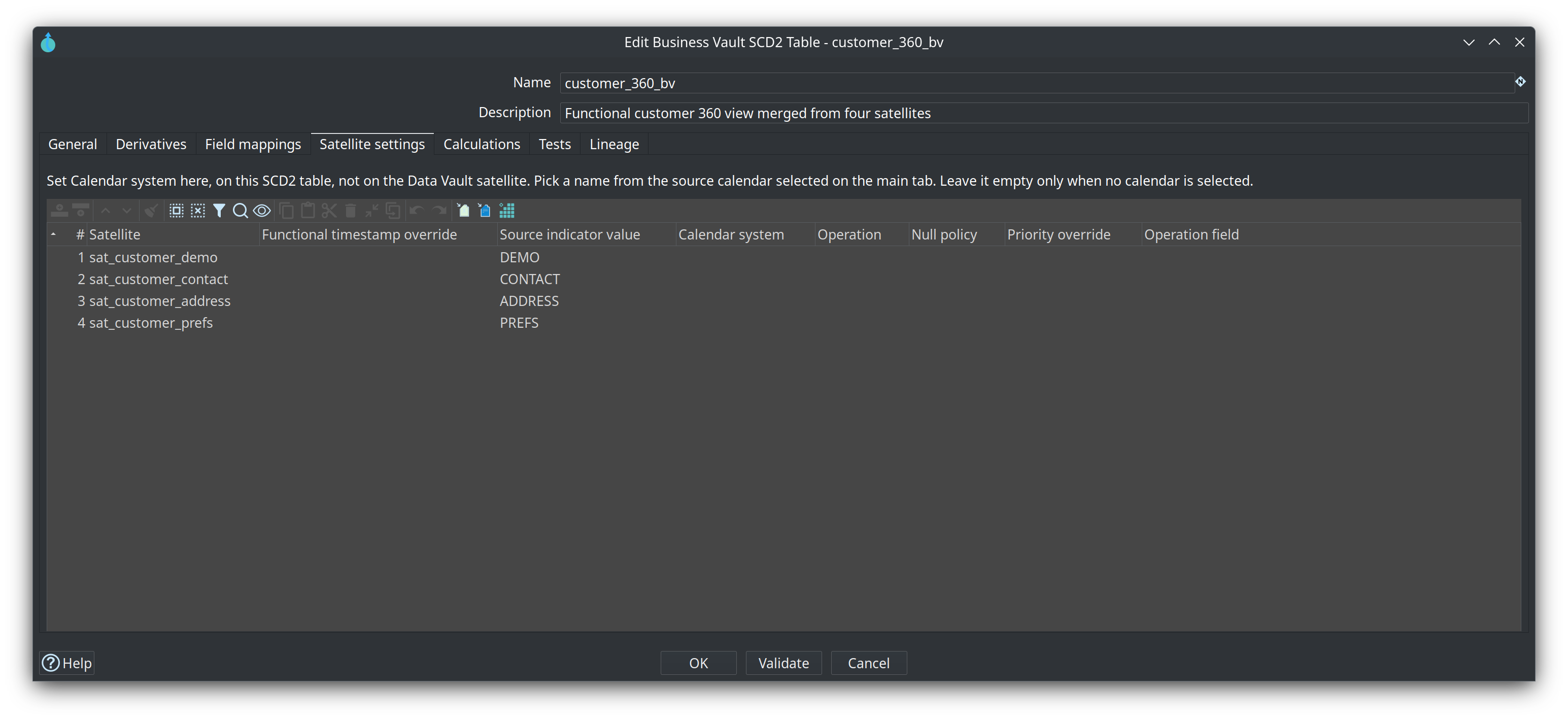
Calendar system is a name you choose, such as ORACLE or KAFKA. It is not a table name. On the SCD2 table, open Satellite settings and pick that name from the dropdown. Source queries are picked on the Derivatives tab. A row is kept when the leg’s functional timestamp falls in a window for that name.
Oracle through February 2024, Kafka from 1 March 2024 onward:
| Calendar system | Effective from | Effective to |
|---|---|---|
ORACLE |
1900-01-01 |
2024-03-01 |
KAFKA |
2024-03-01 |
2024-02-29 23:59:59 is Oracle. 2024-03-01 00:00:00 is Kafka. A date with no time means midnight at the start of that day. An empty effective to means the source is still in use. Dates are yyyy-MM-dd or yyyy-MM-dd HH:mm:ss.
The worked example and the column tooltips are in the source calendar help. How an SCD2 satellite picks ORACLE or KAFKA is in Satellite settings. Priority and mode do not change this filter. Two SCD2 tables can share the calendar and still pick different calendar systems.
Single-satellite SCD2
The simplest case: one DV satellite derivative → one BV table.
-
Set the satellite as a derivative on the SCD2 table
-
Configure functional timestamp (per table, or model default, or load-date fallback)
-
Attribute columns pass through with DV names unless you add field mappings
Example: integration-tests/tests/basic/vault1.hbv builds sat_customer_hb from sat_customer.
Multi-satellite SCD2
When an SCD2 table references two or more satellites (e.g. Customer 360 from demo, contact, address, and preference satellites), you must provide:
-
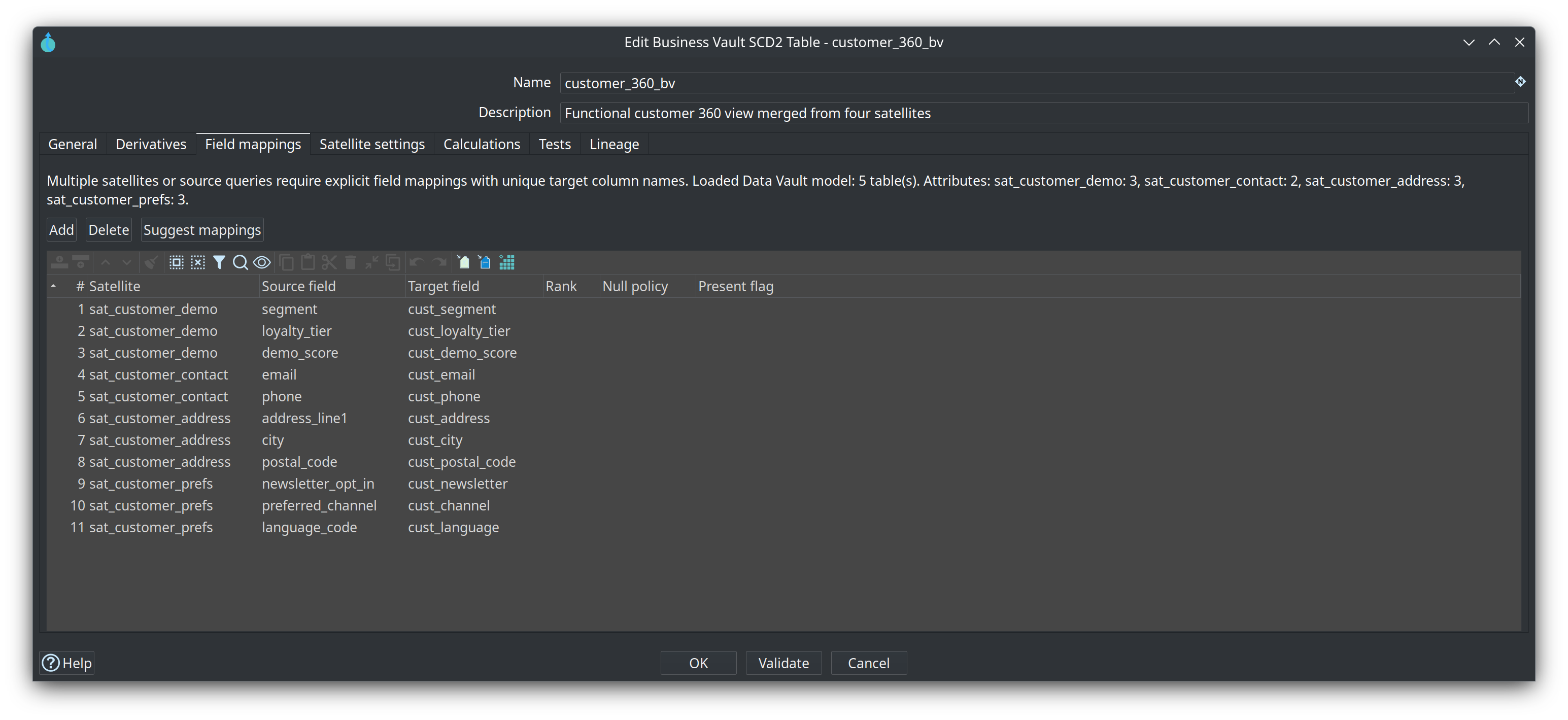
Field mappings — map each
(satellite, source field)to a BV target column name -
Satellite configs — optional per-satellite functional timestamp override and source indicator value
The generated Table Output / native bulk loader field list comes from the SCD2 target layout, which includes every mapping with Load enabled (satellite attribute type when known, otherwise a string fallback). You should not need Get fields on the bulk loader to pick up mapped columns.
Target column names must fit the Business Vault database identifier limit (PostgreSQL 63 characters, MySQL/SingleStore 64, SQL Server 128). Suggest mappings truncates collision prefixes to that limit; Check model errors if a name is still too long.
Validation enforces:
-
All referenced satellites share the same hub (or link) parent, or the SCD2 table has a Parent hub / Linked Hub
-
Every mapped source field exists on the satellite (or source-query column list)
-
No duplicate BV target column from different sources
-
Explicit mappings when multiple satellites are present
-
Column names do not exceed the target identifier limit
Example: integration-tests/tests/multi-satellite-bv/customer-360.hbv → table customer_360_bv with 11 field mappings across 4 satellites.
Functional timestamp resolution
Priority order:
-
Per-satellite override in Satellite configs
-
Per-table functional timestamp field on the SCD2 table
-
Model-level functional timestamp in Business Vault configuration
-
Load date fallback (typically
x_load_tsfrom Data Vault configuration)
The functional timestamp drives SCD2 interval boundaries — not the technical load date unless you choose it explicitly.
SCD2 table dialog (key fields)
| Field | Description |
|---|---|
Name |
Logical name of the SCD2 table in the |
Physical table name |
Target table in the Business Vault database. |
Derivatives |
DV satellite references and/or source queries. At least one satellite or source query is required. |
Include hash key |
When enabled, the parent hash key column is included in the BV table. |
Include hub business keys |
When enabled, parent-hub business key columns are Merge Joined after collapse, before calculations. Identity only (not version drivers). Requires Include hash key and hub-parent satellites. Not supported for link satellites. |
Load hub business keys |
Enabled with Include hub business keys. Checked (default) writes hub BK columns to the BV table. Unchecked keeps them on the stream for calculations only. |
Suggest mappings |
Asks which linked satellites and source queries to fill, reloads the linked |
Functional timestamp |
Column on the satellite stream used as the timeline (see resolution order above). |
Build mode |
|
Hash-key partitions |
|
SQL Expression copies |
Number of parallel copies of the generated SQL Expression transform after collapse (default 1). A literal ( |
Incremental watermark field |
Optional BV column used for |
Valid from / Valid to |
Output column names for SCD2 interval bounds. |
Field mappings |
Required for multi-satellite tables. Maps satellite attribute → BV column. |
Satellite configs |
Per-satellite functional timestamp and source indicator for multi-satellite merges. The source indicator is the merge tag ( |
Source calendar |
Optional name of a |
The Customer 360 sample (customer_360_bv on integration-tests/tests/multi-satellite-bv/customer-360.hbv) uses these tabs:
Target databases
SCD2 pipeline generation requires:
-
Data Vault target database — on the linked
.hdvconfiguration (read satellite history) -
Business Vault target database — on the
.hbvconfiguration (write BV table)
Both connection names must resolve in Hop project metadata. Check model on the .hbv file validates this before pipeline generation.
If you change the linked .hdv file on disk, use Reload DV model on the Business Vault toolbar before generating pipelines.
External satellites
Satellites marked External read-only in the .hdv model are skipped by Data Vault Update but remain fully visible to Business Vault generation. Ensure:
-
Physical table names match the warehouse
-
Attribute lists describe actual columns
-
The vault database connection can read those tables
See integration-tests/tests/multi-satellite-bv/customer-360-external.hdv and .hbv for a working example.