Related guide: business-vault-scd2.
A source calendar says when each source system may contribute rows. It is not a warehouse table. Business Vault Update does not create or load it.
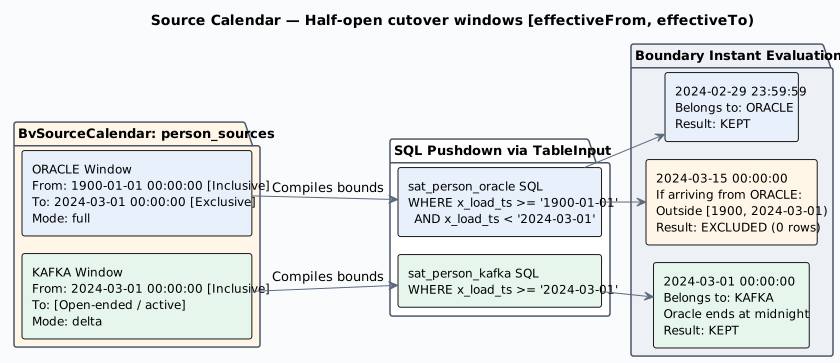
PlantUML source: bv-source-cutover-calendar.puml.
Example
Oracle loads history through February 2024. Kafka takes over on the morning of 1 March 2024 and is still the current source.
| Calendar system | Effective from | Effective to | Priority | Mode |
|---|---|---|---|---|
ORACLE |
1900-01-01 |
2024-03-01 |
full |
|
KAFKA |
2024-03-01 |
delta |
Calendar system is a name you choose. It is not a hub, satellite, or table name. On the SCD2 table, open Satellite settings and pick that name. The dropdown lists the names on the calendar selected on the SCD2 main tab. Source queries are picked on the Derivatives tab. A satellite row is kept only when its functional timestamp falls in a window for the calendar system chosen for that satellite.
What the timestamps do:
-
2024-02-29 23:59:59is Oracle. It is still before 1 March. -
2024-03-01 00:00:00is Kafka, not Oracle. Oracle stopped at that exact moment, and Kafka starts then. -
2024-06-01 12:00:00is Kafka. Kafka has no end date, so it is still eligible.
A date written without a time means midnight at the start of that day. 2024-03-01 and 2024-03-01 00:00:00 are the same instant.
Columns
-
Calendar system — the name the SCD2 Satellite settings tab will offer, such as
ORACLEorKAFKA. Several satellites can share one name when they come from the same system. -
Effective from — first moment the source may contribute. That moment is included.
yyyy-MM-ddoryyyy-MM-dd HH:mm:ss. -
Effective to — first moment the source stops. That moment is not included. Same two formats. Leave it empty while the source is still in use.
-
Priority — not used by the filter.
-
Mode —
full,delta, orseed. Not used by the filter. A delta-only source later defaults survivorship to keep the previous value when that source sends null.
Check model rejects a missing start, an end that is not after the start, a date in another format, and two windows for the same calendar system that cover the same time. The next window may start at the exact end of the previous one, as in the example.
How an SCD2 table uses it
On the SCD2 table, Source calendar names this object. Leave it empty and every satellite row is kept.
When it is set, open Satellite settings and pick a Calendar system for each satellite. That list is these names. Source queries are set on the Derivatives tab. The comparison uses the functional timestamp of that leg (the satellite override, otherwise the SCD2 table, otherwise the model default).
Operation, Null policy, Priority override, and Operation field on the satellite or source query do not change which rows this calendar keeps. seed is valid only on a source query.