Why it matters
The raw Data Vault is the history layer of the warehouse. Hubs hold the business keys you must never lose, links hold the relationships between them, and satellites hold what changed and when — so any question about the past can be answered from insert-only tables. Every layer above answers to this one: Business Vault and dimensional models are derived from these hubs, links, and satellites, so a modelling mistake here is copied into every mart that follows.
This module generates a raw vault from a source model, reads the result the way a vault modeller does, and validates it with Check model before anything is loaded. Budget 35 minutes.
Concepts
The raw vault sits between the catalog and the Business Vault, and every table in it is one of three shapes. Each shape has exactly one grain.

Business keys and hash keys
The business key is the natural identifier of a concept — customer_id, order_id — the value
that would still identify the customer if the warehouse were rebuilt from scratch. The hash key
is the surrogate the vault stores and joins on: Hop calculates it from the business key with the
model’s hash settings (algorithm and storage format, casing, trim, delimiter, null placeholder), all
defined once on Edit model.
A hub stores both: its business-key columns plus the hash-key column that links and satellites reference. Links and satellites never store business-key text — they carry hash keys. A satellite computes its parent hash from the parent hub’s key definitions, applied to columns on its own feed.
One grain per table type
-
Hub — one row per distinct business key. The first time a customer appears, a row is inserted; later loads leave it untouched (the insert-only pattern).
-
Link — one row per distinct relationship between hubs. A transactional link adds dependent child keys (an order line number, a measurement timestamp), so repeated events keep one row each and get their own link hash.
-
Satellite — one row per change of its tracked attributes for a parent key. Unchanged values produce no new row, and Include in CDC decides which columns can trigger a version.
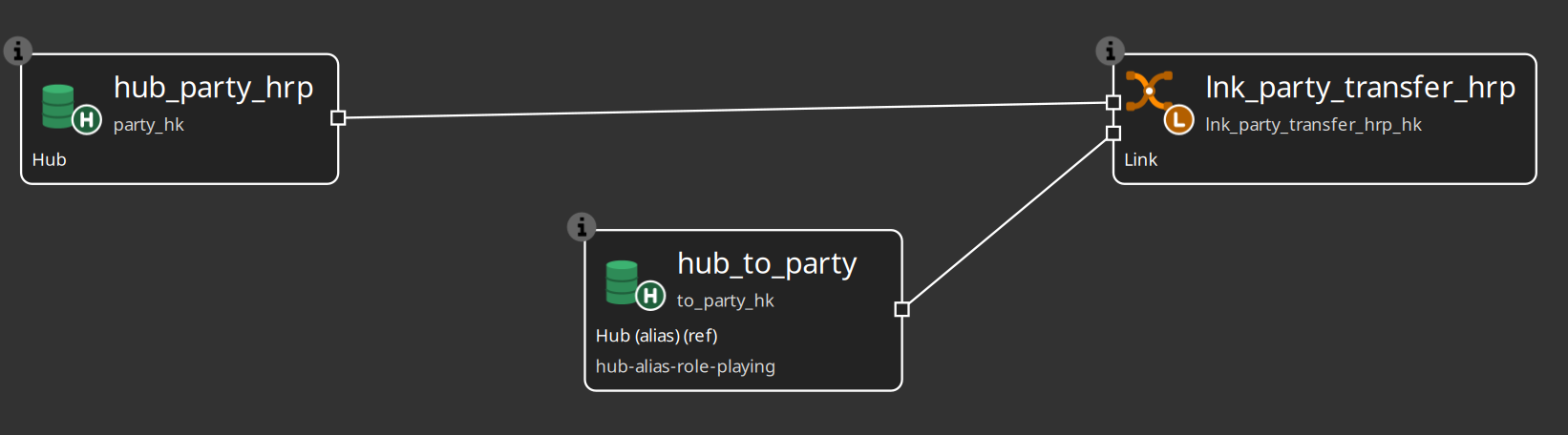
When the same physical hub plays two roles on one link (primary/secondary, from/to), the natural hub keeps the first role and each extra role becomes a hub alias with its own role hash column.
The audit trail: load date and record source
Every row a load inserts carries the batch load date — one timestamp shared by all rows of the same run, so you can always tell what was processed together. Hubs and links also always store the record source, the indicator of the feed that supplied the row; a satellite stores it too unless Store record source indicator is switched off for a VaultSpeed-style mono-source satellite. Together the two columns answer the audit questions: when did the warehouse learn this, and who told it. Change detection itself compares only the tracked attributes, so no-change rows are never inserted.
Integration modes
Vaults are loaded by more than one tool, so every hub, link, and satellite has an integration mode
(hub and link dialogs: Options tab; satellite editor: General tab). Hop managed (the
default) generates DDL and update pipelines. External read-only skips generation for a table
another tool loads — dbt, hand-written SQL, legacy ETL — while Hop still documents its structure for
Business Vault and catalog; the canvas marks it (ext). Custom pipelines runs your own .hpl
files instead of the generator and shows (custom). For a complete existing vault that Hop must not
touch, the model configuration itself has a Read-only existing vault switch.
Naming schemes
Names are mechanical: a dv-hub naming scheme turns Customer into hub_customer, applied with
CTRL-SHIFT-N. Create one scheme per type in the Metadata perspective (Data definition → Naming
scheme) and generation uses the type-specific scheme when one exists, otherwise the built-in
hub_ / sat_ / lnk_ / ref_ prefixes. Check treats a name as conforming when applying the
scheme to the prefix-stripped core reproduces it, so hub_customer matches a hub_ scheme.
Guided walkthrough
Generate, read, and check a vault
The steps use the retail source model, so the result matches the screenshots. Generate into a new
.hdv of your own and keep it — module 4 loads it.
-
Open
retail-example/models/source-tables-crm.hsmin the source modeler and press Generate Data Vault… on the toolbar. The review dialog proposes hubs, satellites, links, and reference tables from the tables, keys, and relationships on the canvas; uncheck any row you do not want and edit Vault name before Apply.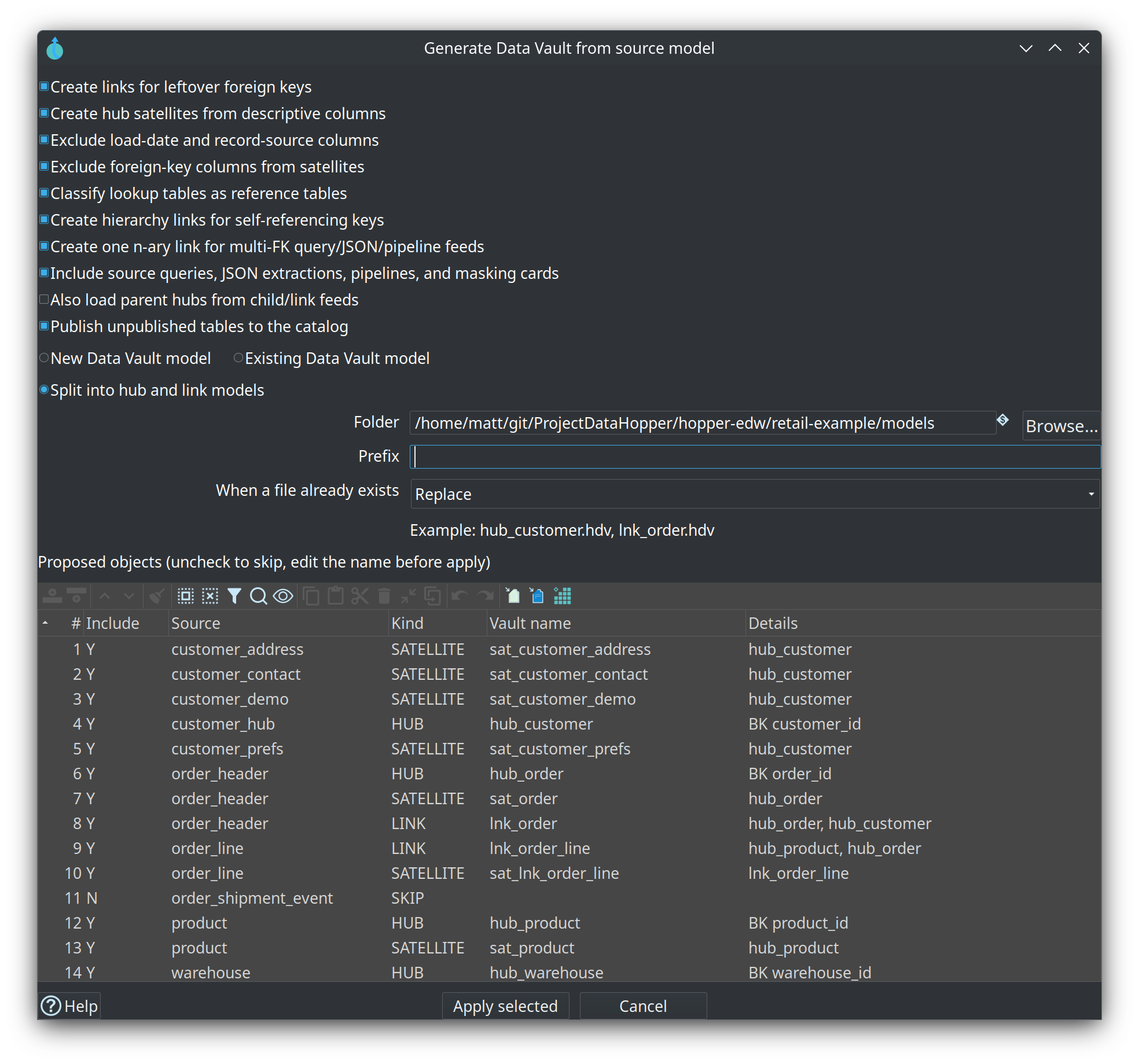
-
Apply into New Data Vault model and save the new
.hdv. The confirmation counts the tables it wrote; for the CRM tables the canvas now holdshub_customerwith its satellites,hub_order/sat_order/lnk_order, and the rest of the classification.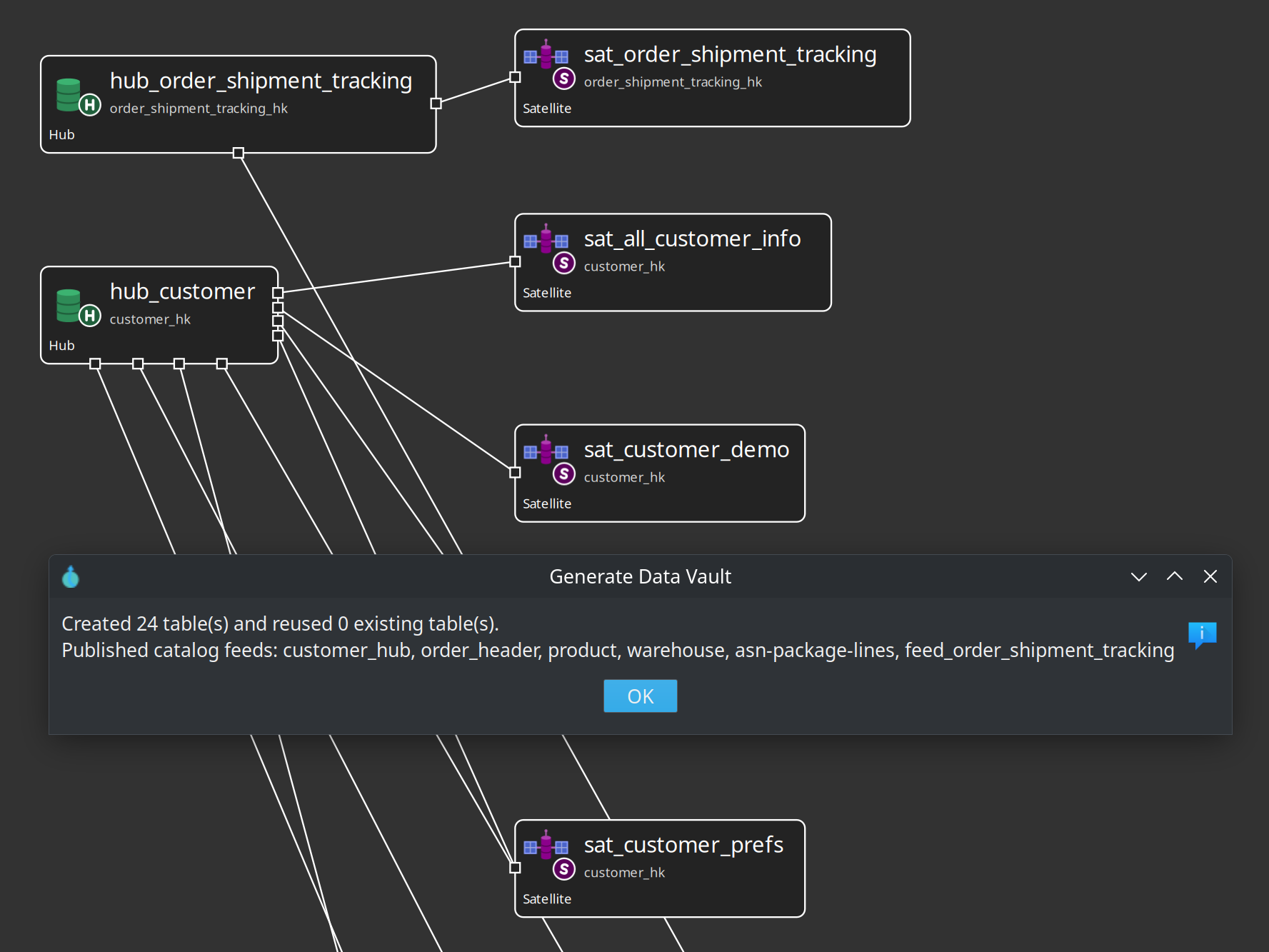
-
Press Edit model and confirm the bindings: Configuration
data-vault, Target databaseVault. Open the Standard columns tab and read the names every table gets —LOAD_DATEandRECORD_SOURCE. These names and the hashing rules are edited once here, for every model that shares the configuration.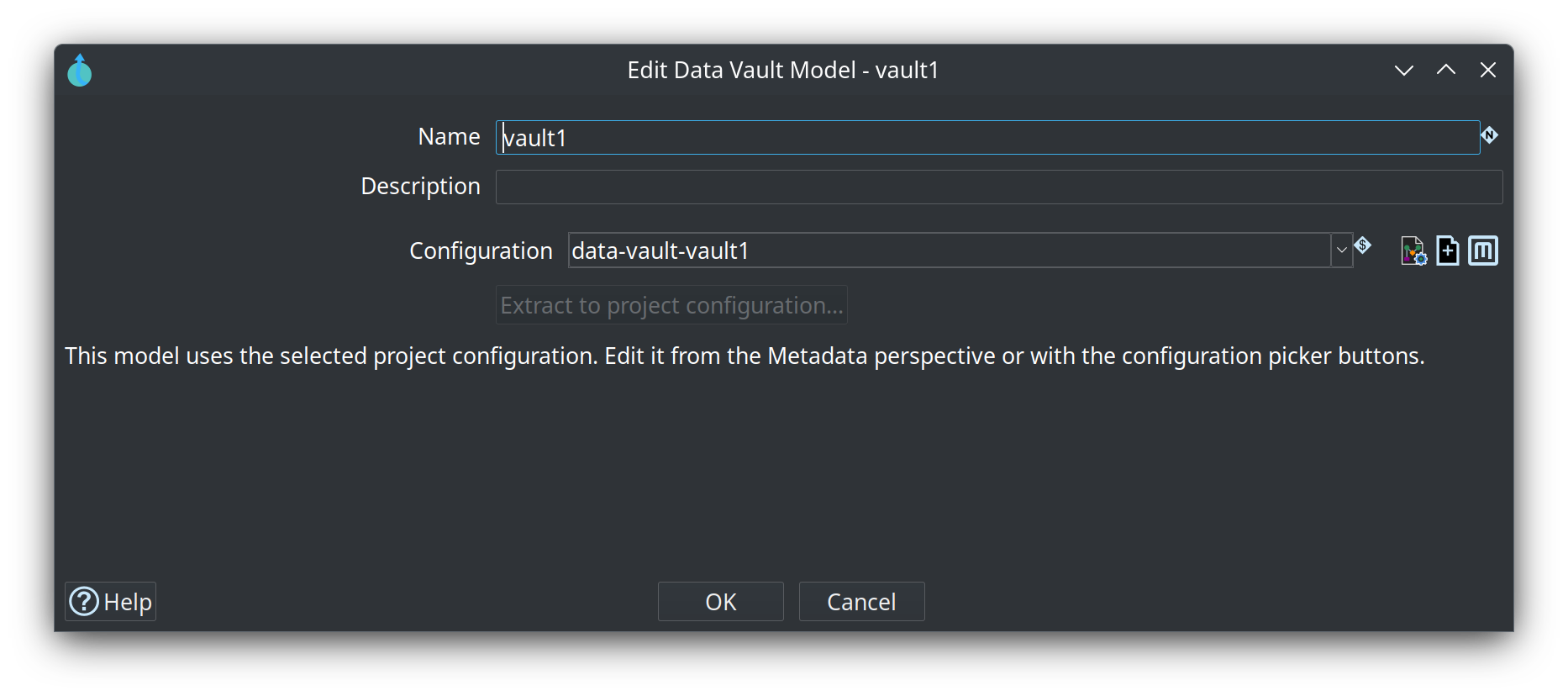
-
Run Check model until it reports no errors. It validates the structure — missing business keys, unattached satellites, links with fewer than two hubs, duplicate names, references that do not resolve — and checks every source-to-target mapping for type compatibility, reading the live source schema when it is available (stored source metadata is the fallback). Then open a satellite by left-clicking its name on the canvas and read the Attributes tab: these are the columns whose changes create history. Uncheck Include in CDC for any column that should never trigger a new version.
-
Open the retail
models/retail-360.hdvand compare. It has the same three shapes at a larger scale: several subject areas (customer, order, product, warehouse) and patterns you will meet in real projects —lnk_order_linekeeps one row per order line becauseline_numberis part of its link hash.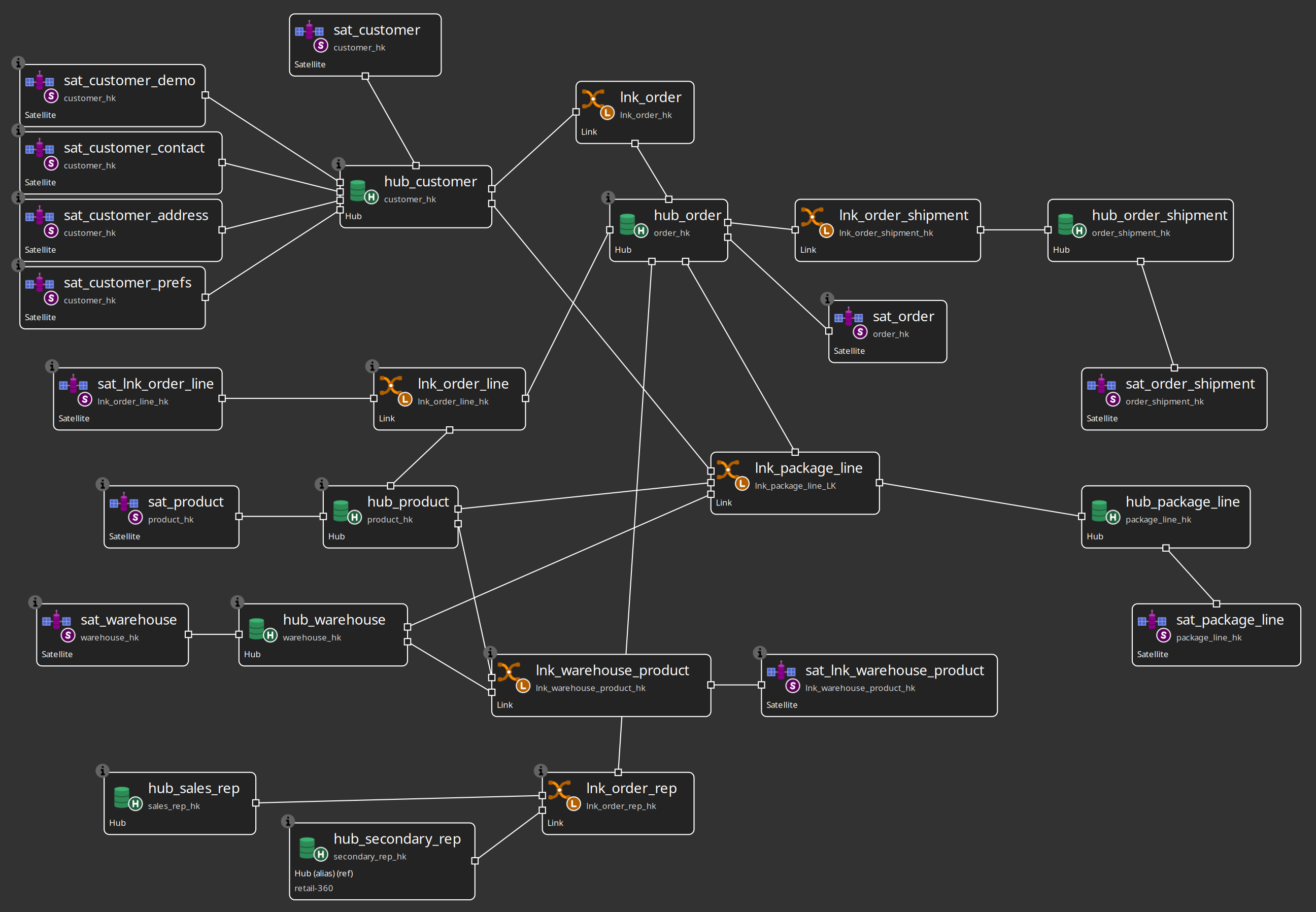
-
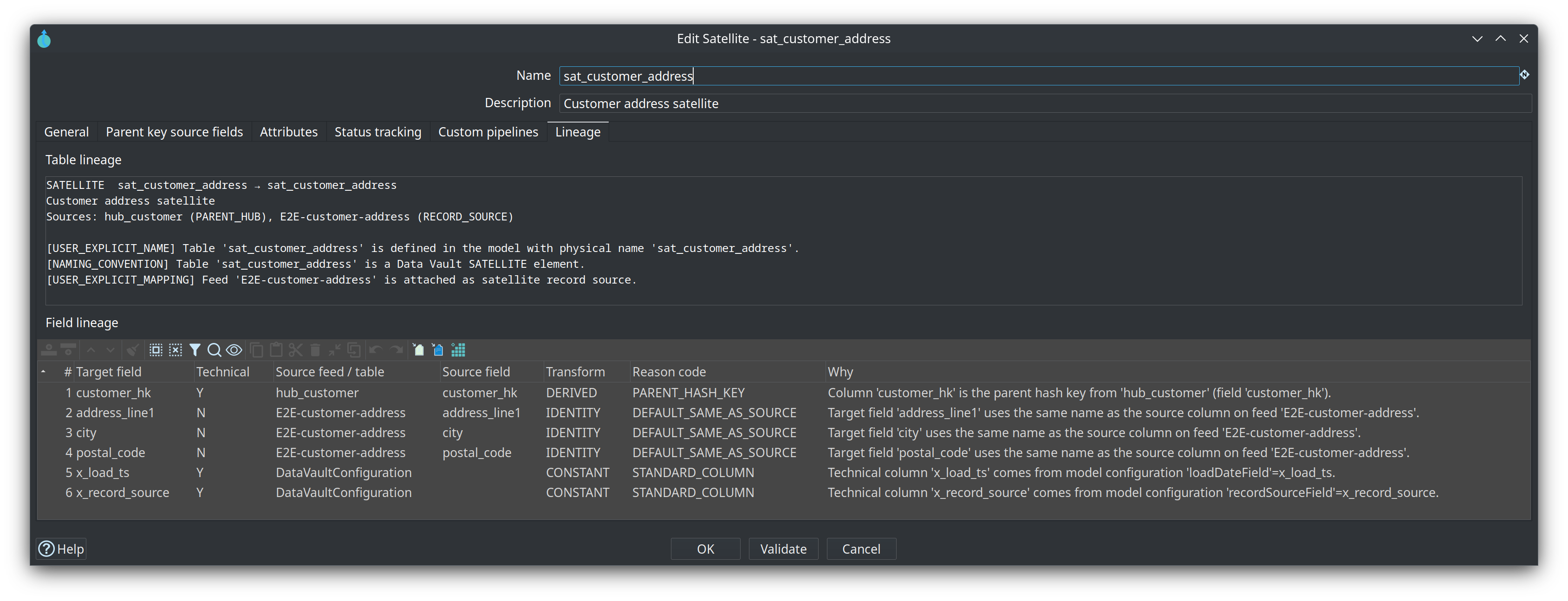
Read one table’s Lineage tab: the parent hub, the feed, the parent hash key, the attribute passthroughs, and the standard columns from the model configuration — a read-only answer to where a field came from, built from the same lineage collectors behind explainable DDL, catalog lineage siblings, and OpenLineage export.
Try it yourself
Pick one generated satellite and add a descriptive column that generation did not map.
-
Open the satellite on your generated canvas (left-click its name).
-
Go to the Attributes tab and add a row for a column you know the catalog feed declares. If you prefer the feed’s full list, press Load from source instead: it appends the feed’s declared fields, skipping the parent hub’s keys automatically, and you keep the column generation missed.
-
Give the attribute the data type and length the feed reports.
-
Close the dialog and run Check model again.
Check your work: the check reports no errors and the new attribute sits in the satellite’s attribute list with a name and length that match a field declared on the satellite’s default record source. A column the feed does not declare fails the check, so if it complains, align the name with the catalog entry from module 2.
Questionnaire
Answer the eight questions. Every answer comes with its reasoning, and Copy my results gives you a text summary to keep.
1. What does one hub row represent?
b) A hub stores the natural business key or keys that identify instances of a concept, plus the surrogate hash key derived from them. Only genuinely new keys are inserted; existing keys are left untouched.
2. Which statement about grain is correct?
b) Hub: one row per distinct business key. Link: one row per distinct relationship — a transactional link with dependent child keys keeps one row per event. Satellite: one row per change of its tracked attributes for a parent key.
3. What are a satellite's load date and record source columns for?
b) Every row loaded in the same run shares one load date, so runs can be grouped; the record source carries the feed's indicator and can be switched off for VaultSpeed-style mono-source satellites. Change detection compares the tracked attribute values themselves.
4. What does Generate Data Vault not create?
c) Generation writes model objects only — a raw-vault starter you review. After Apply you still run Check model, and later a Data Vault Update or group update to create and load the tables; generation creates no pipelines, no tables, and does not edit the resource definition group.
5. What does Check model prove?
b) It flags missing business keys, unattached satellites, links with fewer than two hubs, duplicate names, unresolved references — and source-to-target type mismatches, reading the live source schema where available. It says nothing about a load having run.
6. Scenario: generation skipped a table from your source model. It has a primary key but no relationship to any other table. What now?
b) Isolated tables with no table-to-table relationship are skipped by design (so are tables with no primary key and no inferable identity). Draw the relationship first — or map the table from a JSON or pipeline child — and generate again.
7. Where does a hub satellite get the business key values for its parent hash key?
b) The satellite feed must expose the parent identity columns; the parent hash is computed with the same business-key definition and hash settings as the hub. Satellites store the parent hash key, never business-key text — and the feed does not have to be a hub record source.
8. Scenario: one satellite is loaded by dbt, but must stay in the model so Business Vault and the catalog can read its metadata. Which integration mode fits?
b) External read-only keeps the table in the model — (ext) on the canvas — for lineage, validation, Business Vault and catalog publish. Custom pipelines still asks Hop to run your own .hpl files; for an entire vault Hop must not touch, the model configuration has the Read-only existing vault switch.
Where to go next
-
Data Vault plugin — the modeler, Check model, Debug, and the Data Vault Update action
-
Hubs — keys, record sources, multi-source hubs, composite business keys
-
Links — participating hubs, hub aliases, dependent child keys
-
Satellites — attributes, driving keys, parent key defaults
-
Generate a Data Vault from a source model — classification rules and the review dialog
-
EDW naming schemes — the
hub_/sat_/lnk_/ref_standards -
Data Vault integration modes — Hop managed, external read-only, custom pipelines
-
Module 4 — Loading and resource definition groups — next step
-
Training index — modules 1 to 8 are published there as they land